
hamburger-menu icon
भाषा का चयन करें

DS-157 Supplemental Nonimmigrant Visa Application – Fillable PDF

  1. भाषा अंग्रेज़ी
  2. देश अमेरीका
  3. विभाग राज्य विभाग
  4. गतिविधि वीजा
फार्म को भरो
DS-157 Supplemental Nonimmigrant Visa Application – Fillable PDF

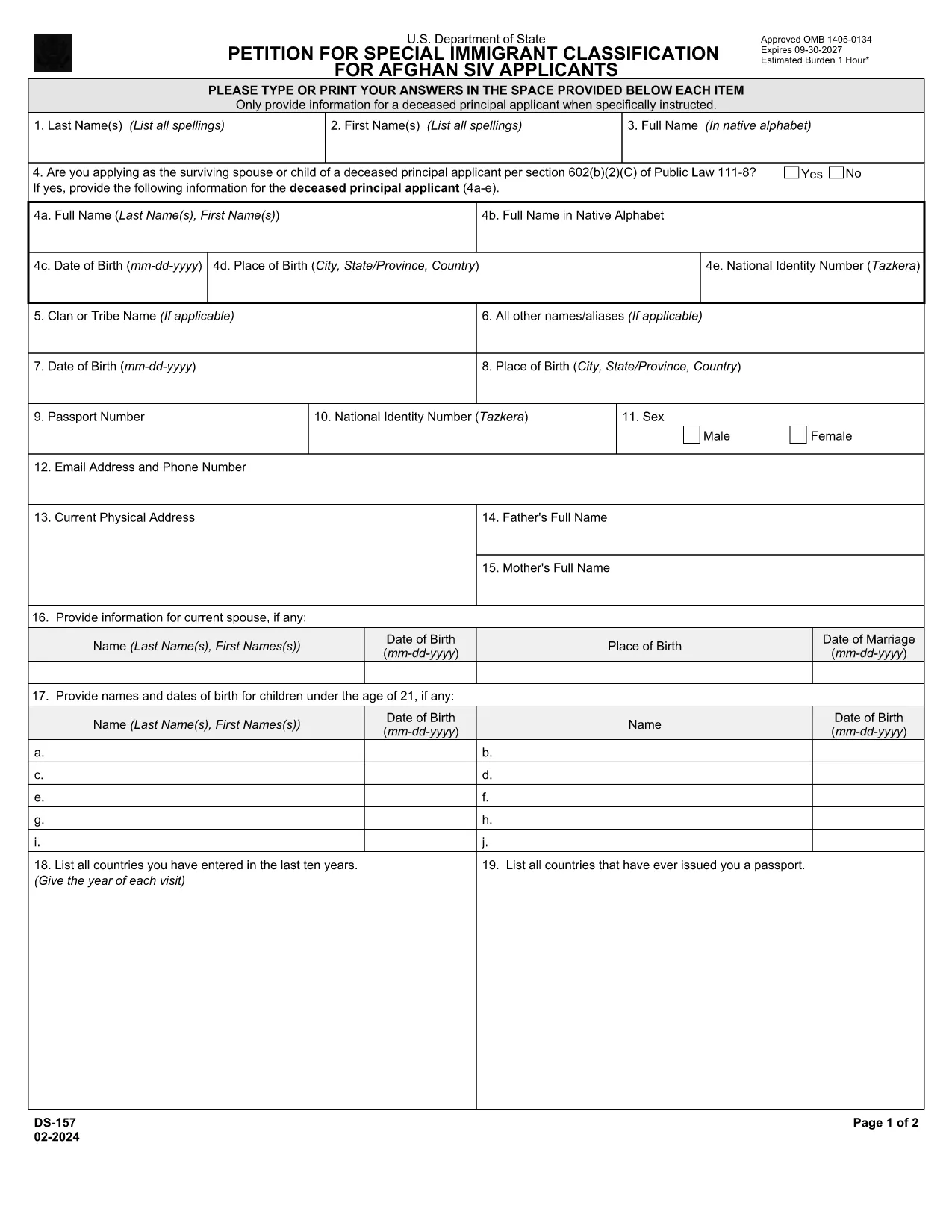
The DS-157 (Supplemental Nonimmigrant Visa Application) is required for certain male visa applicants, especially Afghan Special Immigrant Visa (SIV) candidates. It collects detailed personal, employment, and travel information that supports the main DS-160 application.

What is the DS-157 Form?

Issued by the U.S. Department of State, the DS-157 is a supplemental questionnaire that must be submitted with your visa packet. It is a fillable PDF that can be completed electronically, printed, signed, and attached to your visa interview documents.

How to Fill the DS-157 Online with Formize

Formize provides a secure, browser‑based PDF filler so you never need to download, print, or scan the form. Follow these steps:

  • Click the **"Fill out this form"** button on this page.
  • Wait a few seconds while the Formize PDF Filler app loads.
  • Enter your information in the highlighted fields. Use the tab key or click to move between sections.
  • When finished, click **"Save & Download"** to get a copy you can print or email.
  • Sign the form with your finger (touchscreen) or type your signature, then download the completed PDF.

Common Mistakes to Avoid

  • Leaving fields blank – every question must be answered, even if the answer is “None” or “N/A”.
  • Incorrect dates – double‑check birth dates, travel dates, and employment periods.
  • Illegible signatures – use the built‑in e‑signature tool for a clear, legal signature.
  • Mismatched information – ensure details match those on your DS‑160 and supporting documents.

Where to Submit the Completed Form

Print the filled DS-157, sign it in ink if you printed a hard copy, and attach it to your visa interview packet. Submit the package to the U.S. Embassy or Consulate handling your case. Some posts now accept the PDF electronically; verify the specific instructions on your appointment notice.

Download the Official PDF

For reference or offline use, you can download the official, government‑issued PDF directly from the Department of State:

Download DS-157 PDF

Using Formize’s online filler saves you time, reduces errors, and eliminates the need for a scanner.

सामान्य प्रश्न
  • Who must complete the DS-157 form?

    All male non‑immigrant visa applicants between ages 16‑45, including Afghan SIV applicants, must submit a DS-157 in addition to the DS‑160.

  • Is the DS-157 form available in languages other than English?

    The official form is only provided in English. If you need translation assistance, you must provide an accurate English version for the U.S. Embassy.

  • Can I submit the DS-157 electronically?

    Some U.S. posts accept an electronic PDF, but most still require a printed, signed copy. Check the instructions on your appointment notice.

  • Do I need a notarized signature on the DS-157?

    No notarization is required. A regular signature (ink or e‑signature) is sufficient as long as it matches the signature on your other visa documents.

  • What happens if I make a mistake on the DS-157?

    Correct the error by crossing out the mistake neatly, writing the correct information, and initialing the change. If the mistake is extensive, download a fresh copy and refill the form.

  • How long is the DS-157 valid?

    The DS-157 is tied to a specific visa application. If your application is withdrawn or denied, you must obtain a new form for any future applications.

कैसे करें

ds-157 को मुफ़्त में, ऑनलाइन 4 आसान स्टेप्स में कैसे भरें:

  1. 1
    Open the Formize filler
    Click the "Fill out this form" button on the page. The Formize PDF Filler will open in a new tab.
  2. 2
    Enter your information
    Type directly into each highlighted field. Use the tab key or click to move to the next question.
  3. 3
    Add your signature
    Use the built‑in e‑signature tool to sign with your finger or mouse. The signature is legally binding.
  4. 4
    Save and download
    When all fields are complete, click "Save & Download" to get a copy of the filled PDF. Print it if a hard copy is required.
पीडीएफ फिलर एप तैयार करें
के बारे में

राज्य विभाग (डीओएस) प्रपत्र

ds-157 उन एप्लिकेशन फॉर्मों में से एक है जिसका उपयोग संयुक्त राज्य अमेरिका के राज्य विभाग (डीओएस) द्वारा अंतरराष्ट्रीय यात्रा, वीजा, पासपोर्ट और कांसुलर सेवाओं से संबंधित विभिन्न सेवाओं की जानकारी एकत्र करने और संसाधित करने के लिए किया जाता है। डीओएस अमेरिकी विदेश नीति, अंतर्राष्ट्रीय संबंधों के प्रबंधन और अमेरिकी नागरिकों और विदेशी नागरिकों को सेवाएं प्रदान करने के लिए जिम्मेदार है।

यहां राज्य विभाग के प्रपत्रों के कुछ उदाहरण दिए गए हैं:

पासपोर्ट आवेदन फॉर्म: इन फॉर्मों का उपयोग अमेरिकी पासपोर्ट के लिए आवेदन करने के लिए किया जाता है, जो सरकार द्वारा जारी एक आधिकारिक दस्तावेज है जो व्यक्तियों को अंतरराष्ट्रीय स्तर पर यात्रा करने की अनुमति देता है। पासपोर्ट आवेदन पत्र व्यक्तिगत जानकारी, नागरिकता के बारे में विवरण, पहचान और अन्य आवश्यक जानकारी एकत्र करते हैं।

गैर-आप्रवासी वीज़ा आवेदन फॉर्म: डीओएस गैर-आप्रवासी वीज़ा जारी करने की देखरेख करता है, जो विदेशी नागरिकों को पर्यटन, व्यवसाय, अध्ययन या काम जैसे विभिन्न उद्देश्यों के लिए अस्थायी रूप से संयुक्त राज्य अमेरिका की यात्रा करने की अनुमति देता है। गैर-आप्रवासी वीज़ा आवेदन फॉर्म, जैसे डीएस-160, डीएस-156, या डीएस-260, का उपयोग आवेदक के व्यक्तिगत विवरण, यात्रा इतिहास, यात्रा के उद्देश्य और अन्य प्रासंगिक जानकारी के बारे में जानकारी इकट्ठा करने के लिए किया जाता है।

आप्रवासी वीज़ा आवेदन प्रपत्र: संयुक्त राज्य अमेरिका में प्रवास करने के इच्छुक व्यक्तियों के लिए, अप्रवासी वीज़ा आवेदन प्रपत्रों का उपयोग किया जाता है। ये फॉर्म आवेदक के व्यक्तिगत इतिहास, परिवार के सदस्यों, रोजगार इतिहास और अन्य प्रासंगिक जानकारी के बारे में विस्तृत जानकारी एकत्र करते हैं। उदाहरणों में परिवार-आधारित आप्रवासन के लिए डीएस-260 फॉर्म या विविधता वीज़ा लॉटरी विजेताओं के लिए डीएस-230 फॉर्म शामिल हैं।

विदेश में जन्म की कांसुलर रिपोर्ट (CRBA) फॉर्म: इस फॉर्म का उपयोग किया जाता है अमेरिकी नागरिक माता-पिता के लिए विदेश में अमेरिकी नागरिक बच्चे के जन्म का दस्तावेजीकरण करना। यह बच्चे, माता-पिता और सहायक दस्तावेज़ों के बारे में जानकारी एकत्र करता है।

समर्थन प्रपत्र का शपथ पत्र: संयुक्त राज्य अमेरिका में किसी आप्रवासी को प्रायोजित करते समय, एक अमेरिकी नागरिक या वैध स्थायी निवासी को समर्थन प्रपत्र का शपथ पत्र जमा करने की आवश्यकता हो सकती है। यह फॉर्म, जैसे कि I-864 या I-134, का उपयोग इच्छुक आप्रवासी का समर्थन करने और उन्हें सार्वजनिक आरोप बनने से रोकने की वित्तीय क्षमता प्रदर्शित करने के लिए किया जाता है।

कांसुलर सेवा प्रपत्र: डीओएस अमेरिकी नागरिकों और विदेशी नागरिकों को विभिन्न कांसुलर सेवाएं प्रदान करता है, जैसे नोटरी सेवाएं, आपातकालीन सहायता के लिए अनुरोध, या अमेरिकी नागरिकता का त्याग। इन सेवाओं के लिए विशिष्ट प्रपत्रों का उपयोग किया जाता है, जिनमें अनुरोधित सेवा की प्रकृति के आधार पर फॉर्म DS-11, DS-3053, या DS-4079 शामिल हैं।

यह ध्यान रखना महत्वपूर्ण है कि अमेरिकी विदेश विभाग द्वारा उपयोग किए जाने वाले विशिष्ट फॉर्म समय के साथ बदल सकते हैं, और विभिन्न सेवाओं के लिए अलग-अलग फॉर्म की आवश्यकता हो सकती है। विभिन्न सेवाओं के लिए आवश्यक विशिष्ट प्रपत्रों के संबंध में नवीनतम और सटीक जानकारी के लिए अमेरिकी विदेश विभाग की आधिकारिक वेबसाइट पर जाना या निकटतम अमेरिकी दूतावास या वाणिज्य दूतावास से परामर्श करना उचित है।

विशेषताएं

पीडीएफ भराव

पीडीएफ फॉर्म ऑनलाइन भरने का सबसे आसान तरीका

  • जल्दी से ds-157 भरें
    ds-157 को जल्दी से ऑनलाइन भरने का कोई तरीका खोज रहे हैं? हमारे ऑनलाइन नि:शुल्क पीडीएफ फॉर्म फिलर के साथ, आप एक मिनट से भी कम समय में इस पीडीएफ दस्तावेज़ को संपादित करने और भरने का तरीका जानेंगे।
  • ऑनलाइन पीडीएफ संपादक का उपयोग करना आसान है
    पीडीएफ फाइलों को प्रिंट करने से तंग आ गए हैं ताकि आप उन्हें फिर से स्कैन करने और उन्हें वापस भेजने से पहले संपादित कर सकें? PDF दस्तावेज़ों को निःशुल्क ऑनलाइन संपादित करें। समय और कागज बचाने के लिए हमारे ऑनलाइन पीडीएफ संपादक का प्रयोग करें।
  • महान उपकरण, सभी प्लेटफार्म
    आश्चर्य है कि मैक पर ds-157 कैसे भरें, या शायद पीडीएफ फिलर का मुफ्त में उपयोग कैसे करें? हमारे ऑनलाइन पीडीएफ टूल सभी प्लेटफॉर्म पर काम करते हैं।
  • सुरक्षित फ़ाइल भंडारण
    पूर्ण की गई "ds-157" फ़ाइलें Amazon क्लाउड होस्टिंग द्वारा प्रबंधित एक सुरक्षित डेटाबेस में संग्रहीत की जाती हैं। आप कभी भी अपनी फाइलों को हमारे सिस्टम से हटा सकते हैं। किसी भी स्थिति में, ये फ़ाइलें 24 घंटे के बाद स्वतः हटा दी जाती हैं।
  • {कीवर्ड} से चैट करें
    Chatize पर "ds-157" के साथ चैट करें, जो एक निःशुल्क पीडीएफ रीडर सहायक है। प्रश्न पूछें और "ds-157" से उत्तर प्राप्त करें। बस ऊपर दस्तावेज़ के साथ चैट करें बटन पर क्लिक करें।

फ़िलिंग सत्र मिटाएँ

चयनित फ़िलिंग सत्र को मिटाएँ? इस स्थिति में, फ़ॉर्म को पूरा करने में आपकी प्रगति खो जाएगी।

संपादन सत्र हटाएँ

चयनित संपादन सत्र हटाएँ? इस स्थिति में, फ़ॉर्म बनाने और संपादित करने में आपकी प्रगति नष्ट हो जाएगी।