
hamburger-menu icon
भाषा का चयन करें

DS-60 Affidavit Regarding a Change of Name – Fillable PDF

  1. भाषा अंग्रेज़ी
  2. देश अमेरीका
  3. विभाग राज्य विभाग
फार्म को भरो
DS-60 Affidavit Regarding a Change of Name – Fillable PDF

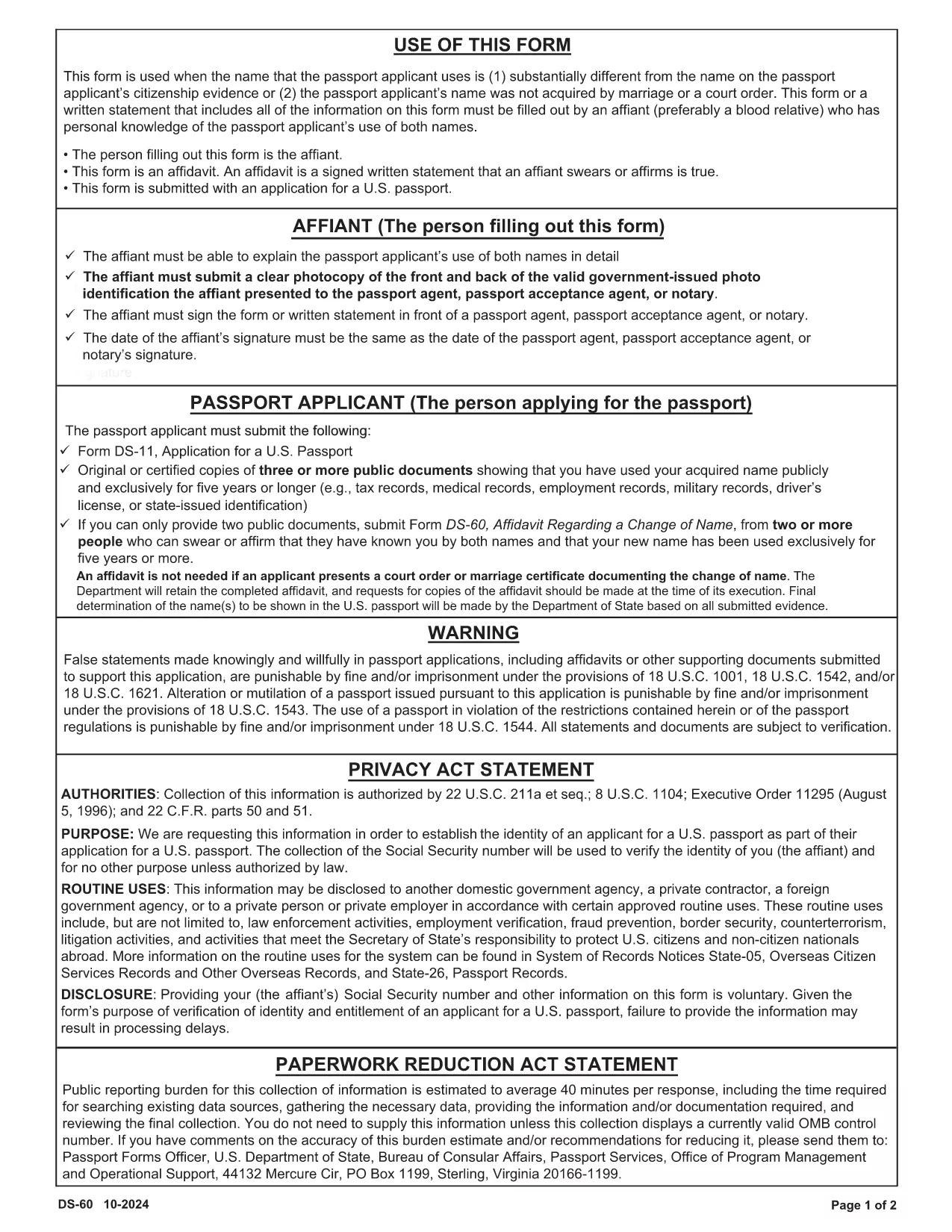
The DS-60 is the U.S. Department of State’s affidavit used when a passport applicant’s current name differs substantially from the name on their citizenship evidence, or when the name was not acquired through marriage or a court order. An affiant—usually a close relative who knows the applicant’s name usage—must complete the form.

Our fillable PDF version lets you complete the DS-60 directly in your browser. No printing, scanning, or PDF editors are required. Just click the button, fill the fields, and download a ready‑to‑submit document.

What Is the DS-60 Form and When Is It Required?

The DS-60 serves as a sworn statement that the applicant is known by two names. It is typically attached to a passport application (Form DS‑11) when:

  • The applicant uses a name that is substantially different from the name on their birth certificate or naturalization certificate.
  • The name change was not the result of marriage, divorce, or a court order.
  • The affiant can personally attest to the applicant’s use of both names.

How to Complete the DS-60 Online with Formize

Follow these simple steps to fill out the DS-60 without leaving your desk:

  1. Click the "Fill out this form" button on the page.
  2. Wait a few seconds while the Formize PDF Filler app loads.
  3. Enter the requested information in each fillable field (affiant name, relationship, applicant’s two names, etc.).
  4. Review the completed form for accuracy.
  5. Click Save & Download to get a PDF you can attach to your passport package.

Common Mistakes to Avoid on Your DS-60

  • Leaving fields blank: Every line must be completed, even if the answer is "None" or "N/A".
  • Incorrect relationship description: Specify the exact relationship (e.g., "maternal aunt") to avoid processing delays.
  • Signature errors: The affiant must sign in the designated area; electronic signatures are accepted when using Formize.
  • Mismatched names: Ensure the two names match exactly what appears on the applicant’s supporting documents.

By using our fillable DS-60, you reduce the risk of these errors and speed up your passport application.

सामान्य प्रश्न
  • Who can act as the affiant on a DS-60?

    The affiant should be a close relative (parent, sibling, child, aunt, uncle, grandparent, etc.) who personally knows the applicant’s use of both names.

  • Do I need to notarize the DS-60?

    No. The DS-60 is a sworn affidavit and does not require notarization, but the affiant must sign the form.

  • Can I submit a digital signature?

    Yes. When you fill out the form using Formize, an electronic signature is accepted by the U.S. Department of State.

  • What supporting documents should I include with the DS-60?

    Attach copies of the applicant’s current passport, birth certificate, naturalization certificate, or any document that shows the name discrepancy.

  • How long does it take for the DS-60 to be processed?

    The DS-60 itself is processed as part of the overall passport application. Processing time depends on the passport service you request (routine, expedited, etc.).

  • Is the DS-60 required for a name change due to marriage?

    No. For name changes due to marriage, divorce, or a court order, use the appropriate legal documents instead of the DS-60.

  • Can I edit the DS-60 after downloading it?

    Yes. With Formize you can reopen the saved PDF, make corrections, and re‑download the final version.

कैसे करें

DS-60 form को मुफ़्त में, ऑनलाइन 4 आसान स्टेप्स में कैसे भरें:

  1. 1
    Open the Fillable Form
    Click the "Fill out this form" button on the page. The Formize PDF Filler will open in a new tab.
  2. 2
    Enter All Required Information
    Type the affiant’s details, relationship to the applicant, and both names exactly as they appear on supporting documents.
  3. 3
    Review and Sign
    Double‑check each field for accuracy, then add your electronic signature in the signature box.
  4. 4
    Save and Download
    Click the "Save & Download" button to obtain a completed PDF ready to be submitted with the passport application.
पीडीएफ फिलर एप तैयार करें
के बारे में

राज्य विभाग (डीओएस) प्रपत्र

DS-60 form उन एप्लिकेशन फॉर्मों में से एक है जिसका उपयोग संयुक्त राज्य अमेरिका के राज्य विभाग (डीओएस) द्वारा अंतरराष्ट्रीय यात्रा, वीजा, पासपोर्ट और कांसुलर सेवाओं से संबंधित विभिन्न सेवाओं की जानकारी एकत्र करने और संसाधित करने के लिए किया जाता है। डीओएस अमेरिकी विदेश नीति, अंतर्राष्ट्रीय संबंधों के प्रबंधन और अमेरिकी नागरिकों और विदेशी नागरिकों को सेवाएं प्रदान करने के लिए जिम्मेदार है।

यहां राज्य विभाग के प्रपत्रों के कुछ उदाहरण दिए गए हैं:

पासपोर्ट आवेदन फॉर्म: इन फॉर्मों का उपयोग अमेरिकी पासपोर्ट के लिए आवेदन करने के लिए किया जाता है, जो सरकार द्वारा जारी एक आधिकारिक दस्तावेज है जो व्यक्तियों को अंतरराष्ट्रीय स्तर पर यात्रा करने की अनुमति देता है। पासपोर्ट आवेदन पत्र व्यक्तिगत जानकारी, नागरिकता के बारे में विवरण, पहचान और अन्य आवश्यक जानकारी एकत्र करते हैं।

गैर-आप्रवासी वीज़ा आवेदन फॉर्म: डीओएस गैर-आप्रवासी वीज़ा जारी करने की देखरेख करता है, जो विदेशी नागरिकों को पर्यटन, व्यवसाय, अध्ययन या काम जैसे विभिन्न उद्देश्यों के लिए अस्थायी रूप से संयुक्त राज्य अमेरिका की यात्रा करने की अनुमति देता है। गैर-आप्रवासी वीज़ा आवेदन फॉर्म, जैसे डीएस-160, डीएस-156, या डीएस-260, का उपयोग आवेदक के व्यक्तिगत विवरण, यात्रा इतिहास, यात्रा के उद्देश्य और अन्य प्रासंगिक जानकारी के बारे में जानकारी इकट्ठा करने के लिए किया जाता है।

आप्रवासी वीज़ा आवेदन प्रपत्र: संयुक्त राज्य अमेरिका में प्रवास करने के इच्छुक व्यक्तियों के लिए, अप्रवासी वीज़ा आवेदन प्रपत्रों का उपयोग किया जाता है। ये फॉर्म आवेदक के व्यक्तिगत इतिहास, परिवार के सदस्यों, रोजगार इतिहास और अन्य प्रासंगिक जानकारी के बारे में विस्तृत जानकारी एकत्र करते हैं। उदाहरणों में परिवार-आधारित आप्रवासन के लिए डीएस-260 फॉर्म या विविधता वीज़ा लॉटरी विजेताओं के लिए डीएस-230 फॉर्म शामिल हैं।

विदेश में जन्म की कांसुलर रिपोर्ट (CRBA) फॉर्म: इस फॉर्म का उपयोग किया जाता है अमेरिकी नागरिक माता-पिता के लिए विदेश में अमेरिकी नागरिक बच्चे के जन्म का दस्तावेजीकरण करना। यह बच्चे, माता-पिता और सहायक दस्तावेज़ों के बारे में जानकारी एकत्र करता है।

समर्थन प्रपत्र का शपथ पत्र: संयुक्त राज्य अमेरिका में किसी आप्रवासी को प्रायोजित करते समय, एक अमेरिकी नागरिक या वैध स्थायी निवासी को समर्थन प्रपत्र का शपथ पत्र जमा करने की आवश्यकता हो सकती है। यह फॉर्म, जैसे कि I-864 या I-134, का उपयोग इच्छुक आप्रवासी का समर्थन करने और उन्हें सार्वजनिक आरोप बनने से रोकने की वित्तीय क्षमता प्रदर्शित करने के लिए किया जाता है।

कांसुलर सेवा प्रपत्र: डीओएस अमेरिकी नागरिकों और विदेशी नागरिकों को विभिन्न कांसुलर सेवाएं प्रदान करता है, जैसे नोटरी सेवाएं, आपातकालीन सहायता के लिए अनुरोध, या अमेरिकी नागरिकता का त्याग। इन सेवाओं के लिए विशिष्ट प्रपत्रों का उपयोग किया जाता है, जिनमें अनुरोधित सेवा की प्रकृति के आधार पर फॉर्म DS-11, DS-3053, या DS-4079 शामिल हैं।

यह ध्यान रखना महत्वपूर्ण है कि अमेरिकी विदेश विभाग द्वारा उपयोग किए जाने वाले विशिष्ट फॉर्म समय के साथ बदल सकते हैं, और विभिन्न सेवाओं के लिए अलग-अलग फॉर्म की आवश्यकता हो सकती है। विभिन्न सेवाओं के लिए आवश्यक विशिष्ट प्रपत्रों के संबंध में नवीनतम और सटीक जानकारी के लिए अमेरिकी विदेश विभाग की आधिकारिक वेबसाइट पर जाना या निकटतम अमेरिकी दूतावास या वाणिज्य दूतावास से परामर्श करना उचित है।

विशेषताएं

पीडीएफ भराव

पीडीएफ फॉर्म ऑनलाइन भरने का सबसे आसान तरीका

  • जल्दी से DS-60 form भरें
    DS-60 form को जल्दी से ऑनलाइन भरने का कोई तरीका खोज रहे हैं? हमारे ऑनलाइन नि:शुल्क पीडीएफ फॉर्म फिलर के साथ, आप एक मिनट से भी कम समय में इस पीडीएफ दस्तावेज़ को संपादित करने और भरने का तरीका जानेंगे।
  • ऑनलाइन पीडीएफ संपादक का उपयोग करना आसान है
    पीडीएफ फाइलों को प्रिंट करने से तंग आ गए हैं ताकि आप उन्हें फिर से स्कैन करने और उन्हें वापस भेजने से पहले संपादित कर सकें? PDF दस्तावेज़ों को निःशुल्क ऑनलाइन संपादित करें। समय और कागज बचाने के लिए हमारे ऑनलाइन पीडीएफ संपादक का प्रयोग करें।
  • महान उपकरण, सभी प्लेटफार्म
    आश्चर्य है कि मैक पर DS-60 form कैसे भरें, या शायद पीडीएफ फिलर का मुफ्त में उपयोग कैसे करें? हमारे ऑनलाइन पीडीएफ टूल सभी प्लेटफॉर्म पर काम करते हैं।
  • सुरक्षित फ़ाइल भंडारण
    पूर्ण की गई "DS-60 form" फ़ाइलें Amazon क्लाउड होस्टिंग द्वारा प्रबंधित एक सुरक्षित डेटाबेस में संग्रहीत की जाती हैं। आप कभी भी अपनी फाइलों को हमारे सिस्टम से हटा सकते हैं। किसी भी स्थिति में, ये फ़ाइलें 24 घंटे के बाद स्वतः हटा दी जाती हैं।
  • {कीवर्ड} से चैट करें
    Chatize पर "DS-60 form" के साथ चैट करें, जो एक निःशुल्क पीडीएफ रीडर सहायक है। प्रश्न पूछें और "DS-60 form" से उत्तर प्राप्त करें। बस ऊपर दस्तावेज़ के साथ चैट करें बटन पर क्लिक करें।

फ़िलिंग सत्र मिटाएँ

चयनित फ़िलिंग सत्र को मिटाएँ? इस स्थिति में, फ़ॉर्म को पूरा करने में आपकी प्रगति खो जाएगी।

संपादन सत्र हटाएँ

चयनित संपादन सत्र हटाएँ? इस स्थिति में, फ़ॉर्म बनाने और संपादित करने में आपकी प्रगति नष्ट हो जाएगी।