
hamburger-menu icon
भाषा का चयन करें

SBTS-602 Instructor Physical Examination Report (Fillable PDF)

  1. भाषा अंग्रेज़ी
  2. देश अमेरीका
  3. गतिविधि ड्राइवर का लाइसेंस
  4. राज्य उत्तरी केरोलिना
फार्म को भरो
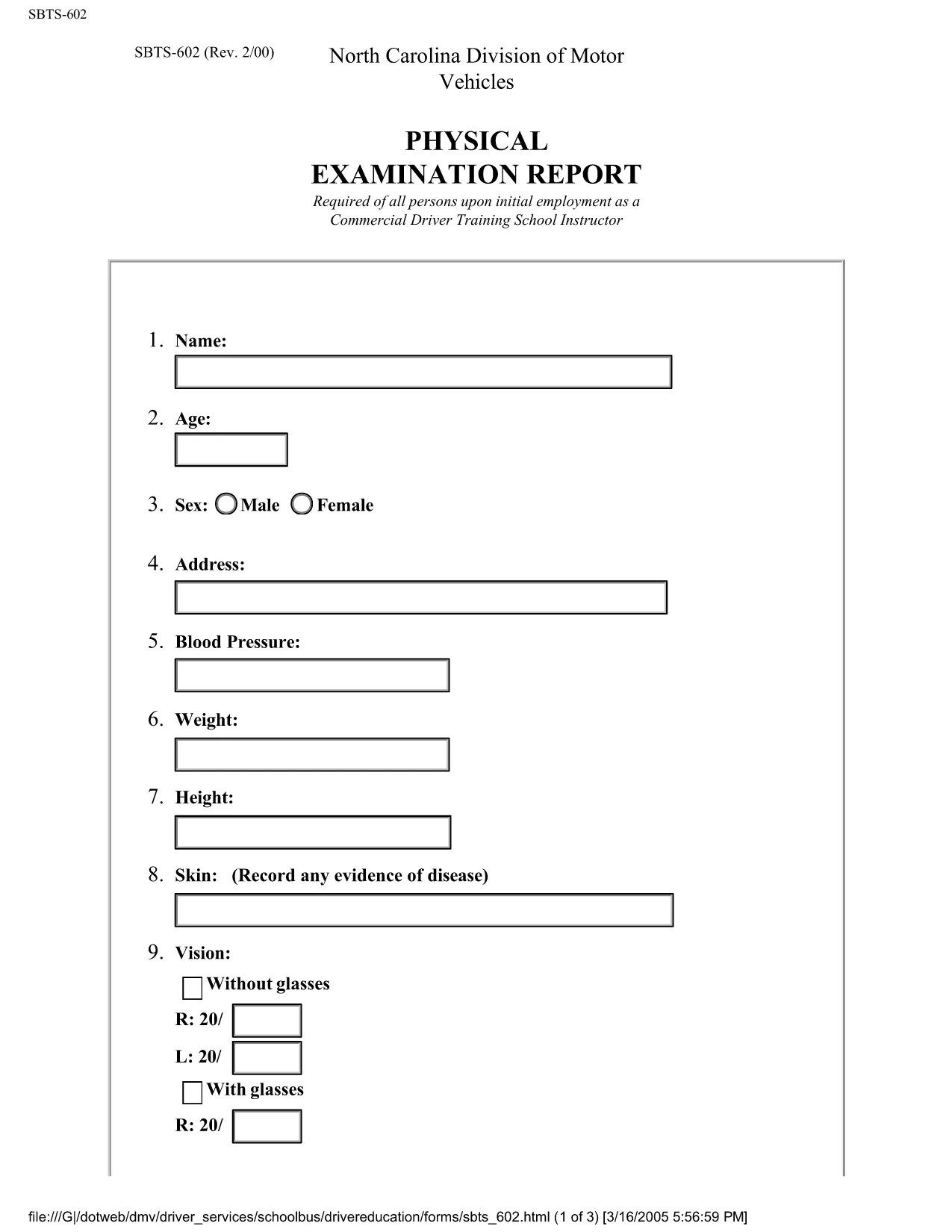
SBTS-602 Instructor Physical Examination Report (Fillable PDF)

What is the SBTS-602 Form?

The SBTS-602 is the Instructor Physical Examination Report required by the North Carolina Department of Transportation (NCDOT) for all driver‑education instructors. The form records the results of a medical exam to confirm that the instructor meets the physical standards for safe instruction.

Who Needs to Complete SBTS-602?

Any individual applying for, renewing, or updating a driver‑education instructor license in North Carolina must submit a completed SBTS-602. This includes:

  • New instructor applicants
  • Instructors renewing their license
  • Instructors changing schools or contact information

How to Fill Out SBTS-602 Online

Instead of downloading the PDF and editing it with a separate editor, simply click the “Fill out this form” button on this page. The Formize PDF Filler app will load automatically, allowing you to complete the form directly in your browser.

Follow the step‑by‑step guide below to finish the form quickly and accurately.

Common Mistakes to Avoid

  • Leaving required fields blank: Every field marked with an asterisk (*) must be completed.
  • Using an outdated medical exam: The physical must be performed within the last 12 months.
  • Incorrect signatures: The physician’s signature and license number are mandatory.
  • Submitting the wrong version: Ensure you are using the latest SBTS-602 PDF (downloaded from this page).

Where to Submit the Completed Form

After you have saved the completed SBTS‑602, submit it to the NCDOT School Bus and Traffic Safety (SBTS) Division. You can upload the PDF through the NCDOT online portal or mail a printed copy to:

School Bus and Traffic Safety Division
NCDOT – Driver Services
3101 Mail Service Center
Raleigh, NC 27699‑3101

Be sure to keep a copy for your records.

सामान्य प्रश्न
  • What does SBTS‑602 stand for?

    SBTS‑602 is the Instructor Physical Examination Report required by the North Carolina School Bus and Traffic Safety Division for driver‑education instructors.

  • Can I fill out SBTS‑602 on a mobile device?

    Yes. The Formize PDF Filler is responsive and works on smartphones and tablets as long as you have an up‑to‑date browser.

  • How recent must the medical exam be?

    The physical examination must be performed within the last 12 months before you submit the form.

  • Do I need a NCDOT account to submit the form?

    You need an account to upload the PDF through the NCDOT online portal, but you can also submit a printed copy by mail without an account.

  • Is there a fee to download or fill out SBTS‑602?

    Downloading and filling out the form with Formize is completely free. NCDOT may charge a processing fee when you submit the application.

  • What should I do if I make a mistake after saving?

    Open the saved PDF again in Formize, edit the incorrect fields, and re‑save or re‑download the corrected version before submitting.

  • Do I need a notary for SBTS‑602?

    No notary is required. The physician’s signature and license number serve as the official verification.

  • How long does the Formize filler stay open?

    Your session remains active for up to 30 minutes of inactivity. You can also save the progress to your Formize account and return later.

कैसे करें

SBTS-602 को मुफ़्त में, ऑनलाइन 5 आसान स्टेप्स में कैसे भरें:

  1. 1
    Click the Fill‑out Button
    Press the “Fill out this form” button on the page. The Formize PDF Filler will open in a new tab.
  2. 2
    Wait for the Formize Loader
    Allow a few seconds for the PDF to load fully. You’ll see interactive fields ready for entry.
  3. 3
    Complete Each Section
    Enter the instructor’s personal data, medical examiner’s findings, and sign where required. All fields are validated in real time.
  4. 4
    Save or Download
    When finished, click “Save” to store the form in your Formize account or “Download” to get a completed PDF copy.
  5. 5
    Submit to NCDOT
    Upload the saved PDF to the NCDOT SBTS portal or mail the printed version to the address provided on the form.
पीडीएफ फिलर एप तैयार करें
के बारे में

ड्राइविंग लाइसेंस आवेदन पत्र

अधिकांश देशों में, सड़क पर चलने से पहले आपके पास ड्राइविंग लाइसेंस होना अनिवार्य है। जो कोई भी कार चलाना चाहता है, उसके लिए ड्राइविंग लाइसेंस प्राप्त करना एक महत्वपूर्ण मील का पत्थर है।

SBTS-602 ड्राइविंग लाइसेंस आवेदन प्रपत्रों में से एक है जो उन लोगों से जानकारी एकत्र करने के लिए उपयोग किए जाने वाले दस्तावेज़ हैं जो ड्राइविंग लाइसेंस के लिए आवेदन करना चाहते हैं। इसमें आमतौर पर आवेदक का नाम, जन्म तिथि, आईडी नंबर, संपर्क जानकारी, साथ ही उनके चालक के लाइसेंस के इतिहास और अनुभव के लिए फ़ील्ड शामिल होते हैं।

विशेषताएं

पीडीएफ भराव

पीडीएफ फॉर्म ऑनलाइन भरने का सबसे आसान तरीका

  • जल्दी से SBTS-602 भरें
    SBTS-602 को जल्दी से ऑनलाइन भरने का कोई तरीका खोज रहे हैं? हमारे ऑनलाइन नि:शुल्क पीडीएफ फॉर्म फिलर के साथ, आप एक मिनट से भी कम समय में इस पीडीएफ दस्तावेज़ को संपादित करने और भरने का तरीका जानेंगे।
  • ऑनलाइन पीडीएफ संपादक का उपयोग करना आसान है
    पीडीएफ फाइलों को प्रिंट करने से तंग आ गए हैं ताकि आप उन्हें फिर से स्कैन करने और उन्हें वापस भेजने से पहले संपादित कर सकें? PDF दस्तावेज़ों को निःशुल्क ऑनलाइन संपादित करें। समय और कागज बचाने के लिए हमारे ऑनलाइन पीडीएफ संपादक का प्रयोग करें।
  • महान उपकरण, सभी प्लेटफार्म
    आश्चर्य है कि मैक पर SBTS-602 कैसे भरें, या शायद पीडीएफ फिलर का मुफ्त में उपयोग कैसे करें? हमारे ऑनलाइन पीडीएफ टूल सभी प्लेटफॉर्म पर काम करते हैं।
  • सुरक्षित फ़ाइल भंडारण
    पूर्ण की गई "SBTS-602" फ़ाइलें Amazon क्लाउड होस्टिंग द्वारा प्रबंधित एक सुरक्षित डेटाबेस में संग्रहीत की जाती हैं। आप कभी भी अपनी फाइलों को हमारे सिस्टम से हटा सकते हैं। किसी भी स्थिति में, ये फ़ाइलें 24 घंटे के बाद स्वतः हटा दी जाती हैं।
  • {कीवर्ड} से चैट करें
    Chatize पर "SBTS-602" के साथ चैट करें, जो एक निःशुल्क पीडीएफ रीडर सहायक है। प्रश्न पूछें और "SBTS-602" से उत्तर प्राप्त करें। बस ऊपर दस्तावेज़ के साथ चैट करें बटन पर क्लिक करें।

फ़िलिंग सत्र मिटाएँ

चयनित फ़िलिंग सत्र को मिटाएँ? इस स्थिति में, फ़ॉर्म को पूरा करने में आपकी प्रगति खो जाएगी।

संपादन सत्र हटाएँ

चयनित संपादन सत्र हटाएँ? इस स्थिति में, फ़ॉर्म बनाने और संपादित करने में आपकी प्रगति नष्ट हो जाएगी।