
hamburger-menu icon
भाषा का चयन करें

DL-80OP – Pennsylvania Occupational Driver’s License Change Form (Fillable PDF)

  1. भाषा अंग्रेज़ी
  2. देश अमेरीका
  3. गतिविधि ड्राइवर का लाइसेंस
  4. राज्य पेंसिल्वेनिया
फार्म को भरो
DL-80OP – Pennsylvania Occupational Driver’s License Change Form (Fillable PDF)

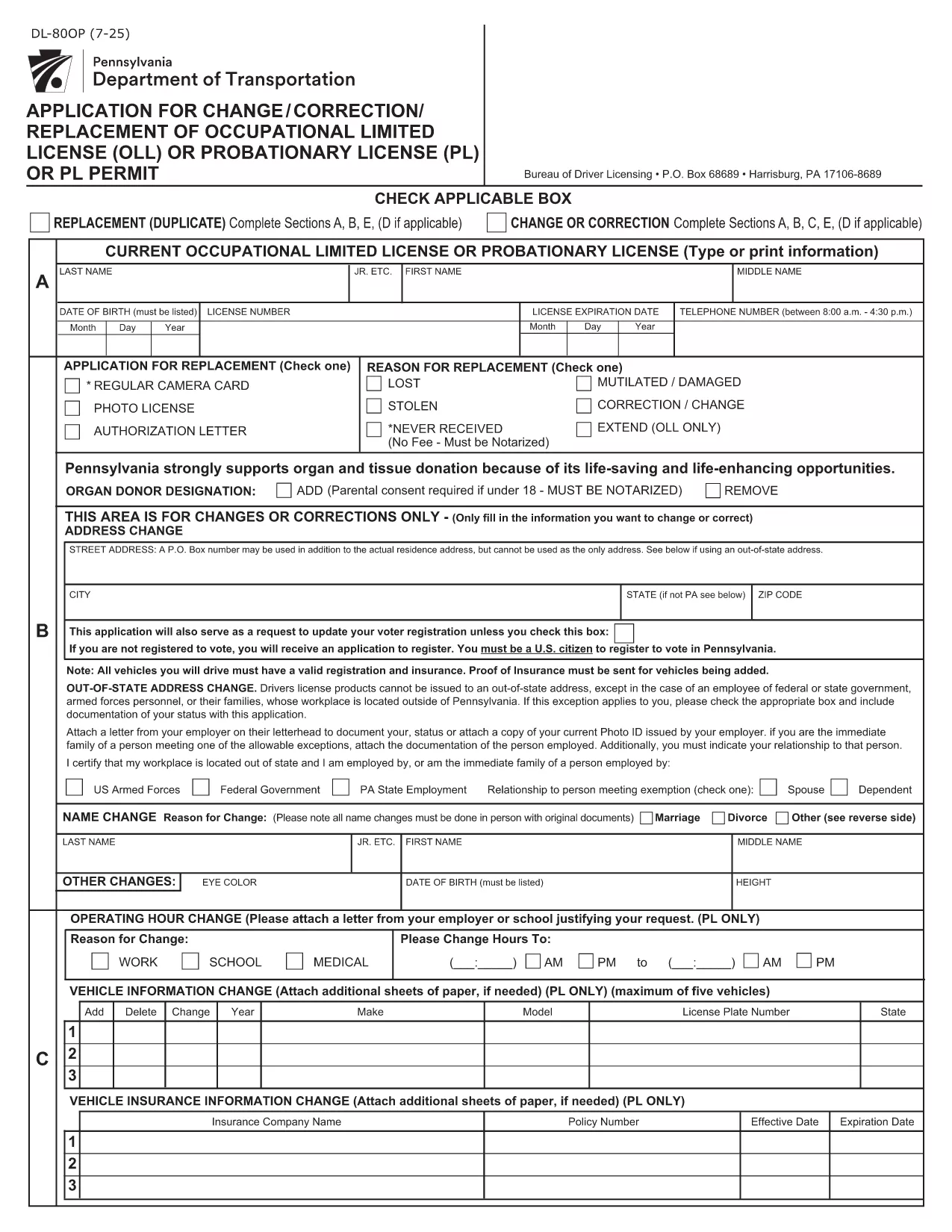
The DL-80OP is the official Pennsylvania Department of Transportation (PennDOT) application used to request a change, correction, or replacement of an occupational driver’s license. This form also lets eligible veterans add a special designation to their license.

What Is the DL-80OP Form?

The DL-80OP covers requests such as name changes, address updates, photo exemptions, and the addition of a veterans designation. It is required for any modification to an existing occupational driver’s license in the Commonwealth of Pennsylvania.

How to Complete the DL-80OP Online

Instead of downloading and printing the PDF, simply click the "Fill out this form" button on this page. The Formize PDF Filler app will load the fillable document directly in your browser:

  1. Click Fill out this form.
  2. Wait a few seconds while the Formize PDF Filler loads.
  3. Enter the required information in each field.
  4. Use the built‑in validation to correct any errors.
  5. When finished, click Submit to download a completed copy or to print.

Common Mistakes to Avoid

  • Leaving required fields blank – the filler will highlight missing data.
  • Using an outdated photo – if you request a photo exemption, be sure you qualify.
  • Incorrect veteran status wording – follow the exact phrasing shown on the form.
  • Submitting without a signature – the electronic signature field must be completed.

Veterans Designation & Special Cases

Qualified veterans may add a “Veterans” designation to their occupational license. The form requires proof of service, which can be uploaded as a PDF attachment after the main form is completed.

Where to Submit Your Completed Form

After filling out the DL-80OP, you can:

  • Mail the printed form to your local PennDOT Driver License Center.
  • Bring the completed form in person to a PennDOT office.
  • Submit electronically if your local office accepts scanned copies (check with them first).

For the most up‑to‑date submission instructions, visit the Pennsylvania Department of Transportation website.

सामान्य प्रश्न
  • What is the DL-80OP used for?

    The DL-80OP is the Pennsylvania form for changing, correcting, or replacing an occupational driver’s license, including adding a veterans designation.

  • Can I fill out the DL-80OP on a mobile device?

    Yes. The Formize PDF Filler works on most smartphones and tablets, allowing you to complete the form anywhere with an internet connection.

  • Do I need to upload proof of veteran status?

    If you request the veterans designation, you must attach a copy of your DD‑214 or other approved proof of service after completing the main form.

  • Is there a fee for submitting the DL-80OP?

    PennDOT may charge a processing fee depending on the type of change. Check the latest fee schedule on the PennDOT website.

  • How long does it take to receive my updated license?

    Processing times vary by office, but most applicants receive their new occupational license within 7‑10 business days after submission.

  • Can I submit the form electronically?

    Some PennDOT locations accept scanned copies of the completed form. Verify with your local Driver License Center before sending an electronic version.

कैसे करें

DL-80OP को मुफ़्त में, ऑनलाइन 5 आसान स्टेप्स में कैसे भरें:

  1. 1
    Open the Fillable Form
    Click the "Fill out this form" button on the page. The Formize PDF Filler will open the DL-80OP directly in your browser.
  2. 2
    Enter Your Information
    Complete each field—personal details, address, license number, and any veteran designation—using the on‑screen prompts.
  3. 3
    Review & Validate
    The filler checks for missing or incorrectly formatted data. Correct any highlighted errors before proceeding.
  4. 4
    Submit & Save
    When all fields are valid, click Submit. Download the completed PDF or save it to your device.
  5. 5
    Print or Email Confirmation
    Print the finished form for mailing or bring it to a PennDOT office. You can also email the PDF if your local office accepts electronic submissions.
पीडीएफ फिलर एप तैयार करें
के बारे में

ड्राइविंग लाइसेंस आवेदन पत्र

अधिकांश देशों में, सड़क पर चलने से पहले आपके पास ड्राइविंग लाइसेंस होना अनिवार्य है। जो कोई भी कार चलाना चाहता है, उसके लिए ड्राइविंग लाइसेंस प्राप्त करना एक महत्वपूर्ण मील का पत्थर है।

DL-80OP ड्राइविंग लाइसेंस आवेदन प्रपत्रों में से एक है जो उन लोगों से जानकारी एकत्र करने के लिए उपयोग किए जाने वाले दस्तावेज़ हैं जो ड्राइविंग लाइसेंस के लिए आवेदन करना चाहते हैं। इसमें आमतौर पर आवेदक का नाम, जन्म तिथि, आईडी नंबर, संपर्क जानकारी, साथ ही उनके चालक के लाइसेंस के इतिहास और अनुभव के लिए फ़ील्ड शामिल होते हैं।

विशेषताएं

पीडीएफ भराव

पीडीएफ फॉर्म ऑनलाइन भरने का सबसे आसान तरीका

  • जल्दी से DL-80OP भरें
    DL-80OP को जल्दी से ऑनलाइन भरने का कोई तरीका खोज रहे हैं? हमारे ऑनलाइन नि:शुल्क पीडीएफ फॉर्म फिलर के साथ, आप एक मिनट से भी कम समय में इस पीडीएफ दस्तावेज़ को संपादित करने और भरने का तरीका जानेंगे।
  • ऑनलाइन पीडीएफ संपादक का उपयोग करना आसान है
    पीडीएफ फाइलों को प्रिंट करने से तंग आ गए हैं ताकि आप उन्हें फिर से स्कैन करने और उन्हें वापस भेजने से पहले संपादित कर सकें? PDF दस्तावेज़ों को निःशुल्क ऑनलाइन संपादित करें। समय और कागज बचाने के लिए हमारे ऑनलाइन पीडीएफ संपादक का प्रयोग करें।
  • महान उपकरण, सभी प्लेटफार्म
    आश्चर्य है कि मैक पर DL-80OP कैसे भरें, या शायद पीडीएफ फिलर का मुफ्त में उपयोग कैसे करें? हमारे ऑनलाइन पीडीएफ टूल सभी प्लेटफॉर्म पर काम करते हैं।
  • सुरक्षित फ़ाइल भंडारण
    पूर्ण की गई "DL-80OP" फ़ाइलें Amazon क्लाउड होस्टिंग द्वारा प्रबंधित एक सुरक्षित डेटाबेस में संग्रहीत की जाती हैं। आप कभी भी अपनी फाइलों को हमारे सिस्टम से हटा सकते हैं। किसी भी स्थिति में, ये फ़ाइलें 24 घंटे के बाद स्वतः हटा दी जाती हैं।
  • {कीवर्ड} से चैट करें
    Chatize पर "DL-80OP" के साथ चैट करें, जो एक निःशुल्क पीडीएफ रीडर सहायक है। प्रश्न पूछें और "DL-80OP" से उत्तर प्राप्त करें। बस ऊपर दस्तावेज़ के साथ चैट करें बटन पर क्लिक करें।

फ़िलिंग सत्र मिटाएँ

चयनित फ़िलिंग सत्र को मिटाएँ? इस स्थिति में, फ़ॉर्म को पूरा करने में आपकी प्रगति खो जाएगी।

संपादन सत्र हटाएँ

चयनित संपादन सत्र हटाएँ? इस स्थिति में, फ़ॉर्म बनाने और संपादित करने में आपकी प्रगति नष्ट हो जाएगी।