
hamburger-menu icon
भाषा का चयन करें

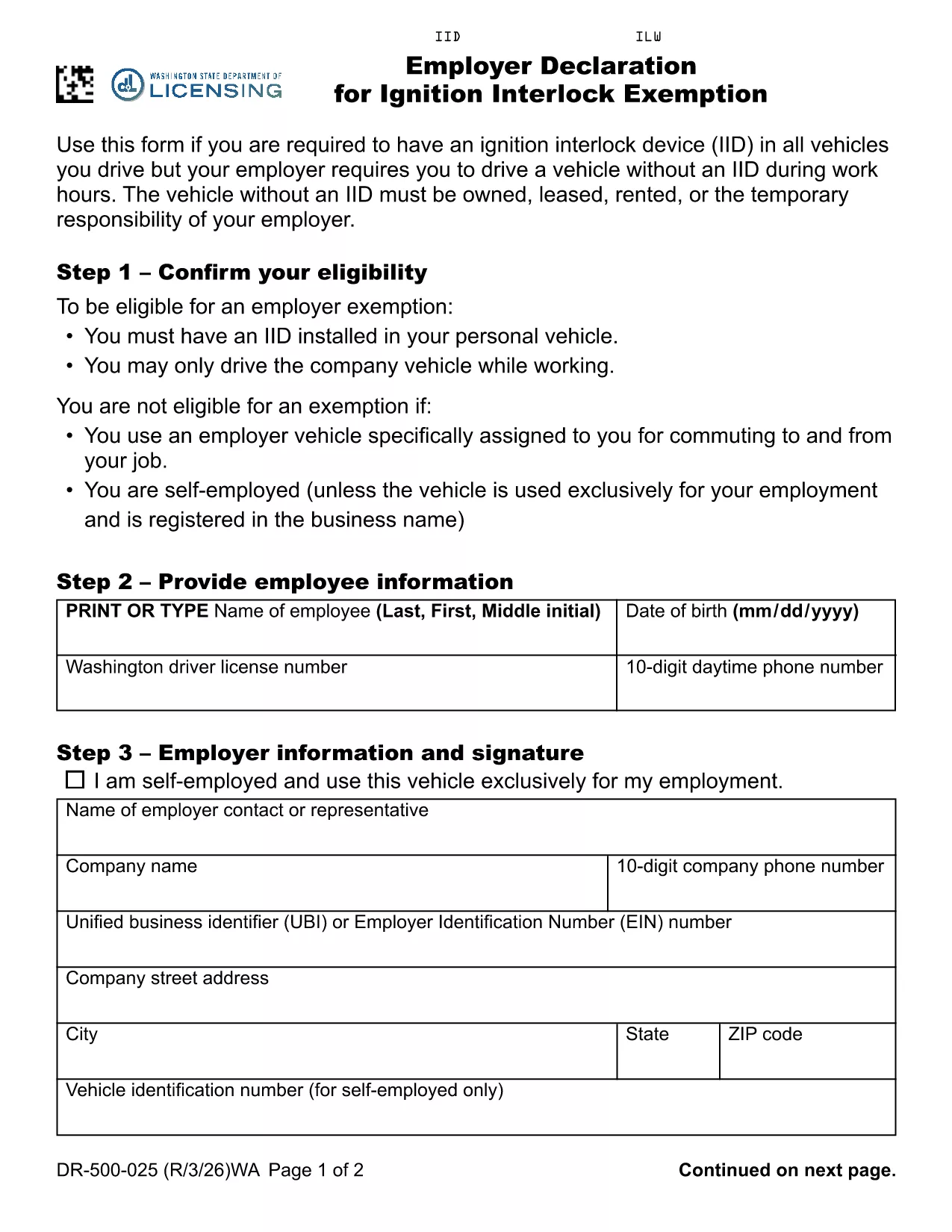
Employer Declaration for Ignition Interlock Exemption

  1. भाषा अंग्रेज़ी
  2. देश अमेरीका
  3. गतिविधि ड्राइवर का लाइसेंस
  4. राज्य वाशिंगटन
फार्म को भरो
Employer Declaration for Ignition Interlock Exemption

Washington law requires drivers with an ignition interlock device (IID) to have the device installed in every vehicle they operate. If your employer requires you to drive a company‑owned, leased, rented or temporarily assigned vehicle that does not have an IID, you must submit an Employer Declaration for Ignition Interlock Exemption (RCW 46.20.720 (6)(b)). This fillable PDF form satisfies the Department of Licensing’s requirement and protects both you and your employer.

What Is an Ignition Interlock Exemption?

An exemption allows a driver who is otherwise required to use an IID to operate a specific vehicle without the device, provided the vehicle is under the employer’s responsibility during work hours. The exemption is granted on a case‑by‑case basis and must be documented with a signed employer declaration.

Who Needs This Declaration?

  • Employees who have an IID installed in their personal vehicle.
  • Employees whose job requires them to drive a company vehicle that does not have an IID.
  • Employers who temporarily assign vehicles to employees during work hours.

How to Complete the Form Online

Instead of downloading the PDF and editing it manually, simply click the "Fill out this form" button below. The Formize PDF Filler app will load the fillable PDF directly in your browser.

Common Mistakes to Avoid

  • Leaving the employer’s address or phone number blank.
  • Forgetting to include the vehicle’s VIN, make, and model.
  • Not signing the declaration electronically before submitting.
  • Submitting an incomplete form, which can delay the exemption approval.

Where to Submit the Completed Form

After you finish the online fill‑out, download the completed PDF and mail it to the Washington State Department of Licensing, or submit it electronically if your employer uses the state’s online portal. Keep a copy for your records.

सामान्य प्रश्न
  • Do I need a separate exemption for each company vehicle?

    Yes. Each vehicle that does not have an IID must be listed on a separate Employer Declaration form.

  • Can my employer fill out the form on my behalf?

    The employer can complete the employer‑specific sections, but the driver must sign the declaration electronically.

  • Is an electronic signature accepted?

    Washington State Department of Licensing accepts electronic signatures submitted through a certified PDF filler like Formize.

  • How long does the exemption approval take?

    Processing typically takes 5‑10 business days after the Department receives a complete, signed declaration.

  • What happens if the form is incomplete?

    An incomplete form will be returned for correction, which can delay the exemption and may result in a citation if you drive without an IID.

  • Do I need to renew the exemption?

    The exemption is valid as long as the driver’s IID requirement remains in effect. If circumstances change, a new declaration must be submitted.

  • Can I use this form if I work outside Washington?

    This specific declaration is for Washington State drivers under RCW 46.20.720. Other states have their own exemption procedures.

कैसे करें

ignition interlock exemption को मुफ़्त में, ऑनलाइन 6 आसान स्टेप्स में कैसे भरें:

  1. 1
    Click the Fill‑out Button
    Press the "Fill out this form" button on the page to launch the Formize PDF Filler.
  2. 2
    Wait for the Filler to Load
    The fillable PDF will appear in your browser within a few seconds.
  3. 3
    Enter Employer Information
    Type the employer’s name, address, and contact details in the highlighted fields.
  4. 4
    Provide Vehicle Details
    Enter the VIN, make, model, and license plate of the company vehicle you will drive.
  5. 5
    Sign Electronically
    Use the signature field to sign the declaration electronically.
  6. 6
    Submit or Download
    Click "Submit" to send the form directly to the Washington Department of Licensing, or download the completed PDF for mailing.
पीडीएफ फिलर एप तैयार करें
के बारे में

ड्राइविंग लाइसेंस आवेदन पत्र

अधिकांश देशों में, सड़क पर चलने से पहले आपके पास ड्राइविंग लाइसेंस होना अनिवार्य है। जो कोई भी कार चलाना चाहता है, उसके लिए ड्राइविंग लाइसेंस प्राप्त करना एक महत्वपूर्ण मील का पत्थर है।

ignition interlock exemption ड्राइविंग लाइसेंस आवेदन प्रपत्रों में से एक है जो उन लोगों से जानकारी एकत्र करने के लिए उपयोग किए जाने वाले दस्तावेज़ हैं जो ड्राइविंग लाइसेंस के लिए आवेदन करना चाहते हैं। इसमें आमतौर पर आवेदक का नाम, जन्म तिथि, आईडी नंबर, संपर्क जानकारी, साथ ही उनके चालक के लाइसेंस के इतिहास और अनुभव के लिए फ़ील्ड शामिल होते हैं।

विशेषताएं

पीडीएफ भराव

पीडीएफ फॉर्म ऑनलाइन भरने का सबसे आसान तरीका

  • जल्दी से ignition interlock exemption भरें
    ignition interlock exemption को जल्दी से ऑनलाइन भरने का कोई तरीका खोज रहे हैं? हमारे ऑनलाइन नि:शुल्क पीडीएफ फॉर्म फिलर के साथ, आप एक मिनट से भी कम समय में इस पीडीएफ दस्तावेज़ को संपादित करने और भरने का तरीका जानेंगे।
  • ऑनलाइन पीडीएफ संपादक का उपयोग करना आसान है
    पीडीएफ फाइलों को प्रिंट करने से तंग आ गए हैं ताकि आप उन्हें फिर से स्कैन करने और उन्हें वापस भेजने से पहले संपादित कर सकें? PDF दस्तावेज़ों को निःशुल्क ऑनलाइन संपादित करें। समय और कागज बचाने के लिए हमारे ऑनलाइन पीडीएफ संपादक का प्रयोग करें।
  • महान उपकरण, सभी प्लेटफार्म
    आश्चर्य है कि मैक पर ignition interlock exemption कैसे भरें, या शायद पीडीएफ फिलर का मुफ्त में उपयोग कैसे करें? हमारे ऑनलाइन पीडीएफ टूल सभी प्लेटफॉर्म पर काम करते हैं।
  • सुरक्षित फ़ाइल भंडारण
    पूर्ण की गई "ignition interlock exemption" फ़ाइलें Amazon क्लाउड होस्टिंग द्वारा प्रबंधित एक सुरक्षित डेटाबेस में संग्रहीत की जाती हैं। आप कभी भी अपनी फाइलों को हमारे सिस्टम से हटा सकते हैं। किसी भी स्थिति में, ये फ़ाइलें 24 घंटे के बाद स्वतः हटा दी जाती हैं।
  • {कीवर्ड} से चैट करें
    Chatize पर "ignition interlock exemption" के साथ चैट करें, जो एक निःशुल्क पीडीएफ रीडर सहायक है। प्रश्न पूछें और "ignition interlock exemption" से उत्तर प्राप्त करें। बस ऊपर दस्तावेज़ के साथ चैट करें बटन पर क्लिक करें।

फ़िलिंग सत्र मिटाएँ

चयनित फ़िलिंग सत्र को मिटाएँ? इस स्थिति में, फ़ॉर्म को पूरा करने में आपकी प्रगति खो जाएगी।

संपादन सत्र हटाएँ

चयनित संपादन सत्र हटाएँ? इस स्थिति में, फ़ॉर्म बनाने और संपादित करने में आपकी प्रगति नष्ट हो जाएगी।