
hamburger-menu icon
भाषा का चयन करें

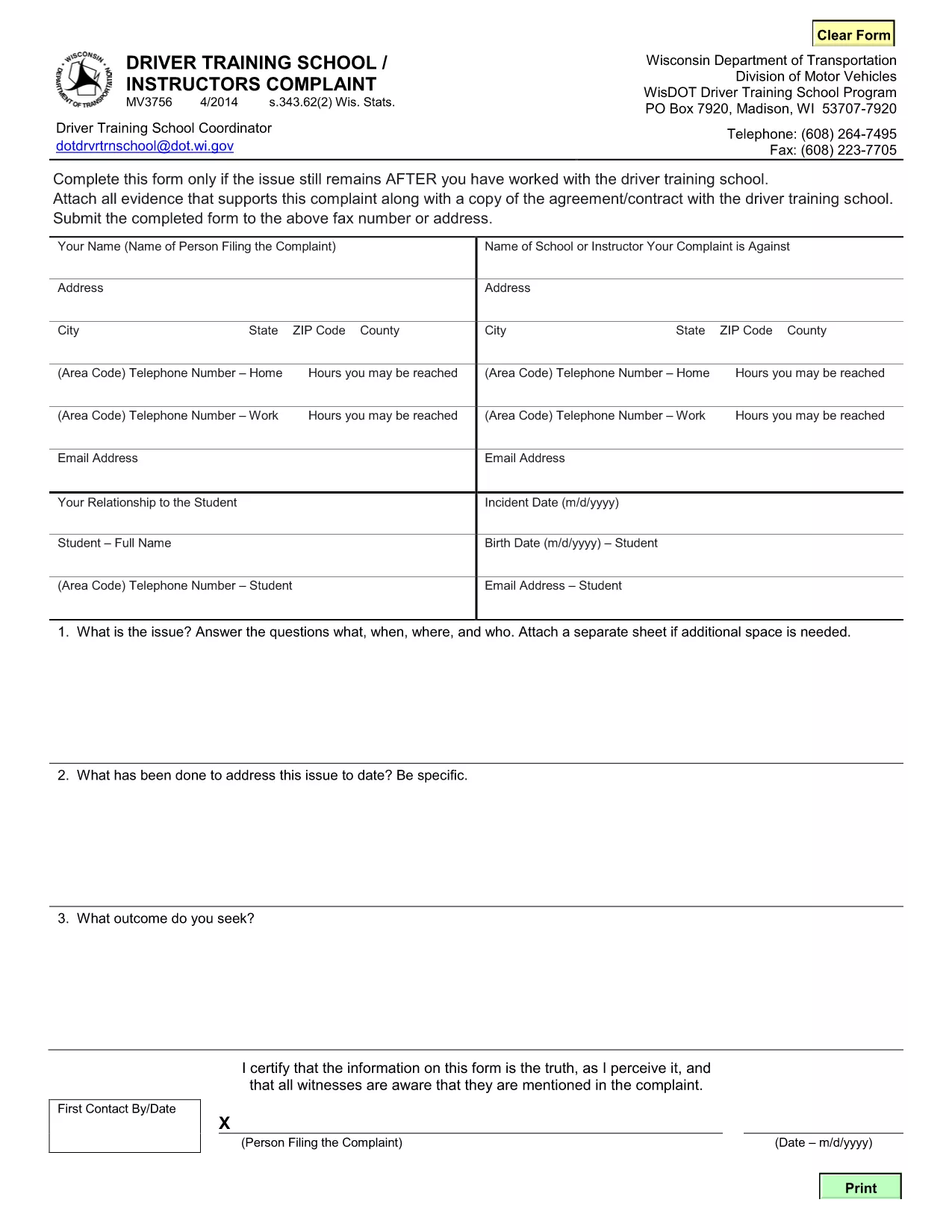
MV3756 Driver Training School & Instructor Complaint Form

  1. भाषा अंग्रेज़ी
  2. देश अमेरीका
  3. गतिविधि ड्राइवर का लाइसेंस
  4. राज्य विस्कॉन्सिन
फार्म को भरो
MV3756 Driver Training School & Instructor Complaint Form

The MV3756 is the official Wisconsin Department of Transportation (WisDOT) complaint form used to report issues with driver training schools or instructors. Whether you experienced inadequate instruction, contract violations, or safety concerns, this fillable PDF lets you submit a detailed complaint quickly.

Formize hosts a secure, browser‑based PDF filler so you never need to download, print, or scan the document. Just click the button, fill the fields, and submit the completed form directly to WisDOT.

Below you’ll find step‑by‑step instructions, common pitfalls to watch out for, and answers to the most frequently asked questions about the MV3756 form.

सामान्य प्रश्न
  • What type of issues can I report with MV3756?

    The form covers any misconduct by a driver‑training school or instructor, including contract breaches, unsafe training practices, or failure to provide promised services.

  • Do I need a Wisconsin address to use this form?

    No. The MV3756 can be submitted by anyone who has taken a driver‑training course in Wisconsin, regardless of where you currently reside.

  • Can I submit the form without attachments?

    While attachments are optional, providing copies of agreements, receipts, or photos greatly strengthens your complaint and speeds up processing.

  • How long does it take for WisDOT to respond?

    WisDOT typically acknowledges receipt within 5‑7 business days and may request additional information before taking action.

  • Is there a fee to file an MV3756 complaint?

    No. Filing the MV3756 form is completely free.

  • What if I make a mistake after submitting?

    Contact the WisDOT Complaint Unit directly (phone or email) and reference your submission ID. They can guide you on amending the complaint.

  • Can I save my progress and finish later?

    Yes. The Formize PDF filler allows you to save a draft locally on your device and reload it when you’re ready to finish.

  • Is my personal information secure?

    Formize uses SSL encryption, and the PDF is stored only for the duration of the session. No data is retained after you submit the form.

कैसे करें

MV3756 को मुफ़्त में, ऑनलाइन 5 आसान स्टेप्स में कैसे भरें:

  1. 1
    Open the Fillable Form
    Click the **Fill out this form** button on the page. Formize will load the MV3756 PDF directly in your browser.
  2. 2
    Enter Your Information
    Complete each required field—your name, contact details, school name, and a clear description of the issue.
  3. 3
    Attach Supporting Documents
    Use the attachment fields to upload copies of contracts, receipts, or any evidence that supports your complaint.
  4. 4
    Review & Sign
    Double‑check all entries for accuracy, then add your electronic signature using the built‑in signing tool.
  5. 5
    Submit the Form
    Press **Submit**. The completed MV3756 will be securely sent to the Wisconsin DOT’s complaint processing center.
पीडीएफ फिलर एप तैयार करें
के बारे में

ड्राइविंग लाइसेंस आवेदन पत्र

अधिकांश देशों में, सड़क पर चलने से पहले आपके पास ड्राइविंग लाइसेंस होना अनिवार्य है। जो कोई भी कार चलाना चाहता है, उसके लिए ड्राइविंग लाइसेंस प्राप्त करना एक महत्वपूर्ण मील का पत्थर है।

MV3756 ड्राइविंग लाइसेंस आवेदन प्रपत्रों में से एक है जो उन लोगों से जानकारी एकत्र करने के लिए उपयोग किए जाने वाले दस्तावेज़ हैं जो ड्राइविंग लाइसेंस के लिए आवेदन करना चाहते हैं। इसमें आमतौर पर आवेदक का नाम, जन्म तिथि, आईडी नंबर, संपर्क जानकारी, साथ ही उनके चालक के लाइसेंस के इतिहास और अनुभव के लिए फ़ील्ड शामिल होते हैं।

विशेषताएं

पीडीएफ भराव

पीडीएफ फॉर्म ऑनलाइन भरने का सबसे आसान तरीका

  • जल्दी से MV3756 भरें
    MV3756 को जल्दी से ऑनलाइन भरने का कोई तरीका खोज रहे हैं? हमारे ऑनलाइन नि:शुल्क पीडीएफ फॉर्म फिलर के साथ, आप एक मिनट से भी कम समय में इस पीडीएफ दस्तावेज़ को संपादित करने और भरने का तरीका जानेंगे।
  • ऑनलाइन पीडीएफ संपादक का उपयोग करना आसान है
    पीडीएफ फाइलों को प्रिंट करने से तंग आ गए हैं ताकि आप उन्हें फिर से स्कैन करने और उन्हें वापस भेजने से पहले संपादित कर सकें? PDF दस्तावेज़ों को निःशुल्क ऑनलाइन संपादित करें। समय और कागज बचाने के लिए हमारे ऑनलाइन पीडीएफ संपादक का प्रयोग करें।
  • महान उपकरण, सभी प्लेटफार्म
    आश्चर्य है कि मैक पर MV3756 कैसे भरें, या शायद पीडीएफ फिलर का मुफ्त में उपयोग कैसे करें? हमारे ऑनलाइन पीडीएफ टूल सभी प्लेटफॉर्म पर काम करते हैं।
  • सुरक्षित फ़ाइल भंडारण
    पूर्ण की गई "MV3756" फ़ाइलें Amazon क्लाउड होस्टिंग द्वारा प्रबंधित एक सुरक्षित डेटाबेस में संग्रहीत की जाती हैं। आप कभी भी अपनी फाइलों को हमारे सिस्टम से हटा सकते हैं। किसी भी स्थिति में, ये फ़ाइलें 24 घंटे के बाद स्वतः हटा दी जाती हैं।
  • {कीवर्ड} से चैट करें
    Chatize पर "MV3756" के साथ चैट करें, जो एक निःशुल्क पीडीएफ रीडर सहायक है। प्रश्न पूछें और "MV3756" से उत्तर प्राप्त करें। बस ऊपर दस्तावेज़ के साथ चैट करें बटन पर क्लिक करें।

फ़िलिंग सत्र मिटाएँ

चयनित फ़िलिंग सत्र को मिटाएँ? इस स्थिति में, फ़ॉर्म को पूरा करने में आपकी प्रगति खो जाएगी।

संपादन सत्र हटाएँ

चयनित संपादन सत्र हटाएँ? इस स्थिति में, फ़ॉर्म बनाने और संपादित करने में आपकी प्रगति नष्ट हो जाएगी।