
hamburger-menu icon
भाषा का चयन करें

Georgia MV-300 – Request Cancellation of Temporary Operating Permit

  1. देश अमेरीका
  2. भाषा अंग्रेज़ी
  3. विभाग Georgia Department of Revenue
  4. गतिविधि वाहन पंजीकरण
फार्म को भरो
Georgia MV-300 – Request Cancellation of Temporary Operating Permit

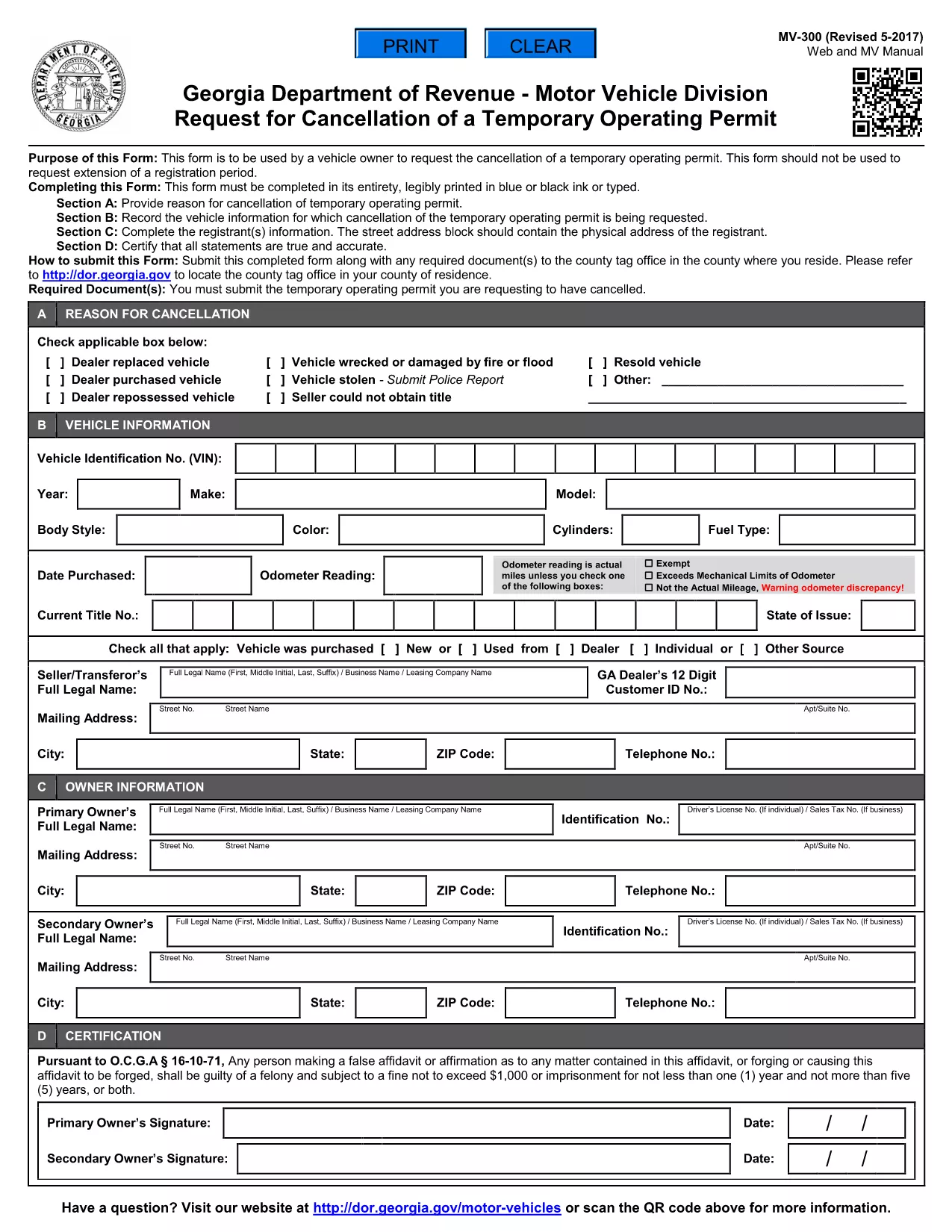
The MV-300 is the official Georgia Department of Revenue Motor Vehicle Division form used to request the cancellation of a temporary operating permit. Whether you’re a dealer, fleet manager, or private vehicle owner, you can now complete this form entirely online with Formize’s fillable PDF tool.

What Is the MV-300 Form?

The MV-300 serves a single purpose: to formally request the termination of a temporary operating permit issued by the Georgia Department of Revenue. It is not intended for extensions, renewals, or any other type of permit request.

How to Complete the MV-300 Online

Follow these simple steps to fill out the MV-300 without leaving your browser:

  • Click the "Fill out this form" button on this page.
  • Wait a few seconds while the Formize PDF Filler app loads the fillable version of the MV-300.
  • Enter the required information in each field (vehicle details, permit number, owner signature, etc.).
  • Review the completed form for accuracy.
  • Click Submit to download the finished PDF or to email it directly to the Motor Vehicle Division.

Common Mistakes to Avoid

  • Using the wrong form: MV-300 is only for cancellation, not for extensions.
  • Leaving required fields blank: Every field marked with an asterisk (*) must be completed.
  • Incorrect permit number: Verify the number on your temporary permit before entering it.
  • Missing signatures: Both the vehicle owner and the authorized dealer must sign.

Where to Submit the Completed Form

After you’ve filled out and saved the PDF, you have two submission options:

  • Mail: Send the printed form to the address listed on the form’s instructions.
  • Electronic: Email a scanned copy to mvforms@dor.ga.gov (if your local office accepts electronic submissions).

Need Help? Frequently Asked Questions

Below are answers to the most common questions about the MV-300.

सामान्य प्रश्न
  • Can I use the MV-300 to extend a temporary operating permit?

    No. The MV-300 is strictly for cancellation. For extensions, you must use the appropriate renewal form.

  • Do I need a notary for the MV-300?

    A notary is not required for the MV-300, but the signatures must be legible and match the names on the permit.

  • What if I lose my temporary operating permit?

    Contact the Georgia Department of Revenue for a replacement permit number before completing the MV-300.

  • Is there a filing fee for cancelling a temporary permit?

    There is no fee to submit the MV-300 cancellation request.

  • How long does it take for the cancellation to be processed?

    Processing typically takes 5‑7 business days after the department receives the completed form.

  • Can I fill out the MV-300 on a mobile device?

    Yes. The Formize PDF Filler works on smartphones and tablets, making it easy to complete the form anywhere.

कैसे करें

MV-300 को मुफ़्त में, ऑनलाइन 4 आसान स्टेप्स में कैसे भरें:

  1. 1
    Open the Fillable Form
    Click the "Fill out this form" button on this page. The Formize PDF Filler will open in a new window.
  2. 2
    Enter Your Information
    Type directly into each field – vehicle details, permit number, owner contact info, and signatures.
  3. 3
    Review and Save
    Check that all required fields are completed, then click "Save" to download the finished PDF to your device.
  4. 4
    Submit to the Motor Vehicle Division
    Mail or email the completed PDF according to the instructions on the form.
पीडीएफ फिलर एप तैयार करें
के बारे में

वाहन पंजीकरण प्रपत्र

MV-300 वाहन पंजीकरण फॉर्मों में से एक है जो संबंधित सरकारी प्राधिकरण, आमतौर पर मोटर वाहन विभाग (डीएमवी) या समकक्ष एजेंसी के साथ मोटर वाहन को पंजीकृत करने के लिए उपयोग किए जाने वाले दस्तावेज हैं। इन फॉर्मों की आवश्यकता तब होती है जब कोई व्यक्ति नया या प्रयुक्त वाहन खरीदता है, वाहन का स्वामित्व स्थानांतरित करता है, या वाहन के साथ नए क्षेत्राधिकार में जाता है।

विशिष्ट वाहन पंजीकरण फॉर्म क्षेत्राधिकार के अनुसार भिन्न हो सकते हैं, लेकिन उन्हें आम तौर पर निम्नलिखित जानकारी की आवश्यकता होती है:

वाहन जानकारी: इसमें वाहन के बारे में विवरण शामिल हैं, जैसे मेक, मॉडल, वर्ष, वाहन पहचान संख्या (वीआईएन), और ओडोमीटर रीडिंग।

मालिक की जानकारी: फॉर्म में वाहन के मालिक के बारे में जानकारी की आवश्यकता होगी, जिसमें उनका नाम, पता, संपर्क जानकारी और ड्राइवर का लाइसेंस नंबर शामिल है।

स्वामित्व का प्रमाण: परिस्थितियों के आधार पर, स्वामित्व के प्रमाण की आवश्यकता हो सकती है, जैसे शीर्षक प्रमाण पत्र, बिक्री का बिल, या निर्माता का मूल प्रमाण पत्र (नए वाहनों के लिए)।

बीमा जानकारी: वैध वाहन बीमा कवरेज का प्रमाण आम तौर पर आवश्यक होता है। इसमें बीमा पॉलिसी नंबर, कवरेज की तारीखें और बीमा कंपनी का विवरण प्रदान करना शामिल हो सकता है।

फीस का भुगतान: वाहन पंजीकरण में विभिन्न शुल्कों का भुगतान शामिल है, जैसे पंजीकरण शुल्क, कर और संभवतः क्षेत्राधिकार के लिए विशिष्ट अन्य शुल्क।

इन बुनियादी आवश्यकताओं के अलावा, कुछ न्यायालयों में अतिरिक्त फॉर्म या दस्तावेज़ीकरण आवश्यकताएँ हो सकती हैं। उदाहरण के लिए, कुछ क्षेत्रों में उत्सर्जन परीक्षण के परिणाम, सुरक्षा निरीक्षण या निवास का प्रमाण आवश्यक हो सकता है।

एक बार वाहन पंजीकरण फॉर्म पूरा हो जाने और जमा हो जाने के बाद, सरकारी प्राधिकरण एक पंजीकरण प्रमाणपत्र, लाइसेंस प्लेट और पंजीकरण स्टिकर जारी करेगा। ये दस्तावेज़ दर्शाते हैं कि वाहन कानूनी रूप से पंजीकृत है और सार्वजनिक सड़कों पर संचालन के लिए अधिकृत है।

यह ध्यान रखना महत्वपूर्ण है कि वाहन पंजीकरण आवश्यकताएँ क्षेत्राधिकार के अनुसार काफी भिन्न हो सकती हैं। इसलिए, आपके स्थान पर लागू विशिष्ट रूपों और प्रक्रियाओं के लिए स्थानीय डीएमवी या समकक्ष एजेंसी से परामर्श करने की अनुशंसा की जाती है।

विशेषताएं

पीडीएफ भराव

पीडीएफ फॉर्म ऑनलाइन भरने का सबसे आसान तरीका

  • जल्दी से MV-300 भरें
    MV-300 को जल्दी से ऑनलाइन भरने का कोई तरीका खोज रहे हैं? हमारे ऑनलाइन नि:शुल्क पीडीएफ फॉर्म फिलर के साथ, आप एक मिनट से भी कम समय में इस पीडीएफ दस्तावेज़ को संपादित करने और भरने का तरीका जानेंगे।
  • ऑनलाइन पीडीएफ संपादक का उपयोग करना आसान है
    पीडीएफ फाइलों को प्रिंट करने से तंग आ गए हैं ताकि आप उन्हें फिर से स्कैन करने और उन्हें वापस भेजने से पहले संपादित कर सकें? PDF दस्तावेज़ों को निःशुल्क ऑनलाइन संपादित करें। समय और कागज बचाने के लिए हमारे ऑनलाइन पीडीएफ संपादक का प्रयोग करें।
  • महान उपकरण, सभी प्लेटफार्म
    आश्चर्य है कि मैक पर MV-300 कैसे भरें, या शायद पीडीएफ फिलर का मुफ्त में उपयोग कैसे करें? हमारे ऑनलाइन पीडीएफ टूल सभी प्लेटफॉर्म पर काम करते हैं।
  • सुरक्षित फ़ाइल भंडारण
    पूर्ण की गई "MV-300" फ़ाइलें Amazon क्लाउड होस्टिंग द्वारा प्रबंधित एक सुरक्षित डेटाबेस में संग्रहीत की जाती हैं। आप कभी भी अपनी फाइलों को हमारे सिस्टम से हटा सकते हैं। किसी भी स्थिति में, ये फ़ाइलें 24 घंटे के बाद स्वतः हटा दी जाती हैं।
  • {कीवर्ड} से चैट करें
    Chatize पर "MV-300" के साथ चैट करें, जो एक निःशुल्क पीडीएफ रीडर सहायक है। प्रश्न पूछें और "MV-300" से उत्तर प्राप्त करें। बस ऊपर दस्तावेज़ के साथ चैट करें बटन पर क्लिक करें।

फ़िलिंग सत्र मिटाएँ

चयनित फ़िलिंग सत्र को मिटाएँ? इस स्थिति में, फ़ॉर्म को पूरा करने में आपकी प्रगति खो जाएगी।

संपादन सत्र हटाएँ

चयनित संपादन सत्र हटाएँ? इस स्थिति में, फ़ॉर्म बनाने और संपादित करने में आपकी प्रगति नष्ट हो जाएगी।