
hamburger-menu icon
भाषा का चयन करें

IRS Form 15105 – Fillable PDF Online

  1. देश अमेरीका
  2. भाषा अंग्रेज़ी
  3. गतिविधि करों
  4. विभाग IRS
फार्म को भरो
IRS Form 15105 – Fillable PDF Online

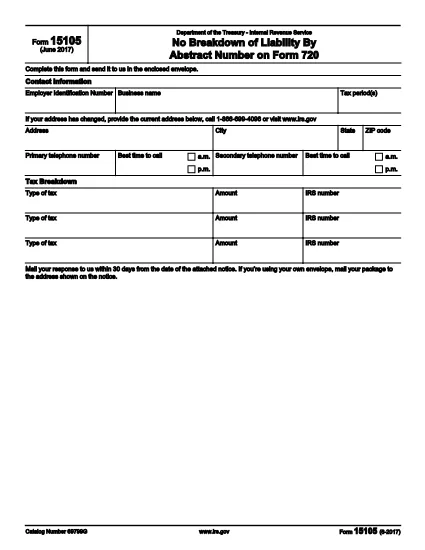
Form 15105 is an IRS notice‑response form used to provide additional information or clarification after the Internal Revenue Service has sent you a tax notice. The form must be completed accurately and returned within 30 days to avoid penalties.

With Formize you can open the official fillable PDF directly in your browser, fill it out, save a copy, and print or e‑mail it without ever installing a PDF editor.

What Is Form 15105?

This form is titled “Request for Taxpayer Identification Number (TIN) Verification” and is typically attached to notices regarding mismatched TINs, identity verification, or other compliance checks. It helps the IRS confirm your identity and resolve the issue promptly.

How to Fill Form 15105 Online

Follow the simple steps below to complete the form in minutes:

  • Click the "Fill out this form" button on the page.
  • Wait for the Formize PDF Filler app to load (a few seconds).
  • Enter the requested information in each fillable field.
  • Review your entries for accuracy.
  • Download the completed PDF or print it directly for mailing.

Common Mistakes to Avoid

  • Leaving required fields blank – the form will not be accepted.
  • Entering an incorrect TIN or Social Security Number.
  • Using an outdated version of the form – make sure you are using the 2023‑2024 edition.
  • Forgetting to sign and date the form.

Where to Mail or Submit Your Form

The notice that accompanied Form 15105 includes a specific mailing address. If you are using your own envelope, ensure the address is visible through the window. Alternatively, you can fax the completed form to the number listed on the notice, if applicable.

FAQs About Form 15105

Below are answers to the most common questions taxpayers ask about this form.

सामान्य प्रश्न
  • Do I need a PDF editor to fill Form 15105?

    No. Formize provides a built‑in fillable PDF editor that works in any modern browser.

  • Is the Form 15105 PDF free to download?

    Yes. The official IRS PDF is available at no cost, and Formize lets you fill it out for free.

  • Can I submit the form electronically?

    Only if the IRS notice specifically allows electronic submission. Otherwise, print and mail the completed form.

  • How long do I have to return Form 15105?

    Typically 30 days from the date on the notice. Check the notice for any extensions.

  • What should I do if I make a mistake after submitting?

    Contact the IRS using the phone number on the notice and request a corrected submission.

  • Is there a Spanish version of Form 15105?

    Yes. The Spanish version is available as f15105sp.pdf, but use the version that matches the language of your notice.

  • Do I need to attach additional documents?

    Only attach documents that the notice specifically requests, such as proof of identity or a corrected TIN.

कैसे करें

Form 15105 को मुफ़्त में, ऑनलाइन 5 आसान स्टेप्स में कैसे भरें:

  1. 1
    Open the Fillable Form
    Click the "Fill out this form" button on the page. The Formize PDF Filler will open in a new tab.
  2. 2
    Load the PDF Filler
    Wait a few seconds while the Formize app loads the official IRS Form 15105 PDF.
  3. 3
    Enter Your Information
    Type your details into each highlighted field. All required fields are marked with an asterisk.
  4. 4
    Review and Save
    Double‑check every entry, then click "Save" to download the completed PDF or print it directly.
  5. 5
    Submit the Form
    Mail or fax the printed form to the address shown on your IRS notice, or follow any electronic submission instructions provided.
पीडीएफ फिलर एप तैयार करें
के बारे में

संघीय कर प्रपत्र

Form 15105 संघीय कर प्रपत्रों में से एक है जो संयुक्त राज्य अमेरिका में आंतरिक राजस्व सेवा (आईआरएस) के साथ संघीय आय करों की रिपोर्ट करने और दाखिल करने के लिए उपयोग किए जाने वाले दस्तावेज़ हैं। इन फॉर्मों का उपयोग व्यक्तियों, व्यवसायों और संगठनों द्वारा उनकी संघीय कर देयता की गणना के लिए आवश्यक आय, कटौती और अन्य प्रासंगिक जानकारी की रिपोर्ट करने के लिए किया जाता है।

सबसे अधिक इस्तेमाल किया जाने वाला संघीय कर फॉर्म फॉर्म 1040 है, जिसका उपयोग व्यक्तिगत करदाताओं द्वारा अपने व्यक्तिगत आयकर की रिपोर्ट करने के लिए किया जाता है। आमतौर पर उपयोग किए जाने वाले अन्य फॉर्म में साझेदारी के लिए फॉर्म 1065, फॉर्म 1120, और कर-मुक्त संगठनों के लिए फॉर्म 990

संघीय कर फॉर्म में आम तौर पर करदाताओं को आय के विभिन्न स्रोतों, जैसे वेतन, वेतन और टिप्स, साथ ही निवेश, किराये की संपत्तियों और अन्य स्रोतों से आय की रिपोर्ट करने की आवश्यकता होती है। फॉर्म करदाताओं को धर्मार्थ योगदान, बंधक ब्याज और स्वास्थ्य देखभाल व्यय जैसे विभिन्न खर्चों के लिए कटौती और क्रेडिट का दावा करने की अनुमति भी देते हैं।

संघीय कर फॉर्म को सही ढंग से और समय पर दाखिल करना महत्वपूर्ण है, क्योंकि ऐसा करने में विफलता के परिणामस्वरूप आईआरएस से जुर्माना और ब्याज शुल्क लिया जा सकता है।

विशेषताएं

पीडीएफ भराव

पीडीएफ फॉर्म ऑनलाइन भरने का सबसे आसान तरीका

  • जल्दी से Form 15105 भरें
    Form 15105 को जल्दी से ऑनलाइन भरने का कोई तरीका खोज रहे हैं? हमारे ऑनलाइन नि:शुल्क पीडीएफ फॉर्म फिलर के साथ, आप एक मिनट से भी कम समय में इस पीडीएफ दस्तावेज़ को संपादित करने और भरने का तरीका जानेंगे।
  • ऑनलाइन पीडीएफ संपादक का उपयोग करना आसान है
    पीडीएफ फाइलों को प्रिंट करने से तंग आ गए हैं ताकि आप उन्हें फिर से स्कैन करने और उन्हें वापस भेजने से पहले संपादित कर सकें? PDF दस्तावेज़ों को निःशुल्क ऑनलाइन संपादित करें। समय और कागज बचाने के लिए हमारे ऑनलाइन पीडीएफ संपादक का प्रयोग करें।
  • महान उपकरण, सभी प्लेटफार्म
    आश्चर्य है कि मैक पर Form 15105 कैसे भरें, या शायद पीडीएफ फिलर का मुफ्त में उपयोग कैसे करें? हमारे ऑनलाइन पीडीएफ टूल सभी प्लेटफॉर्म पर काम करते हैं।
  • सुरक्षित फ़ाइल भंडारण
    पूर्ण की गई "Form 15105" फ़ाइलें Amazon क्लाउड होस्टिंग द्वारा प्रबंधित एक सुरक्षित डेटाबेस में संग्रहीत की जाती हैं। आप कभी भी अपनी फाइलों को हमारे सिस्टम से हटा सकते हैं। किसी भी स्थिति में, ये फ़ाइलें 24 घंटे के बाद स्वतः हटा दी जाती हैं।
  • {कीवर्ड} से चैट करें
    Chatize पर "Form 15105" के साथ चैट करें, जो एक निःशुल्क पीडीएफ रीडर सहायक है। प्रश्न पूछें और "Form 15105" से उत्तर प्राप्त करें। बस ऊपर दस्तावेज़ के साथ चैट करें बटन पर क्लिक करें।

फ़िलिंग सत्र मिटाएँ

चयनित फ़िलिंग सत्र को मिटाएँ? इस स्थिति में, फ़ॉर्म को पूरा करने में आपकी प्रगति खो जाएगी।

संपादन सत्र हटाएँ

चयनित संपादन सत्र हटाएँ? इस स्थिति में, फ़ॉर्म बनाने और संपादित करने में आपकी प्रगति नष्ट हो जाएगी।