
hamburger-menu icon
भाषा का चयन करें

IRS Form 15110 – Fillable PDF (Additional Child Tax Credit)

  1. देश अमेरीका
  2. भाषा अंग्रेज़ी
  3. गतिविधि करों
  4. विभाग IRS
फार्म को भरो
IRS Form 15110 – Fillable PDF (Additional Child Tax Credit)

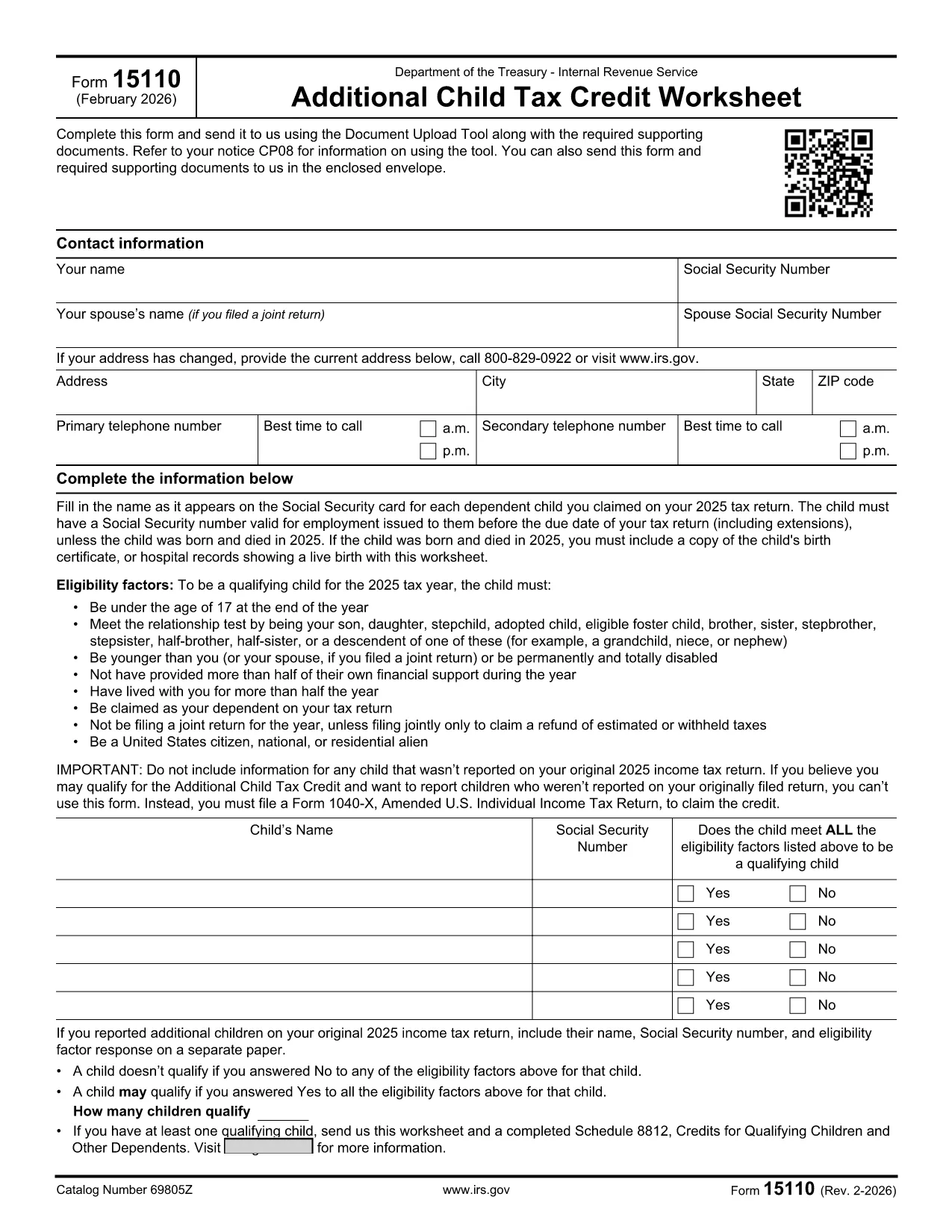
Form 15110 is the Additional Child Tax Credit Worksheet the IRS sends when you receive a CP08 notice. It lets you claim any refundable portion of the child tax credit that wasn’t captured on your original return.

What Is Form 15110 and When Do You Need It?

This one‑page worksheet collects:

  • Taxpayer contact information
  • Social Security numbers for you, your spouse, and each qualifying child
  • Eligibility details for each child (age, relationship, residency, etc.)

If the IRS has told you to complete Form 15110, you must return it with any required supporting documents to claim the additional credit.

How to Complete Form 15110 Online with Formize

Instead of printing, printing, and scanning, use our Formize PDF Filler – a secure, browser‑based editor that works on any device.

  1. Click the "Fill out this form" button on this page.
  2. Wait a few seconds while the Formize PDF Filler app loads the fillable PDF.
  3. Enter your information exactly as it appears on your tax return.
  4. Review each field for accuracy; the filler highlights required fields.
  5. When you’re done, click Save & Download to get a completed PDF you can attach to your CP08 response.

Common Mistakes & Tips for a Smooth Submission

  • Social Security numbers: Double‑check every SSN. A missing or transposed digit will delay processing.
  • Child eligibility: Verify that each child is under 17, lives with you > ½ year, and is a U.S. citizen or resident.
  • Address changes: Use the most recent address on your last filed return; update it in the form if needed.
  • Signature: The fillable PDF allows you to type a digital signature. Make sure it’s legible.
  • Supporting documents: Attach any required proof (e.g., birth certificates) as separate PDFs when you upload your response.

Download the Official Fillable PDF

Need the original PDF for offline use? Click the link below to download the IRS‑provided fillable version.

Download IRS Form 15110 (PDF)

सामान्य प्रश्न
  • Do I need a special program to open Form 15110?

    No. With Formize you can fill out the form directly in your web browser. If you prefer, you can also download the PDF and use any standard PDF reader.

  • What is a CP08 notice?

    A CP08 notice is sent by the IRS when they need additional information to process your claim for the Additional Child Tax Credit. The notice includes Form 15110.

  • Can I use an ITIN instead of an SSN for my children?

    No. For the child tax credit and additional child tax credit, each qualifying child must have a Social Security Number before the tax return due date.

  • How many children can I list on Form 15110?

    You can list up to three qualifying children on a single Form 15110 worksheet. If you have more, you must submit additional worksheets.

  • What happens if I make a mistake on the form?

    Errors can delay your refund. Review the form carefully, use the built‑in validation in Formize, and correct any mistakes before submitting.

  • Is there a filing deadline for Form 15110?

    You should return the completed Form 15110 as soon as possible after receiving the CP08 notice. Late submissions may result in a reduced credit.

  • Do I need to attach proof of residency for each child?

    Typically the IRS only requires the worksheet, but if they request additional documentation, you may need to provide school records, medical bills, or a lease showing the child lived with you > ½ year.

कैसे करें

IRS Form 15110 को मुफ़्त में, ऑनलाइन 4 आसान स्टेप्स में कैसे भरें:

  1. 1
    Open the Fillable Form
    Click the "Fill out this form" button on the page. The Formize PDF Filler will load the Form 15110 directly in your browser.
  2. 2
    Enter Your Information
    Fill in all required fields—name, SSN, address, and each child's details. Required fields are highlighted in red.
  3. 3
    Review and Save
    Double‑check every entry, then click "Save & Download" to get a completed PDF you can attach to your CP08 response.
  4. 4
    Submit to the IRS
    Upload the completed PDF (and any supporting documents) using the IRS Document Upload Tool or mail it in the envelope provided with the notice.
पीडीएफ फिलर एप तैयार करें
के बारे में

कर प्रपत्र

IRS Form 15110 कर प्रपत्रों में से एक है, जो प्रासंगिक कर प्राधिकरण को करों से संबंधित जानकारी की रिपोर्ट करने के लिए उपयोग किए जाने वाले दस्तावेज़ हैं। संघीय, राज्य और स्थानीय कर रूपों सहित विभिन्न प्रकार के टैक्स फॉर्म हैं, जो करदाता की परिस्थितियों और स्थान के आधार पर भिन्न हो सकते हैं।

विशेषताएं

पीडीएफ भराव

पीडीएफ फॉर्म ऑनलाइन भरने का सबसे आसान तरीका

  • जल्दी से IRS Form 15110 भरें
    IRS Form 15110 को जल्दी से ऑनलाइन भरने का कोई तरीका खोज रहे हैं? हमारे ऑनलाइन नि:शुल्क पीडीएफ फॉर्म फिलर के साथ, आप एक मिनट से भी कम समय में इस पीडीएफ दस्तावेज़ को संपादित करने और भरने का तरीका जानेंगे।
  • ऑनलाइन पीडीएफ संपादक का उपयोग करना आसान है
    पीडीएफ फाइलों को प्रिंट करने से तंग आ गए हैं ताकि आप उन्हें फिर से स्कैन करने और उन्हें वापस भेजने से पहले संपादित कर सकें? PDF दस्तावेज़ों को निःशुल्क ऑनलाइन संपादित करें। समय और कागज बचाने के लिए हमारे ऑनलाइन पीडीएफ संपादक का प्रयोग करें।
  • महान उपकरण, सभी प्लेटफार्म
    आश्चर्य है कि मैक पर IRS Form 15110 कैसे भरें, या शायद पीडीएफ फिलर का मुफ्त में उपयोग कैसे करें? हमारे ऑनलाइन पीडीएफ टूल सभी प्लेटफॉर्म पर काम करते हैं।
  • सुरक्षित फ़ाइल भंडारण
    पूर्ण की गई "IRS Form 15110" फ़ाइलें Amazon क्लाउड होस्टिंग द्वारा प्रबंधित एक सुरक्षित डेटाबेस में संग्रहीत की जाती हैं। आप कभी भी अपनी फाइलों को हमारे सिस्टम से हटा सकते हैं। किसी भी स्थिति में, ये फ़ाइलें 24 घंटे के बाद स्वतः हटा दी जाती हैं।
  • {कीवर्ड} से चैट करें
    Chatize पर "IRS Form 15110" के साथ चैट करें, जो एक निःशुल्क पीडीएफ रीडर सहायक है। प्रश्न पूछें और "IRS Form 15110" से उत्तर प्राप्त करें। बस ऊपर दस्तावेज़ के साथ चैट करें बटन पर क्लिक करें।

फ़िलिंग सत्र मिटाएँ

चयनित फ़िलिंग सत्र को मिटाएँ? इस स्थिति में, फ़ॉर्म को पूरा करने में आपकी प्रगति खो जाएगी।

संपादन सत्र हटाएँ

चयनित संपादन सत्र हटाएँ? इस स्थिति में, फ़ॉर्म बनाने और संपादित करने में आपकी प्रगति नष्ट हो जाएगी।