
hamburger-menu icon
भाषा का चयन करें

Kentucky Form TC-138 – Fillable PDF Download

  1. भाषा अंग्रेज़ी
  2. देश अमेरीका
  3. गतिविधि वाहन पंजीकरण
  4. विभाग Kentucky Transportation Cabinet
फार्म को भरो
Kentucky Form TC-138 – Fillable PDF Download

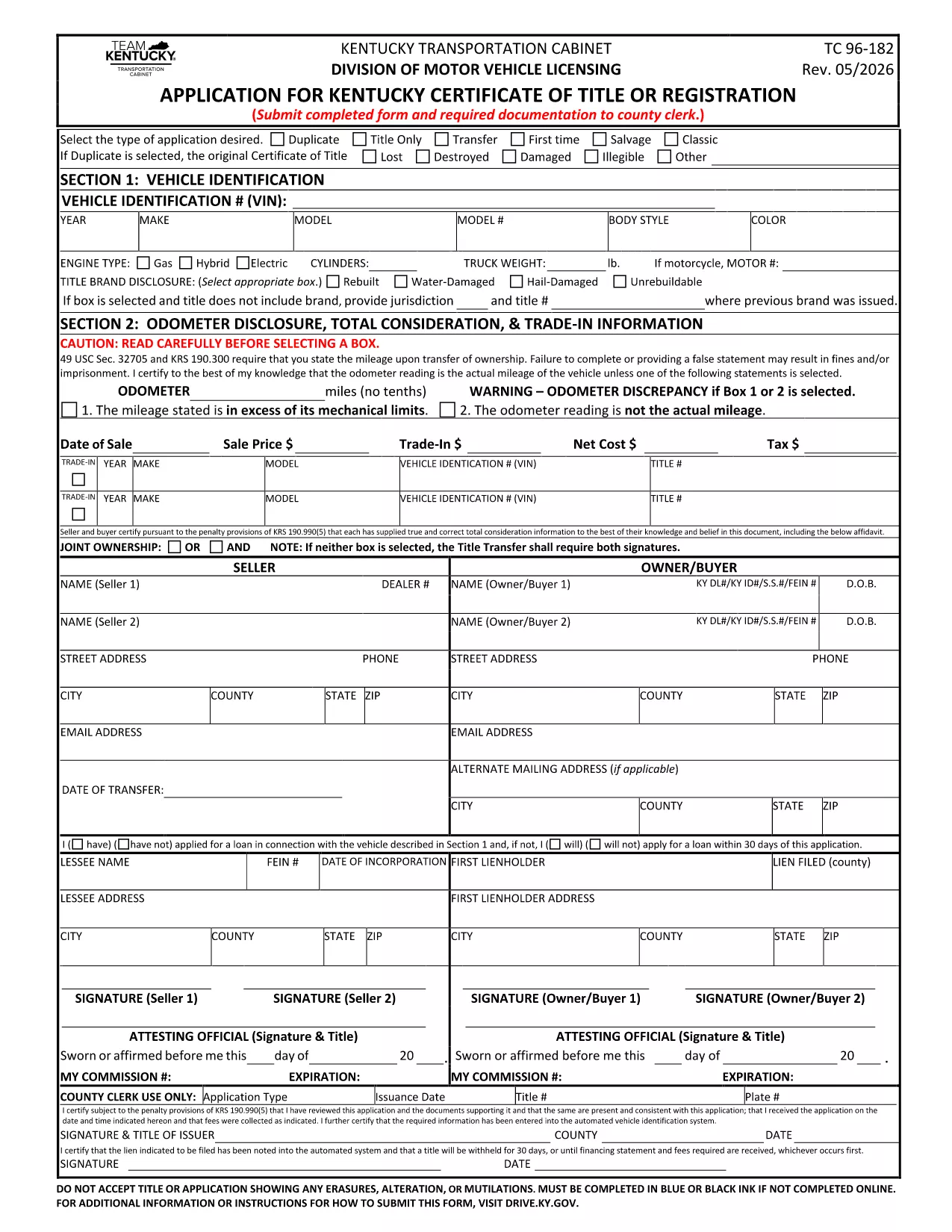
Form TC-138 is a Kentucky Department of Transportation (KYTC) document used for vehicle title, registration, or permit requests. Whether you are applying for a new title, updating registration details, or need a special transportation permit, TC-138 is the official paperwork required by the state.

What is Form TC-138?

TC-138 is part of the KYTC TC series of forms. It typically covers requests such as:

  • Vehicle title transfers
  • Temporary registration permits
  • Dealer or manufacturer vehicle documentation

The form must be completed in black ink or, for faster processing, using a fillable PDF that can be submitted electronically.

How to Fill Out TC-138 Online with Formize

Formize provides a secure, browser‑based PDF filler that eliminates the need for a desktop editor. Follow the simple steps below to complete TC-138 in minutes.

Common Mistakes to Avoid When Completing TC-138

  • Missing signatures: Every signature line must be signed; unsigned forms are rejected.
  • Incorrect VIN or plate numbers: Double‑check the Vehicle Identification Number (VIN) and license plate information.
  • Illegible handwriting: Using the fillable PDF ensures legible, printable text.
  • Omitting required attachments: Include any supporting documents (e.g., proof of ownership) before submission.

Where to Submit the Completed Form

After saving your completed TC-138, you can:

  • Mail it to the Kentucky Transportation Cabinet, Division of Motor Vehicles.
  • Drop it off at any local County Clerk’s office.
  • Upload a scanned copy through the KYTC online portal if you have an account.

Download the Fillable PDF

Click the button below to open the official fillable PDF in Formize. No software download is required – the Formize PDF Filler loads directly in your browser.

Fill out Form TC-138 now

सामान्य प्रश्न
  • Is Form TC-138 available as a fillable PDF?

    Yes. The official KYTC PDF includes fillable fields that work with any modern browser and the Formize PDF Filler.

  • Do I need Adobe Reader to complete TC-138?

    No. While Adobe Reader works, Formize lets you fill out the form directly in your browser without any additional software.

  • Can I submit the completed TC-138 electronically?

    KYTC currently accepts mailed or in‑person submissions. However, you can email a scanned copy after completing the form online for faster processing.

  • How long does it take for the KYTC to process TC-138?

    Processing times vary by request type, but most standard title or registration requests are handled within 7‑10 business days.

  • What should I do if I make a mistake after saving the PDF?

    Open the saved PDF again in Formize, correct the error, and re‑save. If you have already submitted a hard copy, contact your local County Clerk for guidance.

  • Is there a fee for filing Form TC-138?

    Yes. Fees depend on the specific transaction (title transfer, permit, etc.). Refer to the fee schedule on the KYTC website or the form instructions.

कैसे करें

TC-138 PDF को मुफ़्त में, ऑनलाइन 5 आसान स्टेप्स में कैसे भरें:

  1. 1
    Open the Fillable Form
    Click the "Fill out Form TC-138 now" button above. The Formize PDF Filler app will launch directly in your browser.
  2. 2
    Wait for the Filler to Load
    A short loading screen appears while Formize prepares the document. No download or installation is required.
  3. 3
    Complete All Required Fields
    Enter your information into each fillable field. Use the tab key to move quickly between sections.
  4. 4
    Review and Sign
    Double‑check every entry, then add your electronic signature using the built‑in signature tool.
  5. 5
    Save, Print, or Submit
    When finished, click "Save" to download a copy, "Print" for a hard copy, or follow the instructions to submit the PDF to the KYTC.
पीडीएफ फिलर एप तैयार करें
के बारे में

वाहन पंजीकरण प्रपत्र

यदि आप एक मोटर वाहन, ट्रेलर या नाव के मालिक हैं या पट्टे पर हैं, तो आपको अपने वाहन को कानूनी रूप से पंजीकृत और सुरक्षित रखने के लिए कुछ दायित्वों को पूरा करना होगा।

TC-138 PDF वाहन पंजीकरण प्रपत्रों में से एक है जो ऐसे दस्तावेज़ हैं जिनका उपयोग प्रासंगिक राज्य या प्रांतीय प्राधिकरण के साथ मोटर वाहन को पंजीकृत करने के लिए किया जाता है। ये फॉर्म आमतौर पर तब आवश्यक होते हैं जब कोई व्यक्ति नया या इस्तेमाल किया हुआ वाहन खरीदता है या जब वे वाहन के साथ किसी नए राज्य या प्रांत में जाते हैं।

वाहन पंजीकरण के लिए आवश्यक सटीक आवश्यकताएं और फॉर्म स्थान के अनुसार भिन्न हो सकते हैं, लेकिन आम तौर पर, प्रक्रिया में वाहन, मालिक और वाहन पर किसी भी ग्रहणाधिकार के बारे में जानकारी प्रदान करना शामिल होता है।

पंजीकरण फॉर्म और शुल्क जमा करने के बाद, राज्य या प्रांतीय प्राधिकरण वाहन के मालिक को पंजीकरण प्रमाणपत्र या लाइसेंस प्लेट जारी करेगा। यह पंजीकरण वाहन को सार्वजनिक सड़कों और राजमार्गों पर कानूनी रूप से संचालित करने की अनुमति देता है।

विशेषताएं

पीडीएफ भराव

पीडीएफ फॉर्म ऑनलाइन भरने का सबसे आसान तरीका

  • जल्दी से TC-138 PDF भरें
    TC-138 PDF को जल्दी से ऑनलाइन भरने का कोई तरीका खोज रहे हैं? हमारे ऑनलाइन नि:शुल्क पीडीएफ फॉर्म फिलर के साथ, आप एक मिनट से भी कम समय में इस पीडीएफ दस्तावेज़ को संपादित करने और भरने का तरीका जानेंगे।
  • ऑनलाइन पीडीएफ संपादक का उपयोग करना आसान है
    पीडीएफ फाइलों को प्रिंट करने से तंग आ गए हैं ताकि आप उन्हें फिर से स्कैन करने और उन्हें वापस भेजने से पहले संपादित कर सकें? PDF दस्तावेज़ों को निःशुल्क ऑनलाइन संपादित करें। समय और कागज बचाने के लिए हमारे ऑनलाइन पीडीएफ संपादक का प्रयोग करें।
  • महान उपकरण, सभी प्लेटफार्म
    आश्चर्य है कि मैक पर TC-138 PDF कैसे भरें, या शायद पीडीएफ फिलर का मुफ्त में उपयोग कैसे करें? हमारे ऑनलाइन पीडीएफ टूल सभी प्लेटफॉर्म पर काम करते हैं।
  • सुरक्षित फ़ाइल भंडारण
    पूर्ण की गई "TC-138 PDF" फ़ाइलें Amazon क्लाउड होस्टिंग द्वारा प्रबंधित एक सुरक्षित डेटाबेस में संग्रहीत की जाती हैं। आप कभी भी अपनी फाइलों को हमारे सिस्टम से हटा सकते हैं। किसी भी स्थिति में, ये फ़ाइलें 24 घंटे के बाद स्वतः हटा दी जाती हैं।
  • {कीवर्ड} से चैट करें
    Chatize पर "TC-138 PDF" के साथ चैट करें, जो एक निःशुल्क पीडीएफ रीडर सहायक है। प्रश्न पूछें और "TC-138 PDF" से उत्तर प्राप्त करें। बस ऊपर दस्तावेज़ के साथ चैट करें बटन पर क्लिक करें।

फ़िलिंग सत्र मिटाएँ

चयनित फ़िलिंग सत्र को मिटाएँ? इस स्थिति में, फ़ॉर्म को पूरा करने में आपकी प्रगति खो जाएगी।

संपादन सत्र हटाएँ

चयनित संपादन सत्र हटाएँ? इस स्थिति में, फ़ॉर्म बनाने और संपादित करने में आपकी प्रगति नष्ट हो जाएगी।