
hamburger-menu icon
भाषा का चयन करें

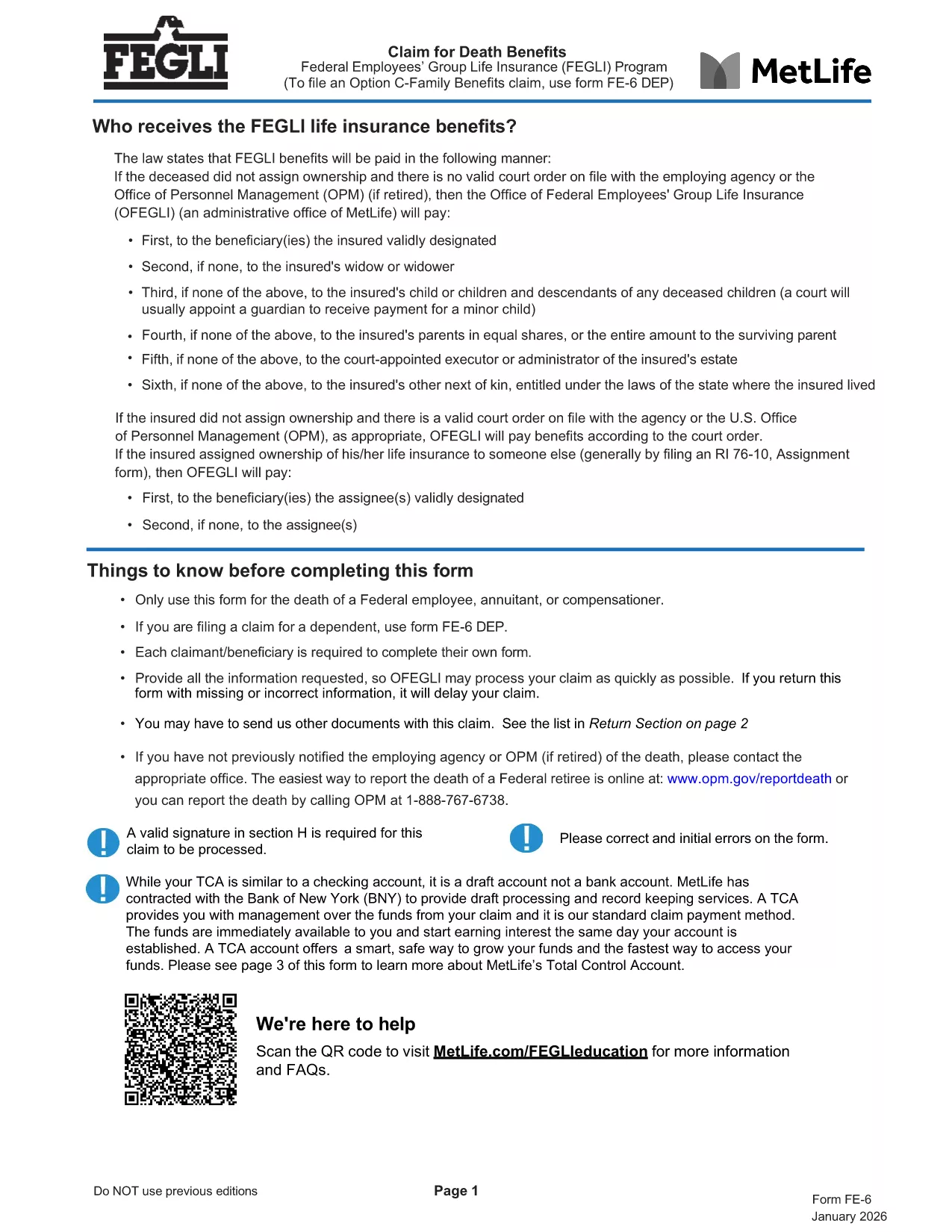
The FE-6 Claim for Death Benefits is the official form used by the Office of Personnel Management (OPM) to request Federal Employees Group Life Insurance (FEGLI) benefits after the death of a federal employee, annuitant, or compensation recipient. With Formize you can open the fillable PDF directly in your browser, fill it out, and save a completed copy without installing any software.

What Is the FE-6 Form?

The FE-6 collects essential information about the deceased, the claimant, and the type of benefit being requested. It is required for:

  • Life‑insurance death benefits for a federal employee or annuitant.
  • Beneficiary designations and payment options (e.g., Total Control Account).
  • Claims for eligible dependents (use FE‑6 DEP for dependents).

How to Complete the FE-6 Online with Formize

Instead of downloading the PDF and opening a separate editor, simply click the **"Fill out this form"** button below. The Formize PDF Filler app loads the fillable document in seconds, letting you type directly into each field.

  1. Click the button – the form opens in a secure, browser‑based editor.
  2. Enter the required data – follow the on‑screen prompts for each section (deceased information, claimant details, beneficiary choices, etc.).
  3. Attach supporting documents – upload a certified copy of the death certificate and any other required paperwork.
  4. Save and download the completed PDF to your computer.
  5. Print or email the file to the address listed in the final section of the form.

Common Mistakes to Avoid

  • Leaving any required field blank – OPM will reject incomplete claims.
  • Using an uncertified death certificate – the document must bear an official stamp or signature.
  • Submitting the wrong version – ensure you are using the current FE-6 (2026 revision).
  • Not signing the form – a handwritten or electronic signature is mandatory.

Where to Send Your Completed Claim

After you have saved the filled PDF, mail it with the certified death certificate to:

Office of Federal Employees Group Life Insurance
P.O. Box 6080
Scranton, PA 18505‑6080
(For overnight delivery: OFEGLI 10 Ed Preate Drive, Moosic, PA 18507)

If you are a federal employee filing on behalf of a dependent, send the completed FE‑6 DEP to the same address or to your employing agency.

सामान्य प्रश्न
  • Who can use the FE-6 form?

    The FE-6 is for the estate of a deceased federal employee, annuitant, or compensation recipient. Dependents use the separate FE‑6 DEP form.

  • Do I need a certified death certificate?

    Yes. OPM requires a certified copy with an official stamp or signature. Uncertified copies will cause a delay or rejection.

  • Can I fill out the FE-6 on a mobile device?

    The Formize PDF Filler works on most modern smartphones and tablets. For best results, use a larger screen or a desktop browser.

  • How long does OPM take to process the claim?

    Processing typically takes 30‑45 days after receipt of a complete, signed claim and certified death certificate.

  • What if I make a mistake after submitting?

    Contact the Office of Federal Employees Group Life Insurance at 1‑800‑633‑4542. They can advise whether a corrected form must be resubmitted.

  • Is there a filing fee for the FE-6?

    No. Filing the FE-6 claim is free of charge.

  • Can I submit the claim electronically?

    OPM currently requires a mailed hard copy with the certified death certificate. The PDF can be filled electronically, but the final submission is by mail.

कैसे करें

FE-6 form को मुफ़्त में, ऑनलाइन 5 आसान स्टेप्स में कैसे भरें:

  1. 1
    Open the FE-6 Form
    Click the "Fill out this form" button on the page. The Formize PDF Filler loads the official FE-6 PDF directly in your browser.
  2. 2
    Enter Required Information
    Complete each section—deceased’s details, claimant information, and beneficiary selections—exactly as instructed.
  3. 3
    Upload Supporting Documents
    Add a certified copy of the death certificate and any other required files using the upload field.
  4. 4
    Save and Download
    When all fields are filled, click "Save" to download the completed PDF to your device.
  5. 5
    Submit the Claim
    Print (or email) the saved form and mail it with the death certificate to the OPM address shown in the form.
पीडीएफ फिलर एप तैयार करें
के बारे में

कार्मिक प्रबंधन कार्यालय (ओपीएम) प्रपत्र

FE-6 form उन आधिकारिक रूपों में से एक है जिनका उपयोग संयुक्त राज्य कार्मिक प्रबंधन कार्यालय द्वारा किया जाता है, जो संघीय सरकार की एक स्वतंत्र एजेंसी है जो सिविल सेवा कार्यबल और संघीय कर्मचारी लाभों के प्रबंधन के लिए जिम्मेदार है। ओपीएम संघीय रोजगार से संबंधित नीतियां और नियम स्थापित करता है, विभिन्न कार्मिक कार्यक्रमों का प्रबंधन करता है, और संघीय कर्मचारियों, सेवानिवृत्त लोगों और नौकरी आवेदकों को सेवाएं प्रदान करता है।

कार्मिक प्रबंधन कार्यालय प्रपत्रों के कुछ उदाहरण यहां दिए गए हैं:

मानक फॉर्म 86 (SF-86) : इस फॉर्म का उपयोग सुरक्षा मंजूरी के लिए आवेदन करने वाले व्यक्तियों की पृष्ठभूमि जांच प्रक्रिया के लिए किया जाता है। यह व्यापक व्यक्तिगत, रोजगार, शिक्षा और वित्तीय जानकारी के साथ-साथ विदेशी संपर्कों और गतिविधियों के बारे में विवरण एकत्र करता है।

मानक फॉर्म 2809 (SF-2809) : इस फॉर्म का उपयोग संघीय कर्मचारी स्वास्थ्य लाभ (एफईएचबी) कार्यक्रम में नामांकन के लिए किया जाता है, जो संघीय कर्मचारियों, सेवानिवृत्त लोगों और उनके योग्य परिवार के सदस्यों को स्वास्थ्य बीमा कवरेज प्रदान करता है।

मानक फॉर्म 2817 (एसएफ-2817): इस फॉर्म का उपयोग सेवानिवृत्ति या संघीय सेवा से अलग होने के बाद संघीय कर्मचारी दंत चिकित्सा और दृष्टि बीमा कार्यक्रम (एफईडीवीआईपी) के तहत कवरेज जारी रखने के लिए आवेदन करने के लिए किया जाता है।

मानक फॉर्म 3107 (SF-3107) : इस फॉर्म का उपयोग सिविल सेवा सेवानिवृत्ति प्रणाली (सीएसआरएस) के तहत सेवानिवृत्ति लाभों के लिए आवेदन करने के लिए किया जाता है।

मानक फॉर्म 2801 (SF-2801) : इस फॉर्म का उपयोग संघीय कर्मचारी सेवानिवृत्ति प्रणाली (एफईआरएस) के तहत सेवानिवृत्ति लाभों के लिए आवेदन करने के लिए किया जाता है।

मानक फॉर्म 15 (SF-15) : इस फॉर्म का उपयोग संघीय रोजगार में अनुभवी की प्राथमिकता के लिए आवेदन करने के लिए किया जाता है। यह संघीय सरकार में रोजगार के अवसर चाहने वाले दिग्गजों या उनके परिवार के योग्य सदस्यों द्वारा प्रस्तुत किया जाता है।

ये उदाहरण संघीय रोजगार और कर्मचारी लाभों के संदर्भ में उपयोग किए जाने वाले कुछ सामान्य ओपीएम फॉर्म का प्रतिनिधित्व करते हैं। हालाँकि, ओपीएम के पास विभिन्न कार्मिक कार्यक्रमों, सेवानिवृत्ति, बीमा और संघीय रोजगार के अन्य पहलुओं से संबंधित कई अन्य रूप हैं। आवश्यक विशिष्ट प्रपत्र लेन-देन की प्रकृति, कार्यक्रम या मांगे जा रहे लाभ के आधार पर भिन्न हो सकते हैं। यह सलाह दी जाती है कि सटीक और उन्नत जानकारी प्राप्त करने के लिए अमेरिकी कार्मिक प्रबंधन कार्यालय की आधिकारिक वेबसाइट (www.opm.gov) से परामर्श लें या ओपीएम या प्रासंगिक मानव संसाधन कर्मियों से मार्गदर्शन लें। आपके संघीय रोजगार या लाभ-संबंधी आवश्यकताओं के लिए प्रासंगिक विशिष्ट ओपीएम फॉर्म के बारे में आज तक की जानकारी।

विशेषताएं

पीडीएफ भराव

पीडीएफ फॉर्म ऑनलाइन भरने का सबसे आसान तरीका

  • जल्दी से FE-6 form भरें
    FE-6 form को जल्दी से ऑनलाइन भरने का कोई तरीका खोज रहे हैं? हमारे ऑनलाइन नि:शुल्क पीडीएफ फॉर्म फिलर के साथ, आप एक मिनट से भी कम समय में इस पीडीएफ दस्तावेज़ को संपादित करने और भरने का तरीका जानेंगे।
  • ऑनलाइन पीडीएफ संपादक का उपयोग करना आसान है
    पीडीएफ फाइलों को प्रिंट करने से तंग आ गए हैं ताकि आप उन्हें फिर से स्कैन करने और उन्हें वापस भेजने से पहले संपादित कर सकें? PDF दस्तावेज़ों को निःशुल्क ऑनलाइन संपादित करें। समय और कागज बचाने के लिए हमारे ऑनलाइन पीडीएफ संपादक का प्रयोग करें।
  • महान उपकरण, सभी प्लेटफार्म
    आश्चर्य है कि मैक पर FE-6 form कैसे भरें, या शायद पीडीएफ फिलर का मुफ्त में उपयोग कैसे करें? हमारे ऑनलाइन पीडीएफ टूल सभी प्लेटफॉर्म पर काम करते हैं।
  • सुरक्षित फ़ाइल भंडारण
    पूर्ण की गई "FE-6 form" फ़ाइलें Amazon क्लाउड होस्टिंग द्वारा प्रबंधित एक सुरक्षित डेटाबेस में संग्रहीत की जाती हैं। आप कभी भी अपनी फाइलों को हमारे सिस्टम से हटा सकते हैं। किसी भी स्थिति में, ये फ़ाइलें 24 घंटे के बाद स्वतः हटा दी जाती हैं।
  • {कीवर्ड} से चैट करें
    Chatize पर "FE-6 form" के साथ चैट करें, जो एक निःशुल्क पीडीएफ रीडर सहायक है। प्रश्न पूछें और "FE-6 form" से उत्तर प्राप्त करें। बस ऊपर दस्तावेज़ के साथ चैट करें बटन पर क्लिक करें।

फ़िलिंग सत्र मिटाएँ

चयनित फ़िलिंग सत्र को मिटाएँ? इस स्थिति में, फ़ॉर्म को पूरा करने में आपकी प्रगति खो जाएगी।

संपादन सत्र हटाएँ

चयनित संपादन सत्र हटाएँ? इस स्थिति में, फ़ॉर्म बनाने और संपादित करने में आपकी प्रगति नष्ट हो जाएगी।