
hamburger-menu icon
भाषा का चयन करें

OPM Form 1523 – Fillable PDF Download & Online Completion

  1. भाषा अंग्रेज़ी
  2. देश अमेरीका
  3. विभाग कार्मिक प्रबंधन कार्यालय
  4. गतिविधि Federal Personnel Management
फार्म को भरो
OPM Form 1523 – Fillable PDF Download & Online Completion

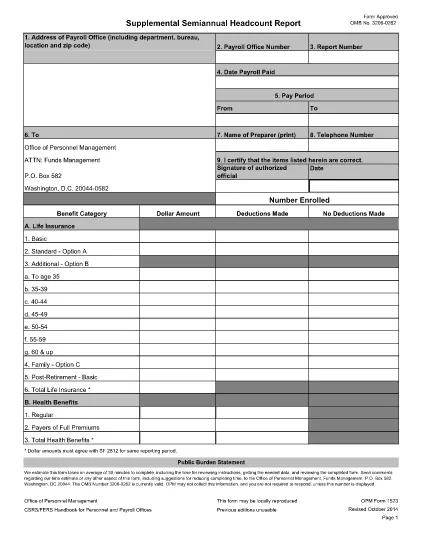
The OPM Form 1523 is the official request used by federal employees to obtain a Pay and Personnel Record from the Office of Personnel Management (OPM). This form is required for many personnel actions, such as retirement, transfer, or verification of service. Below you’ll find everything you need to download, fill out, and submit the form correctly.

What Is OPM Form 1523?

OPM Form 1523, also known as the "Request for Personnel Record," allows employees, retirees, or authorized representatives to request a complete copy of an employee’s official federal service record. The form is used across all civilian federal agencies and is a key document for benefits, clearance, and employment verification.

How to Fill Out OPM Form 1523 Online

Instead of printing and scanning, you can fill the form directly in your browser using Formize’s built‑in PDF filler. Follow these simple steps:

  • Click the "Fill out this form" button on this page.
  • The Formize PDF Filler app will load the fillable PDF automatically.
  • Enter the required information in each field. The form validates entries in real time.
  • When finished, click Save to download a completed copy, or Print to mail a hard copy.

Common Mistakes to Avoid

  • Leaving required fields blank: The form will not submit if any required field (marked with an asterisk) is empty.
  • Using an incorrect signature format: Sign exactly as it appears on your official federal ID.
  • Mismatching dates: Ensure dates are entered in MM/DD/YYYY format.
  • Submitting the wrong version: Use the latest PDF provided below – older versions may be rejected.

Where to Submit the Completed Form

After completing the form, send it to the address listed in the instructions section of the PDF. Most agencies accept electronic submissions through their internal HR portals, but a mailed copy to the OPM Records Center is also acceptable.

Download the Fillable PDF

Click the button below to open the official, up‑to‑date fillable PDF for OPM Form 1523.

Download OPM Form 1523 (Fillable PDF)

सामान्य प्रश्न
  • Who can request an OPM Form 1523?

    Current federal employees, retirees, and their authorized representatives may request a personnel record using Form 1523.

  • Is there a filing fee for OPM Form 1523?

    No. The request for a personnel record is free of charge, but you may incur mailing costs if you send a hard copy.

  • How long does it take to receive the records?

    OPM estimates an average processing time of 30 minutes for electronic requests, though mailed requests may take up to 15 business days.

  • Can I edit the PDF after I download it?

    Yes. Use the Formize PDF Filler on this page to edit the fillable fields directly in the browser without needing additional software.

  • What if I make a mistake on the form?

    You can correct errors before saving or printing. If you have already submitted a hard copy, submit a corrected form with a brief note explaining the change.

  • Do I need to attach supporting documents?

    Only if the instructions on the form request additional verification, such as a copy of your federal ID or prior separation notice.

  • Is the PDF version on this page the most current?

    Yes. The link points to the official OPM website, which always hosts the latest version of Form 1523.

कैसे करें

OPM Form 1523 को मुफ़्त में, ऑनलाइन 4 आसान स्टेप्स में कैसे भरें:

  1. 1
    Open the Fillable Form
    Click the "Fill out this form" button on the page. The Formize PDF Filler will load the OPM Form 1523 automatically.
  2. 2
    Enter Your Information
    Fill each field as instructed. Required fields are marked with an asterisk. The filler validates entries in real time.
  3. 3
    Save or Print the Completed Form
    When all sections are complete, click "Save" to download a PDF copy or "Print" to produce a hard‑copy version for mailing.
  4. 4
    Submit the Form
    Follow the submission instructions in the PDF—either upload through your agency’s portal or mail to the OPM Records Center.
पीडीएफ फिलर एप तैयार करें
के बारे में

कार्मिक प्रबंधन कार्यालय (ओपीएम) प्रपत्र

OPM Form 1523 उन आधिकारिक रूपों में से एक है जिनका उपयोग संयुक्त राज्य कार्मिक प्रबंधन कार्यालय द्वारा किया जाता है, जो संघीय सरकार की एक स्वतंत्र एजेंसी है जो सिविल सेवा कार्यबल और संघीय कर्मचारी लाभों के प्रबंधन के लिए जिम्मेदार है। ओपीएम संघीय रोजगार से संबंधित नीतियां और नियम स्थापित करता है, विभिन्न कार्मिक कार्यक्रमों का प्रबंधन करता है, और संघीय कर्मचारियों, सेवानिवृत्त लोगों और नौकरी आवेदकों को सेवाएं प्रदान करता है।

कार्मिक प्रबंधन कार्यालय प्रपत्रों के कुछ उदाहरण यहां दिए गए हैं:

मानक फॉर्म 86 (SF-86) : इस फॉर्म का उपयोग सुरक्षा मंजूरी के लिए आवेदन करने वाले व्यक्तियों की पृष्ठभूमि जांच प्रक्रिया के लिए किया जाता है। यह व्यापक व्यक्तिगत, रोजगार, शिक्षा और वित्तीय जानकारी के साथ-साथ विदेशी संपर्कों और गतिविधियों के बारे में विवरण एकत्र करता है।

मानक फॉर्म 2809 (SF-2809) : इस फॉर्म का उपयोग संघीय कर्मचारी स्वास्थ्य लाभ (एफईएचबी) कार्यक्रम में नामांकन के लिए किया जाता है, जो संघीय कर्मचारियों, सेवानिवृत्त लोगों और उनके योग्य परिवार के सदस्यों को स्वास्थ्य बीमा कवरेज प्रदान करता है।

मानक फॉर्म 2817 (एसएफ-2817): इस फॉर्म का उपयोग सेवानिवृत्ति या संघीय सेवा से अलग होने के बाद संघीय कर्मचारी दंत चिकित्सा और दृष्टि बीमा कार्यक्रम (एफईडीवीआईपी) के तहत कवरेज जारी रखने के लिए आवेदन करने के लिए किया जाता है।

मानक फॉर्म 3107 (SF-3107) : इस फॉर्म का उपयोग सिविल सेवा सेवानिवृत्ति प्रणाली (सीएसआरएस) के तहत सेवानिवृत्ति लाभों के लिए आवेदन करने के लिए किया जाता है।

मानक फॉर्म 2801 (SF-2801) : इस फॉर्म का उपयोग संघीय कर्मचारी सेवानिवृत्ति प्रणाली (एफईआरएस) के तहत सेवानिवृत्ति लाभों के लिए आवेदन करने के लिए किया जाता है।

मानक फॉर्म 15 (SF-15) : इस फॉर्म का उपयोग संघीय रोजगार में अनुभवी की प्राथमिकता के लिए आवेदन करने के लिए किया जाता है। यह संघीय सरकार में रोजगार के अवसर चाहने वाले दिग्गजों या उनके परिवार के योग्य सदस्यों द्वारा प्रस्तुत किया जाता है।

ये उदाहरण संघीय रोजगार और कर्मचारी लाभों के संदर्भ में उपयोग किए जाने वाले कुछ सामान्य ओपीएम फॉर्म का प्रतिनिधित्व करते हैं। हालाँकि, ओपीएम के पास विभिन्न कार्मिक कार्यक्रमों, सेवानिवृत्ति, बीमा और संघीय रोजगार के अन्य पहलुओं से संबंधित कई अन्य रूप हैं। आवश्यक विशिष्ट प्रपत्र लेन-देन की प्रकृति, कार्यक्रम या मांगे जा रहे लाभ के आधार पर भिन्न हो सकते हैं। यह सलाह दी जाती है कि सटीक और उन्नत जानकारी प्राप्त करने के लिए अमेरिकी कार्मिक प्रबंधन कार्यालय की आधिकारिक वेबसाइट (www.opm.gov) से परामर्श लें या ओपीएम या प्रासंगिक मानव संसाधन कर्मियों से मार्गदर्शन लें। आपके संघीय रोजगार या लाभ-संबंधी आवश्यकताओं के लिए प्रासंगिक विशिष्ट ओपीएम फॉर्म के बारे में आज तक की जानकारी।

विशेषताएं

पीडीएफ भराव

पीडीएफ फॉर्म ऑनलाइन भरने का सबसे आसान तरीका

  • जल्दी से OPM Form 1523 भरें
    OPM Form 1523 को जल्दी से ऑनलाइन भरने का कोई तरीका खोज रहे हैं? हमारे ऑनलाइन नि:शुल्क पीडीएफ फॉर्म फिलर के साथ, आप एक मिनट से भी कम समय में इस पीडीएफ दस्तावेज़ को संपादित करने और भरने का तरीका जानेंगे।
  • ऑनलाइन पीडीएफ संपादक का उपयोग करना आसान है
    पीडीएफ फाइलों को प्रिंट करने से तंग आ गए हैं ताकि आप उन्हें फिर से स्कैन करने और उन्हें वापस भेजने से पहले संपादित कर सकें? PDF दस्तावेज़ों को निःशुल्क ऑनलाइन संपादित करें। समय और कागज बचाने के लिए हमारे ऑनलाइन पीडीएफ संपादक का प्रयोग करें।
  • महान उपकरण, सभी प्लेटफार्म
    आश्चर्य है कि मैक पर OPM Form 1523 कैसे भरें, या शायद पीडीएफ फिलर का मुफ्त में उपयोग कैसे करें? हमारे ऑनलाइन पीडीएफ टूल सभी प्लेटफॉर्म पर काम करते हैं।
  • सुरक्षित फ़ाइल भंडारण
    पूर्ण की गई "OPM Form 1523" फ़ाइलें Amazon क्लाउड होस्टिंग द्वारा प्रबंधित एक सुरक्षित डेटाबेस में संग्रहीत की जाती हैं। आप कभी भी अपनी फाइलों को हमारे सिस्टम से हटा सकते हैं। किसी भी स्थिति में, ये फ़ाइलें 24 घंटे के बाद स्वतः हटा दी जाती हैं।
  • {कीवर्ड} से चैट करें
    Chatize पर "OPM Form 1523" के साथ चैट करें, जो एक निःशुल्क पीडीएफ रीडर सहायक है। प्रश्न पूछें और "OPM Form 1523" से उत्तर प्राप्त करें। बस ऊपर दस्तावेज़ के साथ चैट करें बटन पर क्लिक करें।

फ़िलिंग सत्र मिटाएँ

चयनित फ़िलिंग सत्र को मिटाएँ? इस स्थिति में, फ़ॉर्म को पूरा करने में आपकी प्रगति खो जाएगी।

संपादन सत्र हटाएँ

चयनित संपादन सत्र हटाएँ? इस स्थिति में, फ़ॉर्म बनाने और संपादित करने में आपकी प्रगति नष्ट हो जाएगी।