
hamburger-menu icon
भाषा का चयन करें

OPM Form 1351A – Work Years and Personnel Costs Report (Fillable PDF)

  1. भाषा अंग्रेज़ी
  2. देश अमेरीका
  3. विभाग कार्मिक प्रबंधन कार्यालय
  4. क्षेत्र ओपीएम फॉर्म
फार्म को भरो
OPM Form 1351A – Work Years and Personnel Costs Report (Fillable PDF)

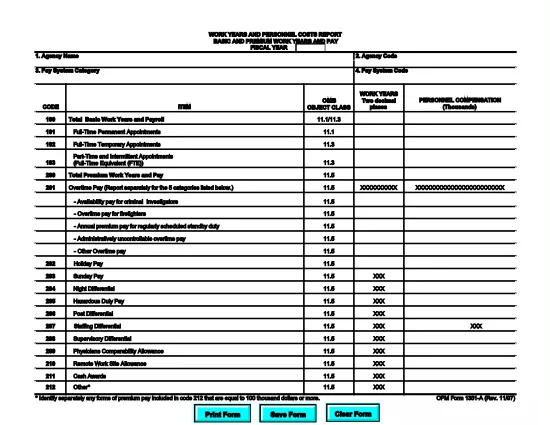
The OPM Form 1351A (Work Years and Personnel Costs Report – Basic and Premium Work Years and Pay) is a mandatory annual report for federal agencies. It captures the number of work years, basic salary, and premium pay for all employees in a fiscal year. Accurate completion supports workforce analysis, budgeting, and compliance with Office of Personnel Management (OPM) guidelines.

What Is OPM Form 1351A?

This form collects detailed payroll data for each employee, including:

  • Basic work years
  • Premium work years (e.g., overtime, hazard pay)
  • Total basic pay and premium pay
  • Fiscal year covered

Agencies submit the data to OPM for the annual Federal Workforce Report.

How to Complete the Form Using Formize PDF Filler

Our online Formize PDF Filler turns the static PDF into an interactive form. No extra software is required—just a web browser.

  1. Click the **"Fill out this form"** button below.
  2. Wait a few seconds while the Formize PDF Filler app loads the fillable version of OPM Form 1351A.
  3. Enter the required data in each field. Navigation tabs let you jump between sections quickly.
  4. Use the **Validate** button to check for missing or incorrectly formatted entries.
  5. When finished, click **Save & Download** to get a completed PDF you can upload to OPM’s portal.

Common Mistakes to Avoid When Filing 1351A

  • Incorrect fiscal year: Verify the FY matches the reporting period.
  • Missing premium pay codes: Ensure all premium pay types (e.g., overtime, night differential) are included.
  • Rounding errors: Use the exact figures from your payroll system; do not round up or down.
  • Duplicate entries: Each employee should appear only once per fiscal year.

Download the Fillable PDF Instantly

Click the button below to open the fillable version of OPM Form 1351A. The file is hosted by the official OPM website, guaranteeing the latest version.

Helpful Resources & FAQs

Below you’ll find answers to the most common questions about OPM Form 1351A and using our PDF filler.

सामान्य प्रश्न
  • What is the purpose of OPM Form 1351A?

    Form 1351A collects annual data on basic and premium work years and pay for all federal employees, helping OPM analyze workforce costs and trends.

  • Do I need a special PDF editor to fill out Form 1351A?

    No. Our Formize PDF Filler turns the PDF into an interactive web form, so you can complete it directly in your browser.

  • Can I save my progress and return later?

    Yes. Use the "Save" button at any time to download a partially completed PDF, then reload it later in the Formize filler to continue.

  • What fiscal year should I report?

    Report the fiscal year that matches the data you are submitting (e.g., FY 2024 for the period October 1 2023 – September 30 2024).

  • Where do I submit the completed Form 1351A?

    After downloading the completed PDF, upload it to the OPM reporting portal or follow your agency’s internal submission process.

  • Is the PDF version on Formize the official OPM form?

    Yes. The file is linked directly from the official OPM website, ensuring you have the most current version.

  • What if I make a mistake after downloading?

    Open the saved PDF again with Formize, correct the errors, re‑validate, and download the updated version.

कैसे करें

OPM Form 1351A को मुफ़्त में, ऑनलाइन 4 आसान स्टेप्स में कैसे भरें:

  1. 1
    Open the Fillable Form
    Click the "Fill out this form" button on the page. The Formize PDF Filler will load the OPM Form 1351A automatically.
  2. 2
    Enter Your Data
    Complete each section—basic work years, premium work years, pay amounts, and fiscal year—using the on‑screen fields.
  3. 3
    Validate & Review
    Use the built‑in validation tool to catch missing or mismatched entries, then review the entire form for accuracy.
  4. 4
    Save and Download
    When all data is correct, click "Save & Download" to obtain a completed PDF ready for submission to OPM.
पीडीएफ फिलर एप तैयार करें
के बारे में

कार्मिक प्रबंधन कार्यालय (ओपीएम) प्रपत्र

OPM Form 1351A उन आधिकारिक रूपों में से एक है जिनका उपयोग संयुक्त राज्य कार्मिक प्रबंधन कार्यालय द्वारा किया जाता है, जो संघीय सरकार की एक स्वतंत्र एजेंसी है जो सिविल सेवा कार्यबल और संघीय कर्मचारी लाभों के प्रबंधन के लिए जिम्मेदार है। ओपीएम संघीय रोजगार से संबंधित नीतियां और नियम स्थापित करता है, विभिन्न कार्मिक कार्यक्रमों का प्रबंधन करता है, और संघीय कर्मचारियों, सेवानिवृत्त लोगों और नौकरी आवेदकों को सेवाएं प्रदान करता है।

कार्मिक प्रबंधन कार्यालय प्रपत्रों के कुछ उदाहरण यहां दिए गए हैं:

मानक फॉर्म 86 (SF-86) : इस फॉर्म का उपयोग सुरक्षा मंजूरी के लिए आवेदन करने वाले व्यक्तियों की पृष्ठभूमि जांच प्रक्रिया के लिए किया जाता है। यह व्यापक व्यक्तिगत, रोजगार, शिक्षा और वित्तीय जानकारी के साथ-साथ विदेशी संपर्कों और गतिविधियों के बारे में विवरण एकत्र करता है।

मानक फॉर्म 2809 (SF-2809) : इस फॉर्म का उपयोग संघीय कर्मचारी स्वास्थ्य लाभ (एफईएचबी) कार्यक्रम में नामांकन के लिए किया जाता है, जो संघीय कर्मचारियों, सेवानिवृत्त लोगों और उनके योग्य परिवार के सदस्यों को स्वास्थ्य बीमा कवरेज प्रदान करता है।

मानक फॉर्म 2817 (एसएफ-2817): इस फॉर्म का उपयोग सेवानिवृत्ति या संघीय सेवा से अलग होने के बाद संघीय कर्मचारी दंत चिकित्सा और दृष्टि बीमा कार्यक्रम (एफईडीवीआईपी) के तहत कवरेज जारी रखने के लिए आवेदन करने के लिए किया जाता है।

मानक फॉर्म 3107 (SF-3107) : इस फॉर्म का उपयोग सिविल सेवा सेवानिवृत्ति प्रणाली (सीएसआरएस) के तहत सेवानिवृत्ति लाभों के लिए आवेदन करने के लिए किया जाता है।

मानक फॉर्म 2801 (SF-2801) : इस फॉर्म का उपयोग संघीय कर्मचारी सेवानिवृत्ति प्रणाली (एफईआरएस) के तहत सेवानिवृत्ति लाभों के लिए आवेदन करने के लिए किया जाता है।

मानक फॉर्म 15 (SF-15) : इस फॉर्म का उपयोग संघीय रोजगार में अनुभवी की प्राथमिकता के लिए आवेदन करने के लिए किया जाता है। यह संघीय सरकार में रोजगार के अवसर चाहने वाले दिग्गजों या उनके परिवार के योग्य सदस्यों द्वारा प्रस्तुत किया जाता है।

ये उदाहरण संघीय रोजगार और कर्मचारी लाभों के संदर्भ में उपयोग किए जाने वाले कुछ सामान्य ओपीएम फॉर्म का प्रतिनिधित्व करते हैं। हालाँकि, ओपीएम के पास विभिन्न कार्मिक कार्यक्रमों, सेवानिवृत्ति, बीमा और संघीय रोजगार के अन्य पहलुओं से संबंधित कई अन्य रूप हैं। आवश्यक विशिष्ट प्रपत्र लेन-देन की प्रकृति, कार्यक्रम या मांगे जा रहे लाभ के आधार पर भिन्न हो सकते हैं। यह सलाह दी जाती है कि सटीक और उन्नत जानकारी प्राप्त करने के लिए अमेरिकी कार्मिक प्रबंधन कार्यालय की आधिकारिक वेबसाइट (www.opm.gov) से परामर्श लें या ओपीएम या प्रासंगिक मानव संसाधन कर्मियों से मार्गदर्शन लें। आपके संघीय रोजगार या लाभ-संबंधी आवश्यकताओं के लिए प्रासंगिक विशिष्ट ओपीएम फॉर्म के बारे में आज तक की जानकारी।

विशेषताएं

पीडीएफ भराव

पीडीएफ फॉर्म ऑनलाइन भरने का सबसे आसान तरीका

  • जल्दी से OPM Form 1351A भरें
    OPM Form 1351A को जल्दी से ऑनलाइन भरने का कोई तरीका खोज रहे हैं? हमारे ऑनलाइन नि:शुल्क पीडीएफ फॉर्म फिलर के साथ, आप एक मिनट से भी कम समय में इस पीडीएफ दस्तावेज़ को संपादित करने और भरने का तरीका जानेंगे।
  • ऑनलाइन पीडीएफ संपादक का उपयोग करना आसान है
    पीडीएफ फाइलों को प्रिंट करने से तंग आ गए हैं ताकि आप उन्हें फिर से स्कैन करने और उन्हें वापस भेजने से पहले संपादित कर सकें? PDF दस्तावेज़ों को निःशुल्क ऑनलाइन संपादित करें। समय और कागज बचाने के लिए हमारे ऑनलाइन पीडीएफ संपादक का प्रयोग करें।
  • महान उपकरण, सभी प्लेटफार्म
    आश्चर्य है कि मैक पर OPM Form 1351A कैसे भरें, या शायद पीडीएफ फिलर का मुफ्त में उपयोग कैसे करें? हमारे ऑनलाइन पीडीएफ टूल सभी प्लेटफॉर्म पर काम करते हैं।
  • सुरक्षित फ़ाइल भंडारण
    पूर्ण की गई "OPM Form 1351A" फ़ाइलें Amazon क्लाउड होस्टिंग द्वारा प्रबंधित एक सुरक्षित डेटाबेस में संग्रहीत की जाती हैं। आप कभी भी अपनी फाइलों को हमारे सिस्टम से हटा सकते हैं। किसी भी स्थिति में, ये फ़ाइलें 24 घंटे के बाद स्वतः हटा दी जाती हैं।
  • {कीवर्ड} से चैट करें
    Chatize पर "OPM Form 1351A" के साथ चैट करें, जो एक निःशुल्क पीडीएफ रीडर सहायक है। प्रश्न पूछें और "OPM Form 1351A" से उत्तर प्राप्त करें। बस ऊपर दस्तावेज़ के साथ चैट करें बटन पर क्लिक करें।

फ़िलिंग सत्र मिटाएँ

चयनित फ़िलिंग सत्र को मिटाएँ? इस स्थिति में, फ़ॉर्म को पूरा करने में आपकी प्रगति खो जाएगी।

संपादन सत्र हटाएँ

चयनित संपादन सत्र हटाएँ? इस स्थिति में, फ़ॉर्म बनाने और संपादित करने में आपकी प्रगति नष्ट हो जाएगी।