
hamburger-menu icon
भाषा का चयन करें

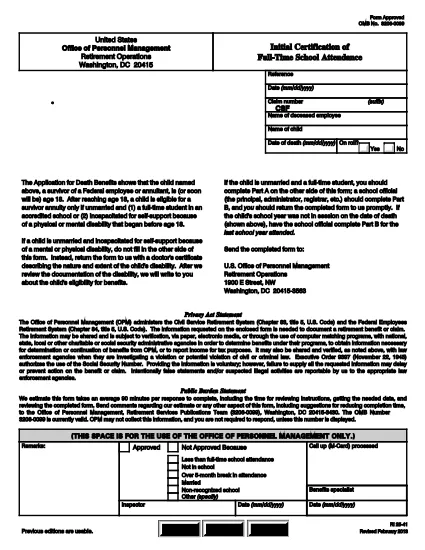
RI 25‑41 Fillable PDF – Initial Certification of Full‑Time School Attendance

  1. देश अमेरीका
  2. भाषा अंग्रेज़ी
  3. विभाग कार्मिक प्रबंधन कार्यालय
  4. क्षेत्र सेवानिवृत्ति और बीमा प्रपत्र
फार्म को भरो
RI 25‑41 Fillable PDF – Initial Certification of Full‑Time School Attendance

The RI 25‑41 is the federal “Initial Certification of Full‑Time School Attendance” used by the Office of Personnel Management (OPM) to verify a student’s eligibility for federal education benefits. This form is required for each school year and must be completed by both the payee (the student’s parent or guardian) and an official of the educational institution.

What Is the RI 25‑41 Form?

RI 25‑41 collects detailed information about the student’s enrollment, the school’s accreditation, and the anticipated dates of attendance. Part A is filled out by the payee, while Part B is completed by a school official. The form must be signed and returned to OPM before benefits are paid.

How to Fill Out RI 25‑41 Online with Formize

Instead of printing, scanning, or editing the PDF in a separate program, you can fill the form directly on our site. Follow the simple steps below:

  1. Click the “Fill out this form” button on the page.
  2. Wait a few seconds while the Formize PDF Filler app loads the fillable RI 25‑41 document.
  3. Enter your information in each field. Use the TAB key to jump between fields.
  4. When all required fields are completed, click Save & Download to get a copy of the completed PDF.
  5. Print the signed copy (if a signature is required) and submit it to OPM as instructed.

Key Sections & Common Mistakes to Avoid

  • Part A – Payee Information: Double‑check the Social Security Number and date of birth; a typo will delay processing.
  • Part B – School Official: Ensure the official’s title and phone number are current; OPM may contact them for verification.
  • Attendance Dates: Use the exact start and end dates of the academic term. Do not leave blanks.
  • Signatures: Electronic signatures are accepted only if the PDF is printed, signed, and scanned back. The online filler does not replace a handwritten signature where required.
  • Attachments: If the school requires additional documentation (e.g., enrollment verification), attach those files before downloading the final PDF.

Where to Submit the Completed Form

After saving the completed RI 25‑41, mail or fax the signed PDF to the address listed on the OPM website. For most federal employees, the preferred method is to upload the PDF to the OPM portal under “Retirement & Insurance Forms.”

Need a printable version? Use the direct download link below.

सामान्य प्रश्न
  • Can I submit the RI 25‑41 electronically?

    Yes. After completing the form in the Formize filler, you can download the PDF and upload it to the OPM portal. If a signature is required, print, sign, and scan the document before uploading.

  • Who can fill out Part B of the form?

    Part B must be completed by an authorized official of the educational institution, such as the registrar or dean.

  • What happens if I make a mistake on the form?

    Incorrect or missing information can delay benefit payments. Review all entries carefully and correct any errors before submitting.

  • Do I need to attach proof of enrollment?

    OPM may request additional enrollment verification. Attach any required documents before downloading the final PDF.

  • Is the RI 25‑41 form still valid for 2024‑2025 school years?

    Yes. The RI 25‑41 form is the current version for all upcoming school years unless OPM announces a revision.

  • How long does it take for OPM to process the form?

    Processing typically takes 10‑14 business days after receipt of a complete and signed form.

कैसे करें

RI 25-41 को मुफ़्त में, ऑनलाइन 4 आसान स्टेप्स में कैसे भरें:

  1. 1
    Open the Fillable Form
    Click the “Fill out this form” button on this page. The Formize PDF Filler will open the RI 25‑41 document automatically.
  2. 2
    Enter Your Information
    Type directly into each field. Use TAB to move to the next field. All required fields are marked with an asterisk.
  3. 3
    Save and Download
    When you’re finished, click “Save & Download” to get a copy of the completed PDF. Print and sign if a handwritten signature is required.
  4. 4
    Submit to OPM
    Mail, fax, or upload the signed PDF to the OPM portal as instructed in the form’s instructions.
पीडीएफ फिलर एप तैयार करें
के बारे में

कार्मिक प्रबंधन कार्यालय (ओपीएम) प्रपत्र

RI 25-41 उन आधिकारिक रूपों में से एक है जिनका उपयोग संयुक्त राज्य कार्मिक प्रबंधन कार्यालय द्वारा किया जाता है, जो संघीय सरकार की एक स्वतंत्र एजेंसी है जो सिविल सेवा कार्यबल और संघीय कर्मचारी लाभों के प्रबंधन के लिए जिम्मेदार है। ओपीएम संघीय रोजगार से संबंधित नीतियां और नियम स्थापित करता है, विभिन्न कार्मिक कार्यक्रमों का प्रबंधन करता है, और संघीय कर्मचारियों, सेवानिवृत्त लोगों और नौकरी आवेदकों को सेवाएं प्रदान करता है।

कार्मिक प्रबंधन कार्यालय प्रपत्रों के कुछ उदाहरण यहां दिए गए हैं:

मानक फॉर्म 86 (SF-86) : इस फॉर्म का उपयोग सुरक्षा मंजूरी के लिए आवेदन करने वाले व्यक्तियों की पृष्ठभूमि जांच प्रक्रिया के लिए किया जाता है। यह व्यापक व्यक्तिगत, रोजगार, शिक्षा और वित्तीय जानकारी के साथ-साथ विदेशी संपर्कों और गतिविधियों के बारे में विवरण एकत्र करता है।

मानक फॉर्म 2809 (SF-2809) : इस फॉर्म का उपयोग संघीय कर्मचारी स्वास्थ्य लाभ (एफईएचबी) कार्यक्रम में नामांकन के लिए किया जाता है, जो संघीय कर्मचारियों, सेवानिवृत्त लोगों और उनके योग्य परिवार के सदस्यों को स्वास्थ्य बीमा कवरेज प्रदान करता है।

मानक फॉर्म 2817 (एसएफ-2817): इस फॉर्म का उपयोग सेवानिवृत्ति या संघीय सेवा से अलग होने के बाद संघीय कर्मचारी दंत चिकित्सा और दृष्टि बीमा कार्यक्रम (एफईडीवीआईपी) के तहत कवरेज जारी रखने के लिए आवेदन करने के लिए किया जाता है।

मानक फॉर्म 3107 (SF-3107) : इस फॉर्म का उपयोग सिविल सेवा सेवानिवृत्ति प्रणाली (सीएसआरएस) के तहत सेवानिवृत्ति लाभों के लिए आवेदन करने के लिए किया जाता है।

मानक फॉर्म 2801 (SF-2801) : इस फॉर्म का उपयोग संघीय कर्मचारी सेवानिवृत्ति प्रणाली (एफईआरएस) के तहत सेवानिवृत्ति लाभों के लिए आवेदन करने के लिए किया जाता है।

मानक फॉर्म 15 (SF-15) : इस फॉर्म का उपयोग संघीय रोजगार में अनुभवी की प्राथमिकता के लिए आवेदन करने के लिए किया जाता है। यह संघीय सरकार में रोजगार के अवसर चाहने वाले दिग्गजों या उनके परिवार के योग्य सदस्यों द्वारा प्रस्तुत किया जाता है।

ये उदाहरण संघीय रोजगार और कर्मचारी लाभों के संदर्भ में उपयोग किए जाने वाले कुछ सामान्य ओपीएम फॉर्म का प्रतिनिधित्व करते हैं। हालाँकि, ओपीएम के पास विभिन्न कार्मिक कार्यक्रमों, सेवानिवृत्ति, बीमा और संघीय रोजगार के अन्य पहलुओं से संबंधित कई अन्य रूप हैं। आवश्यक विशिष्ट प्रपत्र लेन-देन की प्रकृति, कार्यक्रम या मांगे जा रहे लाभ के आधार पर भिन्न हो सकते हैं। यह सलाह दी जाती है कि सटीक और उन्नत जानकारी प्राप्त करने के लिए अमेरिकी कार्मिक प्रबंधन कार्यालय की आधिकारिक वेबसाइट (www.opm.gov) से परामर्श लें या ओपीएम या प्रासंगिक मानव संसाधन कर्मियों से मार्गदर्शन लें। आपके संघीय रोजगार या लाभ-संबंधी आवश्यकताओं के लिए प्रासंगिक विशिष्ट ओपीएम फॉर्म के बारे में आज तक की जानकारी।

विशेषताएं

पीडीएफ भराव

पीडीएफ फॉर्म ऑनलाइन भरने का सबसे आसान तरीका

  • जल्दी से RI 25-41 भरें
    RI 25-41 को जल्दी से ऑनलाइन भरने का कोई तरीका खोज रहे हैं? हमारे ऑनलाइन नि:शुल्क पीडीएफ फॉर्म फिलर के साथ, आप एक मिनट से भी कम समय में इस पीडीएफ दस्तावेज़ को संपादित करने और भरने का तरीका जानेंगे।
  • ऑनलाइन पीडीएफ संपादक का उपयोग करना आसान है
    पीडीएफ फाइलों को प्रिंट करने से तंग आ गए हैं ताकि आप उन्हें फिर से स्कैन करने और उन्हें वापस भेजने से पहले संपादित कर सकें? PDF दस्तावेज़ों को निःशुल्क ऑनलाइन संपादित करें। समय और कागज बचाने के लिए हमारे ऑनलाइन पीडीएफ संपादक का प्रयोग करें।
  • महान उपकरण, सभी प्लेटफार्म
    आश्चर्य है कि मैक पर RI 25-41 कैसे भरें, या शायद पीडीएफ फिलर का मुफ्त में उपयोग कैसे करें? हमारे ऑनलाइन पीडीएफ टूल सभी प्लेटफॉर्म पर काम करते हैं।
  • सुरक्षित फ़ाइल भंडारण
    पूर्ण की गई "RI 25-41" फ़ाइलें Amazon क्लाउड होस्टिंग द्वारा प्रबंधित एक सुरक्षित डेटाबेस में संग्रहीत की जाती हैं। आप कभी भी अपनी फाइलों को हमारे सिस्टम से हटा सकते हैं। किसी भी स्थिति में, ये फ़ाइलें 24 घंटे के बाद स्वतः हटा दी जाती हैं।
  • {कीवर्ड} से चैट करें
    Chatize पर "RI 25-41" के साथ चैट करें, जो एक निःशुल्क पीडीएफ रीडर सहायक है। प्रश्न पूछें और "RI 25-41" से उत्तर प्राप्त करें। बस ऊपर दस्तावेज़ के साथ चैट करें बटन पर क्लिक करें।

फ़िलिंग सत्र मिटाएँ

चयनित फ़िलिंग सत्र को मिटाएँ? इस स्थिति में, फ़ॉर्म को पूरा करने में आपकी प्रगति खो जाएगी।

संपादन सत्र हटाएँ

चयनित संपादन सत्र हटाएँ? इस स्थिति में, फ़ॉर्म बनाने और संपादित करने में आपकी प्रगति नष्ट हो जाएगी।