
hamburger-menu icon
भाषा का चयन करें

RI 92-22 – 2021 FERS Annuity Supplement Earnings Report (Fillable PDF)

  1. देश अमेरीका
  2. विभाग कार्मिक प्रबंधन कार्यालय
  3. क्षेत्र सेवानिवृत्ति और बीमा प्रपत्र
फार्म को भरो
RI 92-22 – 2021 FERS Annuity Supplement Earnings Report (Fillable PDF)

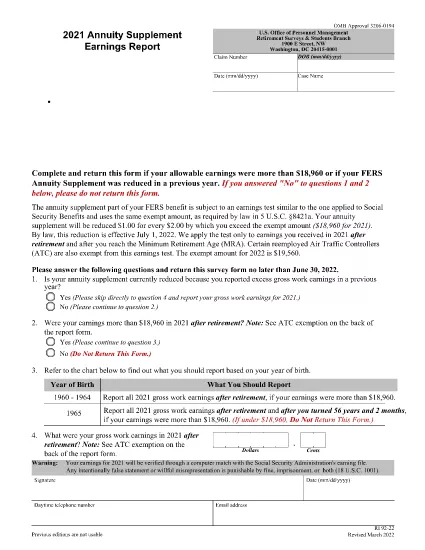
The RI 92-22 is the official Office of Personnel Management (OPM) form used by Federal Employees Retirement System (FERS) retirees to report any earnings that may affect their annuity supplement. Each year, retirees must disclose wages, self‑employment income, and other compensation to determine if the earnings test applies.

What Is the RI 92-22 Form?

This form collects the amount of personal earnings you earned during the calendar year and calculates the exempt amount allowed under the FERS earnings test. The 2021 version is available as a fillable PDF, making data entry quick and error‑free.

Why You Need to File the RI 92-22 Annually

  • Compliance with OPM regulations.
  • Avoid penalties for under‑reporting earnings.
  • Ensure accurate calculation of your annuity supplement.
  • Maintain eligibility for other federal benefits.

How to Complete the Fillable PDF with Formize

Instead of downloading the PDF and opening a separate editor, simply click the "Fill out this form" button on this page. The Formize PDF Filler app loads directly in your browser, letting you:

  1. Enter personal information and earnings data.
  2. See real‑time validation messages.
  3. Save progress and return later if needed.
  4. Download a completed, OPM‑ready PDF or submit electronically as instructed.

Common Mistakes to Avoid

  • Leaving fields blank: Every required field must be completed; otherwise OPM may reject the form.
  • Mis‑reporting exempt earnings: Use the correct exempt amount for the year (2021 exempt amount is $3,600).
  • Submitting after the deadline: The deadline is typically March 31 of the following year.
  • Using an outdated PDF version: Always use the latest fillable version linked below.

Where to Submit Your Completed Form

After you finish, print the completed PDF and mail it to the address listed on the form, or follow any electronic submission instructions provided by your agency’s HR office.

सामान्य प्रश्न
  • Who must file the RI 92-22 form?

    All FERS retirees who earned wages, self‑employment income, or other compensation during the reporting year must file.

  • What is the exempt amount for 2021?

    For 2021, the earnings test exempt amount is $3,600. Earnings above this limit may reduce your annuity supplement.

  • Can I submit the RI 92-22 electronically?

    OPM currently requires a printed, signed PDF for most retirees. Some agencies accept electronic copies; check with your HR office.

  • What happens if I miss the filing deadline?

    Late filing can result in penalties, loss of the annuity supplement, and potential interest charges on any under‑reported earnings.

  • Is the Formize filler secure?

    Yes. Formize uses SSL encryption and does not store your personal data on its servers after the session ends.

  • Do I need to attach supporting documents?

    Generally, no. OPM may request wage statements or tax returns during an audit, but they are not required with the initial filing.

  • What if my earnings are below the exempt amount?

    If total earnings are at or below the exempt amount, you still must submit the form, but your annuity supplement will not be reduced.

  • Can I correct a mistake after submitting?

    Yes. Submit a corrected RI 92-22 form with a note explaining the change, or contact OPM for guidance.

कैसे करें

RI 92-22 को मुफ़्त में, ऑनलाइन 4 आसान स्टेप्स में कैसे भरें:

  1. 1
    Open the Fillable Form
    Click the "Fill out this form" button on the page. The Formize PDF Filler loads instantly in your browser.
  2. 2
    Enter Your Information
    Complete all required fields: personal details, earnings amounts, and exemptions. Validation prompts appear if data is missing or incorrect.
  3. 3
    Review and Save
    Use the preview feature to double‑check entries. Save the form to your device or cloud storage if you need to pause.
  4. 4
    Download or Print
    When finished, download the completed PDF or print it for mailing to OPM as instructed.
पीडीएफ फिलर एप तैयार करें
के बारे में

कार्मिक प्रबंधन कार्यालय (ओपीएम) प्रपत्र

RI 92-22 उन आधिकारिक रूपों में से एक है जिनका उपयोग संयुक्त राज्य कार्मिक प्रबंधन कार्यालय द्वारा किया जाता है, जो संघीय सरकार की एक स्वतंत्र एजेंसी है जो सिविल सेवा कार्यबल और संघीय कर्मचारी लाभों के प्रबंधन के लिए जिम्मेदार है। ओपीएम संघीय रोजगार से संबंधित नीतियां और नियम स्थापित करता है, विभिन्न कार्मिक कार्यक्रमों का प्रबंधन करता है, और संघीय कर्मचारियों, सेवानिवृत्त लोगों और नौकरी आवेदकों को सेवाएं प्रदान करता है।

कार्मिक प्रबंधन कार्यालय प्रपत्रों के कुछ उदाहरण यहां दिए गए हैं:

मानक फॉर्म 86 (SF-86) : इस फॉर्म का उपयोग सुरक्षा मंजूरी के लिए आवेदन करने वाले व्यक्तियों की पृष्ठभूमि जांच प्रक्रिया के लिए किया जाता है। यह व्यापक व्यक्तिगत, रोजगार, शिक्षा और वित्तीय जानकारी के साथ-साथ विदेशी संपर्कों और गतिविधियों के बारे में विवरण एकत्र करता है।

मानक फॉर्म 2809 (SF-2809) : इस फॉर्म का उपयोग संघीय कर्मचारी स्वास्थ्य लाभ (एफईएचबी) कार्यक्रम में नामांकन के लिए किया जाता है, जो संघीय कर्मचारियों, सेवानिवृत्त लोगों और उनके योग्य परिवार के सदस्यों को स्वास्थ्य बीमा कवरेज प्रदान करता है।

मानक फॉर्म 2817 (एसएफ-2817): इस फॉर्म का उपयोग सेवानिवृत्ति या संघीय सेवा से अलग होने के बाद संघीय कर्मचारी दंत चिकित्सा और दृष्टि बीमा कार्यक्रम (एफईडीवीआईपी) के तहत कवरेज जारी रखने के लिए आवेदन करने के लिए किया जाता है।

मानक फॉर्म 3107 (SF-3107) : इस फॉर्म का उपयोग सिविल सेवा सेवानिवृत्ति प्रणाली (सीएसआरएस) के तहत सेवानिवृत्ति लाभों के लिए आवेदन करने के लिए किया जाता है।

मानक फॉर्म 2801 (SF-2801) : इस फॉर्म का उपयोग संघीय कर्मचारी सेवानिवृत्ति प्रणाली (एफईआरएस) के तहत सेवानिवृत्ति लाभों के लिए आवेदन करने के लिए किया जाता है।

मानक फॉर्म 15 (SF-15) : इस फॉर्म का उपयोग संघीय रोजगार में अनुभवी की प्राथमिकता के लिए आवेदन करने के लिए किया जाता है। यह संघीय सरकार में रोजगार के अवसर चाहने वाले दिग्गजों या उनके परिवार के योग्य सदस्यों द्वारा प्रस्तुत किया जाता है।

ये उदाहरण संघीय रोजगार और कर्मचारी लाभों के संदर्भ में उपयोग किए जाने वाले कुछ सामान्य ओपीएम फॉर्म का प्रतिनिधित्व करते हैं। हालाँकि, ओपीएम के पास विभिन्न कार्मिक कार्यक्रमों, सेवानिवृत्ति, बीमा और संघीय रोजगार के अन्य पहलुओं से संबंधित कई अन्य रूप हैं। आवश्यक विशिष्ट प्रपत्र लेन-देन की प्रकृति, कार्यक्रम या मांगे जा रहे लाभ के आधार पर भिन्न हो सकते हैं। यह सलाह दी जाती है कि सटीक और उन्नत जानकारी प्राप्त करने के लिए अमेरिकी कार्मिक प्रबंधन कार्यालय की आधिकारिक वेबसाइट (www.opm.gov) से परामर्श लें या ओपीएम या प्रासंगिक मानव संसाधन कर्मियों से मार्गदर्शन लें। आपके संघीय रोजगार या लाभ-संबंधी आवश्यकताओं के लिए प्रासंगिक विशिष्ट ओपीएम फॉर्म के बारे में आज तक की जानकारी।

विशेषताएं

पीडीएफ भराव

पीडीएफ फॉर्म ऑनलाइन भरने का सबसे आसान तरीका

  • जल्दी से RI 92-22 भरें
    RI 92-22 को जल्दी से ऑनलाइन भरने का कोई तरीका खोज रहे हैं? हमारे ऑनलाइन नि:शुल्क पीडीएफ फॉर्म फिलर के साथ, आप एक मिनट से भी कम समय में इस पीडीएफ दस्तावेज़ को संपादित करने और भरने का तरीका जानेंगे।
  • ऑनलाइन पीडीएफ संपादक का उपयोग करना आसान है
    पीडीएफ फाइलों को प्रिंट करने से तंग आ गए हैं ताकि आप उन्हें फिर से स्कैन करने और उन्हें वापस भेजने से पहले संपादित कर सकें? PDF दस्तावेज़ों को निःशुल्क ऑनलाइन संपादित करें। समय और कागज बचाने के लिए हमारे ऑनलाइन पीडीएफ संपादक का प्रयोग करें।
  • महान उपकरण, सभी प्लेटफार्म
    आश्चर्य है कि मैक पर RI 92-22 कैसे भरें, या शायद पीडीएफ फिलर का मुफ्त में उपयोग कैसे करें? हमारे ऑनलाइन पीडीएफ टूल सभी प्लेटफॉर्म पर काम करते हैं।
  • सुरक्षित फ़ाइल भंडारण
    पूर्ण की गई "RI 92-22" फ़ाइलें Amazon क्लाउड होस्टिंग द्वारा प्रबंधित एक सुरक्षित डेटाबेस में संग्रहीत की जाती हैं। आप कभी भी अपनी फाइलों को हमारे सिस्टम से हटा सकते हैं। किसी भी स्थिति में, ये फ़ाइलें 24 घंटे के बाद स्वतः हटा दी जाती हैं।
  • {कीवर्ड} से चैट करें
    Chatize पर "RI 92-22" के साथ चैट करें, जो एक निःशुल्क पीडीएफ रीडर सहायक है। प्रश्न पूछें और "RI 92-22" से उत्तर प्राप्त करें। बस ऊपर दस्तावेज़ के साथ चैट करें बटन पर क्लिक करें।

फ़िलिंग सत्र मिटाएँ

चयनित फ़िलिंग सत्र को मिटाएँ? इस स्थिति में, फ़ॉर्म को पूरा करने में आपकी प्रगति खो जाएगी।

संपादन सत्र हटाएँ

चयनित संपादन सत्र हटाएँ? इस स्थिति में, फ़ॉर्म बनाने और संपादित करने में आपकी प्रगति नष्ट हो जाएगी।