
hamburger-menu icon
भाषा का चयन करें

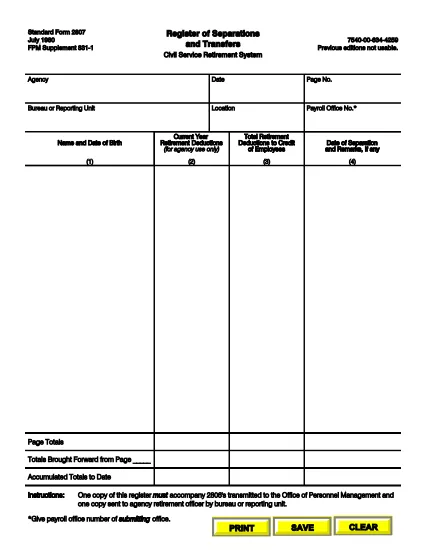
SF‑2807 Register of Separations and Transfers – Fillable PDF

  1. भाषा अंग्रेज़ी
  2. देश अमेरीका
  3. विभाग कार्मिक प्रबंधन कार्यालय
  4. क्षेत्र मानक प्रपत्र
फार्म को भरो
SF‑2807 Register of Separations and Transfers – Fillable PDF

The Standard Form 2807 (SF‑2807) is the official Register of Separations and Transfers used by the Civil Service Retirement System (CSRS) and the Federal Employees Retirement System (FERS). Federal agencies must submit this form whenever an employee separates from service or transfers to another position. Our fillable PDF makes the process fast, accurate, and fully compliant.

What is the SF‑2807 Form?

SF‑2807 captures essential data about an employee’s separation or transfer, including dates, reasons, and final pay details. It is required to accompany the SF‑2806 (Separation Notice) and must be sent to the Office of Personnel Management (OPM) and the agency’s retirement officer.

How to Complete the SF‑2807 Online

Follow these simple steps to fill out the form directly in your browser using Formize’s PDF Filler:

  • Click the "Fill out this form" button on the page.
  • The Formize PDF Filler loads automatically – no extra software needed.
  • Enter the requested information in each field. Use the Tab key to move quickly between fields.
  • When finished, click Save & Download to get a completed PDF copy.
  • Print or email the file as instructed by your agency.

Common Mistakes to Avoid

  • Leaving blank fields: Every required box must be completed; otherwise, OPM will reject the submission.
  • Incorrect dates: Verify the separation or transfer date against your official personnel record.
  • Handwritten edits: Do not cross out or write over printed text. Use the digital form to make corrections.
  • Mismatched signatures: Ensure the signing authority uses the same name format as on other retirement documents.

Where to Submit the Completed Form

After saving the filled PDF, send it to the following recipients:

  • OPM: Upload via the OPM portal or email to the address provided by your agency.
  • Agency Retirement Officer: Submit a hard copy or electronic copy according to your agency’s policy.

FAQs About SF‑2807

Below are the most frequently asked questions from federal employees.

सामान्य प्रश्न
  • Who must complete the SF‑2807?

    Any federal employee who is separating from service or transferring to a new position must have a completed SF‑2807 filed with OPM.

  • Can I submit a handwritten version of SF‑2807?

    No. OPM requires a clean, fillable PDF version without handwritten corrections. Use the online filler to avoid errors.

  • What is the deadline for submitting SF‑2807?

    The form should be submitted simultaneously with the SF‑2806. Most agencies require it within 10 business days of the separation date.

  • Do I need a digital signature?

    Yes. The signing authority can use an electronic signature within the Formize PDF Filler, which is accepted by OPM.

  • What should I do if I make a mistake after saving?

    Open the saved PDF again in the Formize filler, correct the error, and re‑save. Do not print, cross out, and rescan the document.

  • Is there a cost to use the fillable SF‑2807?

    No. The fillable PDF and Formize’s online filler are completely free for all federal employees.

  • Where can I find additional retirement forms?

    Visit the OPM website or your agency’s human resources portal for a full list of CSRS and FERS retirement forms.

कैसे करें

SF-2807 को मुफ़्त में, ऑनलाइन 5 आसान स्टेप्स में कैसे भरें:

  1. 1
    Click the Fill‑out Button
    Locate the "Fill out this form" button on the page and click it to launch the Formize PDF Filler.
  2. 2
    Wait for the Filler to Load
    The fillable PDF loads directly in your browser – no download or installation required.
  3. 3
    Enter Your Information
    Complete each field using your keyboard. Use the Tab key to move quickly between sections.
  4. 4
    Save and Download
    When all fields are filled, click "Save & Download" to get a completed PDF copy on your device.
  5. 5
    Submit as Required
    Print or email the saved PDF to OPM and your agency’s retirement officer according to your agency’s guidelines.
पीडीएफ फिलर एप तैयार करें
के बारे में

कार्मिक प्रबंधन कार्यालय (ओपीएम) प्रपत्र

SF-2807 उन आधिकारिक रूपों में से एक है जिनका उपयोग संयुक्त राज्य कार्मिक प्रबंधन कार्यालय द्वारा किया जाता है, जो संघीय सरकार की एक स्वतंत्र एजेंसी है जो सिविल सेवा कार्यबल और संघीय कर्मचारी लाभों के प्रबंधन के लिए जिम्मेदार है। ओपीएम संघीय रोजगार से संबंधित नीतियां और नियम स्थापित करता है, विभिन्न कार्मिक कार्यक्रमों का प्रबंधन करता है, और संघीय कर्मचारियों, सेवानिवृत्त लोगों और नौकरी आवेदकों को सेवाएं प्रदान करता है।

कार्मिक प्रबंधन कार्यालय प्रपत्रों के कुछ उदाहरण यहां दिए गए हैं:

मानक फॉर्म 86 (SF-86) : इस फॉर्म का उपयोग सुरक्षा मंजूरी के लिए आवेदन करने वाले व्यक्तियों की पृष्ठभूमि जांच प्रक्रिया के लिए किया जाता है। यह व्यापक व्यक्तिगत, रोजगार, शिक्षा और वित्तीय जानकारी के साथ-साथ विदेशी संपर्कों और गतिविधियों के बारे में विवरण एकत्र करता है।

मानक फॉर्म 2809 (SF-2809) : इस फॉर्म का उपयोग संघीय कर्मचारी स्वास्थ्य लाभ (एफईएचबी) कार्यक्रम में नामांकन के लिए किया जाता है, जो संघीय कर्मचारियों, सेवानिवृत्त लोगों और उनके योग्य परिवार के सदस्यों को स्वास्थ्य बीमा कवरेज प्रदान करता है।

मानक फॉर्म 2817 (एसएफ-2817): इस फॉर्म का उपयोग सेवानिवृत्ति या संघीय सेवा से अलग होने के बाद संघीय कर्मचारी दंत चिकित्सा और दृष्टि बीमा कार्यक्रम (एफईडीवीआईपी) के तहत कवरेज जारी रखने के लिए आवेदन करने के लिए किया जाता है।

मानक फॉर्म 3107 (SF-3107) : इस फॉर्म का उपयोग सिविल सेवा सेवानिवृत्ति प्रणाली (सीएसआरएस) के तहत सेवानिवृत्ति लाभों के लिए आवेदन करने के लिए किया जाता है।

मानक फॉर्म 2801 (SF-2801) : इस फॉर्म का उपयोग संघीय कर्मचारी सेवानिवृत्ति प्रणाली (एफईआरएस) के तहत सेवानिवृत्ति लाभों के लिए आवेदन करने के लिए किया जाता है।

मानक फॉर्म 15 (SF-15) : इस फॉर्म का उपयोग संघीय रोजगार में अनुभवी की प्राथमिकता के लिए आवेदन करने के लिए किया जाता है। यह संघीय सरकार में रोजगार के अवसर चाहने वाले दिग्गजों या उनके परिवार के योग्य सदस्यों द्वारा प्रस्तुत किया जाता है।

ये उदाहरण संघीय रोजगार और कर्मचारी लाभों के संदर्भ में उपयोग किए जाने वाले कुछ सामान्य ओपीएम फॉर्म का प्रतिनिधित्व करते हैं। हालाँकि, ओपीएम के पास विभिन्न कार्मिक कार्यक्रमों, सेवानिवृत्ति, बीमा और संघीय रोजगार के अन्य पहलुओं से संबंधित कई अन्य रूप हैं। आवश्यक विशिष्ट प्रपत्र लेन-देन की प्रकृति, कार्यक्रम या मांगे जा रहे लाभ के आधार पर भिन्न हो सकते हैं। यह सलाह दी जाती है कि सटीक और उन्नत जानकारी प्राप्त करने के लिए अमेरिकी कार्मिक प्रबंधन कार्यालय की आधिकारिक वेबसाइट (www.opm.gov) से परामर्श लें या ओपीएम या प्रासंगिक मानव संसाधन कर्मियों से मार्गदर्शन लें। आपके संघीय रोजगार या लाभ-संबंधी आवश्यकताओं के लिए प्रासंगिक विशिष्ट ओपीएम फॉर्म के बारे में आज तक की जानकारी।

विशेषताएं

पीडीएफ भराव

पीडीएफ फॉर्म ऑनलाइन भरने का सबसे आसान तरीका

  • जल्दी से SF-2807 भरें
    SF-2807 को जल्दी से ऑनलाइन भरने का कोई तरीका खोज रहे हैं? हमारे ऑनलाइन नि:शुल्क पीडीएफ फॉर्म फिलर के साथ, आप एक मिनट से भी कम समय में इस पीडीएफ दस्तावेज़ को संपादित करने और भरने का तरीका जानेंगे।
  • ऑनलाइन पीडीएफ संपादक का उपयोग करना आसान है
    पीडीएफ फाइलों को प्रिंट करने से तंग आ गए हैं ताकि आप उन्हें फिर से स्कैन करने और उन्हें वापस भेजने से पहले संपादित कर सकें? PDF दस्तावेज़ों को निःशुल्क ऑनलाइन संपादित करें। समय और कागज बचाने के लिए हमारे ऑनलाइन पीडीएफ संपादक का प्रयोग करें।
  • महान उपकरण, सभी प्लेटफार्म
    आश्चर्य है कि मैक पर SF-2807 कैसे भरें, या शायद पीडीएफ फिलर का मुफ्त में उपयोग कैसे करें? हमारे ऑनलाइन पीडीएफ टूल सभी प्लेटफॉर्म पर काम करते हैं।
  • सुरक्षित फ़ाइल भंडारण
    पूर्ण की गई "SF-2807" फ़ाइलें Amazon क्लाउड होस्टिंग द्वारा प्रबंधित एक सुरक्षित डेटाबेस में संग्रहीत की जाती हैं। आप कभी भी अपनी फाइलों को हमारे सिस्टम से हटा सकते हैं। किसी भी स्थिति में, ये फ़ाइलें 24 घंटे के बाद स्वतः हटा दी जाती हैं।
  • {कीवर्ड} से चैट करें
    Chatize पर "SF-2807" के साथ चैट करें, जो एक निःशुल्क पीडीएफ रीडर सहायक है। प्रश्न पूछें और "SF-2807" से उत्तर प्राप्त करें। बस ऊपर दस्तावेज़ के साथ चैट करें बटन पर क्लिक करें।

फ़िलिंग सत्र मिटाएँ

चयनित फ़िलिंग सत्र को मिटाएँ? इस स्थिति में, फ़ॉर्म को पूरा करने में आपकी प्रगति खो जाएगी।

संपादन सत्र हटाएँ

चयनित संपादन सत्र हटाएँ? इस स्थिति में, फ़ॉर्म बनाने और संपादित करने में आपकी प्रगति नष्ट हो जाएगी।