
hamburger-menu icon
भाषा का चयन करें

SF 3107PR Payroll Provider Checklist – Fillable PDF

  1. भाषा अंग्रेज़ी
  2. देश अमेरीका
  3. विभाग कार्मिक प्रबंधन कार्यालय
  4. क्षेत्र मानक प्रपत्र
फार्म को भरो
SF 3107PR Payroll Provider Checklist – Fillable PDF

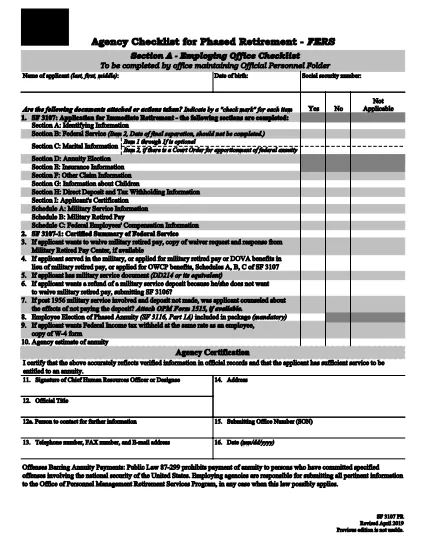
The SF 3107PR is the official Payroll Provider Checklist for Phased Retirement – FERS used by federal agencies to verify that all payroll actions are correctly processed when an employee retires early under the Federal Employees Retirement System (FERS). This form must be completed by the payroll office and signed by the employee’s agency before the retirement becomes effective.

What Is the SF 3107PR Form?

SF 3107PR (Form 3107PR) is published by the Office of Personnel Management (OPM). It contains sections for:

  • Employee identification and retirement date
  • Payroll provider verification
  • Check of final salary, leave balances, and deductions
  • Signatures from the employee, payroll officer, and agency head

How to Complete the SF 3107PR Online

Instead of printing, filling, and scanning the PDF, you can complete the form directly in your browser using Formize’s built‑in PDF filler. Follow the simple steps below.

Common Mistakes to Avoid

Even with a fillable PDF, errors can slip through. Keep these tips in mind:

  • Wrong retirement date: Verify the date matches the employee’s approved phased‑retirement request.
  • Missing signatures: All required signatures must be captured before submission.
  • Incorrect payroll codes: Double‑check the payroll provider and cost‑center numbers.
  • Unfilled optional fields: If a field is marked “N/A,” type “N/A” rather than leaving it blank.

Where to Submit the Completed Checklist

After the form is filled and signed, the payroll office should forward the PDF to the OPM Retirement Services Program and retain a copy in the employee’s official personnel file.

Need the original PDF? Click the button below to open the fillable version instantly.

सामान्य प्रश्न
  • What is the purpose of SF 3107PR?

    SF 3107PR is used by federal agencies to confirm that payroll actions are correctly set up for an employee who is retiring early under the phased‑retirement option of FERS.

  • Can I fill out SF 3107PR on a mobile device?

    Yes. The Formize PDF filler works on most modern smartphones and tablets, allowing you to complete the form anywhere with an internet connection.

  • Do I need a PDF reader to use the fillable form?

    No. The form is fully interactive within the browser; you only need a web browser that supports JavaScript.

  • How many signatures are required on SF 3107PR?

    Three signatures are required: the employee, the payroll officer, and an authorized agency official.

  • What should I do if I make a mistake after saving?

    Open the saved PDF again in the Formize filler, correct the error, and re‑save. The form retains all previously entered data.

  • Is the fillable PDF version the same as the paper version?

    Yes. The electronic version contains the exact same fields and wording as the printable PDF published by OPM.

  • Where do I submit the completed SF 3107PR?

    Submit the final PDF to your agency’s payroll office and forward a copy to the OPM Retirement Services Program as instructed in agency policy.

कैसे करें

SF 3107PR को मुफ़्त में, ऑनलाइन 5 आसान स्टेप्स में कैसे भरें:

  1. 1
    Click the Fill‑out Button
    On this page, click the "Fill out this form" button. The Formize PDF Filler app will open in a new tab.
  2. 2
    Wait for the Filler to Load
    The fillable version of SF 3107PR loads automatically. No download or extra software is required.
  3. 3
    Enter All Required Information
    Complete each field, using drop‑downs and check‑boxes where provided. Type "N/A" for any non‑applicable items.
  4. 4
    Add Signatures
    Use the built‑in signature tool to capture electronic signatures from the employee and payroll officer.
  5. 5
    Save or Email the Completed Form
    When finished, click "Save" to download a copy or "Email" to send the PDF directly to your agency’s retirement office.
पीडीएफ फिलर एप तैयार करें
के बारे में

कार्मिक प्रबंधन कार्यालय (ओपीएम) प्रपत्र

SF 3107PR उन आधिकारिक रूपों में से एक है जिनका उपयोग संयुक्त राज्य कार्मिक प्रबंधन कार्यालय द्वारा किया जाता है, जो संघीय सरकार की एक स्वतंत्र एजेंसी है जो सिविल सेवा कार्यबल और संघीय कर्मचारी लाभों के प्रबंधन के लिए जिम्मेदार है। ओपीएम संघीय रोजगार से संबंधित नीतियां और नियम स्थापित करता है, विभिन्न कार्मिक कार्यक्रमों का प्रबंधन करता है, और संघीय कर्मचारियों, सेवानिवृत्त लोगों और नौकरी आवेदकों को सेवाएं प्रदान करता है।

कार्मिक प्रबंधन कार्यालय प्रपत्रों के कुछ उदाहरण यहां दिए गए हैं:

मानक फॉर्म 86 (SF-86) : इस फॉर्म का उपयोग सुरक्षा मंजूरी के लिए आवेदन करने वाले व्यक्तियों की पृष्ठभूमि जांच प्रक्रिया के लिए किया जाता है। यह व्यापक व्यक्तिगत, रोजगार, शिक्षा और वित्तीय जानकारी के साथ-साथ विदेशी संपर्कों और गतिविधियों के बारे में विवरण एकत्र करता है।

मानक फॉर्म 2809 (SF-2809) : इस फॉर्म का उपयोग संघीय कर्मचारी स्वास्थ्य लाभ (एफईएचबी) कार्यक्रम में नामांकन के लिए किया जाता है, जो संघीय कर्मचारियों, सेवानिवृत्त लोगों और उनके योग्य परिवार के सदस्यों को स्वास्थ्य बीमा कवरेज प्रदान करता है।

मानक फॉर्म 2817 (एसएफ-2817): इस फॉर्म का उपयोग सेवानिवृत्ति या संघीय सेवा से अलग होने के बाद संघीय कर्मचारी दंत चिकित्सा और दृष्टि बीमा कार्यक्रम (एफईडीवीआईपी) के तहत कवरेज जारी रखने के लिए आवेदन करने के लिए किया जाता है।

मानक फॉर्म 3107 (SF-3107) : इस फॉर्म का उपयोग सिविल सेवा सेवानिवृत्ति प्रणाली (सीएसआरएस) के तहत सेवानिवृत्ति लाभों के लिए आवेदन करने के लिए किया जाता है।

मानक फॉर्म 2801 (SF-2801) : इस फॉर्म का उपयोग संघीय कर्मचारी सेवानिवृत्ति प्रणाली (एफईआरएस) के तहत सेवानिवृत्ति लाभों के लिए आवेदन करने के लिए किया जाता है।

मानक फॉर्म 15 (SF-15) : इस फॉर्म का उपयोग संघीय रोजगार में अनुभवी की प्राथमिकता के लिए आवेदन करने के लिए किया जाता है। यह संघीय सरकार में रोजगार के अवसर चाहने वाले दिग्गजों या उनके परिवार के योग्य सदस्यों द्वारा प्रस्तुत किया जाता है।

ये उदाहरण संघीय रोजगार और कर्मचारी लाभों के संदर्भ में उपयोग किए जाने वाले कुछ सामान्य ओपीएम फॉर्म का प्रतिनिधित्व करते हैं। हालाँकि, ओपीएम के पास विभिन्न कार्मिक कार्यक्रमों, सेवानिवृत्ति, बीमा और संघीय रोजगार के अन्य पहलुओं से संबंधित कई अन्य रूप हैं। आवश्यक विशिष्ट प्रपत्र लेन-देन की प्रकृति, कार्यक्रम या मांगे जा रहे लाभ के आधार पर भिन्न हो सकते हैं। यह सलाह दी जाती है कि सटीक और उन्नत जानकारी प्राप्त करने के लिए अमेरिकी कार्मिक प्रबंधन कार्यालय की आधिकारिक वेबसाइट (www.opm.gov) से परामर्श लें या ओपीएम या प्रासंगिक मानव संसाधन कर्मियों से मार्गदर्शन लें। आपके संघीय रोजगार या लाभ-संबंधी आवश्यकताओं के लिए प्रासंगिक विशिष्ट ओपीएम फॉर्म के बारे में आज तक की जानकारी।

विशेषताएं

पीडीएफ भराव

पीडीएफ फॉर्म ऑनलाइन भरने का सबसे आसान तरीका

  • जल्दी से SF 3107PR भरें
    SF 3107PR को जल्दी से ऑनलाइन भरने का कोई तरीका खोज रहे हैं? हमारे ऑनलाइन नि:शुल्क पीडीएफ फॉर्म फिलर के साथ, आप एक मिनट से भी कम समय में इस पीडीएफ दस्तावेज़ को संपादित करने और भरने का तरीका जानेंगे।
  • ऑनलाइन पीडीएफ संपादक का उपयोग करना आसान है
    पीडीएफ फाइलों को प्रिंट करने से तंग आ गए हैं ताकि आप उन्हें फिर से स्कैन करने और उन्हें वापस भेजने से पहले संपादित कर सकें? PDF दस्तावेज़ों को निःशुल्क ऑनलाइन संपादित करें। समय और कागज बचाने के लिए हमारे ऑनलाइन पीडीएफ संपादक का प्रयोग करें।
  • महान उपकरण, सभी प्लेटफार्म
    आश्चर्य है कि मैक पर SF 3107PR कैसे भरें, या शायद पीडीएफ फिलर का मुफ्त में उपयोग कैसे करें? हमारे ऑनलाइन पीडीएफ टूल सभी प्लेटफॉर्म पर काम करते हैं।
  • सुरक्षित फ़ाइल भंडारण
    पूर्ण की गई "SF 3107PR" फ़ाइलें Amazon क्लाउड होस्टिंग द्वारा प्रबंधित एक सुरक्षित डेटाबेस में संग्रहीत की जाती हैं। आप कभी भी अपनी फाइलों को हमारे सिस्टम से हटा सकते हैं। किसी भी स्थिति में, ये फ़ाइलें 24 घंटे के बाद स्वतः हटा दी जाती हैं।
  • {कीवर्ड} से चैट करें
    Chatize पर "SF 3107PR" के साथ चैट करें, जो एक निःशुल्क पीडीएफ रीडर सहायक है। प्रश्न पूछें और "SF 3107PR" से उत्तर प्राप्त करें। बस ऊपर दस्तावेज़ के साथ चैट करें बटन पर क्लिक करें।

फ़िलिंग सत्र मिटाएँ

चयनित फ़िलिंग सत्र को मिटाएँ? इस स्थिति में, फ़ॉर्म को पूरा करने में आपकी प्रगति खो जाएगी।

संपादन सत्र हटाएँ

चयनित संपादन सत्र हटाएँ? इस स्थिति में, फ़ॉर्म बनाने और संपादित करने में आपकी प्रगति नष्ट हो जाएगी।