
hamburger-menu icon
भाषा का चयन करें

VSD 773 Vehicle Transfer Notice – Fillable PDF

  1. भाषा अंग्रेज़ी
  2. देश अमेरीका
  3. गतिविधि वाहन पंजीकरण
  4. विभाग Oklahoma Tax Commission
फार्म को भरो
VSD 773 Vehicle Transfer Notice – Fillable PDF

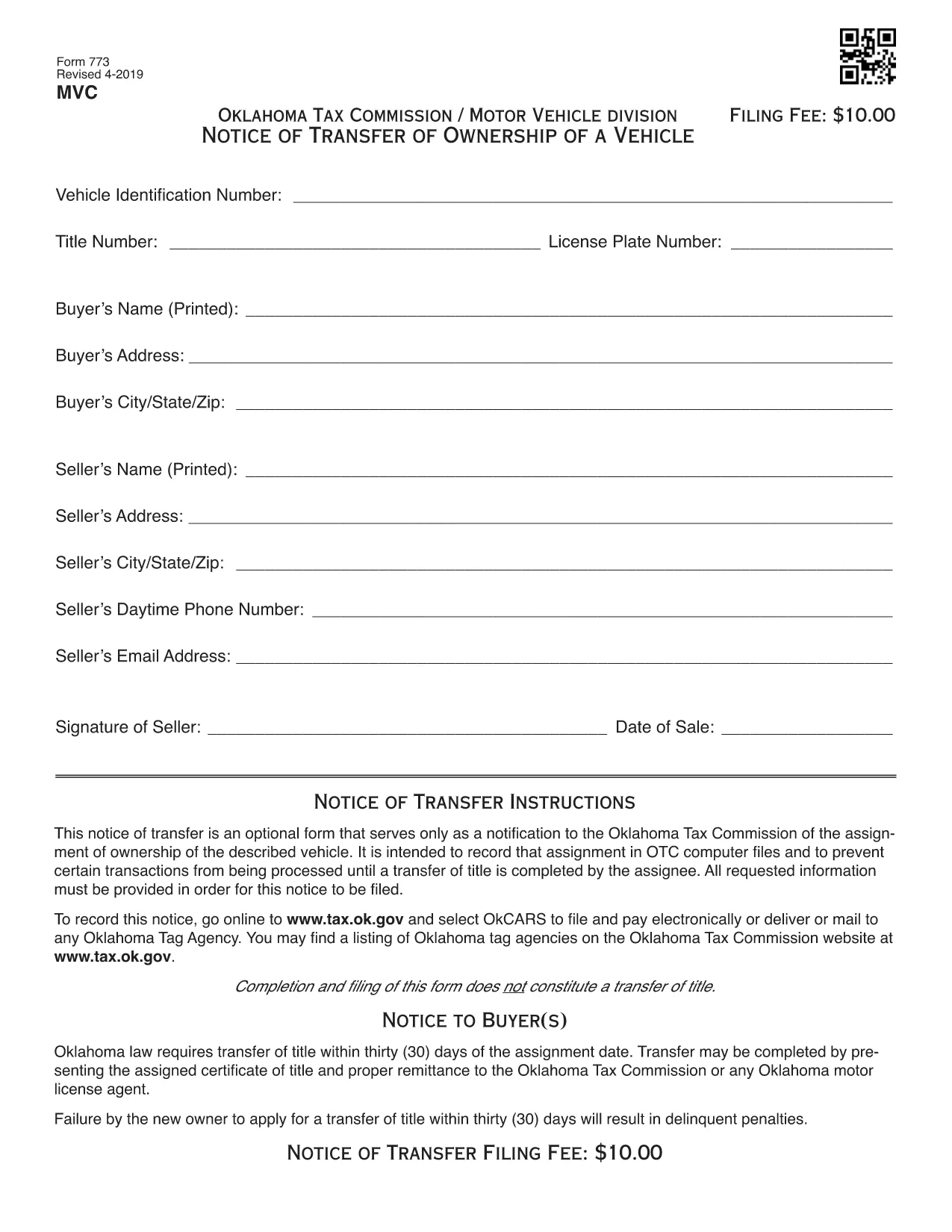
The VSD 773 is Oklahoma’s official Notice of Transfer form. It notifies the Oklahoma Tax Commission of a change in vehicle ownership and helps keep the state’s title records accurate. Whether you’re selling a car, gifting a vehicle, or transferring a title after a divorce, the VSD 773 is required before the new owner can register the vehicle.

Our page provides a Fill out this form button that launches the Formize PDF Filler app. The filler works directly in your browser—no download, no printing, no scanning.

What Is the VSD 773 Form?

The VSD 773 captures essential details such as the seller’s and buyer’s names, vehicle identification number (VIN), license plate, sale price, and odometer reading. Once submitted, the Oklahoma Tax Commission updates its database, preventing future title‑related issues.

How to Complete the VSD 773 Online

Follow these simple steps:

  1. Click the Fill out this form button above.
  2. The Formize PDF Filler loads instantly in a new tab.
  3. Enter the required information in each fillable field.
  4. Review the data for accuracy and click Save & Download to get a completed PDF.
  5. Print the completed form (if required) and submit it to your local Oklahoma Tax Commission office or mail it as instructed.

Common Mistakes to Avoid

  • Incorrect VIN: Double‑check the 17‑character VIN; a single typo can delay the title transfer.
  • Missing Odometer Reading: Oklahoma law requires the current mileage; leaving it blank may cause the form to be rejected.
  • Unsigned Sections: Both buyer and seller must sign the form. The PDF filler lets you add a digital signature, but some offices still require a handwritten one.
  • Wrong Sale Price: Enter the actual sale price; under‑reporting can lead to tax penalties.

Where to Submit the Completed Form

After completing the VSD 773, you can:

  • Visit any Oklahoma Tax Commission office in person.
  • Mail the form to the address on the Oklahoma Tax Commission website.
  • Include it with your vehicle registration renewal packet.

For the latest submission guidelines, always check the Oklahoma Tax Commission website.

सामान्य प्रश्न
  • What is the purpose of the VSD 773 form?

    The VSD 773 notifies the Oklahoma Tax Commission of a change in vehicle ownership, ensuring the title records are updated.

  • Can I submit the VSD 773 electronically?

    Most Oklahoma Tax Commission offices require a printed copy, but you can fill it out electronically with Formize and then print the completed PDF.

  • Do I need a notary for the VSD 773?

    A notary is not required for the VSD 773, but both the buyer and seller must sign the form.

  • How long does it take for the title to update after submitting the VSD 773?

    Processing usually takes 5‑7 business days once the form is received and all information is verified.

  • What happens if I enter the wrong VIN?

    An incorrect VIN will cause the title transfer to be rejected, and you’ll need to submit a corrected VSD 773.

  • Is there a fee to file the VSD 773?

    There is no separate fee for the VSD 773 itself, but title transfer fees apply when you register the vehicle in the new owner's name.

  • Can I use the VSD 773 for a gifted vehicle?

    Yes, the form is used for sales, gifts, inheritances, and any transfer of ownership.

  • Where can I find the latest version of the VSD 773?

    The most recent version is available for download on this page and is hosted by the Oklahoma Tax Commission.

कैसे करें

VSD 773 को मुफ़्त में, ऑनलाइन 5 आसान स्टेप्स में कैसे भरें:

  1. 1
    Open the Fillable Form
    Click the “Fill out this form” button on the page. The Formize PDF Filler will load in your browser instantly.
  2. 2
    Enter Your Information
    Type in all required fields: seller and buyer details, VIN, license plate, sale price, and odometer reading.
  3. 3
    Review & Sign
    Double‑check each entry for accuracy. Add a digital signature if your local office accepts it.
  4. 4
    Save the Completed PDF
    Click “Save & Download” to store the filled‑out VSD 773 on your device.
  5. 5
    Submit the Form
    Print the PDF (if needed) and deliver it to an Oklahoma Tax Commission office or mail it according to the instructions.
पीडीएफ फिलर एप तैयार करें
के बारे में

वाहन पंजीकरण प्रपत्र

VSD 773 डीएमवी फॉर्मों में से एक है, जिसे मोटर वाहन विभाग फॉर्म के रूप में भी जाना जाता है, जो मोटर वाहनों से संबंधित विभिन्न लेनदेन और प्रक्रियाओं में उपयोग किए जाने वाले दस्तावेज हैं। DMV एक सरकारी एजेंसी है जो ड्राइवर लाइसेंसिंग, वाहन पंजीकरण और मोटर वाहन कानूनों को लागू करने के लिए जिम्मेदार है। उपलब्ध विशिष्ट DMV फॉर्म क्षेत्राधिकार के अनुसार भिन्न हो सकते हैं, लेकिन यहां कुछ सामान्य उदाहरण दिए गए हैं:

ड्राइवर लाइसेंस फॉर्म: इन फॉर्म का उपयोग ड्राइवर के लाइसेंस के लिए आवेदन करने या परिवर्तन या नवीनीकरण का अनुरोध करने के लिए किया जाता है। उन्हें आम तौर पर व्यक्तिगत जानकारी, पहचान के प्रमाण की आवश्यकता होती है, और इसमें चिकित्सा जानकारी या ड्राइविंग इतिहास के अनुभाग शामिल हो सकते हैं।

वाहन पंजीकरण फॉर्म: इन फॉर्मों का उपयोग डीएमवी के साथ मोटर वाहन को पंजीकृत करने के लिए किया जाता है। उन्हें वाहन की जानकारी, स्वामित्व विवरण और बीमा के प्रमाण की आवश्यकता होती है।

टाइटल ट्रांसफर फॉर्म: वाहन खरीदते या बेचते समय, इन फॉर्मों का उपयोग एक पक्ष से दूसरे पक्ष को स्वामित्व हस्तांतरित करने के लिए किया जाता है। उन्हें खरीदार, विक्रेता, वाहन विवरण के बारे में जानकारी की आवश्यकता होती है और इसमें बिक्री का बिल भी शामिल हो सकता है।

वाहन दायित्व प्रपत्र जारी करना: किसी वाहन के स्वामित्व को बेचते या स्थानांतरित करते समय, ये प्रपत्र डीएमवी को सूचित करते हैं कि विक्रेता अब वाहन के लिए जिम्मेदार नहीं है। यह विक्रेता को बिक्री के बाद वाहन से जुड़ी दुर्घटनाओं या घटनाओं के लिए दायित्व से बचाने में मदद करता है।

लाइसेंस प्लेट और पंजीकरण नवीनीकरण फॉर्म: इन फॉर्मों का उपयोग वाहन पंजीकरण को नवीनीकृत करने या नए लाइसेंस प्लेटों का अनुरोध करने के लिए किया जाता है। उन्हें आम तौर पर पंजीकृत मालिक, वर्तमान पंजीकरण विवरण और लागू शुल्क के भुगतान के बारे में जानकारी की आवश्यकता होती है।

ड्राइविंग रिकॉर्ड अनुरोध फॉर्म: ये फॉर्म व्यक्तियों को डीएमवी से अपने ड्राइविंग रिकॉर्ड का अनुरोध करने की अनुमति देते हैं, जो ड्राइविंग उल्लंघन, लाइसेंस स्थिति और अन्य प्रासंगिक विवरणों के बारे में जानकारी प्रदान करते हैं।

विशेषता या वैयक्तिकृत लाइसेंस प्लेट फॉर्म: इन फॉर्मों का उपयोग वैयक्तिकृत या विशिष्ट लाइसेंस प्लेटों के लिए आवेदन करने के लिए किया जाता है, जो व्यक्तियों को विशिष्ट पात्रों या डिज़ाइन के साथ अपनी लाइसेंस प्लेट को अनुकूलित करने की अनुमति देते हैं।

ये उन अनेक प्रपत्रों के कुछ उदाहरण हैं जो DMV के माध्यम से उपलब्ध हो सकते हैं। विशिष्ट फॉर्म और आवश्यकताएं क्षेत्राधिकार के अनुसार अलग-अलग हो सकती हैं, इसलिए अपनी विशेष जरूरतों के लिए सही फॉर्म प्राप्त करने के लिए स्थानीय डीएमवी वेबसाइट से परामर्श करना या डीएमवी कार्यालय में जाना महत्वपूर्ण है।

विशेषताएं

पीडीएफ भराव

पीडीएफ फॉर्म ऑनलाइन भरने का सबसे आसान तरीका

  • जल्दी से VSD 773 भरें
    VSD 773 को जल्दी से ऑनलाइन भरने का कोई तरीका खोज रहे हैं? हमारे ऑनलाइन नि:शुल्क पीडीएफ फॉर्म फिलर के साथ, आप एक मिनट से भी कम समय में इस पीडीएफ दस्तावेज़ को संपादित करने और भरने का तरीका जानेंगे।
  • ऑनलाइन पीडीएफ संपादक का उपयोग करना आसान है
    पीडीएफ फाइलों को प्रिंट करने से तंग आ गए हैं ताकि आप उन्हें फिर से स्कैन करने और उन्हें वापस भेजने से पहले संपादित कर सकें? PDF दस्तावेज़ों को निःशुल्क ऑनलाइन संपादित करें। समय और कागज बचाने के लिए हमारे ऑनलाइन पीडीएफ संपादक का प्रयोग करें।
  • महान उपकरण, सभी प्लेटफार्म
    आश्चर्य है कि मैक पर VSD 773 कैसे भरें, या शायद पीडीएफ फिलर का मुफ्त में उपयोग कैसे करें? हमारे ऑनलाइन पीडीएफ टूल सभी प्लेटफॉर्म पर काम करते हैं।
  • सुरक्षित फ़ाइल भंडारण
    पूर्ण की गई "VSD 773" फ़ाइलें Amazon क्लाउड होस्टिंग द्वारा प्रबंधित एक सुरक्षित डेटाबेस में संग्रहीत की जाती हैं। आप कभी भी अपनी फाइलों को हमारे सिस्टम से हटा सकते हैं। किसी भी स्थिति में, ये फ़ाइलें 24 घंटे के बाद स्वतः हटा दी जाती हैं।
  • {कीवर्ड} से चैट करें
    Chatize पर "VSD 773" के साथ चैट करें, जो एक निःशुल्क पीडीएफ रीडर सहायक है। प्रश्न पूछें और "VSD 773" से उत्तर प्राप्त करें। बस ऊपर दस्तावेज़ के साथ चैट करें बटन पर क्लिक करें।

फ़िलिंग सत्र मिटाएँ

चयनित फ़िलिंग सत्र को मिटाएँ? इस स्थिति में, फ़ॉर्म को पूरा करने में आपकी प्रगति खो जाएगी।

संपादन सत्र हटाएँ

चयनित संपादन सत्र हटाएँ? इस स्थिति में, फ़ॉर्म बनाने और संपादित करने में आपकी प्रगति नष्ट हो जाएगी।