
hamburger-menu icon
भाषा का चयन करें

PennDOT Form MV‑73A – Fillable Employee Service Report

  1. भाषा अंग्रेज़ी
  2. देश अमेरीका
  3. विभाग PennDOT
  4. गतिविधि वाहन पंजीकरण
फार्म को भरो
PennDOT Form MV‑73A – Fillable Employee Service Report

What Is Form MV‑73A?

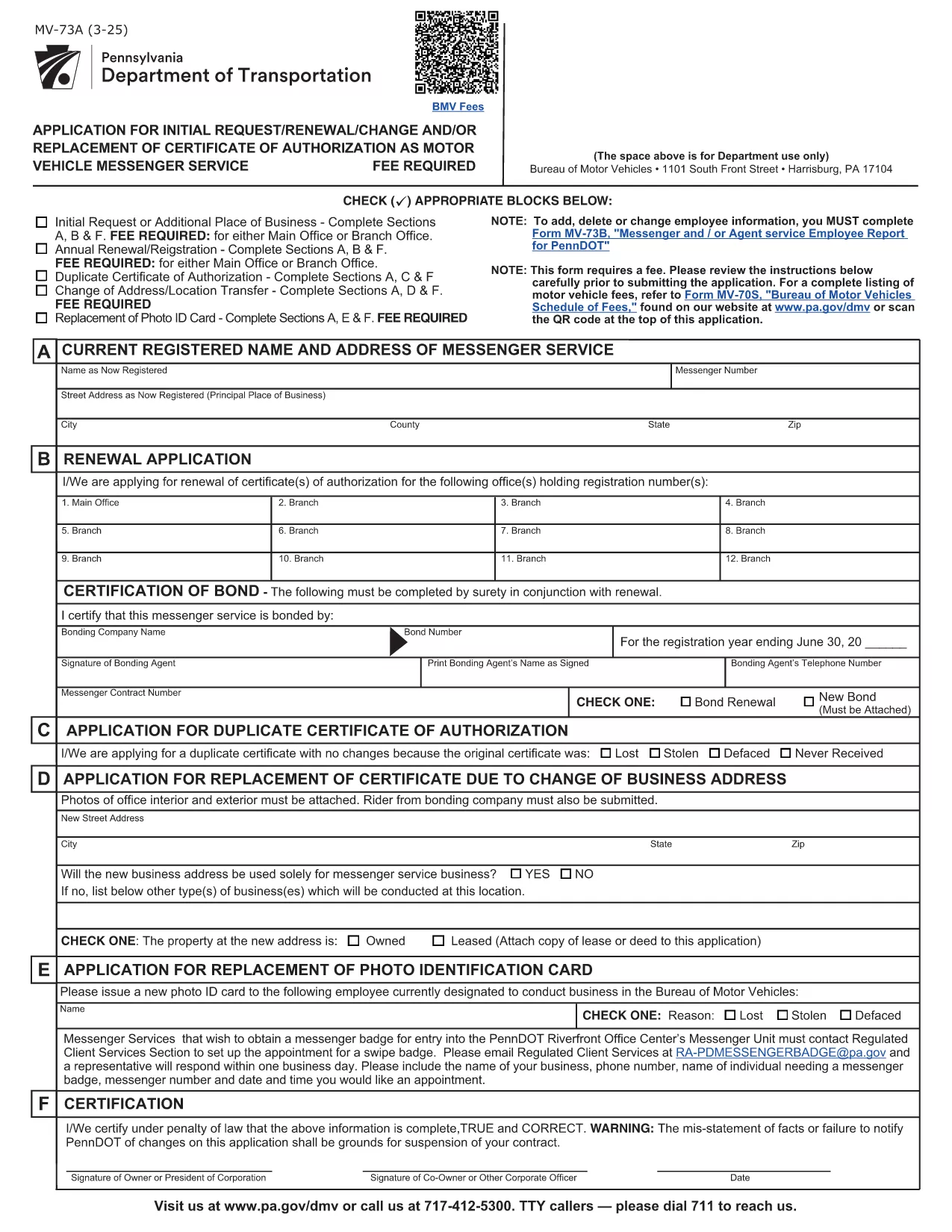
Form MV‑73A is the Pennsylvania Department of Transportation (PennDOT) “Messenger and/or Agent Service Employee Report.” It is required when a messenger, agent, or employee provides services on behalf of a motor vehicle dealer or a registered motor vehicle service provider. The form captures employee details, service type, and any fees associated with the service.

How to Complete the Fillable PDF

Instead of downloading the PDF and editing it manually, simply click the “Fill out this form” button on this page. The Formize PDF Filler app will load the official MV‑73A document, allowing you to type directly into each field, add dates, and select check‑boxes.

Once all required fields are completed, you can review, save, or print the form for submission.

Common Mistakes to Avoid

  • Leaving the “Signature” or “Date” fields blank – both are mandatory.
  • Entering an incorrect employee ID number; double‑check the ID on the employee badge.
  • Using a non‑fillable version of the PDF – the Formize version ensures every field is editable.
  • Forgetting to attach supporting documents (e.g., proof of agency registration).

Where to Submit the Form

After completing the form, submit it to the PennDOT office that issued the original request. Most dealers fax or mail the completed MV‑73A to their local PennDOT Motor Vehicle Services office. Check the instructions on the form for the correct address or fax number.

Download the Official PDF

If you prefer to keep a copy of the original, you can download the official, government‑issued PDF directly from the link below. This file is the source used by the Formize filler.

Download MV‑73A PDF

सामान्य प्रश्न
  • Do I need Adobe Acrobat to fill out MV‑73A?

    No. The Formize PDF Filler works in any modern browser, so you don’t need Adobe Acrobat or any extra software.

  • Is there a fee to submit Form MV‑73A?

    The form itself is free, but PennDOT may charge a processing fee depending on the service reported. Check the form’s instructions for details.

  • Can I save my progress and finish later?

    Yes. Use the “Save” button in the Formize filler to download a partially‑filled PDF, then reopen it later to continue.

  • What should I do if I make a mistake after submitting?

    Contact the PennDOT office where you submitted the form. They will advise whether you need to submit a corrected MV‑73A or an amendment.

  • Is the fillable PDF compatible with mobile devices?

    The Formize filler is responsive and works on smartphones and tablets, allowing you to complete the form on the go.

  • How long does it take PennDOT to process the form?

    Processing times vary, but most offices complete the review within 7‑10 business days after receipt.

  • Do I need a notary for the signature on MV‑73A?

    A notary is not required for MV‑73A unless specifically stated in the accompanying instructions.

कैसे करें

MV-73A को मुफ़्त में, ऑनलाइन 4 आसान स्टेप्स में कैसे भरें:

  1. 1
    Click the Fill‑out Button
    Press the “Fill out this form” button on the page to launch the Formize PDF Filler.
  2. 2
    Wait for the Filler to Load
    The fillable version of MV‑73A will appear in your browser. All fields become editable automatically.
  3. 3
    Enter Your Information
    Type directly into each field, select dates from the calendar widget, and check the appropriate boxes.
  4. 4
    Review, Save, and Submit
    After completing the form, review it for errors, then download or print the completed PDF to submit to PennDOT.
पीडीएफ फिलर एप तैयार करें
के बारे में

वाहन पंजीकरण प्रपत्र

MV-73A डीएमवी फॉर्मों में से एक है, जिसे मोटर वाहन विभाग फॉर्म के रूप में भी जाना जाता है, जो मोटर वाहनों से संबंधित विभिन्न लेनदेन और प्रक्रियाओं में उपयोग किए जाने वाले दस्तावेज हैं। DMV एक सरकारी एजेंसी है जो ड्राइवर लाइसेंसिंग, वाहन पंजीकरण और मोटर वाहन कानूनों को लागू करने के लिए जिम्मेदार है। उपलब्ध विशिष्ट DMV फॉर्म क्षेत्राधिकार के अनुसार भिन्न हो सकते हैं, लेकिन यहां कुछ सामान्य उदाहरण दिए गए हैं:

ड्राइवर लाइसेंस फॉर्म: इन फॉर्म का उपयोग ड्राइवर के लाइसेंस के लिए आवेदन करने या परिवर्तन या नवीनीकरण का अनुरोध करने के लिए किया जाता है। उन्हें आम तौर पर व्यक्तिगत जानकारी, पहचान के प्रमाण की आवश्यकता होती है, और इसमें चिकित्सा जानकारी या ड्राइविंग इतिहास के अनुभाग शामिल हो सकते हैं।

वाहन पंजीकरण फॉर्म: इन फॉर्मों का उपयोग डीएमवी के साथ मोटर वाहन को पंजीकृत करने के लिए किया जाता है। उन्हें वाहन की जानकारी, स्वामित्व विवरण और बीमा के प्रमाण की आवश्यकता होती है।

टाइटल ट्रांसफर फॉर्म: वाहन खरीदते या बेचते समय, इन फॉर्मों का उपयोग एक पक्ष से दूसरे पक्ष को स्वामित्व हस्तांतरित करने के लिए किया जाता है। उन्हें खरीदार, विक्रेता, वाहन विवरण के बारे में जानकारी की आवश्यकता होती है और इसमें बिक्री का बिल भी शामिल हो सकता है।

वाहन दायित्व प्रपत्र जारी करना: किसी वाहन के स्वामित्व को बेचते या स्थानांतरित करते समय, ये प्रपत्र डीएमवी को सूचित करते हैं कि विक्रेता अब वाहन के लिए जिम्मेदार नहीं है। यह विक्रेता को बिक्री के बाद वाहन से जुड़ी दुर्घटनाओं या घटनाओं के लिए दायित्व से बचाने में मदद करता है।

लाइसेंस प्लेट और पंजीकरण नवीनीकरण फॉर्म: इन फॉर्मों का उपयोग वाहन पंजीकरण को नवीनीकृत करने या नए लाइसेंस प्लेटों का अनुरोध करने के लिए किया जाता है। उन्हें आम तौर पर पंजीकृत मालिक, वर्तमान पंजीकरण विवरण और लागू शुल्क के भुगतान के बारे में जानकारी की आवश्यकता होती है।

ड्राइविंग रिकॉर्ड अनुरोध फॉर्म: ये फॉर्म व्यक्तियों को डीएमवी से अपने ड्राइविंग रिकॉर्ड का अनुरोध करने की अनुमति देते हैं, जो ड्राइविंग उल्लंघन, लाइसेंस स्थिति और अन्य प्रासंगिक विवरणों के बारे में जानकारी प्रदान करते हैं।

विशेषता या वैयक्तिकृत लाइसेंस प्लेट फॉर्म: इन फॉर्मों का उपयोग वैयक्तिकृत या विशिष्ट लाइसेंस प्लेटों के लिए आवेदन करने के लिए किया जाता है, जो व्यक्तियों को विशिष्ट पात्रों या डिज़ाइन के साथ अपनी लाइसेंस प्लेट को अनुकूलित करने की अनुमति देते हैं।

ये उन अनेक प्रपत्रों के कुछ उदाहरण हैं जो DMV के माध्यम से उपलब्ध हो सकते हैं। विशिष्ट फॉर्म और आवश्यकताएं क्षेत्राधिकार के अनुसार अलग-अलग हो सकती हैं, इसलिए अपनी विशेष जरूरतों के लिए सही फॉर्म प्राप्त करने के लिए स्थानीय डीएमवी वेबसाइट से परामर्श करना या डीएमवी कार्यालय में जाना महत्वपूर्ण है।

विशेषताएं

पीडीएफ भराव

पीडीएफ फॉर्म ऑनलाइन भरने का सबसे आसान तरीका

  • जल्दी से MV-73A भरें
    MV-73A को जल्दी से ऑनलाइन भरने का कोई तरीका खोज रहे हैं? हमारे ऑनलाइन नि:शुल्क पीडीएफ फॉर्म फिलर के साथ, आप एक मिनट से भी कम समय में इस पीडीएफ दस्तावेज़ को संपादित करने और भरने का तरीका जानेंगे।
  • ऑनलाइन पीडीएफ संपादक का उपयोग करना आसान है
    पीडीएफ फाइलों को प्रिंट करने से तंग आ गए हैं ताकि आप उन्हें फिर से स्कैन करने और उन्हें वापस भेजने से पहले संपादित कर सकें? PDF दस्तावेज़ों को निःशुल्क ऑनलाइन संपादित करें। समय और कागज बचाने के लिए हमारे ऑनलाइन पीडीएफ संपादक का प्रयोग करें।
  • महान उपकरण, सभी प्लेटफार्म
    आश्चर्य है कि मैक पर MV-73A कैसे भरें, या शायद पीडीएफ फिलर का मुफ्त में उपयोग कैसे करें? हमारे ऑनलाइन पीडीएफ टूल सभी प्लेटफॉर्म पर काम करते हैं।
  • सुरक्षित फ़ाइल भंडारण
    पूर्ण की गई "MV-73A" फ़ाइलें Amazon क्लाउड होस्टिंग द्वारा प्रबंधित एक सुरक्षित डेटाबेस में संग्रहीत की जाती हैं। आप कभी भी अपनी फाइलों को हमारे सिस्टम से हटा सकते हैं। किसी भी स्थिति में, ये फ़ाइलें 24 घंटे के बाद स्वतः हटा दी जाती हैं।
  • {कीवर्ड} से चैट करें
    Chatize पर "MV-73A" के साथ चैट करें, जो एक निःशुल्क पीडीएफ रीडर सहायक है। प्रश्न पूछें और "MV-73A" से उत्तर प्राप्त करें। बस ऊपर दस्तावेज़ के साथ चैट करें बटन पर क्लिक करें।

फ़िलिंग सत्र मिटाएँ

चयनित फ़िलिंग सत्र को मिटाएँ? इस स्थिति में, फ़ॉर्म को पूरा करने में आपकी प्रगति खो जाएगी।

संपादन सत्र हटाएँ

चयनित संपादन सत्र हटाएँ? इस स्थिति में, फ़ॉर्म बनाने और संपादित करने में आपकी प्रगति नष्ट हो जाएगी।