hamburger-menu icon
भाषा का चयन करें

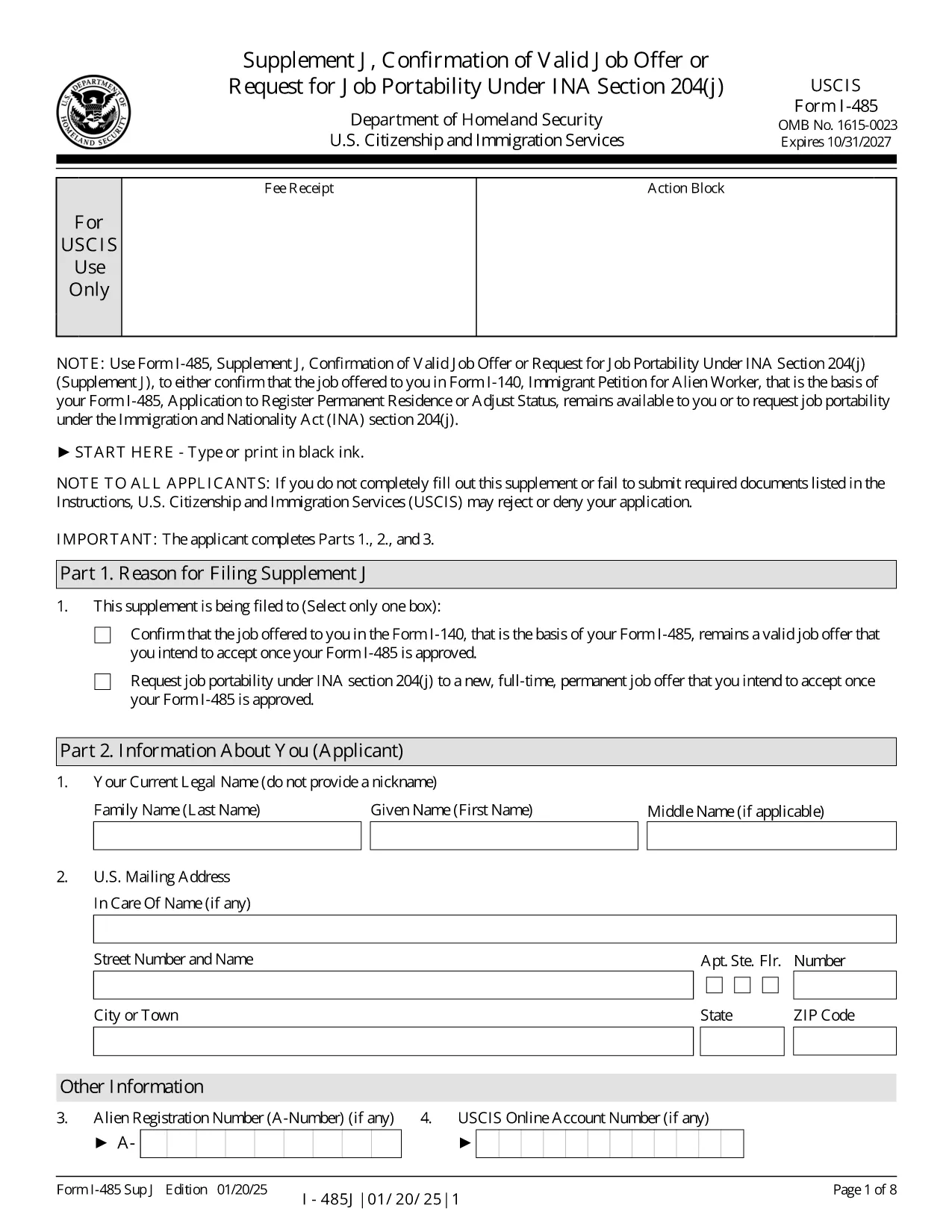
The I-485 Supplement J is the USCIS form used to confirm that the job offer listed in your Form I‑140 is still valid, or to request job portability under INA §204(j). This supplement is required for most employment‑based adjustment‑of‑status applicants.

Our fillable PDF version lets you enter data directly on the screen, eliminates the need for printing, and ensures the correct edition of the form (current as of 01/20/25). When you finish, you can download a completed PDF ready for submission by mail or online.

Key benefits of using the Formize fillable PDF:

  • Auto‑save while you type – no lost information.
  • Built‑in validation to reduce common errors.
  • One‑click download of the final, USCIS‑approved PDF.

Below you’ll find quick answers to the most common questions and a step‑by‑step guide to finish the form in seconds.

सामान्य प्रश्न
  • Do I have to file Supplement J with every I-485 application?

    You must file Supplement J when you submit an I‑485 based on a pending or approved I‑140 that requires a job offer, or when you request job portability after 180 days of pending status.

  • Can I submit Supplement J online?

    Yes, if you have an I‑485 receipt number that begins with “IOE” and you are filing only the supplement (no other forms). Otherwise, you must file by mail.

  • What is job portability under INA §204(j)?

    Job portability allows you to change to a new, full‑time, permanent job in the same or similar occupational classification after your I‑485 has been pending for at least 180 days.

  • What happens if I make a mistake on the form?

    USCIS may reject the supplement and request a corrected version. Using the fillable PDF reduces errors because the app validates entries before you download.

  • Do I need a lawyer’s signature on Supplement J?

    If an attorney or accredited representative prepared the application, they must sign the form using Form G‑28. The fillable PDF allows you to upload a scanned signature image.

  • Is there a filing fee for Supplement J?

    No separate fee is required for Supplement J. The fee is covered by the I‑485 filing fee.

  • Can I use an older edition of the form?

    USCIS only accepts the current edition (dated 01/20/25). Using an outdated version may lead to a rejection.

  • How long does it take USCIS to process Supplement J?

    Processing time varies, but USCIS typically reviews Supplement J within the same timeframe as the pending I‑485. They may request additional evidence if needed.

  • What if I change employers after filing Supplement J?

    You would need to file a new Supplement J to confirm the new job offer, provided the new role is in the same or similar occupational classification.

  • Where can I find the official instructions for Supplement J?

    The official instructions are available on the USCIS website and can be downloaded alongside the PDF form.

कैसे करें

I-485 Supplement J को मुफ़्त में, ऑनलाइन 5 आसान स्टेप्स में कैसे भरें:

  1. 1
    Click the Fillable Form Button
    Press the “Fill out this form” button on the page. The Formize PDF Filler app will open in a new tab.
  2. 2
    Wait for the Filler to Load
    The app loads the I‑485 Supplement J template. This only takes a few seconds.
  3. 3
    Enter Your Information
    Complete each field directly on the screen. Required fields are highlighted, and the filler validates dates, numbers, and signatures.
  4. 4
    Review and Save
    When all sections are complete, click “Review” to see a preview. If everything looks correct, click “Download Completed PDF.”
  5. 5
    Submit to USCIS
    Print the downloaded PDF (if filing by mail) or upload it to your USCIS online account, following the filing instructions on the USCIS website.
पीडीएफ फिलर एप तैयार करें
के बारे में

I-485 Supplement J टेम्पलेट

एक पीडीएफ दस्तावेज़ को देखने और भरने के लिए सुविधाओं के पारंपरिक सेट के साथ, एक वेब एप्लिकेशन और उत्तरदायी लेआउट के लाभों के साथ, आप I-485 Supplement J को मिनटों में पूरा कर सकते हैं।

विशेषताएं

पीडीएफ भराव

पीडीएफ फॉर्म ऑनलाइन भरने का सबसे आसान तरीका

  • जल्दी से I-485 Supplement J भरें
    I-485 Supplement J को जल्दी से ऑनलाइन भरने का कोई तरीका खोज रहे हैं? हमारे ऑनलाइन नि:शुल्क पीडीएफ फॉर्म फिलर के साथ, आप एक मिनट से भी कम समय में इस पीडीएफ दस्तावेज़ को संपादित करने और भरने का तरीका जानेंगे।
  • ऑनलाइन पीडीएफ संपादक का उपयोग करना आसान है
    पीडीएफ फाइलों को प्रिंट करने से तंग आ गए हैं ताकि आप उन्हें फिर से स्कैन करने और उन्हें वापस भेजने से पहले संपादित कर सकें? PDF दस्तावेज़ों को निःशुल्क ऑनलाइन संपादित करें। समय और कागज बचाने के लिए हमारे ऑनलाइन पीडीएफ संपादक का प्रयोग करें।
  • महान उपकरण, सभी प्लेटफार्म
    आश्चर्य है कि मैक पर I-485 Supplement J कैसे भरें, या शायद पीडीएफ फिलर का मुफ्त में उपयोग कैसे करें? हमारे ऑनलाइन पीडीएफ टूल सभी प्लेटफॉर्म पर काम करते हैं।
  • सुरक्षित फ़ाइल भंडारण
    पूर्ण की गई "I-485 Supplement J" फ़ाइलें Amazon क्लाउड होस्टिंग द्वारा प्रबंधित एक सुरक्षित डेटाबेस में संग्रहीत की जाती हैं। आप कभी भी अपनी फाइलों को हमारे सिस्टम से हटा सकते हैं। किसी भी स्थिति में, ये फ़ाइलें 24 घंटे के बाद स्वतः हटा दी जाती हैं।
  • {कीवर्ड} से चैट करें
    Chatize पर "I-485 Supplement J" के साथ चैट करें, जो एक निःशुल्क पीडीएफ रीडर सहायक है। प्रश्न पूछें और "I-485 Supplement J" से उत्तर प्राप्त करें। बस ऊपर दस्तावेज़ के साथ चैट करें बटन पर क्लिक करें।

फ़िलिंग सत्र मिटाएँ

चयनित फ़िलिंग सत्र को मिटाएँ? इस स्थिति में, फ़ॉर्म को पूरा करने में आपकी प्रगति खो जाएगी।

संपादन सत्र हटाएँ

चयनित संपादन सत्र हटाएँ? इस स्थिति में, फ़ॉर्म बनाने और संपादित करने में आपकी प्रगति नष्ट हो जाएगी।