
hamburger-menu icon
भाषा का चयन करें

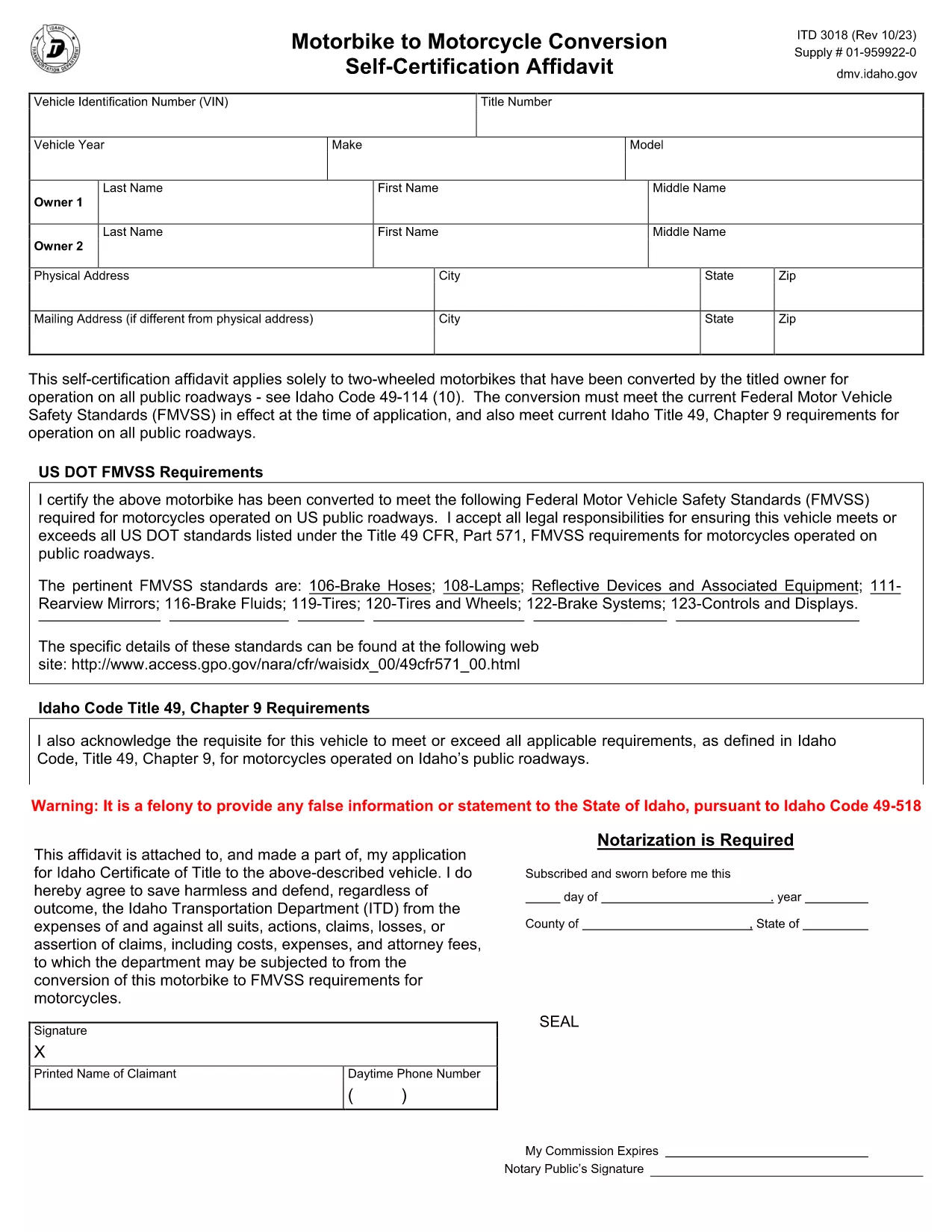
ITD 3018 Motorbike to Motorcycle Conversion Self‑Certification Affidavit

  1. भाषा अंग्रेज़ी
  2. देश अमेरीका
  3. गतिविधि वाहन पंजीकरण
  4. राज्य इडाहो
फार्म को भरो
ITD 3018 Motorbike to Motorcycle Conversion Self‑Certification Affidavit

The ITD 3018 is Idaho’s Motorbike to Motorcycle Conversion Self‑Certification Affidavit. It is required when a two‑wheeled motorbike is permanently converted to meet Idaho’s motorcycle standards and be registered for road use.

What Is the ITD 3018 Form?

This affidavit verifies that the conversion complies with Idaho Code 49‑114 (10) and all applicable Federal Motor Vehicle Safety Standards (FMVSS). The form must be signed by the vehicle’s owner and submitted to the Idaho Transportation Department (ITD) as part of the titling process.

Who Must Use This Form?

  • Owners who have modified a motorbike into a street‑legal motorcycle.
  • Dealers registering a converted vehicle for a customer.
  • Anyone needing an official record of the conversion for insurance or resale.

How to Fill Out ITD 3018 Online

With Formize’s fillable PDF, you can complete the affidavit directly in your browser—no extra software required. Follow the simple steps in the How‑to section below.

Common Mistakes & Tips

  • Missing signatures: Both the owner and a qualified inspector must sign.
  • Incorrect VIN: Double‑check the Vehicle Identification Number after the conversion.
  • Omitting supporting documents: Attach any receipts or inspection reports that prove compliance.

Download the Fillable PDF

Click the button below to open the ITD 3018 affidavit in Formize’s PDF Filler. The form loads instantly, letting you type, check boxes, and sign electronically.

सामान्य प्रश्न
  • Do I need a notary for the ITD 3018 affidavit?

    A notary is not required if you use an electronic signature within the Formize PDF Filler. However, a qualified inspector’s signature is mandatory.

  • Can I submit the PDF electronically to the ITD?

    Yes. Idaho Transportation Department accepts electronic PDFs for the ITD 3018 as long as they are fully completed and signed.

  • What if my conversion does not meet FMVSS standards?

    The affidavit will be rejected. Ensure the conversion complies with all applicable Federal Motor Vehicle Safety Standards before completing the form.

  • How long does the ITD 3018 processing take?

    Processing typically takes 5‑7 business days after submission, assuming all required documentation is attached.

  • Is there a fee for filing the ITD 3018?

    There is no separate fee for the affidavit itself, but standard titling and registration fees apply when you submit the form.

  • Can a dealer fill out the ITD 3018 on my behalf?

    Yes, dealers can complete the form for you, but the vehicle owner must still provide a signature.

  • What should I do if I make a mistake on the form?

    If you’re using the fillable PDF, simply delete the incorrect entry and re‑type. For printed copies, you must start a new form.

कैसे करें

ITD 3018 को मुफ़्त में, ऑनलाइन 5 आसान स्टेप्स में कैसे भरें:

  1. 1
    Click the "Fill out this form" button
    On the page, press the highlighted button to launch the Formize PDF Filler with the ITD 3018 affidavit loaded.
  2. 2
    Wait for the Formize PDF Filler to load
    The filler initializes in a few seconds. You’ll see a fully interactive PDF ready for input.
  3. 3
    Complete each section
    Enter the required information, select the appropriate check boxes, and use the built‑in signature field to sign electronically.
  4. 4
    Save or download the completed form
    When you’re done, click “Save” to store the file in your browser or “Download” to get a copy on your computer.
  5. 5
    Print or submit to ITD
    Print the signed PDF and attach it to your vehicle title application, or submit the electronic copy according to Idaho Transportation Department guidelines.
पीडीएफ फिलर एप तैयार करें
के बारे में

वाहन पंजीकरण प्रपत्र

यदि आप एक मोटर वाहन, ट्रेलर या नाव के मालिक हैं या पट्टे पर हैं, तो आपको अपने वाहन को कानूनी रूप से पंजीकृत और सुरक्षित रखने के लिए कुछ दायित्वों को पूरा करना होगा।

ITD 3018 वाहन पंजीकरण प्रपत्रों में से एक है जो ऐसे दस्तावेज़ हैं जिनका उपयोग प्रासंगिक राज्य या प्रांतीय प्राधिकरण के साथ मोटर वाहन को पंजीकृत करने के लिए किया जाता है। ये फॉर्म आमतौर पर तब आवश्यक होते हैं जब कोई व्यक्ति नया या इस्तेमाल किया हुआ वाहन खरीदता है या जब वे वाहन के साथ किसी नए राज्य या प्रांत में जाते हैं।

वाहन पंजीकरण के लिए आवश्यक सटीक आवश्यकताएं और फॉर्म स्थान के अनुसार भिन्न हो सकते हैं, लेकिन आम तौर पर, प्रक्रिया में वाहन, मालिक और वाहन पर किसी भी ग्रहणाधिकार के बारे में जानकारी प्रदान करना शामिल होता है।

पंजीकरण फॉर्म और शुल्क जमा करने के बाद, राज्य या प्रांतीय प्राधिकरण वाहन के मालिक को पंजीकरण प्रमाणपत्र या लाइसेंस प्लेट जारी करेगा। यह पंजीकरण वाहन को सार्वजनिक सड़कों और राजमार्गों पर कानूनी रूप से संचालित करने की अनुमति देता है।

विशेषताएं

पीडीएफ भराव

पीडीएफ फॉर्म ऑनलाइन भरने का सबसे आसान तरीका

  • जल्दी से ITD 3018 भरें
    ITD 3018 को जल्दी से ऑनलाइन भरने का कोई तरीका खोज रहे हैं? हमारे ऑनलाइन नि:शुल्क पीडीएफ फॉर्म फिलर के साथ, आप एक मिनट से भी कम समय में इस पीडीएफ दस्तावेज़ को संपादित करने और भरने का तरीका जानेंगे।
  • ऑनलाइन पीडीएफ संपादक का उपयोग करना आसान है
    पीडीएफ फाइलों को प्रिंट करने से तंग आ गए हैं ताकि आप उन्हें फिर से स्कैन करने और उन्हें वापस भेजने से पहले संपादित कर सकें? PDF दस्तावेज़ों को निःशुल्क ऑनलाइन संपादित करें। समय और कागज बचाने के लिए हमारे ऑनलाइन पीडीएफ संपादक का प्रयोग करें।
  • महान उपकरण, सभी प्लेटफार्म
    आश्चर्य है कि मैक पर ITD 3018 कैसे भरें, या शायद पीडीएफ फिलर का मुफ्त में उपयोग कैसे करें? हमारे ऑनलाइन पीडीएफ टूल सभी प्लेटफॉर्म पर काम करते हैं।
  • सुरक्षित फ़ाइल भंडारण
    पूर्ण की गई "ITD 3018" फ़ाइलें Amazon क्लाउड होस्टिंग द्वारा प्रबंधित एक सुरक्षित डेटाबेस में संग्रहीत की जाती हैं। आप कभी भी अपनी फाइलों को हमारे सिस्टम से हटा सकते हैं। किसी भी स्थिति में, ये फ़ाइलें 24 घंटे के बाद स्वतः हटा दी जाती हैं।
  • {कीवर्ड} से चैट करें
    Chatize पर "ITD 3018" के साथ चैट करें, जो एक निःशुल्क पीडीएफ रीडर सहायक है। प्रश्न पूछें और "ITD 3018" से उत्तर प्राप्त करें। बस ऊपर दस्तावेज़ के साथ चैट करें बटन पर क्लिक करें।

फ़िलिंग सत्र मिटाएँ

चयनित फ़िलिंग सत्र को मिटाएँ? इस स्थिति में, फ़ॉर्म को पूरा करने में आपकी प्रगति खो जाएगी।

संपादन सत्र हटाएँ

चयनित संपादन सत्र हटाएँ? इस स्थिति में, फ़ॉर्म बनाने और संपादित करने में आपकी प्रगति नष्ट हो जाएगी।