
hamburger-menu icon
भाषा का चयन करें

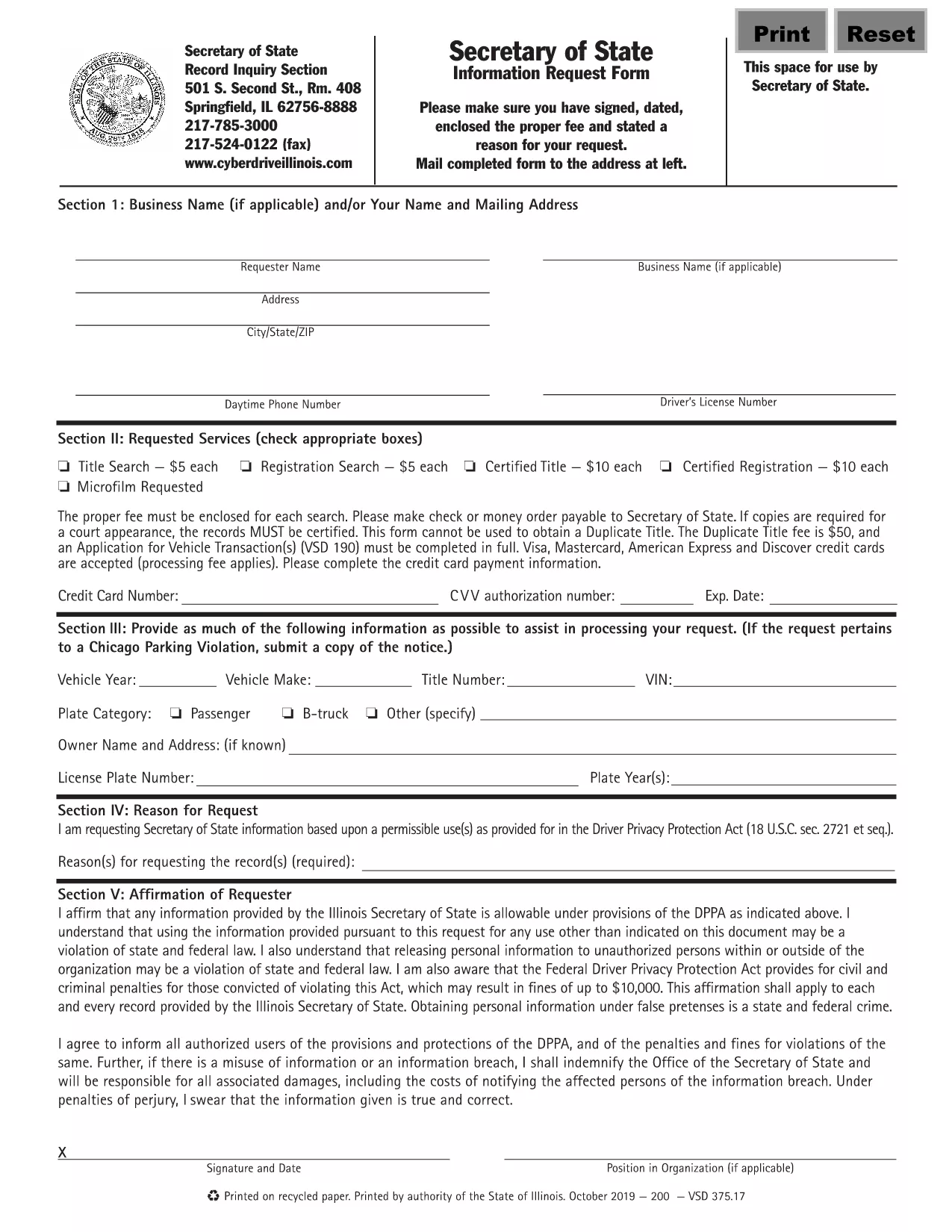
Illinois VSD 375 Information Request Form (Fillable PDF)

  1. भाषा अंग्रेज़ी
  2. देश अमेरीका
  3. गतिविधि वाहन पंजीकरण
  4. राज्य इलिनोइस
फार्म को भरो
Illinois VSD 375 Information Request Form (Fillable PDF)

The VSD 375 is the Illinois Secretary of State’s official Information Request Form. It is used to obtain vehicle‑related records such as ownership history, title status, and registration details. This page provides a direct link to the fillable VSD 375 PDF and step‑by‑step instructions for completing it online with Formize’s PDF Filler.

What is the VSD 375 Form?

The VSD 375 form is required whenever you need official information from the Illinois Secretary of State’s Vehicle Services Division. Typical uses include:

  • Verifying ownership before purchasing a used vehicle
  • Checking title history for lien information
  • Obtaining registration status for legal or insurance purposes

How to Fill Out the VSD 375 Online

Instead of printing, scanning, or editing the PDF manually, simply click the “Fill out this form” button on this page. The Formize PDF Filler will load in your browser, allowing you to complete every field, add an electronic signature, and download the finished document.

Common Mistakes to Avoid

  • Missing signatures: The form is invalid without a signed and dated request.
  • Incorrect VIN or plate number: Double‑check the numbers for accuracy to prevent processing delays.
  • Omitting the fee: Include the required filing fee with your submission, as instructed on the form.

Where to Submit the Completed Form

After you have filled, signed, and saved the PDF, you can:

  • Mail it to the address listed on the form’s last page.
  • Deliver it in person to any Illinois Secretary of State office.

Processing times vary; in‑person delivery is usually faster.

सामान्य प्रश्न
  • What does VSD 375 stand for?

    VSD 375 is the Illinois Secretary of State’s Vehicle Services Division Information Request Form used to obtain official vehicle records.

  • Is the form free to download?

    Yes, the fillable PDF is free to download. However, a filing fee may be required when you submit the request.

  • Can I submit the form electronically?

    The Illinois Secretary of State currently requires a signed paper copy. You can fill it out online, then print, sign, and mail it.

  • How long does it take to receive the requested records?

    Processing typically takes 5‑10 business days by mail; in‑person delivery can be faster.

  • What information do I need to provide?

    You must include your name, address, contact details, the vehicle’s VIN or license plate number, and the specific type of information you are requesting.

  • Do I need a notary for the VSD 375 form?

    No notary is required. A regular handwritten or electronic signature is sufficient.

  • What if I make a mistake after submitting?

    If you notice an error, contact the Illinois Secretary of State office immediately to request a correction or submit a new form.

कैसे करें

VSD 375 को मुफ़्त में, ऑनलाइन 5 आसान स्टेप्स में कैसे भरें:

  1. 1
    Click the Fill‑out Button
    Press the “Fill out this form” button on this page to launch Formize’s PDF Filler in a new tab.
  2. 2
    Wait for the Filler to Load
    The Formize PDF Filler loads automatically; this may take a few seconds depending on your connection.
  3. 3
    Complete Each Field
    Enter your contact information, vehicle details (VIN, plate number, make, model), and specify the records you need.
  4. 4
    Add Your Electronic Signature
    Use the built‑in signature tool to sign and date the form. The signature is legally binding.
  5. 5
    Download or Submit
    Save the completed PDF to your device, then mail or deliver it to the Illinois Secretary of State office as instructed.
पीडीएफ फिलर एप तैयार करें
के बारे में

वाहन पंजीकरण प्रपत्र

VSD 375 वाहन पंजीकरण फॉर्मों में से एक है जो संबंधित सरकारी प्राधिकरण, आमतौर पर मोटर वाहन विभाग (डीएमवी) या समकक्ष एजेंसी के साथ मोटर वाहन को पंजीकृत करने के लिए उपयोग किए जाने वाले दस्तावेज हैं। इन फॉर्मों की आवश्यकता तब होती है जब कोई व्यक्ति नया या प्रयुक्त वाहन खरीदता है, वाहन का स्वामित्व स्थानांतरित करता है, या वाहन के साथ नए क्षेत्राधिकार में जाता है।

विशिष्ट वाहन पंजीकरण फॉर्म क्षेत्राधिकार के अनुसार भिन्न हो सकते हैं, लेकिन उन्हें आम तौर पर निम्नलिखित जानकारी की आवश्यकता होती है:

वाहन जानकारी: इसमें वाहन के बारे में विवरण शामिल हैं, जैसे मेक, मॉडल, वर्ष, वाहन पहचान संख्या (वीआईएन), और ओडोमीटर रीडिंग।

मालिक की जानकारी: फॉर्म में वाहन के मालिक के बारे में जानकारी की आवश्यकता होगी, जिसमें उनका नाम, पता, संपर्क जानकारी और ड्राइवर का लाइसेंस नंबर शामिल है।

स्वामित्व का प्रमाण: परिस्थितियों के आधार पर, स्वामित्व के प्रमाण की आवश्यकता हो सकती है, जैसे शीर्षक प्रमाण पत्र, बिक्री का बिल, या निर्माता का मूल प्रमाण पत्र (नए वाहनों के लिए)।

बीमा जानकारी: वैध वाहन बीमा कवरेज का प्रमाण आम तौर पर आवश्यक होता है। इसमें बीमा पॉलिसी नंबर, कवरेज की तारीखें और बीमा कंपनी का विवरण प्रदान करना शामिल हो सकता है।

फीस का भुगतान: वाहन पंजीकरण में विभिन्न शुल्कों का भुगतान शामिल है, जैसे पंजीकरण शुल्क, कर और संभवतः क्षेत्राधिकार के लिए विशिष्ट अन्य शुल्क।

इन बुनियादी आवश्यकताओं के अलावा, कुछ न्यायालयों में अतिरिक्त फॉर्म या दस्तावेज़ीकरण आवश्यकताएँ हो सकती हैं। उदाहरण के लिए, कुछ क्षेत्रों में उत्सर्जन परीक्षण के परिणाम, सुरक्षा निरीक्षण या निवास का प्रमाण आवश्यक हो सकता है।

एक बार वाहन पंजीकरण फॉर्म पूरा हो जाने और जमा हो जाने के बाद, सरकारी प्राधिकरण एक पंजीकरण प्रमाणपत्र, लाइसेंस प्लेट और पंजीकरण स्टिकर जारी करेगा। ये दस्तावेज़ दर्शाते हैं कि वाहन कानूनी रूप से पंजीकृत है और सार्वजनिक सड़कों पर संचालन के लिए अधिकृत है।

यह ध्यान रखना महत्वपूर्ण है कि वाहन पंजीकरण आवश्यकताएँ क्षेत्राधिकार के अनुसार काफी भिन्न हो सकती हैं। इसलिए, आपके स्थान पर लागू विशिष्ट रूपों और प्रक्रियाओं के लिए स्थानीय डीएमवी या समकक्ष एजेंसी से परामर्श करने की अनुशंसा की जाती है।

विशेषताएं

पीडीएफ भराव

पीडीएफ फॉर्म ऑनलाइन भरने का सबसे आसान तरीका

  • जल्दी से VSD 375 भरें
    VSD 375 को जल्दी से ऑनलाइन भरने का कोई तरीका खोज रहे हैं? हमारे ऑनलाइन नि:शुल्क पीडीएफ फॉर्म फिलर के साथ, आप एक मिनट से भी कम समय में इस पीडीएफ दस्तावेज़ को संपादित करने और भरने का तरीका जानेंगे।
  • ऑनलाइन पीडीएफ संपादक का उपयोग करना आसान है
    पीडीएफ फाइलों को प्रिंट करने से तंग आ गए हैं ताकि आप उन्हें फिर से स्कैन करने और उन्हें वापस भेजने से पहले संपादित कर सकें? PDF दस्तावेज़ों को निःशुल्क ऑनलाइन संपादित करें। समय और कागज बचाने के लिए हमारे ऑनलाइन पीडीएफ संपादक का प्रयोग करें।
  • महान उपकरण, सभी प्लेटफार्म
    आश्चर्य है कि मैक पर VSD 375 कैसे भरें, या शायद पीडीएफ फिलर का मुफ्त में उपयोग कैसे करें? हमारे ऑनलाइन पीडीएफ टूल सभी प्लेटफॉर्म पर काम करते हैं।
  • सुरक्षित फ़ाइल भंडारण
    पूर्ण की गई "VSD 375" फ़ाइलें Amazon क्लाउड होस्टिंग द्वारा प्रबंधित एक सुरक्षित डेटाबेस में संग्रहीत की जाती हैं। आप कभी भी अपनी फाइलों को हमारे सिस्टम से हटा सकते हैं। किसी भी स्थिति में, ये फ़ाइलें 24 घंटे के बाद स्वतः हटा दी जाती हैं।
  • {कीवर्ड} से चैट करें
    Chatize पर "VSD 375" के साथ चैट करें, जो एक निःशुल्क पीडीएफ रीडर सहायक है। प्रश्न पूछें और "VSD 375" से उत्तर प्राप्त करें। बस ऊपर दस्तावेज़ के साथ चैट करें बटन पर क्लिक करें।

फ़िलिंग सत्र मिटाएँ

चयनित फ़िलिंग सत्र को मिटाएँ? इस स्थिति में, फ़ॉर्म को पूरा करने में आपकी प्रगति खो जाएगी।

संपादन सत्र हटाएँ

चयनित संपादन सत्र हटाएँ? इस स्थिति में, फ़ॉर्म बनाने और संपादित करने में आपकी प्रगति नष्ट हो जाएगी।