
hamburger-menu icon
भाषा का चयन करें

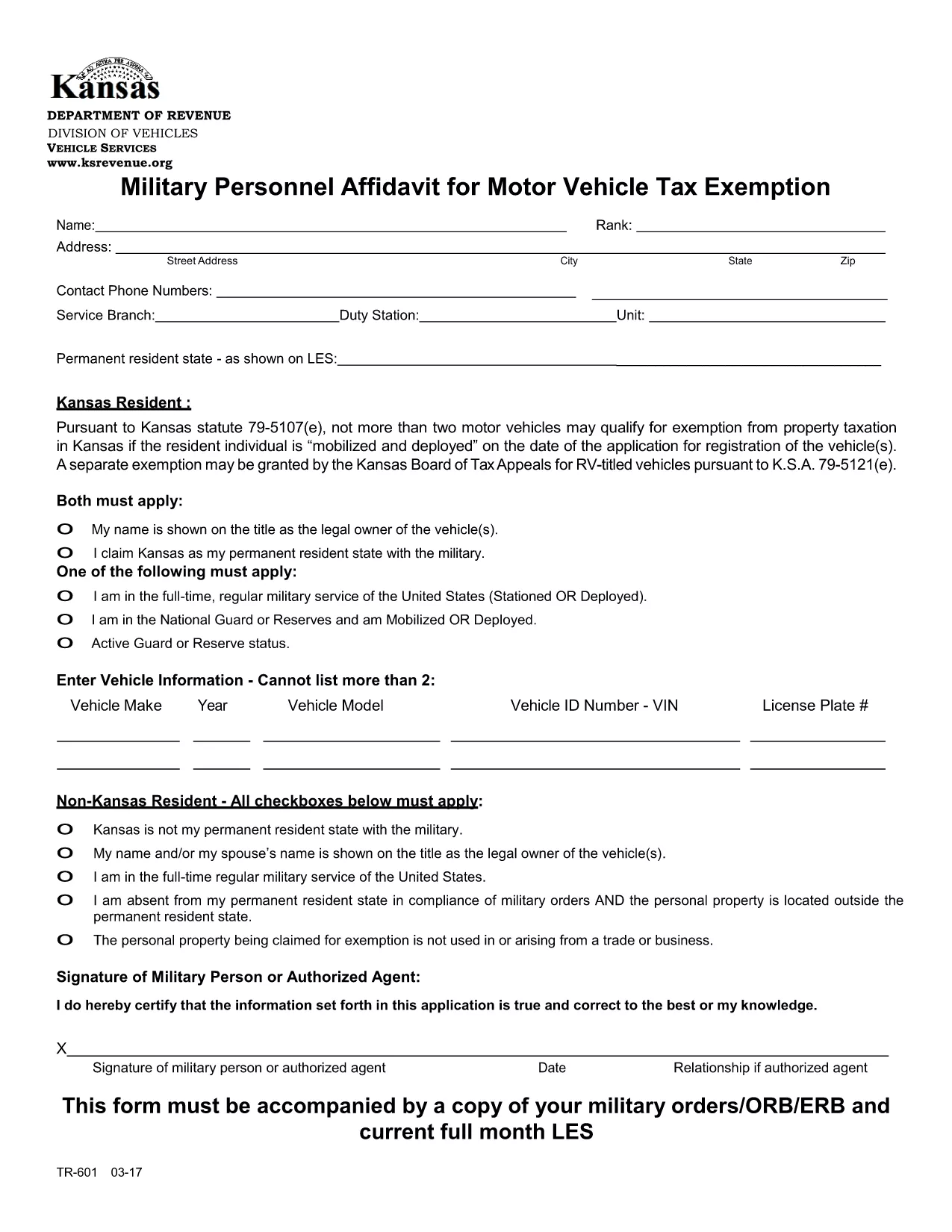
TR‑601 Kansas Military Personnel Affidavit (Fillable PDF)

  1. देश अमेरीका
  2. भाषा अंग्रेज़ी
  3. गतिविधि वाहन पंजीकरण
  4. राज्य केंसास
फार्म को भरो
TR‑601 Kansas Military Personnel Affidavit (Fillable PDF)

The TR‑601 Military Personnel Affidavit is the official Kansas form used by active‑duty service members to claim exemption from motor vehicle property tax. The form must be filed with the Kansas Department of Revenue (or your local county clerk) together with a copy of your military orders.

What Is the TR‑601 Affidavit?

This affidavit verifies that you are a member of the United States Armed Forces and that the vehicle(s) you own qualify for the two‑vehicle exemption under Kansas Statute 79‑5107(e)(1). The form requests basic personal information, vehicle details, and a copy of your orders (ORB/ERB).

How to Complete the Form in Seconds

Instead of downloading, printing, and hand‑filling the PDF, use the Formize fillable PDF feature:

  1. Click the Fill out this form button on this page.
  2. Wait a few seconds for the Formize PDF Filler app to load.
  3. Enter your information directly into the on‑screen fields.
  4. Upload a scanned copy of your military orders.
  5. Review, then click Submit to download a completed PDF you can print or email.

Common Mistakes & Tips for a Smooth Submission

  • Missing orders: The affidavit is invalid without a current copy of your ORB/ERB.
  • Vehicle count: Kansas only allows exemption for up to two qualifying vehicles.
  • Signature: Use an electronic signature in Formize or sign the printed copy before submission.
  • Incorrect VIN: Double‑check the Vehicle Identification Number; a typo will delay processing.

Where to Submit Your Completed Affidavit

After completing the form, you can:

  • Mail the PDF to your county treasurer’s office.
  • Upload it through the Kansas Department of Revenue’s online portal.
  • Deliver a printed copy in person at the local county clerk.

Keep a copy for your records in case the agency requests additional documentation.

सामान्य प्रश्न
  • Who is eligible to use the TR‑601 affidavit?

    Active‑duty members of the U.S. Armed Forces who own up to two motor vehicles that are registered in Kansas.

  • Do I need to attach my military orders?

    Yes. A current copy of your ORB/ERB (or other official orders) must accompany the affidavit.

  • Can I claim exemption for more than two vehicles?

    No. Kansas law limits the exemption to a maximum of two qualifying vehicles per service member.

  • Is an electronic signature accepted?

    Yes. The Formize PDF Filler lets you add an electronic signature, which is accepted by the Kansas Department of Revenue.

  • How long does it take for the county to process the affidavit?

    Processing times vary by county, but most offices review the submission within 7‑10 business days.

  • What if I make a mistake after submitting?

    Contact your county treasurer’s office immediately. You may need to submit a corrected affidavit with a new signature.

  • Do I need to re‑file the affidavit each year?

    Yes. The exemption must be renewed annually, and you must provide updated orders if your status changes.

  • Can I file the form online without printing?

    Yes. Once you complete the form in Formize, you can download the PDF and email it directly to the appropriate agency.

कैसे करें

TR-601 को मुफ़्त में, ऑनलाइन 5 आसान स्टेप्स में कैसे भरें:

  1. 1
    Open the Fillable Form
    Click the "Fill out this form" button on this page to launch the Formize PDF Filler.
  2. 2
    Load the PDF Filler
    Wait a few seconds while the Formize app loads the TR‑601 PDF in your browser.
  3. 3
    Enter Your Information
    Type your personal details, vehicle information, and upload a scanned copy of your military orders.
  4. 4
    Review and Sign
    Check all fields for accuracy, add an electronic signature, and click "Submit" to generate the completed PDF.
  5. 5
    Download or Print
    Save the finished affidavit to your device, print it, and send it to the appropriate Kansas agency.
पीडीएफ फिलर एप तैयार करें
के बारे में

वाहन पंजीकरण प्रपत्र

TR-601 वाहन पंजीकरण फॉर्मों में से एक है जो संबंधित सरकारी प्राधिकरण, आमतौर पर मोटर वाहन विभाग (डीएमवी) या समकक्ष एजेंसी के साथ मोटर वाहन को पंजीकृत करने के लिए उपयोग किए जाने वाले दस्तावेज हैं। इन फॉर्मों की आवश्यकता तब होती है जब कोई व्यक्ति नया या प्रयुक्त वाहन खरीदता है, वाहन का स्वामित्व स्थानांतरित करता है, या वाहन के साथ नए क्षेत्राधिकार में जाता है।

विशिष्ट वाहन पंजीकरण फॉर्म क्षेत्राधिकार के अनुसार भिन्न हो सकते हैं, लेकिन उन्हें आम तौर पर निम्नलिखित जानकारी की आवश्यकता होती है:

वाहन जानकारी: इसमें वाहन के बारे में विवरण शामिल हैं, जैसे मेक, मॉडल, वर्ष, वाहन पहचान संख्या (वीआईएन), और ओडोमीटर रीडिंग।

मालिक की जानकारी: फॉर्म में वाहन के मालिक के बारे में जानकारी की आवश्यकता होगी, जिसमें उनका नाम, पता, संपर्क जानकारी और ड्राइवर का लाइसेंस नंबर शामिल है।

स्वामित्व का प्रमाण: परिस्थितियों के आधार पर, स्वामित्व के प्रमाण की आवश्यकता हो सकती है, जैसे शीर्षक प्रमाण पत्र, बिक्री का बिल, या निर्माता का मूल प्रमाण पत्र (नए वाहनों के लिए)।

बीमा जानकारी: वैध वाहन बीमा कवरेज का प्रमाण आम तौर पर आवश्यक होता है। इसमें बीमा पॉलिसी नंबर, कवरेज की तारीखें और बीमा कंपनी का विवरण प्रदान करना शामिल हो सकता है।

फीस का भुगतान: वाहन पंजीकरण में विभिन्न शुल्कों का भुगतान शामिल है, जैसे पंजीकरण शुल्क, कर और संभवतः क्षेत्राधिकार के लिए विशिष्ट अन्य शुल्क।

इन बुनियादी आवश्यकताओं के अलावा, कुछ न्यायालयों में अतिरिक्त फॉर्म या दस्तावेज़ीकरण आवश्यकताएँ हो सकती हैं। उदाहरण के लिए, कुछ क्षेत्रों में उत्सर्जन परीक्षण के परिणाम, सुरक्षा निरीक्षण या निवास का प्रमाण आवश्यक हो सकता है।

एक बार वाहन पंजीकरण फॉर्म पूरा हो जाने और जमा हो जाने के बाद, सरकारी प्राधिकरण एक पंजीकरण प्रमाणपत्र, लाइसेंस प्लेट और पंजीकरण स्टिकर जारी करेगा। ये दस्तावेज़ दर्शाते हैं कि वाहन कानूनी रूप से पंजीकृत है और सार्वजनिक सड़कों पर संचालन के लिए अधिकृत है।

यह ध्यान रखना महत्वपूर्ण है कि वाहन पंजीकरण आवश्यकताएँ क्षेत्राधिकार के अनुसार काफी भिन्न हो सकती हैं। इसलिए, आपके स्थान पर लागू विशिष्ट रूपों और प्रक्रियाओं के लिए स्थानीय डीएमवी या समकक्ष एजेंसी से परामर्श करने की अनुशंसा की जाती है।

विशेषताएं

पीडीएफ भराव

पीडीएफ फॉर्म ऑनलाइन भरने का सबसे आसान तरीका

  • जल्दी से TR-601 भरें
    TR-601 को जल्दी से ऑनलाइन भरने का कोई तरीका खोज रहे हैं? हमारे ऑनलाइन नि:शुल्क पीडीएफ फॉर्म फिलर के साथ, आप एक मिनट से भी कम समय में इस पीडीएफ दस्तावेज़ को संपादित करने और भरने का तरीका जानेंगे।
  • ऑनलाइन पीडीएफ संपादक का उपयोग करना आसान है
    पीडीएफ फाइलों को प्रिंट करने से तंग आ गए हैं ताकि आप उन्हें फिर से स्कैन करने और उन्हें वापस भेजने से पहले संपादित कर सकें? PDF दस्तावेज़ों को निःशुल्क ऑनलाइन संपादित करें। समय और कागज बचाने के लिए हमारे ऑनलाइन पीडीएफ संपादक का प्रयोग करें।
  • महान उपकरण, सभी प्लेटफार्म
    आश्चर्य है कि मैक पर TR-601 कैसे भरें, या शायद पीडीएफ फिलर का मुफ्त में उपयोग कैसे करें? हमारे ऑनलाइन पीडीएफ टूल सभी प्लेटफॉर्म पर काम करते हैं।
  • सुरक्षित फ़ाइल भंडारण
    पूर्ण की गई "TR-601" फ़ाइलें Amazon क्लाउड होस्टिंग द्वारा प्रबंधित एक सुरक्षित डेटाबेस में संग्रहीत की जाती हैं। आप कभी भी अपनी फाइलों को हमारे सिस्टम से हटा सकते हैं। किसी भी स्थिति में, ये फ़ाइलें 24 घंटे के बाद स्वतः हटा दी जाती हैं।
  • {कीवर्ड} से चैट करें
    Chatize पर "TR-601" के साथ चैट करें, जो एक निःशुल्क पीडीएफ रीडर सहायक है। प्रश्न पूछें और "TR-601" से उत्तर प्राप्त करें। बस ऊपर दस्तावेज़ के साथ चैट करें बटन पर क्लिक करें।

फ़िलिंग सत्र मिटाएँ

चयनित फ़िलिंग सत्र को मिटाएँ? इस स्थिति में, फ़ॉर्म को पूरा करने में आपकी प्रगति खो जाएगी।

संपादन सत्र हटाएँ

चयनित संपादन सत्र हटाएँ? इस स्थिति में, फ़ॉर्म बनाने और संपादित करने में आपकी प्रगति नष्ट हो जाएगी।