
hamburger-menu icon
भाषा का चयन करें

Fillable Missouri Form 4803 – Request for Information

  1. भाषा अंग्रेज़ी
  2. देश अमेरीका
  3. गतिविधि वाहन पंजीकरण
  4. राज्य मिसौरी
फार्म को भरो
Fillable Missouri Form 4803 – Request for Information

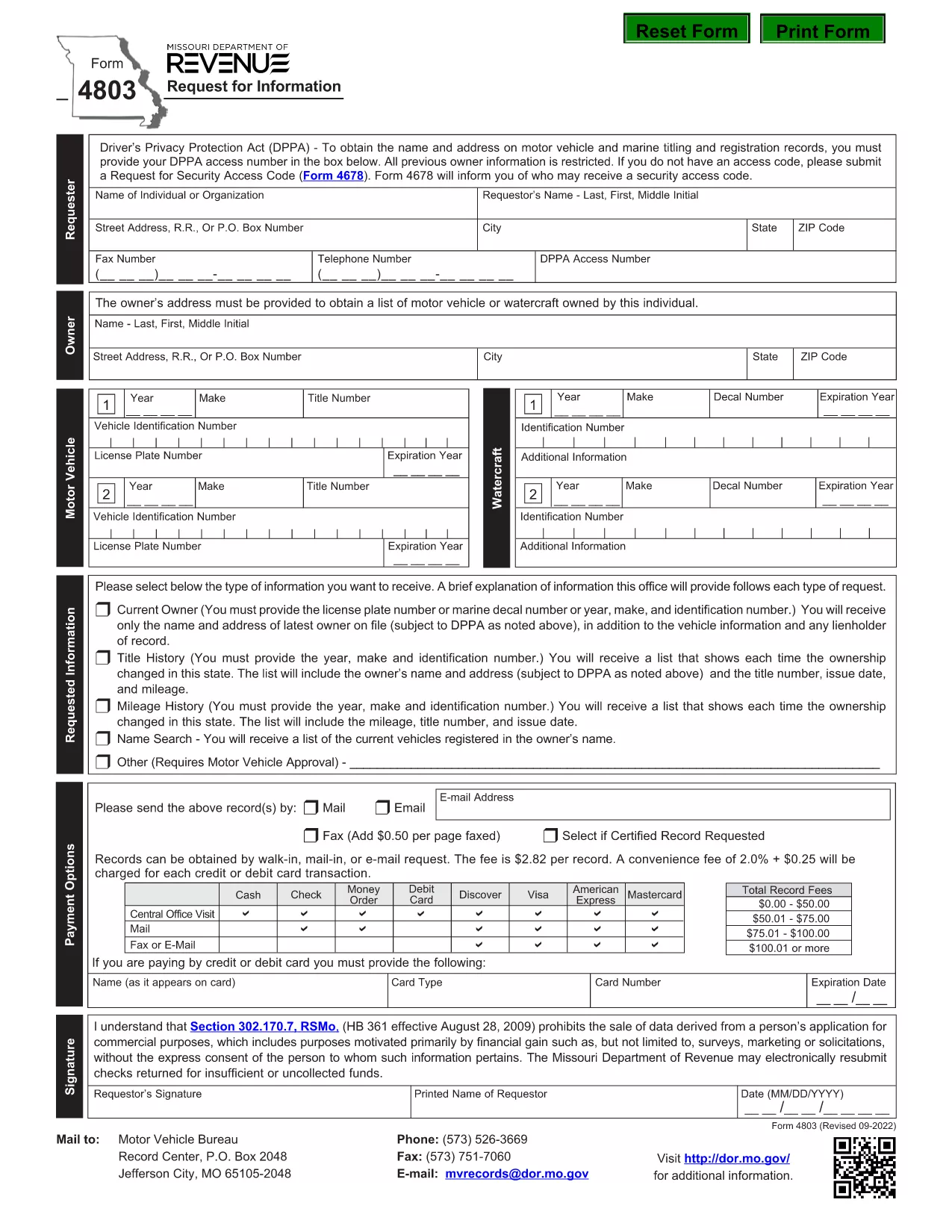
Missouri Form 4803 is the official “Request for Information” used by the Missouri Department of Revenue. Whether you need tax records, payment history, or other revenue‑related data, this form lets you request the details in writing.

What Is Missouri Form 4803?

The form is a simple one‑page request that asks for your identifying information, the type of data you need, and a brief justification. It is commonly used by individuals, businesses, and professionals who need official records for audits, legal matters, or personal review.

How to Complete the Fillable PDF

Instead of printing and manually filling the form, you can fill it directly in your browser using Formize’s online PDF filler. Follow the steps below for a smooth experience.

Common Mistakes to Avoid

  • Leaving required fields blank – the filler will highlight missing information.
  • Using an outdated address – double‑check your mailing address before submitting.
  • Submitting the wrong request type – each checkbox corresponds to a specific information category.

Where to Submit the Completed Form

After filling out the form, you can either download the completed PDF and mail it to the address listed on the form, or submit it electronically if the Department of Revenue provides an online portal.

Why Use Formize PDF Filler?

Formize loads the official PDF instantly, preserves all formatting, and saves your entries securely. No extra software is required, and you can download the finished document in seconds.

सामान्य प्रश्न
  • Do I need a PDF reader to fill Form 4803?

    No. Formize’s online filler works in any modern browser, so you don’t need Adobe Acrobat or any other software.

  • Is the fillable version the same as the official paper form?

    Yes. The PDF is the exact official form from the Missouri Department of Revenue; only the input method changes.

  • Can I edit the form after I download it?

    Once you download the completed PDF, you can reopen it in any PDF editor, but all required fields must already be filled for the Department to accept it.

  • How long does it take for the Department to respond?

    Response times vary, but the Department typically replies within 15‑30 business days after receiving a complete Form 4803.

  • What if I make a mistake while filling the form?

    Simply use the “Clear” button in the filler to reset a field, or click “Reset Form” to start over before saving.

  • Is there a fee to submit Form 4803?

    There is no fee to request information using Form 4803, but the Department may charge for copying or certified copies of records.

  • Can I submit Form 4803 electronically?

    If the Missouri Department of Revenue offers an e‑submission portal, you can upload the completed PDF there. Otherwise, mail the printed form to the address on the document.

कैसे करें

Form 4803 को मुफ़्त में, ऑनलाइन 5 आसान स्टेप्स में कैसे भरें:

  1. 1
    Click the Fill Out This Form Button
    On the Formize page, locate the bright “Fill out this form” button and click it. The PDF loads directly in the browser.
  2. 2
    Wait for the Formize PDF Filler to Load
    A loading bar appears while the secure PDF filler initializes. This usually takes only a few seconds.
  3. 3
    Enter Your Information
    Type directly into each field. Required fields are marked with a red asterisk and will be highlighted if left empty.
  4. 4
    Review and Save
    Use the preview button to double‑check your entries. When satisfied, click “Save” to download the completed PDF to your device.
  5. 5
    Submit the Form
    Print and mail the saved PDF to the address on the form, or follow any electronic submission instructions provided by the Missouri Department of Revenue.
पीडीएफ फिलर एप तैयार करें
के बारे में

वाहन पंजीकरण प्रपत्र

यदि आप एक मोटर वाहन, ट्रेलर या नाव के मालिक हैं या पट्टे पर हैं, तो आपको अपने वाहन को कानूनी रूप से पंजीकृत और सुरक्षित रखने के लिए कुछ दायित्वों को पूरा करना होगा।

Form 4803 वाहन पंजीकरण प्रपत्रों में से एक है जो ऐसे दस्तावेज़ हैं जिनका उपयोग प्रासंगिक राज्य या प्रांतीय प्राधिकरण के साथ मोटर वाहन को पंजीकृत करने के लिए किया जाता है। ये फॉर्म आमतौर पर तब आवश्यक होते हैं जब कोई व्यक्ति नया या इस्तेमाल किया हुआ वाहन खरीदता है या जब वे वाहन के साथ किसी नए राज्य या प्रांत में जाते हैं।

वाहन पंजीकरण के लिए आवश्यक सटीक आवश्यकताएं और फॉर्म स्थान के अनुसार भिन्न हो सकते हैं, लेकिन आम तौर पर, प्रक्रिया में वाहन, मालिक और वाहन पर किसी भी ग्रहणाधिकार के बारे में जानकारी प्रदान करना शामिल होता है।

पंजीकरण फॉर्म और शुल्क जमा करने के बाद, राज्य या प्रांतीय प्राधिकरण वाहन के मालिक को पंजीकरण प्रमाणपत्र या लाइसेंस प्लेट जारी करेगा। यह पंजीकरण वाहन को सार्वजनिक सड़कों और राजमार्गों पर कानूनी रूप से संचालित करने की अनुमति देता है।

विशेषताएं

पीडीएफ भराव

पीडीएफ फॉर्म ऑनलाइन भरने का सबसे आसान तरीका

  • जल्दी से Form 4803 भरें
    Form 4803 को जल्दी से ऑनलाइन भरने का कोई तरीका खोज रहे हैं? हमारे ऑनलाइन नि:शुल्क पीडीएफ फॉर्म फिलर के साथ, आप एक मिनट से भी कम समय में इस पीडीएफ दस्तावेज़ को संपादित करने और भरने का तरीका जानेंगे।
  • ऑनलाइन पीडीएफ संपादक का उपयोग करना आसान है
    पीडीएफ फाइलों को प्रिंट करने से तंग आ गए हैं ताकि आप उन्हें फिर से स्कैन करने और उन्हें वापस भेजने से पहले संपादित कर सकें? PDF दस्तावेज़ों को निःशुल्क ऑनलाइन संपादित करें। समय और कागज बचाने के लिए हमारे ऑनलाइन पीडीएफ संपादक का प्रयोग करें।
  • महान उपकरण, सभी प्लेटफार्म
    आश्चर्य है कि मैक पर Form 4803 कैसे भरें, या शायद पीडीएफ फिलर का मुफ्त में उपयोग कैसे करें? हमारे ऑनलाइन पीडीएफ टूल सभी प्लेटफॉर्म पर काम करते हैं।
  • सुरक्षित फ़ाइल भंडारण
    पूर्ण की गई "Form 4803" फ़ाइलें Amazon क्लाउड होस्टिंग द्वारा प्रबंधित एक सुरक्षित डेटाबेस में संग्रहीत की जाती हैं। आप कभी भी अपनी फाइलों को हमारे सिस्टम से हटा सकते हैं। किसी भी स्थिति में, ये फ़ाइलें 24 घंटे के बाद स्वतः हटा दी जाती हैं।
  • {कीवर्ड} से चैट करें
    Chatize पर "Form 4803" के साथ चैट करें, जो एक निःशुल्क पीडीएफ रीडर सहायक है। प्रश्न पूछें और "Form 4803" से उत्तर प्राप्त करें। बस ऊपर दस्तावेज़ के साथ चैट करें बटन पर क्लिक करें।

फ़िलिंग सत्र मिटाएँ

चयनित फ़िलिंग सत्र को मिटाएँ? इस स्थिति में, फ़ॉर्म को पूरा करने में आपकी प्रगति खो जाएगी।

संपादन सत्र हटाएँ

चयनित संपादन सत्र हटाएँ? इस स्थिति में, फ़ॉर्म बनाने और संपादित करने में आपकी प्रगति नष्ट हो जाएगी।