
hamburger-menu icon
भाषा का चयन करें

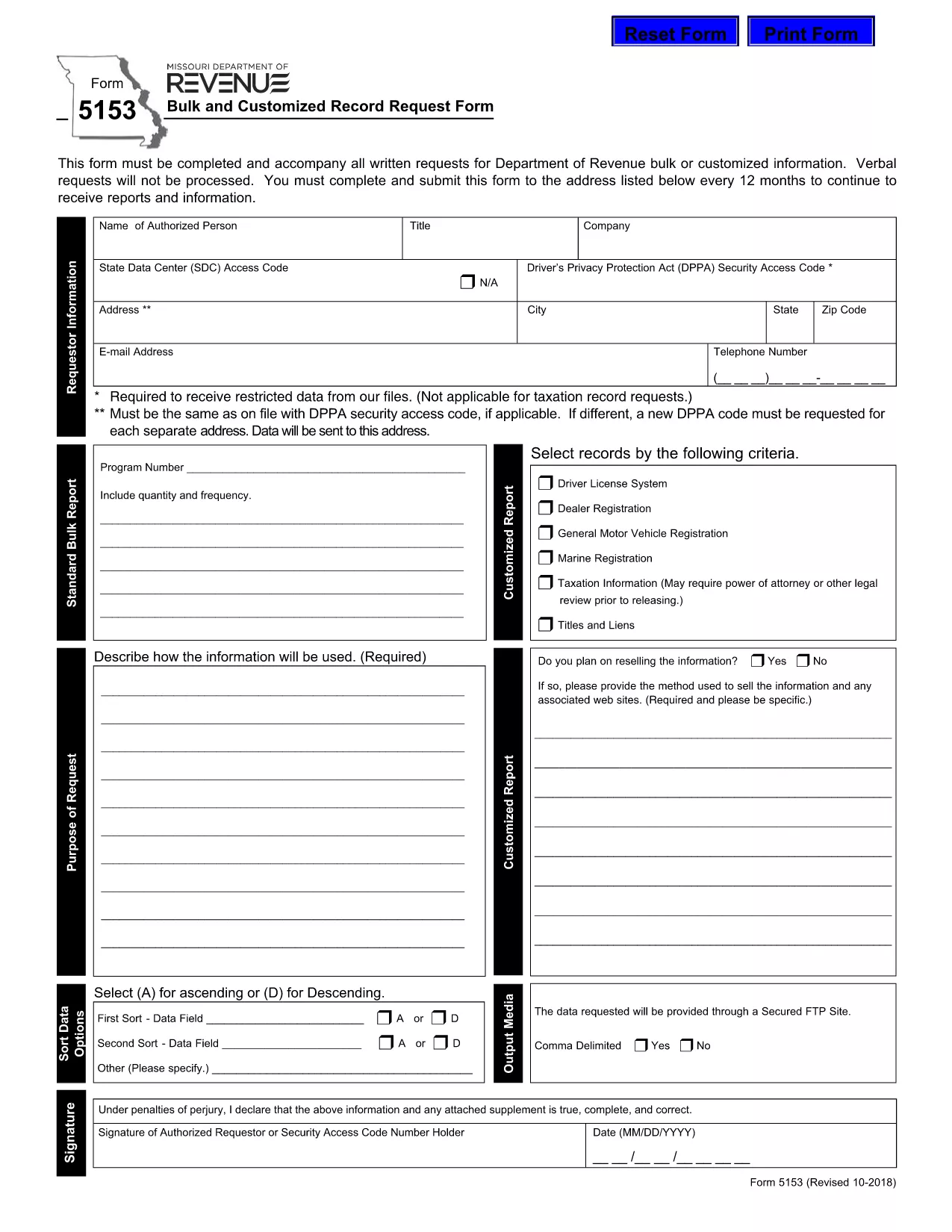
Form 5153 – Bulk and Customized Record Request

  1. भाषा अंग्रेज़ी
  2. देश अमेरीका
  3. गतिविधि वाहन पंजीकरण
  4. राज्य मिसौरी
फार्म को भरो
Form 5153 – Bulk and Customized Record Request

The Missouri Department of Revenue requires Form 5153 for any bulk or customized request for tax records. This form must accompany every written request; verbal requests are not processed.

What is Form 5153?

Form 5153, titled Bulk and Customized Record Request Form, authorizes the Department of Revenue to release large sets of tax data or specific customized information to the requester. It is used by businesses, researchers, and legal representatives who need extensive revenue data.

How to Fill Form 5153 Online

Instead of downloading and editing the PDF manually, simply click the “Fill out this form” button on this page. The Formize PDF Filler app will load the fillable version of Form 5153 directly in your browser.

  • Step 1: Click the blue “Fill out this form” button.
  • Step 2: Wait a few seconds while the Formize PDF Filler loads.
  • Step 3: Complete each field. The filler validates dates, numbers, and required entries in real time.
  • Step 4: When finished, click Save & Download to store a copy on your computer.
  • Step 5: Print the saved PDF, sign where required, and mail it to the address listed on the form.

Common Mistakes to Avoid

Even with an online filler, errors can cause delays. Keep these tips in mind:

  • Do not leave required fields blank – the filler will highlight them.
  • Use the exact legal name of the requesting entity.
  • Provide a complete, current mailing address.
  • Double‑check the date format (MM/DD/YYYY).
  • Ensure the signature line is signed after printing – electronic signatures are not accepted for this form.

Submission Guidelines

After printing and signing, mail the completed Form 5153 to the address shown on the last page of the PDF. Include any supporting documentation required for your specific request. Keep a copy of the signed form for your records.

Download the Fillable PDF

If you prefer the traditional method, you can download the original fillable PDF directly from the Missouri Department of Revenue:

Download Form 5153 (PDF)

सामान्य प्रश्न
  • What is the purpose of Form 5153?

    Form 5153 is used to request bulk or customized tax records from the Missouri Department of Revenue.

  • Can I submit Form 5153 electronically?

    No. After completing the form online, you must print, sign, and mail it to the Department of Revenue.

  • How often can I submit Form 5153?

    You may submit the form once every 12 months for the same type of request.

  • Is there a fee for filing Form 5153?

    The form itself is free, but the Department may charge fees for processing large data requests.

  • What should I do if I make a mistake on the form?

    Print a new copy, correct the error, and submit the revised form. Do not send a corrected version of a previously mailed form.

  • Where do I mail the completed Form 5153?

    The mailing address is printed on the last page of the PDF. Verify the address on the form before sending.

  • Can I request records for multiple entities on one Form 5153?

    Each entity requires its own separate Form 5153 to ensure proper processing.

कैसे करें

Form 5153 को मुफ़्त में, ऑनलाइन 4 आसान स्टेप्स में कैसे भरें:

  1. 1
    Open the Fillable Form
    Click the blue “Fill out this form” button on the page. The Formize PDF Filler loads the fillable version of Form 5153 directly in your browser.
  2. 2
    Complete the Fields
    Enter all required information. The filler validates entries in real time, highlighting any missing or incorrect data.
  3. 3
    Save and Download
    When all fields are completed, click “Save & Download” to store a copy on your computer.
  4. 4
    Print, Sign, and Mail
    Print the saved PDF, sign the required signature line, and mail the form to the address listed on the last page.
पीडीएफ फिलर एप तैयार करें
के बारे में

वाहन पंजीकरण प्रपत्र

Form 5153 वाहन पंजीकरण फॉर्मों में से एक है जो संबंधित सरकारी प्राधिकरण, आमतौर पर मोटर वाहन विभाग (डीएमवी) या समकक्ष एजेंसी के साथ मोटर वाहन को पंजीकृत करने के लिए उपयोग किए जाने वाले दस्तावेज हैं। इन फॉर्मों की आवश्यकता तब होती है जब कोई व्यक्ति नया या प्रयुक्त वाहन खरीदता है, वाहन का स्वामित्व स्थानांतरित करता है, या वाहन के साथ नए क्षेत्राधिकार में जाता है।

विशिष्ट वाहन पंजीकरण फॉर्म क्षेत्राधिकार के अनुसार भिन्न हो सकते हैं, लेकिन उन्हें आम तौर पर निम्नलिखित जानकारी की आवश्यकता होती है:

वाहन जानकारी: इसमें वाहन के बारे में विवरण शामिल हैं, जैसे मेक, मॉडल, वर्ष, वाहन पहचान संख्या (वीआईएन), और ओडोमीटर रीडिंग।

मालिक की जानकारी: फॉर्म में वाहन के मालिक के बारे में जानकारी की आवश्यकता होगी, जिसमें उनका नाम, पता, संपर्क जानकारी और ड्राइवर का लाइसेंस नंबर शामिल है।

स्वामित्व का प्रमाण: परिस्थितियों के आधार पर, स्वामित्व के प्रमाण की आवश्यकता हो सकती है, जैसे शीर्षक प्रमाण पत्र, बिक्री का बिल, या निर्माता का मूल प्रमाण पत्र (नए वाहनों के लिए)।

बीमा जानकारी: वैध वाहन बीमा कवरेज का प्रमाण आम तौर पर आवश्यक होता है। इसमें बीमा पॉलिसी नंबर, कवरेज की तारीखें और बीमा कंपनी का विवरण प्रदान करना शामिल हो सकता है।

फीस का भुगतान: वाहन पंजीकरण में विभिन्न शुल्कों का भुगतान शामिल है, जैसे पंजीकरण शुल्क, कर और संभवतः क्षेत्राधिकार के लिए विशिष्ट अन्य शुल्क।

इन बुनियादी आवश्यकताओं के अलावा, कुछ न्यायालयों में अतिरिक्त फॉर्म या दस्तावेज़ीकरण आवश्यकताएँ हो सकती हैं। उदाहरण के लिए, कुछ क्षेत्रों में उत्सर्जन परीक्षण के परिणाम, सुरक्षा निरीक्षण या निवास का प्रमाण आवश्यक हो सकता है।

एक बार वाहन पंजीकरण फॉर्म पूरा हो जाने और जमा हो जाने के बाद, सरकारी प्राधिकरण एक पंजीकरण प्रमाणपत्र, लाइसेंस प्लेट और पंजीकरण स्टिकर जारी करेगा। ये दस्तावेज़ दर्शाते हैं कि वाहन कानूनी रूप से पंजीकृत है और सार्वजनिक सड़कों पर संचालन के लिए अधिकृत है।

यह ध्यान रखना महत्वपूर्ण है कि वाहन पंजीकरण आवश्यकताएँ क्षेत्राधिकार के अनुसार काफी भिन्न हो सकती हैं। इसलिए, आपके स्थान पर लागू विशिष्ट रूपों और प्रक्रियाओं के लिए स्थानीय डीएमवी या समकक्ष एजेंसी से परामर्श करने की अनुशंसा की जाती है।

विशेषताएं

पीडीएफ भराव

पीडीएफ फॉर्म ऑनलाइन भरने का सबसे आसान तरीका

  • जल्दी से Form 5153 भरें
    Form 5153 को जल्दी से ऑनलाइन भरने का कोई तरीका खोज रहे हैं? हमारे ऑनलाइन नि:शुल्क पीडीएफ फॉर्म फिलर के साथ, आप एक मिनट से भी कम समय में इस पीडीएफ दस्तावेज़ को संपादित करने और भरने का तरीका जानेंगे।
  • ऑनलाइन पीडीएफ संपादक का उपयोग करना आसान है
    पीडीएफ फाइलों को प्रिंट करने से तंग आ गए हैं ताकि आप उन्हें फिर से स्कैन करने और उन्हें वापस भेजने से पहले संपादित कर सकें? PDF दस्तावेज़ों को निःशुल्क ऑनलाइन संपादित करें। समय और कागज बचाने के लिए हमारे ऑनलाइन पीडीएफ संपादक का प्रयोग करें।
  • महान उपकरण, सभी प्लेटफार्म
    आश्चर्य है कि मैक पर Form 5153 कैसे भरें, या शायद पीडीएफ फिलर का मुफ्त में उपयोग कैसे करें? हमारे ऑनलाइन पीडीएफ टूल सभी प्लेटफॉर्म पर काम करते हैं।
  • सुरक्षित फ़ाइल भंडारण
    पूर्ण की गई "Form 5153" फ़ाइलें Amazon क्लाउड होस्टिंग द्वारा प्रबंधित एक सुरक्षित डेटाबेस में संग्रहीत की जाती हैं। आप कभी भी अपनी फाइलों को हमारे सिस्टम से हटा सकते हैं। किसी भी स्थिति में, ये फ़ाइलें 24 घंटे के बाद स्वतः हटा दी जाती हैं।
  • {कीवर्ड} से चैट करें
    Chatize पर "Form 5153" के साथ चैट करें, जो एक निःशुल्क पीडीएफ रीडर सहायक है। प्रश्न पूछें और "Form 5153" से उत्तर प्राप्त करें। बस ऊपर दस्तावेज़ के साथ चैट करें बटन पर क्लिक करें।

फ़िलिंग सत्र मिटाएँ

चयनित फ़िलिंग सत्र को मिटाएँ? इस स्थिति में, फ़ॉर्म को पूरा करने में आपकी प्रगति खो जाएगी।

संपादन सत्र हटाएँ

चयनित संपादन सत्र हटाएँ? इस स्थिति में, फ़ॉर्म बनाने और संपादित करने में आपकी प्रगति नष्ट हो जाएगी।