
hamburger-menu icon
भाषा का चयन करें

Missouri Form 5315 – Application for Surrender of Title

  1. भाषा अंग्रेज़ी
  2. देश अमेरीका
  3. गतिविधि वाहन पंजीकरण
  4. राज्य मिसौरी
फार्म को भरो
Missouri Form 5315 – Application for Surrender of Title

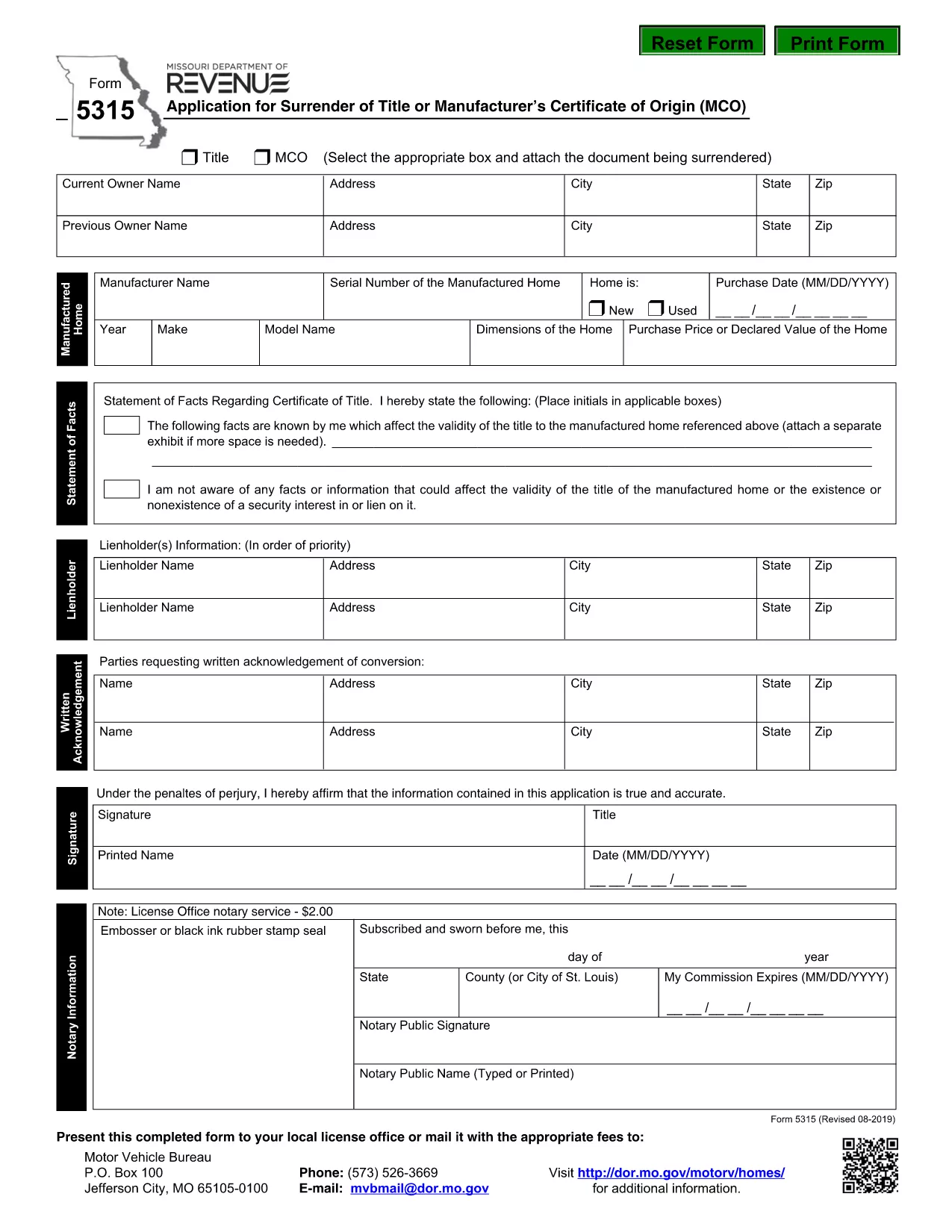
Form 5315 is the official Application for Surrender of Title or Manufacturer’s Certificate of Origin used by the Missouri Department of Revenue. Whether you’re disposing of a vehicle, transferring ownership without a title, or returning a Manufacturer’s Certificate of Origin (MCO), this form is required.

What Is Form 5315?

The form collects essential information about the vehicle, the current owner, and the reason for surrender. It is filed with the Motor Vehicle Bureau and must be signed by the owner or an authorized representative.

How to Fill Out Form 5315 Online

Instead of printing and hand‑writing, you can complete the fillable PDF directly in your browser using Formize’s PDF Filler:

  • Click the **"Fill out this form"** button on the page.
  • Wait a few seconds while the Formize PDF Filler app loads.
  • Enter the required data in each field – the interface guides you through every section.
  • When finished, click **Save** to download the completed PDF or **Submit** to send it directly to the Missouri Department of Revenue (if your jurisdiction supports electronic submission).

Common Mistakes to Avoid

  • Incorrect VIN: Double‑check the Vehicle Identification Number; a single digit error can delay processing.
  • Missing signatures: Both the owner and, when applicable, the dealer must sign.
  • Wrong fee amount: Verify the current surrender fee on the Missouri Department of Revenue website.
  • Incomplete address: Provide a full mailing address; partial addresses are rejected.

Where to Submit the Completed Form

After you’ve saved the filled PDF, you have two options:

  1. Mail the form with the required fee to:
    Motor Vehicle Bureau, P.O. Box 100, Jefferson City, MO 65102
  2. Take the form in person to any Missouri Department of Revenue office.

FAQs About Form 5315

Below are answers to the most common questions we receive from Missouri vehicle owners.

सामान्य प्रश्न
  • What is the purpose of Form 5315?

    Form 5315 is used to surrender a vehicle title or a Manufacturer’s Certificate of Origin when the vehicle is being disposed of, transferred without a title, or the MCO is being returned.

  • Can I submit Form 5315 electronically?

    Missouri currently requires the completed form to be mailed or delivered in person. The online fillable PDF makes data entry easier, but the final submission is still physical.

  • How much does it cost to surrender a title?

    The fee varies; check the latest fee schedule on the Missouri Department of Revenue website before mailing your form.

  • Do I need to provide proof of ownership?

    Yes. Attach a copy of the current title, registration card, or a bill of sale that proves you are the legal owner.

  • What should I do if I make a mistake after saving the PDF?

    Open the saved PDF again in the Formize PDF Filler, correct the error, and re‑save before sending it.

  • Is a notarized signature required?

    No. The form only requires the owner’s signature; notarization is not needed for a title surrender in Missouri.

  • How long does processing take after I mail the form?

    Processing typically takes 7‑10 business days after the Missouri Department of Revenue receives your completed form and fee.

कैसे करें

form 5315 को मुफ़्त में, ऑनलाइन 5 आसान स्टेप्स में कैसे भरें:

  1. 1
    Open the Fillable Form
    Click the "Fill out this form" button on the page. The Formize PDF Filler will open in a new tab.
  2. 2
    Enter Your Information
    Fill each highlighted field with the requested details – VIN, owner name, address, reason for surrender, etc.
  3. 3
    Review and Sign
    Double‑check all entries for accuracy, then add your electronic signature using the built‑in signature tool.
  4. 4
    Save or Submit
    Click "Save" to download the completed PDF to your computer, or click "Submit" if electronic submission is available.
  5. 5
    Send the Form
    Mail the saved PDF with the appropriate fee to the Motor Vehicle Bureau, or deliver it in person to a local revenue office.
पीडीएफ फिलर एप तैयार करें
के बारे में

वाहन पंजीकरण प्रपत्र

form 5315 डीएमवी फॉर्मों में से एक है, जिसे मोटर वाहन विभाग फॉर्म के रूप में भी जाना जाता है, जो मोटर वाहनों से संबंधित विभिन्न लेनदेन और प्रक्रियाओं में उपयोग किए जाने वाले दस्तावेज हैं। DMV एक सरकारी एजेंसी है जो ड्राइवर लाइसेंसिंग, वाहन पंजीकरण और मोटर वाहन कानूनों को लागू करने के लिए जिम्मेदार है। उपलब्ध विशिष्ट DMV फॉर्म क्षेत्राधिकार के अनुसार भिन्न हो सकते हैं, लेकिन यहां कुछ सामान्य उदाहरण दिए गए हैं:

ड्राइवर लाइसेंस फॉर्म: इन फॉर्म का उपयोग ड्राइवर के लाइसेंस के लिए आवेदन करने या परिवर्तन या नवीनीकरण का अनुरोध करने के लिए किया जाता है। उन्हें आम तौर पर व्यक्तिगत जानकारी, पहचान के प्रमाण की आवश्यकता होती है, और इसमें चिकित्सा जानकारी या ड्राइविंग इतिहास के अनुभाग शामिल हो सकते हैं।

वाहन पंजीकरण फॉर्म: इन फॉर्मों का उपयोग डीएमवी के साथ मोटर वाहन को पंजीकृत करने के लिए किया जाता है। उन्हें वाहन की जानकारी, स्वामित्व विवरण और बीमा के प्रमाण की आवश्यकता होती है।

टाइटल ट्रांसफर फॉर्म: वाहन खरीदते या बेचते समय, इन फॉर्मों का उपयोग एक पक्ष से दूसरे पक्ष को स्वामित्व हस्तांतरित करने के लिए किया जाता है। उन्हें खरीदार, विक्रेता, वाहन विवरण के बारे में जानकारी की आवश्यकता होती है और इसमें बिक्री का बिल भी शामिल हो सकता है।

वाहन दायित्व प्रपत्र जारी करना: किसी वाहन के स्वामित्व को बेचते या स्थानांतरित करते समय, ये प्रपत्र डीएमवी को सूचित करते हैं कि विक्रेता अब वाहन के लिए जिम्मेदार नहीं है। यह विक्रेता को बिक्री के बाद वाहन से जुड़ी दुर्घटनाओं या घटनाओं के लिए दायित्व से बचाने में मदद करता है।

लाइसेंस प्लेट और पंजीकरण नवीनीकरण फॉर्म: इन फॉर्मों का उपयोग वाहन पंजीकरण को नवीनीकृत करने या नए लाइसेंस प्लेटों का अनुरोध करने के लिए किया जाता है। उन्हें आम तौर पर पंजीकृत मालिक, वर्तमान पंजीकरण विवरण और लागू शुल्क के भुगतान के बारे में जानकारी की आवश्यकता होती है।

ड्राइविंग रिकॉर्ड अनुरोध फॉर्म: ये फॉर्म व्यक्तियों को डीएमवी से अपने ड्राइविंग रिकॉर्ड का अनुरोध करने की अनुमति देते हैं, जो ड्राइविंग उल्लंघन, लाइसेंस स्थिति और अन्य प्रासंगिक विवरणों के बारे में जानकारी प्रदान करते हैं।

विशेषता या वैयक्तिकृत लाइसेंस प्लेट फॉर्म: इन फॉर्मों का उपयोग वैयक्तिकृत या विशिष्ट लाइसेंस प्लेटों के लिए आवेदन करने के लिए किया जाता है, जो व्यक्तियों को विशिष्ट पात्रों या डिज़ाइन के साथ अपनी लाइसेंस प्लेट को अनुकूलित करने की अनुमति देते हैं।

ये उन अनेक प्रपत्रों के कुछ उदाहरण हैं जो DMV के माध्यम से उपलब्ध हो सकते हैं। विशिष्ट फॉर्म और आवश्यकताएं क्षेत्राधिकार के अनुसार अलग-अलग हो सकती हैं, इसलिए अपनी विशेष जरूरतों के लिए सही फॉर्म प्राप्त करने के लिए स्थानीय डीएमवी वेबसाइट से परामर्श करना या डीएमवी कार्यालय में जाना महत्वपूर्ण है।

विशेषताएं

पीडीएफ भराव

पीडीएफ फॉर्म ऑनलाइन भरने का सबसे आसान तरीका

  • जल्दी से form 5315 भरें
    form 5315 को जल्दी से ऑनलाइन भरने का कोई तरीका खोज रहे हैं? हमारे ऑनलाइन नि:शुल्क पीडीएफ फॉर्म फिलर के साथ, आप एक मिनट से भी कम समय में इस पीडीएफ दस्तावेज़ को संपादित करने और भरने का तरीका जानेंगे।
  • ऑनलाइन पीडीएफ संपादक का उपयोग करना आसान है
    पीडीएफ फाइलों को प्रिंट करने से तंग आ गए हैं ताकि आप उन्हें फिर से स्कैन करने और उन्हें वापस भेजने से पहले संपादित कर सकें? PDF दस्तावेज़ों को निःशुल्क ऑनलाइन संपादित करें। समय और कागज बचाने के लिए हमारे ऑनलाइन पीडीएफ संपादक का प्रयोग करें।
  • महान उपकरण, सभी प्लेटफार्म
    आश्चर्य है कि मैक पर form 5315 कैसे भरें, या शायद पीडीएफ फिलर का मुफ्त में उपयोग कैसे करें? हमारे ऑनलाइन पीडीएफ टूल सभी प्लेटफॉर्म पर काम करते हैं।
  • सुरक्षित फ़ाइल भंडारण
    पूर्ण की गई "form 5315" फ़ाइलें Amazon क्लाउड होस्टिंग द्वारा प्रबंधित एक सुरक्षित डेटाबेस में संग्रहीत की जाती हैं। आप कभी भी अपनी फाइलों को हमारे सिस्टम से हटा सकते हैं। किसी भी स्थिति में, ये फ़ाइलें 24 घंटे के बाद स्वतः हटा दी जाती हैं।
  • {कीवर्ड} से चैट करें
    Chatize पर "form 5315" के साथ चैट करें, जो एक निःशुल्क पीडीएफ रीडर सहायक है। प्रश्न पूछें और "form 5315" से उत्तर प्राप्त करें। बस ऊपर दस्तावेज़ के साथ चैट करें बटन पर क्लिक करें।

फ़िलिंग सत्र मिटाएँ

चयनित फ़िलिंग सत्र को मिटाएँ? इस स्थिति में, फ़ॉर्म को पूरा करने में आपकी प्रगति खो जाएगी।

संपादन सत्र हटाएँ

चयनित संपादन सत्र हटाएँ? इस स्थिति में, फ़ॉर्म बनाने और संपादित करने में आपकी प्रगति नष्ट हो जाएगी।