
hamburger-menu icon
भाषा का चयन करें

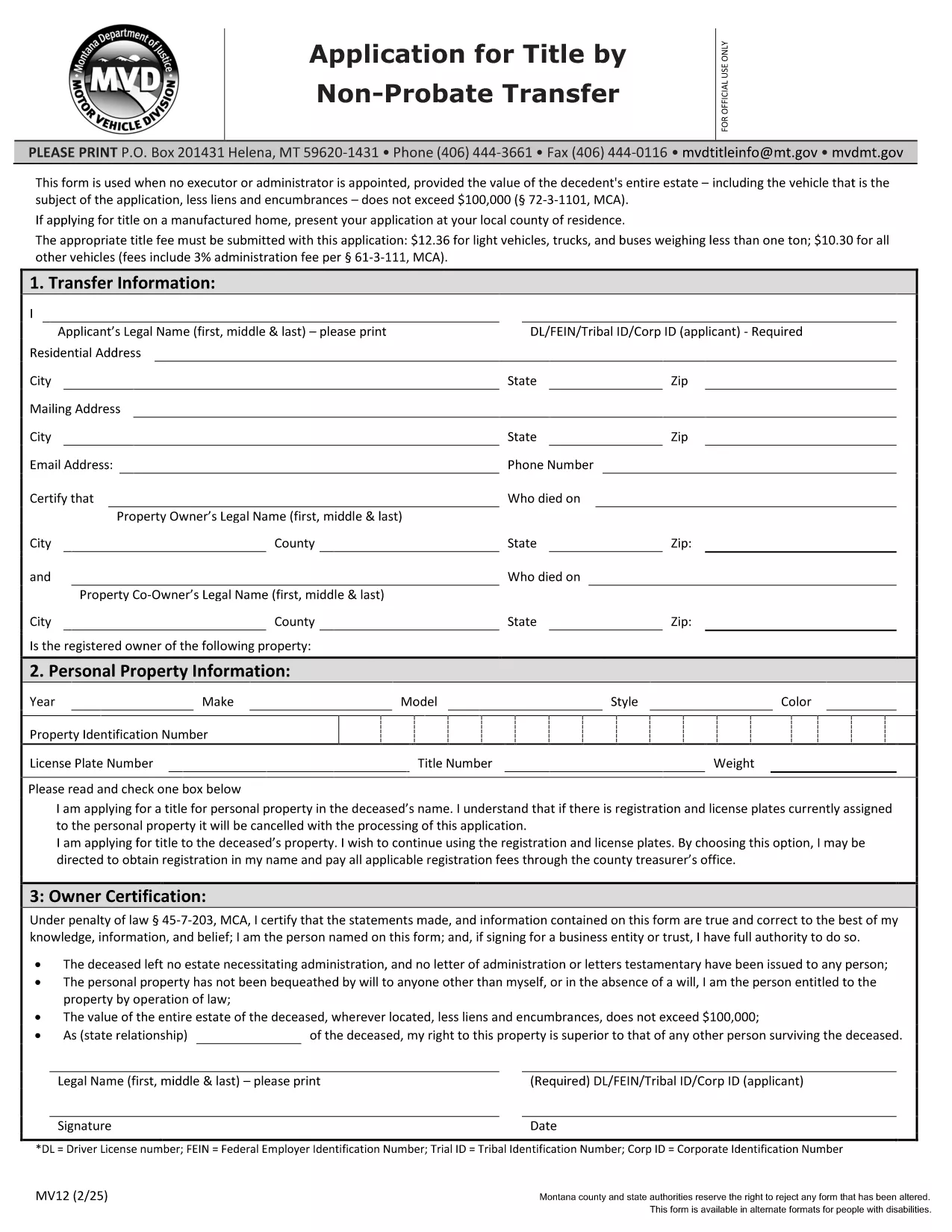
MV12 Application for Title of Vehicle – Fillable PDF Form

  1. भाषा अंग्रेज़ी
  2. देश अमेरीका
  3. गतिविधि वाहन पंजीकरण
  4. राज्य मोंटाना
फार्म को भरो
MV12 Application for Title of Vehicle – Fillable PDF Form

The MV12 is the official Montana application used to transfer a vehicle title when the owner has died or when a non‑probate transfer is required. This fillable PDF lets you complete the form quickly, securely, and without printing a single page.

Whether you are handling a right‑of‑survivorship transfer, a transfer by inheritance, or a simple change of ownership, the MV12 captures all required details—vehicle description, lien information, and the parties involved.

What Is the MV12 Form?

The MV12 is issued by the Montana Motor Vehicle Department (MVD). It is used when the estate’s total value is under $100,000 and no executor or administrator is appointed, or when the transfer is based on survivorship rights. The form replaces a paper‑only process with a digital, fillable version.

How to Fill Out the MV12 Online

Instead of downloading the PDF and opening a separate editor, simply click the "Fill out this form" button on this page. The Formize PDF Filler will load instantly, letting you type directly into each field, add signatures, and save your progress.

Common Mistakes to Avoid

  • Leaving the VIN or vehicle description blank.
  • Forgetting to attach a notarized signature when required.
  • Providing an outdated address for the owner or transferee.
  • Skipping the lien release section if a loan still exists on the vehicle.

Where to Submit the Completed Form

After you finish, download the completed PDF and mail or hand‑deliver it to your nearest Montana MVD office, or upload it through the MVD’s online portal if you have an account.

Eligibility & Required Documents

Before you start, gather these items:

  • Current vehicle title.
  • Proof of ownership (bill of sale, inheritance documents, or survivorship affidavit).
  • Notarized signatures where indicated.
  • Any lien release paperwork, if applicable.

Having these on hand will speed up processing and reduce the chance of a return.

सामान्य प्रश्न
  • Who can use the MV12 form?

    Anyone transferring a vehicle title in Montana when the estate value is under $100,000 and no executor is appointed, or when the transfer is based on right‑of‑survivorship.

  • Do I need a notary for the MV12?

    Yes, signatures on the owner’s declaration and any survivorship statements must be notarized.

  • Can I submit the MV12 electronically?

    You can upload the completed PDF through the Montana MVD’s online portal if you have an account; otherwise, mail or deliver the paper copy.

  • What happens if I make a mistake on the form?

    Minor errors can be corrected with a written amendment and a new signature. Major errors may require a new MV12 to be filed.

  • Is there a filing fee for the MV12?

    Yes, the MVD charges a standard title transfer fee. Check the latest fee schedule on the Montana MVD website.

  • How long does processing take?

    Processing typically takes 5‑10 business days after the MVD receives a complete and correct MV12.

  • Can I use the MV12 for a vehicle with an existing lien?

    Only if you include a lien release document signed by the lienholder. Otherwise, the title cannot be transferred.

  • What if the vehicle is a boat or snowmobile?

    The MV12 also covers motorboats, personal watercraft, and snowmobiles, as long as they are registered with the Montana MVD.

कैसे करें

MV12 form को मुफ़्त में, ऑनलाइन 5 आसान स्टेप्स में कैसे भरें:

  1. 1
    Open the Fillable Form
    Click the "Fill out this form" button on the page. The Formize PDF Filler loads instantly in your browser.
  2. 2
    Enter Your Information
    Type directly into each field—vehicle details, owner and transferee names, and lien information. Use the Tab key to move quickly between fields.
  3. 3
    Add Signatures
    Use the built‑in signature tool to draw or upload a scanned signature. Ensure notarized sections are signed by a qualified notary.
  4. 4
    Review & Save
    Click the "Review" button to check for missing fields. When everything looks correct, save the completed PDF to your computer.
  5. 5
    Submit to the MVD
    Mail, hand‑deliver, or upload the saved PDF to the Montana Motor Vehicle Department as instructed on the form.
पीडीएफ फिलर एप तैयार करें
के बारे में

वाहन पंजीकरण प्रपत्र

MV12 form डीएमवी फॉर्मों में से एक है, जिसे मोटर वाहन विभाग फॉर्म के रूप में भी जाना जाता है, जो मोटर वाहनों से संबंधित विभिन्न लेनदेन और प्रक्रियाओं में उपयोग किए जाने वाले दस्तावेज हैं। DMV एक सरकारी एजेंसी है जो ड्राइवर लाइसेंसिंग, वाहन पंजीकरण और मोटर वाहन कानूनों को लागू करने के लिए जिम्मेदार है। उपलब्ध विशिष्ट DMV फॉर्म क्षेत्राधिकार के अनुसार भिन्न हो सकते हैं, लेकिन यहां कुछ सामान्य उदाहरण दिए गए हैं:

ड्राइवर लाइसेंस फॉर्म: इन फॉर्म का उपयोग ड्राइवर के लाइसेंस के लिए आवेदन करने या परिवर्तन या नवीनीकरण का अनुरोध करने के लिए किया जाता है। उन्हें आम तौर पर व्यक्तिगत जानकारी, पहचान के प्रमाण की आवश्यकता होती है, और इसमें चिकित्सा जानकारी या ड्राइविंग इतिहास के अनुभाग शामिल हो सकते हैं।

वाहन पंजीकरण फॉर्म: इन फॉर्मों का उपयोग डीएमवी के साथ मोटर वाहन को पंजीकृत करने के लिए किया जाता है। उन्हें वाहन की जानकारी, स्वामित्व विवरण और बीमा के प्रमाण की आवश्यकता होती है।

टाइटल ट्रांसफर फॉर्म: वाहन खरीदते या बेचते समय, इन फॉर्मों का उपयोग एक पक्ष से दूसरे पक्ष को स्वामित्व हस्तांतरित करने के लिए किया जाता है। उन्हें खरीदार, विक्रेता, वाहन विवरण के बारे में जानकारी की आवश्यकता होती है और इसमें बिक्री का बिल भी शामिल हो सकता है।

वाहन दायित्व प्रपत्र जारी करना: किसी वाहन के स्वामित्व को बेचते या स्थानांतरित करते समय, ये प्रपत्र डीएमवी को सूचित करते हैं कि विक्रेता अब वाहन के लिए जिम्मेदार नहीं है। यह विक्रेता को बिक्री के बाद वाहन से जुड़ी दुर्घटनाओं या घटनाओं के लिए दायित्व से बचाने में मदद करता है।

लाइसेंस प्लेट और पंजीकरण नवीनीकरण फॉर्म: इन फॉर्मों का उपयोग वाहन पंजीकरण को नवीनीकृत करने या नए लाइसेंस प्लेटों का अनुरोध करने के लिए किया जाता है। उन्हें आम तौर पर पंजीकृत मालिक, वर्तमान पंजीकरण विवरण और लागू शुल्क के भुगतान के बारे में जानकारी की आवश्यकता होती है।

ड्राइविंग रिकॉर्ड अनुरोध फॉर्म: ये फॉर्म व्यक्तियों को डीएमवी से अपने ड्राइविंग रिकॉर्ड का अनुरोध करने की अनुमति देते हैं, जो ड्राइविंग उल्लंघन, लाइसेंस स्थिति और अन्य प्रासंगिक विवरणों के बारे में जानकारी प्रदान करते हैं।

विशेषता या वैयक्तिकृत लाइसेंस प्लेट फॉर्म: इन फॉर्मों का उपयोग वैयक्तिकृत या विशिष्ट लाइसेंस प्लेटों के लिए आवेदन करने के लिए किया जाता है, जो व्यक्तियों को विशिष्ट पात्रों या डिज़ाइन के साथ अपनी लाइसेंस प्लेट को अनुकूलित करने की अनुमति देते हैं।

ये उन अनेक प्रपत्रों के कुछ उदाहरण हैं जो DMV के माध्यम से उपलब्ध हो सकते हैं। विशिष्ट फॉर्म और आवश्यकताएं क्षेत्राधिकार के अनुसार अलग-अलग हो सकती हैं, इसलिए अपनी विशेष जरूरतों के लिए सही फॉर्म प्राप्त करने के लिए स्थानीय डीएमवी वेबसाइट से परामर्श करना या डीएमवी कार्यालय में जाना महत्वपूर्ण है।

विशेषताएं

पीडीएफ भराव

पीडीएफ फॉर्म ऑनलाइन भरने का सबसे आसान तरीका

  • जल्दी से MV12 form भरें
    MV12 form को जल्दी से ऑनलाइन भरने का कोई तरीका खोज रहे हैं? हमारे ऑनलाइन नि:शुल्क पीडीएफ फॉर्म फिलर के साथ, आप एक मिनट से भी कम समय में इस पीडीएफ दस्तावेज़ को संपादित करने और भरने का तरीका जानेंगे।
  • ऑनलाइन पीडीएफ संपादक का उपयोग करना आसान है
    पीडीएफ फाइलों को प्रिंट करने से तंग आ गए हैं ताकि आप उन्हें फिर से स्कैन करने और उन्हें वापस भेजने से पहले संपादित कर सकें? PDF दस्तावेज़ों को निःशुल्क ऑनलाइन संपादित करें। समय और कागज बचाने के लिए हमारे ऑनलाइन पीडीएफ संपादक का प्रयोग करें।
  • महान उपकरण, सभी प्लेटफार्म
    आश्चर्य है कि मैक पर MV12 form कैसे भरें, या शायद पीडीएफ फिलर का मुफ्त में उपयोग कैसे करें? हमारे ऑनलाइन पीडीएफ टूल सभी प्लेटफॉर्म पर काम करते हैं।
  • सुरक्षित फ़ाइल भंडारण
    पूर्ण की गई "MV12 form" फ़ाइलें Amazon क्लाउड होस्टिंग द्वारा प्रबंधित एक सुरक्षित डेटाबेस में संग्रहीत की जाती हैं। आप कभी भी अपनी फाइलों को हमारे सिस्टम से हटा सकते हैं। किसी भी स्थिति में, ये फ़ाइलें 24 घंटे के बाद स्वतः हटा दी जाती हैं।
  • {कीवर्ड} से चैट करें
    Chatize पर "MV12 form" के साथ चैट करें, जो एक निःशुल्क पीडीएफ रीडर सहायक है। प्रश्न पूछें और "MV12 form" से उत्तर प्राप्त करें। बस ऊपर दस्तावेज़ के साथ चैट करें बटन पर क्लिक करें।

फ़िलिंग सत्र मिटाएँ

चयनित फ़िलिंग सत्र को मिटाएँ? इस स्थिति में, फ़ॉर्म को पूरा करने में आपकी प्रगति खो जाएगी।

संपादन सत्र हटाएँ

चयनित संपादन सत्र हटाएँ? इस स्थिति में, फ़ॉर्म बनाने और संपादित करने में आपकी प्रगति नष्ट हो जाएगी।