
hamburger-menu icon
भाषा का चयन करें

Nevada VP‑198 Affidavit of Non‑Residency – Fillable PDF

  1. भाषा अंग्रेज़ी
  2. देश अमेरीका
  3. गतिविधि वाहन पंजीकरण
  4. राज्य नेवादा
फार्म को भरो
Nevada VP‑198 Affidavit of Non‑Residency – Fillable PDF

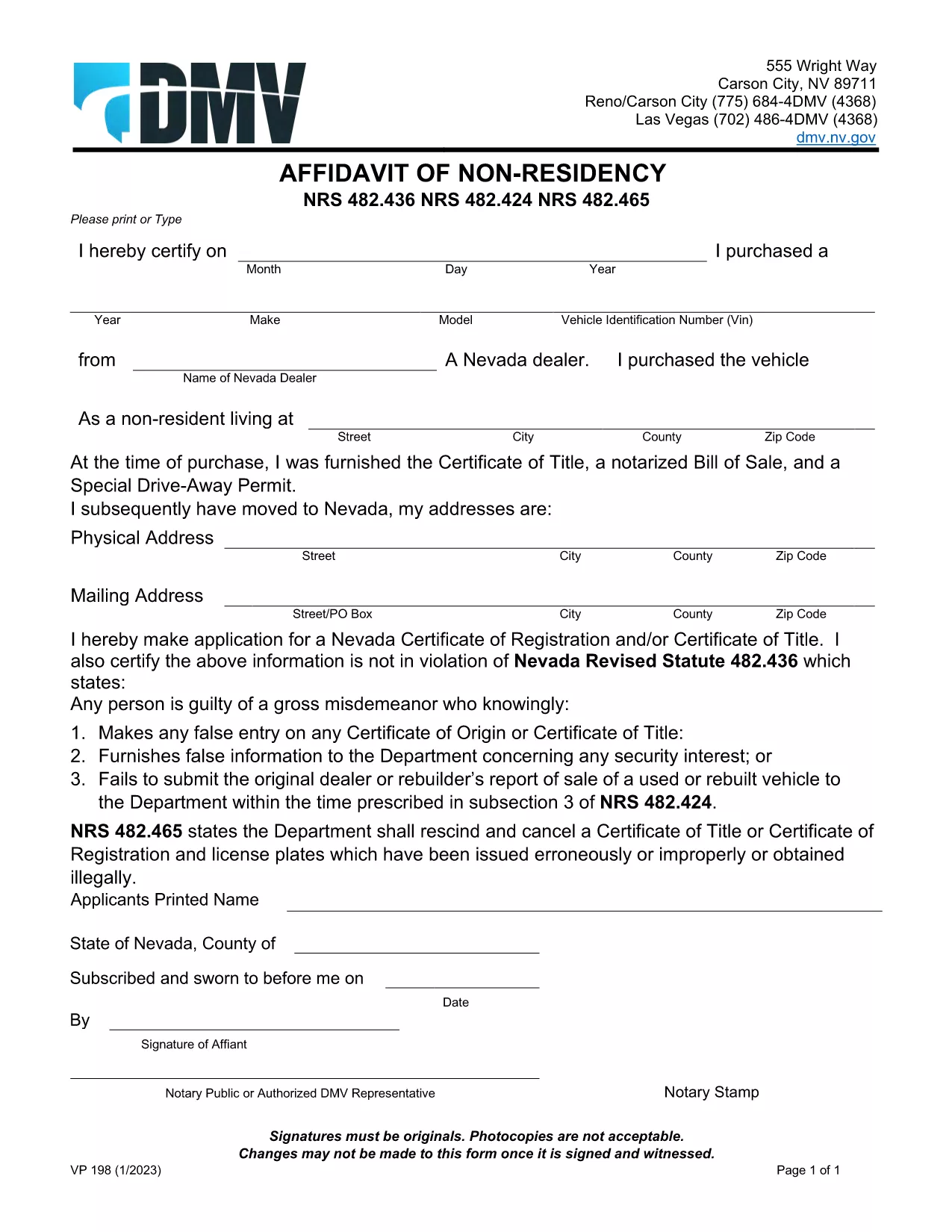
The VP‑198 Affidavit of Non‑Residency is the Nevada Department of Motor Vehicles (DMV) form used when a vehicle owner needs to prove they are not a Nevada resident for registration purposes. This form must be notarized or signed by an authorized DMV representative, and all signatures must be original.

What Is the VP‑198 Form?

VP‑198 is a one‑page affidavit that collects:

  • Owner’s full name and address
  • Vehicle identification number (VIN)
  • Statement of non‑residency
  • Notary or DMV representative signature and seal

The form is required for out‑of‑state owners who are registering a vehicle in Nevada but do not live in the state.

How to Complete the VP‑198 Online with Formize

Instead of printing, printing, and scanning, you can fill the official PDF directly in your browser using the Formize PDF Filler app. Follow these simple steps:

  1. Click the "Fill out this form" button on this page.
  2. Wait a few seconds while the Formize PDF Filler loads the VP‑198 PDF.
  3. Enter the required information in each field, then click Save to download the completed file.
  4. Print the saved PDF and have it notarized or signed by an authorized DMV representative.

Common Mistakes to Avoid

  • Do not use photocopies of the affidavit – the DMV requires original signatures.
  • Never alter the form after it has been signed; any changes invalidate the document.
  • Make sure the VIN matches the vehicle you are registering; mismatched numbers cause delays.
  • Check that the notary’s stamp and signature are clearly legible.

Where to Submit the Completed Form

After notarization, bring the completed VP‑198 to any Nevada DMV office or mail it with your registration paperwork. The form is accepted only in its original, signed form.

Download the Official VP‑198 PDF

Click the button below to open the official Nevada DMV VP‑198 fillable PDF. The file is hosted by the Nevada DMV and updated as of January 2023.

Download VP‑198 PDF

सामान्य प्रश्न
  • Do I need to print the VP‑198 after filling it online?

    Yes. The DMV requires an original signature and notary seal, so you must print the completed PDF and have it signed in person.

  • Can I submit a scanned copy of the signed VP‑198?

    No. The DMV only accepts the original paper form with a handwritten signature and official stamp.

  • Is the VP‑198 form free to download?

    Yes. The official VP‑198 PDF is provided by the Nevada DMV at no cost.

  • What if I make a mistake after the form is signed?

    Any alterations after notarization invalidate the document. You must obtain a new VP‑198 and have it re‑signed.

  • Can I use a digital signature instead of a notary?

    No. The Nevada DMV specifically requires a physical notary or authorized DMV representative signature.

  • How long is the VP‑198 valid?

    The affidavit is valid for the registration transaction it accompanies. If the vehicle is not registered within the DMV’s processing time, you may need a new form.

  • Do I need a separate form for out‑of‑state vehicle inspection?

    If your vehicle requires a Nevada inspection, you will need the appropriate inspection certificate (e.g., VP‑064) in addition to the VP‑198.

कैसे करें

VP-198 को मुफ़्त में, ऑनलाइन 3 आसान स्टेप्स में कैसे भरें:

  1. 1
    Open the Formize PDF Filler
    Click the "Fill out this form" button on the page. The Formize PDF Filler app will load the VP‑198 PDF automatically.
  2. 2
    Enter Your Information
    Fill each field with the required details—owner name, address, VIN, and residency statement. The interface saves your changes in real time.
  3. 3
    Save and Print for Notarization
    After completing the form, click "Save" to download the filled PDF. Print the file and have it signed and stamped by a notary or DMV representative.
पीडीएफ फिलर एप तैयार करें
के बारे में

वाहन पंजीकरण प्रपत्र

VP-198 वाहन पंजीकरण फॉर्मों में से एक है जो संबंधित सरकारी प्राधिकरण, आमतौर पर मोटर वाहन विभाग (डीएमवी) या समकक्ष एजेंसी के साथ मोटर वाहन को पंजीकृत करने के लिए उपयोग किए जाने वाले दस्तावेज हैं। इन फॉर्मों की आवश्यकता तब होती है जब कोई व्यक्ति नया या प्रयुक्त वाहन खरीदता है, वाहन का स्वामित्व स्थानांतरित करता है, या वाहन के साथ नए क्षेत्राधिकार में जाता है।

विशिष्ट वाहन पंजीकरण फॉर्म क्षेत्राधिकार के अनुसार भिन्न हो सकते हैं, लेकिन उन्हें आम तौर पर निम्नलिखित जानकारी की आवश्यकता होती है:

वाहन जानकारी: इसमें वाहन के बारे में विवरण शामिल हैं, जैसे मेक, मॉडल, वर्ष, वाहन पहचान संख्या (वीआईएन), और ओडोमीटर रीडिंग।

मालिक की जानकारी: फॉर्म में वाहन के मालिक के बारे में जानकारी की आवश्यकता होगी, जिसमें उनका नाम, पता, संपर्क जानकारी और ड्राइवर का लाइसेंस नंबर शामिल है।

स्वामित्व का प्रमाण: परिस्थितियों के आधार पर, स्वामित्व के प्रमाण की आवश्यकता हो सकती है, जैसे शीर्षक प्रमाण पत्र, बिक्री का बिल, या निर्माता का मूल प्रमाण पत्र (नए वाहनों के लिए)।

बीमा जानकारी: वैध वाहन बीमा कवरेज का प्रमाण आम तौर पर आवश्यक होता है। इसमें बीमा पॉलिसी नंबर, कवरेज की तारीखें और बीमा कंपनी का विवरण प्रदान करना शामिल हो सकता है।

फीस का भुगतान: वाहन पंजीकरण में विभिन्न शुल्कों का भुगतान शामिल है, जैसे पंजीकरण शुल्क, कर और संभवतः क्षेत्राधिकार के लिए विशिष्ट अन्य शुल्क।

इन बुनियादी आवश्यकताओं के अलावा, कुछ न्यायालयों में अतिरिक्त फॉर्म या दस्तावेज़ीकरण आवश्यकताएँ हो सकती हैं। उदाहरण के लिए, कुछ क्षेत्रों में उत्सर्जन परीक्षण के परिणाम, सुरक्षा निरीक्षण या निवास का प्रमाण आवश्यक हो सकता है।

एक बार वाहन पंजीकरण फॉर्म पूरा हो जाने और जमा हो जाने के बाद, सरकारी प्राधिकरण एक पंजीकरण प्रमाणपत्र, लाइसेंस प्लेट और पंजीकरण स्टिकर जारी करेगा। ये दस्तावेज़ दर्शाते हैं कि वाहन कानूनी रूप से पंजीकृत है और सार्वजनिक सड़कों पर संचालन के लिए अधिकृत है।

यह ध्यान रखना महत्वपूर्ण है कि वाहन पंजीकरण आवश्यकताएँ क्षेत्राधिकार के अनुसार काफी भिन्न हो सकती हैं। इसलिए, आपके स्थान पर लागू विशिष्ट रूपों और प्रक्रियाओं के लिए स्थानीय डीएमवी या समकक्ष एजेंसी से परामर्श करने की अनुशंसा की जाती है।

विशेषताएं

पीडीएफ भराव

पीडीएफ फॉर्म ऑनलाइन भरने का सबसे आसान तरीका

  • जल्दी से VP-198 भरें
    VP-198 को जल्दी से ऑनलाइन भरने का कोई तरीका खोज रहे हैं? हमारे ऑनलाइन नि:शुल्क पीडीएफ फॉर्म फिलर के साथ, आप एक मिनट से भी कम समय में इस पीडीएफ दस्तावेज़ को संपादित करने और भरने का तरीका जानेंगे।
  • ऑनलाइन पीडीएफ संपादक का उपयोग करना आसान है
    पीडीएफ फाइलों को प्रिंट करने से तंग आ गए हैं ताकि आप उन्हें फिर से स्कैन करने और उन्हें वापस भेजने से पहले संपादित कर सकें? PDF दस्तावेज़ों को निःशुल्क ऑनलाइन संपादित करें। समय और कागज बचाने के लिए हमारे ऑनलाइन पीडीएफ संपादक का प्रयोग करें।
  • महान उपकरण, सभी प्लेटफार्म
    आश्चर्य है कि मैक पर VP-198 कैसे भरें, या शायद पीडीएफ फिलर का मुफ्त में उपयोग कैसे करें? हमारे ऑनलाइन पीडीएफ टूल सभी प्लेटफॉर्म पर काम करते हैं।
  • सुरक्षित फ़ाइल भंडारण
    पूर्ण की गई "VP-198" फ़ाइलें Amazon क्लाउड होस्टिंग द्वारा प्रबंधित एक सुरक्षित डेटाबेस में संग्रहीत की जाती हैं। आप कभी भी अपनी फाइलों को हमारे सिस्टम से हटा सकते हैं। किसी भी स्थिति में, ये फ़ाइलें 24 घंटे के बाद स्वतः हटा दी जाती हैं।
  • {कीवर्ड} से चैट करें
    Chatize पर "VP-198" के साथ चैट करें, जो एक निःशुल्क पीडीएफ रीडर सहायक है। प्रश्न पूछें और "VP-198" से उत्तर प्राप्त करें। बस ऊपर दस्तावेज़ के साथ चैट करें बटन पर क्लिक करें।

फ़िलिंग सत्र मिटाएँ

चयनित फ़िलिंग सत्र को मिटाएँ? इस स्थिति में, फ़ॉर्म को पूरा करने में आपकी प्रगति खो जाएगी।

संपादन सत्र हटाएँ

चयनित संपादन सत्र हटाएँ? इस स्थिति में, फ़ॉर्म बनाने और संपादित करने में आपकी प्रगति नष्ट हो जाएगी।