
hamburger-menu icon
भाषा का चयन करें

BLC‑54C Blue Emergency Light Permit Application (Fillable PDF)

  1. भाषा अंग्रेज़ी
  2. देश अमेरीका
  3. गतिविधि वाहन पंजीकरण
  4. राज्य न्यू जर्सी
फार्म को भरो
BLC‑54C Blue Emergency Light Permit Application (Fillable PDF)

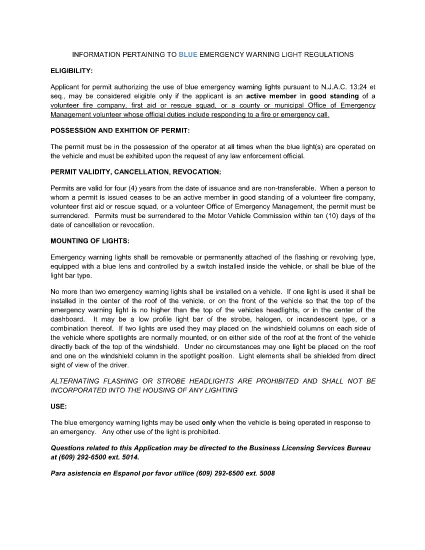
The BLC‑54C is the New Jersey Motor Vehicle Commission (MVC) application that authorizes volunteers to use blue emergency warning lights on their vehicles. Whether you’re a firefighter, first‑aid squad member, rescue team volunteer, or an authorized municipal emergency manager, this fillable PDF lets you complete the permit request quickly and accurately.

Why use Formize? Our built‑in PDF filler loads directly in your browser, so you never need to download, print, edit, and re‑scan the form. Fill, sign, and download the completed PDF in minutes.

Below you’ll find everything you need to know about the BLC‑54C form, from eligibility to step‑by‑step online completion.

Who Needs the BLC‑54C Form?

Active members of volunteer fire companies, first‑aid squads, rescue squads, and municipal Office of Emergency Management personnel who respond to fire or emergency calls are required to hold a blue‑light permit.

Eligibility Requirements

  • Must be an active volunteer in good standing with a recognized emergency organization.
  • Must have documented duties that include responding to fire or emergency calls.
  • Municipal officials (mayor, chief executive) must certify the organization’s need for the permit.

How to Complete the Form Online

Follow the simple steps in the “How‑To” section below. The Formize PDF Filler automatically validates required fields, so you’ll know instantly if something is missing.

Common Mistakes to Avoid

  • Leaving the “Signature” field blank – use the e‑sign feature.
  • Submitting outdated contact information – double‑check phone and email.
  • Failing to attach supporting documentation (e.g., letter from the fire department).

Submitting Your Completed Application

After you download the filled PDF, print it and attach any required attachments, then submit it to the New Jersey MVC office as instructed on the form.

सामान्य प्रश्न
  • What is the BLC‑54C form used for?

    It is the official New Jersey application that authorizes volunteers to install and operate blue emergency warning lights on their vehicles.

  • Who is eligible to apply?

    Active volunteers in good standing with fire companies, first‑aid squads, rescue squads, or municipal emergency management offices that respond to emergencies.

  • Can I submit the form electronically?

    The form must be printed and mailed or delivered to the NJ MVC after it is completed and signed. The online filler only streamlines data entry.

  • Do I need a separate signature from my organization?

    Yes. The form requires a signature from an authorized official (mayor, chief executive, or department head) confirming the applicant’s role.

  • How long does the permit processing take?

    Processing times vary, but the MVC typically reviews applications within 10‑14 business days after receipt.

  • Is there a fee for the BLC‑54C permit?

    Yes, the MVC charges a nominal fee. Refer to the fee schedule on the form or the MVC website for the current amount.

  • What happens if I operate a blue light without this permit?

    Operating blue emergency lights without a valid permit can result in fines, vehicle registration suspension, and possible criminal charges.

  • Can I use the same form for other states?

    No. The BLC‑54C is specific to New Jersey. Other states have their own separate applications.

कैसे करें

BLC-54C को मुफ़्त में, ऑनलाइन 5 आसान स्टेप्स में कैसे भरें:

  1. 1
    Open the Fillable Form
    Click the “Fill out this form” button on this page. The Formize PDF Filler app will load directly in your browser.
  2. 2
    Enter Your Information
    Complete each field – the filler highlights required sections and validates data in real time.
  3. 3
    Add Your Signature
    Use the built‑in e‑sign tool to apply a legally binding signature.
  4. 4
    Download the Completed PDF
    When all fields are filled, click “Download” to save the completed BLC‑54C form to your device.
  5. 5
    Print and Submit
    Print the downloaded PDF, attach any supporting documents, and submit it to the New Jersey MVC as instructed.
पीडीएफ फिलर एप तैयार करें
के बारे में

वाहन पंजीकरण प्रपत्र

BLC-54C वाहन पंजीकरण फॉर्मों में से एक है जो संबंधित सरकारी प्राधिकरण, आमतौर पर मोटर वाहन विभाग (डीएमवी) या समकक्ष एजेंसी के साथ मोटर वाहन को पंजीकृत करने के लिए उपयोग किए जाने वाले दस्तावेज हैं। इन फॉर्मों की आवश्यकता तब होती है जब कोई व्यक्ति नया या प्रयुक्त वाहन खरीदता है, वाहन का स्वामित्व स्थानांतरित करता है, या वाहन के साथ नए क्षेत्राधिकार में जाता है।

विशिष्ट वाहन पंजीकरण फॉर्म क्षेत्राधिकार के अनुसार भिन्न हो सकते हैं, लेकिन उन्हें आम तौर पर निम्नलिखित जानकारी की आवश्यकता होती है:

वाहन जानकारी: इसमें वाहन के बारे में विवरण शामिल हैं, जैसे मेक, मॉडल, वर्ष, वाहन पहचान संख्या (वीआईएन), और ओडोमीटर रीडिंग।

मालिक की जानकारी: फॉर्म में वाहन के मालिक के बारे में जानकारी की आवश्यकता होगी, जिसमें उनका नाम, पता, संपर्क जानकारी और ड्राइवर का लाइसेंस नंबर शामिल है।

स्वामित्व का प्रमाण: परिस्थितियों के आधार पर, स्वामित्व के प्रमाण की आवश्यकता हो सकती है, जैसे शीर्षक प्रमाण पत्र, बिक्री का बिल, या निर्माता का मूल प्रमाण पत्र (नए वाहनों के लिए)।

बीमा जानकारी: वैध वाहन बीमा कवरेज का प्रमाण आम तौर पर आवश्यक होता है। इसमें बीमा पॉलिसी नंबर, कवरेज की तारीखें और बीमा कंपनी का विवरण प्रदान करना शामिल हो सकता है।

फीस का भुगतान: वाहन पंजीकरण में विभिन्न शुल्कों का भुगतान शामिल है, जैसे पंजीकरण शुल्क, कर और संभवतः क्षेत्राधिकार के लिए विशिष्ट अन्य शुल्क।

इन बुनियादी आवश्यकताओं के अलावा, कुछ न्यायालयों में अतिरिक्त फॉर्म या दस्तावेज़ीकरण आवश्यकताएँ हो सकती हैं। उदाहरण के लिए, कुछ क्षेत्रों में उत्सर्जन परीक्षण के परिणाम, सुरक्षा निरीक्षण या निवास का प्रमाण आवश्यक हो सकता है।

एक बार वाहन पंजीकरण फॉर्म पूरा हो जाने और जमा हो जाने के बाद, सरकारी प्राधिकरण एक पंजीकरण प्रमाणपत्र, लाइसेंस प्लेट और पंजीकरण स्टिकर जारी करेगा। ये दस्तावेज़ दर्शाते हैं कि वाहन कानूनी रूप से पंजीकृत है और सार्वजनिक सड़कों पर संचालन के लिए अधिकृत है।

यह ध्यान रखना महत्वपूर्ण है कि वाहन पंजीकरण आवश्यकताएँ क्षेत्राधिकार के अनुसार काफी भिन्न हो सकती हैं। इसलिए, आपके स्थान पर लागू विशिष्ट रूपों और प्रक्रियाओं के लिए स्थानीय डीएमवी या समकक्ष एजेंसी से परामर्श करने की अनुशंसा की जाती है।

विशेषताएं

पीडीएफ भराव

पीडीएफ फॉर्म ऑनलाइन भरने का सबसे आसान तरीका

  • जल्दी से BLC-54C भरें
    BLC-54C को जल्दी से ऑनलाइन भरने का कोई तरीका खोज रहे हैं? हमारे ऑनलाइन नि:शुल्क पीडीएफ फॉर्म फिलर के साथ, आप एक मिनट से भी कम समय में इस पीडीएफ दस्तावेज़ को संपादित करने और भरने का तरीका जानेंगे।
  • ऑनलाइन पीडीएफ संपादक का उपयोग करना आसान है
    पीडीएफ फाइलों को प्रिंट करने से तंग आ गए हैं ताकि आप उन्हें फिर से स्कैन करने और उन्हें वापस भेजने से पहले संपादित कर सकें? PDF दस्तावेज़ों को निःशुल्क ऑनलाइन संपादित करें। समय और कागज बचाने के लिए हमारे ऑनलाइन पीडीएफ संपादक का प्रयोग करें।
  • महान उपकरण, सभी प्लेटफार्म
    आश्चर्य है कि मैक पर BLC-54C कैसे भरें, या शायद पीडीएफ फिलर का मुफ्त में उपयोग कैसे करें? हमारे ऑनलाइन पीडीएफ टूल सभी प्लेटफॉर्म पर काम करते हैं।
  • सुरक्षित फ़ाइल भंडारण
    पूर्ण की गई "BLC-54C" फ़ाइलें Amazon क्लाउड होस्टिंग द्वारा प्रबंधित एक सुरक्षित डेटाबेस में संग्रहीत की जाती हैं। आप कभी भी अपनी फाइलों को हमारे सिस्टम से हटा सकते हैं। किसी भी स्थिति में, ये फ़ाइलें 24 घंटे के बाद स्वतः हटा दी जाती हैं।
  • {कीवर्ड} से चैट करें
    Chatize पर "BLC-54C" के साथ चैट करें, जो एक निःशुल्क पीडीएफ रीडर सहायक है। प्रश्न पूछें और "BLC-54C" से उत्तर प्राप्त करें। बस ऊपर दस्तावेज़ के साथ चैट करें बटन पर क्लिक करें।

फ़िलिंग सत्र मिटाएँ

चयनित फ़िलिंग सत्र को मिटाएँ? इस स्थिति में, फ़ॉर्म को पूरा करने में आपकी प्रगति खो जाएगी।

संपादन सत्र हटाएँ

चयनित संपादन सत्र हटाएँ? इस स्थिति में, फ़ॉर्म बनाने और संपादित करने में आपकी प्रगति नष्ट हो जाएगी।