
hamburger-menu icon
भाषा का चयन करें

MVD-11201 Autism Plate Application – Fillable PDF Form

  1. भाषा अंग्रेज़ी
  2. देश अमेरीका
  3. गतिविधि वाहन पंजीकरण
  4. राज्य न्यू मैक्सिको
फार्म को भरो
MVD-11201 Autism Plate Application – Fillable PDF Form

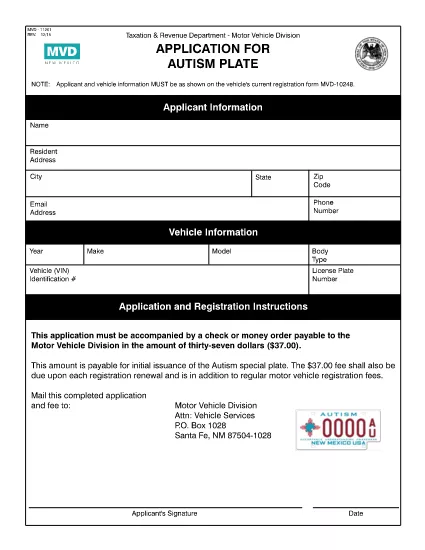
The MVD-11201 is the official New Mexico Motor Vehicle Division (MVD) application for an Autism (disability) license plate. This special plate provides recognition and certain parking privileges for drivers with autism spectrum disorder.

Our fillable PDF version lets you complete the entire application directly in your browser—no printing, scanning, or mailing required. Once you finish, you can download the completed PDF or submit it electronically through the Formize PDF Filler app.

What Is the MVD-11201 Autism Plate Form?

The form collects personal information, proof of diagnosis, vehicle details, and a fee schedule. It is required for anyone seeking a state‑issued autism plate in New Mexico.

How to Complete the Form Online

Simply click the Fill out this form button below. The Formize PDF Filler will load, and you can start entering your data immediately.

Common Mistakes to Avoid

  • Leaving the physician’s certification section blank.
  • Using an outdated address or vehicle VIN.
  • Forgetting to attach the required supporting documents (medical diagnosis, proof of residency).
  • Misspelling your name or Social Security Number.

Submission Instructions & Fees

After completing the form, you can either:

  • Download the finished PDF, print it, and mail it with the $10 plate fee to the MVD address listed on the form.
  • Submit the PDF electronically via the Formize portal if your local MVD office accepts digital submissions.

Where to Get Help

If you have questions about eligibility, required documentation, or the filing process, contact the New Mexico Motor Vehicle Division at 1‑800‑XYZ‑MVD or visit your nearest MVD office.

सामान्य प्रश्न
  • Who is eligible for an autism plate in New Mexico?

    Anyone with a documented autism spectrum disorder who can provide a physician’s certification and meets the standard vehicle registration requirements.

  • What supporting documents are required?

    A signed medical statement from a qualified physician, proof of New Mexico residency, and a copy of your driver's license or ID.

  • How much does the autism plate cost?

    The standard fee is $10 for the special plate, plus any applicable registration fees for your vehicle.

  • Can I submit the form electronically?

    Yes, if your local MVD office accepts digital submissions. Use the Formize PDF Filler to download the completed PDF and follow your office’s electronic filing instructions.

  • What if I make a mistake after submitting?

    Contact the MVD directly. Minor errors can often be corrected by submitting a written amendment; major errors may require a new application.

  • How long does it take to receive the plate?

    Processing typically takes 7‑10 business days after the MVD receives a complete application and payment.

  • Do I need to renew the autism plate?

    The plate itself does not require renewal, but you must keep your vehicle registration current each year.

कैसे करें

MVD-11201 को मुफ़्त में, ऑनलाइन 5 आसान स्टेप्स में कैसे भरें:

  1. 1
    Click the Fill Out Button
    Press the "Fill out this form" button on the page to launch the Formize PDF Filler.
  2. 2
    Wait for the Filler to Load
    The Formize app loads in seconds. No download or installation is required.
  3. 3
    Enter Your Information
    Complete each field—personal details, vehicle info, and physician certification—directly in the browser.
  4. 4
    Save and Review
    Use the "Save" option to store your progress, then double‑check all entries for accuracy.
  5. 5
    Submit or Download
    When finished, either submit the form electronically or download the completed PDF to print and mail.
पीडीएफ फिलर एप तैयार करें
के बारे में

वाहन पंजीकरण प्रपत्र

यदि आप एक मोटर वाहन, ट्रेलर या नाव के मालिक हैं या पट्टे पर हैं, तो आपको अपने वाहन को कानूनी रूप से पंजीकृत और सुरक्षित रखने के लिए कुछ दायित्वों को पूरा करना होगा।

MVD-11201 वाहन पंजीकरण प्रपत्रों में से एक है जो ऐसे दस्तावेज़ हैं जिनका उपयोग प्रासंगिक राज्य या प्रांतीय प्राधिकरण के साथ मोटर वाहन को पंजीकृत करने के लिए किया जाता है। ये फॉर्म आमतौर पर तब आवश्यक होते हैं जब कोई व्यक्ति नया या इस्तेमाल किया हुआ वाहन खरीदता है या जब वे वाहन के साथ किसी नए राज्य या प्रांत में जाते हैं।

वाहन पंजीकरण के लिए आवश्यक सटीक आवश्यकताएं और फॉर्म स्थान के अनुसार भिन्न हो सकते हैं, लेकिन आम तौर पर, प्रक्रिया में वाहन, मालिक और वाहन पर किसी भी ग्रहणाधिकार के बारे में जानकारी प्रदान करना शामिल होता है।

पंजीकरण फॉर्म और शुल्क जमा करने के बाद, राज्य या प्रांतीय प्राधिकरण वाहन के मालिक को पंजीकरण प्रमाणपत्र या लाइसेंस प्लेट जारी करेगा। यह पंजीकरण वाहन को सार्वजनिक सड़कों और राजमार्गों पर कानूनी रूप से संचालित करने की अनुमति देता है।

विशेषताएं

पीडीएफ भराव

पीडीएफ फॉर्म ऑनलाइन भरने का सबसे आसान तरीका

  • जल्दी से MVD-11201 भरें
    MVD-11201 को जल्दी से ऑनलाइन भरने का कोई तरीका खोज रहे हैं? हमारे ऑनलाइन नि:शुल्क पीडीएफ फॉर्म फिलर के साथ, आप एक मिनट से भी कम समय में इस पीडीएफ दस्तावेज़ को संपादित करने और भरने का तरीका जानेंगे।
  • ऑनलाइन पीडीएफ संपादक का उपयोग करना आसान है
    पीडीएफ फाइलों को प्रिंट करने से तंग आ गए हैं ताकि आप उन्हें फिर से स्कैन करने और उन्हें वापस भेजने से पहले संपादित कर सकें? PDF दस्तावेज़ों को निःशुल्क ऑनलाइन संपादित करें। समय और कागज बचाने के लिए हमारे ऑनलाइन पीडीएफ संपादक का प्रयोग करें।
  • महान उपकरण, सभी प्लेटफार्म
    आश्चर्य है कि मैक पर MVD-11201 कैसे भरें, या शायद पीडीएफ फिलर का मुफ्त में उपयोग कैसे करें? हमारे ऑनलाइन पीडीएफ टूल सभी प्लेटफॉर्म पर काम करते हैं।
  • सुरक्षित फ़ाइल भंडारण
    पूर्ण की गई "MVD-11201" फ़ाइलें Amazon क्लाउड होस्टिंग द्वारा प्रबंधित एक सुरक्षित डेटाबेस में संग्रहीत की जाती हैं। आप कभी भी अपनी फाइलों को हमारे सिस्टम से हटा सकते हैं। किसी भी स्थिति में, ये फ़ाइलें 24 घंटे के बाद स्वतः हटा दी जाती हैं।
  • {कीवर्ड} से चैट करें
    Chatize पर "MVD-11201" के साथ चैट करें, जो एक निःशुल्क पीडीएफ रीडर सहायक है। प्रश्न पूछें और "MVD-11201" से उत्तर प्राप्त करें। बस ऊपर दस्तावेज़ के साथ चैट करें बटन पर क्लिक करें।

फ़िलिंग सत्र मिटाएँ

चयनित फ़िलिंग सत्र को मिटाएँ? इस स्थिति में, फ़ॉर्म को पूरा करने में आपकी प्रगति खो जाएगी।

संपादन सत्र हटाएँ

चयनित संपादन सत्र हटाएँ? इस स्थिति में, फ़ॉर्म बनाने और संपादित करने में आपकी प्रगति नष्ट हो जाएगी।