
hamburger-menu icon
भाषा का चयन करें

MV-82D Duplicate Title Form – Fill Online for Free

  1. देश अमेरीका
  2. भाषा अंग्रेज़ी
  3. गतिविधि वाहन पंजीकरण
  4. राज्य न्यूयॉर्क
फार्म को भरो
MV-82D Duplicate Title Form – Fill Online for Free

What Is the MV-82D Form?

The MV-82D is the New York State Department of Motor Vehicles (DMV) application used to request a duplicate vehicle title. It is required when the original title is lost, damaged, or stolen. The form captures vehicle information, owner details, and the reason for the duplicate request.

How to Complete the MV-82D Online

With Formize you can fill out the MV-82D directly in your browser—no PDF editor needed. Follow these simple steps:

  1. Click the "Fill out this form" button on this page.
  2. Wait a few seconds while the Formize PDF Filler app loads the fillable version of the MV-82D.
  3. Enter the required information in each field. The form automatically validates dates, VIN numbers, and fee amounts.
  4. Review your answers, then click Submit to download the completed PDF.

After downloading, you can print the document and take it to your local DMV office or mail it with the required payment.

Common Mistakes to Avoid

  • Incorrect VIN: Double‑check the Vehicle Identification Number; a single digit error will cause the DMV to reject the form.
  • Missing Signature: The owner’s signature is mandatory. Use the digital signature tool in Formize or sign after printing.
  • Wrong Fee Amount: The duplicate title fee changes periodically. Verify the current fee on the NY DMV website before submitting.
  • Out‑of‑date Address: Ensure your mailing address matches the one on file with the DMV.

Where to Submit Your Completed Form

Once you have the filled‑out MV-82D PDF, you can:

  • Visit any NY DMV office in person.
  • Mail the form with a check or money order for the duplicate title fee to the address listed on the form.
  • Use the NY DMV online portal (if you have a MyDMV account) to upload the PDF.

Download the Official PDF

If you prefer the original, non‑fillable PDF, you can download it directly from the NY DMV:

Download MV-82D – Duplicate Title Form (PDF)

सामान्य प्रश्न
  • What is the MV-82D used for?

    The MV-82D is the application for obtaining a duplicate vehicle title in New York State when the original title is lost, stolen, or damaged.

  • Can I submit the MV-82D electronically?

    Yes. After filling it out with Formize, you can upload the completed PDF through the NY DMV online portal or email it if your local office accepts electronic submissions.

  • How much does a duplicate title cost?

    The fee varies; check the current duplicate title fee on the NY DMV website before submitting your payment.

  • Do I need a notarized signature on the MV-82D?

    No notarization is required for a duplicate title, but the owner’s signature must be present and legible.

  • What documents should I attach with the MV-82D?

    Include a copy of your driver's license or ID, proof of ownership (if requested), and the payment method (check or money order).

  • Is the Formize filler compatible with mobile devices?

    Yes, Formize works on most modern smartphones and tablets, allowing you to complete the MV-82D on the go.

कैसे करें

MV-82D को मुफ़्त में, ऑनलाइन 4 आसान स्टेप्स में कैसे भरें:

  1. 1
    Click the Fill‑out Button
    Press the "Fill out this form" button on the page to launch the Formize PDF Filler.
  2. 2
    Wait for the Filler to Load
    The app loads the MV-82D as a fillable document in a few seconds—no download required.
  3. 3
    Enter Your Information
    Complete each field. Formize validates entries in real time, reducing errors.
  4. 4
    Download or Print
    When finished, click "Submit" to download the completed PDF. Print it for DMV submission.
पीडीएफ फिलर एप तैयार करें
के बारे में

वाहन पंजीकरण प्रपत्र

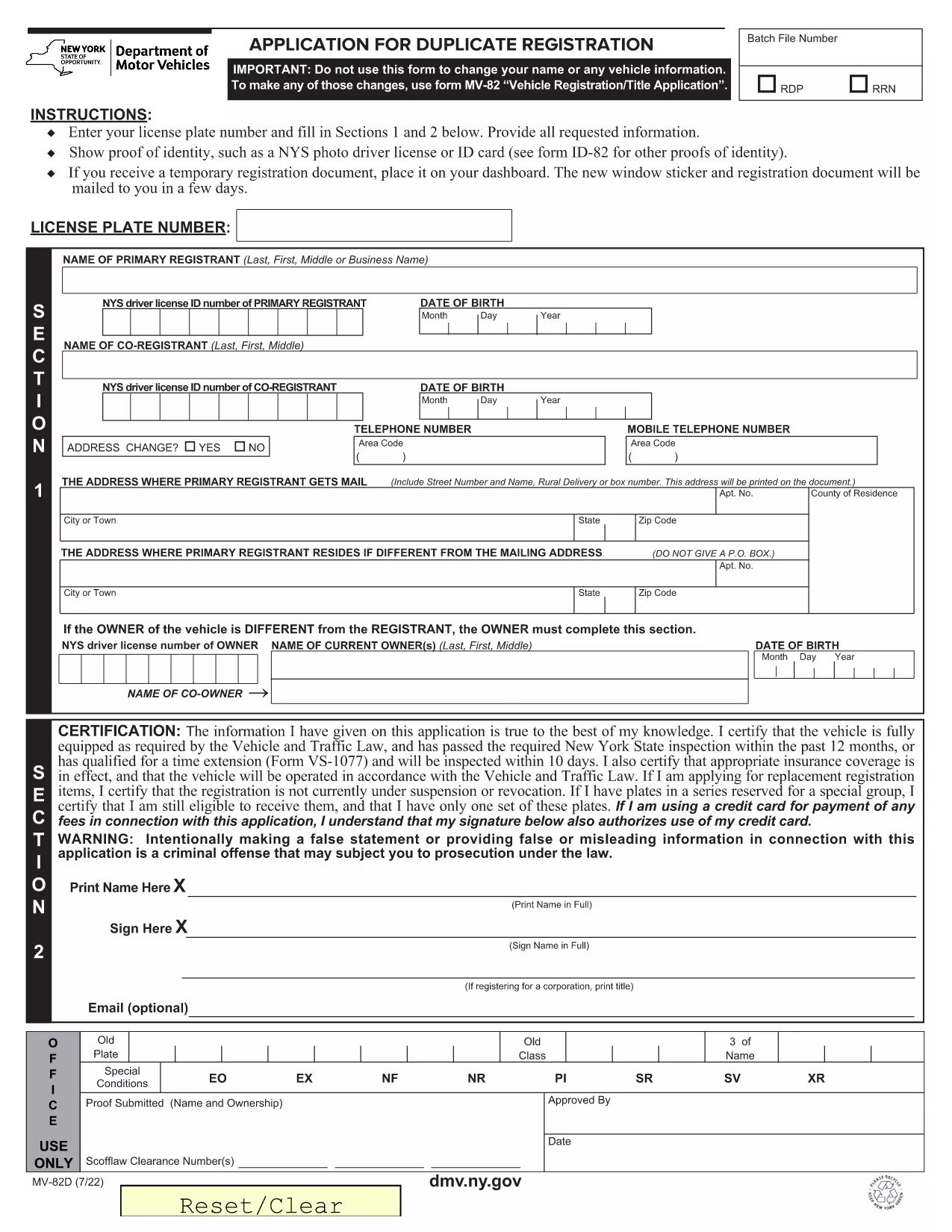
MV-82D वाहन पंजीकरण फॉर्मों में से एक है जो संबंधित सरकारी प्राधिकरण, आमतौर पर मोटर वाहन विभाग (डीएमवी) या समकक्ष एजेंसी के साथ मोटर वाहन को पंजीकृत करने के लिए उपयोग किए जाने वाले दस्तावेज हैं। इन फॉर्मों की आवश्यकता तब होती है जब कोई व्यक्ति नया या प्रयुक्त वाहन खरीदता है, वाहन का स्वामित्व स्थानांतरित करता है, या वाहन के साथ नए क्षेत्राधिकार में जाता है।

विशिष्ट वाहन पंजीकरण फॉर्म क्षेत्राधिकार के अनुसार भिन्न हो सकते हैं, लेकिन उन्हें आम तौर पर निम्नलिखित जानकारी की आवश्यकता होती है:

वाहन जानकारी: इसमें वाहन के बारे में विवरण शामिल हैं, जैसे मेक, मॉडल, वर्ष, वाहन पहचान संख्या (वीआईएन), और ओडोमीटर रीडिंग।

मालिक की जानकारी: फॉर्म में वाहन के मालिक के बारे में जानकारी की आवश्यकता होगी, जिसमें उनका नाम, पता, संपर्क जानकारी और ड्राइवर का लाइसेंस नंबर शामिल है।

स्वामित्व का प्रमाण: परिस्थितियों के आधार पर, स्वामित्व के प्रमाण की आवश्यकता हो सकती है, जैसे शीर्षक प्रमाण पत्र, बिक्री का बिल, या निर्माता का मूल प्रमाण पत्र (नए वाहनों के लिए)।

बीमा जानकारी: वैध वाहन बीमा कवरेज का प्रमाण आम तौर पर आवश्यक होता है। इसमें बीमा पॉलिसी नंबर, कवरेज की तारीखें और बीमा कंपनी का विवरण प्रदान करना शामिल हो सकता है।

फीस का भुगतान: वाहन पंजीकरण में विभिन्न शुल्कों का भुगतान शामिल है, जैसे पंजीकरण शुल्क, कर और संभवतः क्षेत्राधिकार के लिए विशिष्ट अन्य शुल्क।

इन बुनियादी आवश्यकताओं के अलावा, कुछ न्यायालयों में अतिरिक्त फॉर्म या दस्तावेज़ीकरण आवश्यकताएँ हो सकती हैं। उदाहरण के लिए, कुछ क्षेत्रों में उत्सर्जन परीक्षण के परिणाम, सुरक्षा निरीक्षण या निवास का प्रमाण आवश्यक हो सकता है।

एक बार वाहन पंजीकरण फॉर्म पूरा हो जाने और जमा हो जाने के बाद, सरकारी प्राधिकरण एक पंजीकरण प्रमाणपत्र, लाइसेंस प्लेट और पंजीकरण स्टिकर जारी करेगा। ये दस्तावेज़ दर्शाते हैं कि वाहन कानूनी रूप से पंजीकृत है और सार्वजनिक सड़कों पर संचालन के लिए अधिकृत है।

यह ध्यान रखना महत्वपूर्ण है कि वाहन पंजीकरण आवश्यकताएँ क्षेत्राधिकार के अनुसार काफी भिन्न हो सकती हैं। इसलिए, आपके स्थान पर लागू विशिष्ट रूपों और प्रक्रियाओं के लिए स्थानीय डीएमवी या समकक्ष एजेंसी से परामर्श करने की अनुशंसा की जाती है।

विशेषताएं

पीडीएफ भराव

पीडीएफ फॉर्म ऑनलाइन भरने का सबसे आसान तरीका

  • जल्दी से MV-82D भरें
    MV-82D को जल्दी से ऑनलाइन भरने का कोई तरीका खोज रहे हैं? हमारे ऑनलाइन नि:शुल्क पीडीएफ फॉर्म फिलर के साथ, आप एक मिनट से भी कम समय में इस पीडीएफ दस्तावेज़ को संपादित करने और भरने का तरीका जानेंगे।
  • ऑनलाइन पीडीएफ संपादक का उपयोग करना आसान है
    पीडीएफ फाइलों को प्रिंट करने से तंग आ गए हैं ताकि आप उन्हें फिर से स्कैन करने और उन्हें वापस भेजने से पहले संपादित कर सकें? PDF दस्तावेज़ों को निःशुल्क ऑनलाइन संपादित करें। समय और कागज बचाने के लिए हमारे ऑनलाइन पीडीएफ संपादक का प्रयोग करें।
  • महान उपकरण, सभी प्लेटफार्म
    आश्चर्य है कि मैक पर MV-82D कैसे भरें, या शायद पीडीएफ फिलर का मुफ्त में उपयोग कैसे करें? हमारे ऑनलाइन पीडीएफ टूल सभी प्लेटफॉर्म पर काम करते हैं।
  • सुरक्षित फ़ाइल भंडारण
    पूर्ण की गई "MV-82D" फ़ाइलें Amazon क्लाउड होस्टिंग द्वारा प्रबंधित एक सुरक्षित डेटाबेस में संग्रहीत की जाती हैं। आप कभी भी अपनी फाइलों को हमारे सिस्टम से हटा सकते हैं। किसी भी स्थिति में, ये फ़ाइलें 24 घंटे के बाद स्वतः हटा दी जाती हैं।
  • {कीवर्ड} से चैट करें
    Chatize पर "MV-82D" के साथ चैट करें, जो एक निःशुल्क पीडीएफ रीडर सहायक है। प्रश्न पूछें और "MV-82D" से उत्तर प्राप्त करें। बस ऊपर दस्तावेज़ के साथ चैट करें बटन पर क्लिक करें।

फ़िलिंग सत्र मिटाएँ

चयनित फ़िलिंग सत्र को मिटाएँ? इस स्थिति में, फ़ॉर्म को पूरा करने में आपकी प्रगति खो जाएगी।

संपादन सत्र हटाएँ

चयनित संपादन सत्र हटाएँ? इस स्थिति में, फ़ॉर्म बनाने और संपादित करने में आपकी प्रगति नष्ट हो जाएगी।