
hamburger-menu icon
भाषा का चयन करें

MVR-618 Fillable PDF – North Carolina Weight Declaration Form

  1. भाषा अंग्रेज़ी
  2. देश अमेरीका
  3. गतिविधि वाहन पंजीकरण
  4. राज्य उत्तरी केरोलिना
फार्म को भरो
MVR-618 Fillable PDF – North Carolina Weight Declaration Form

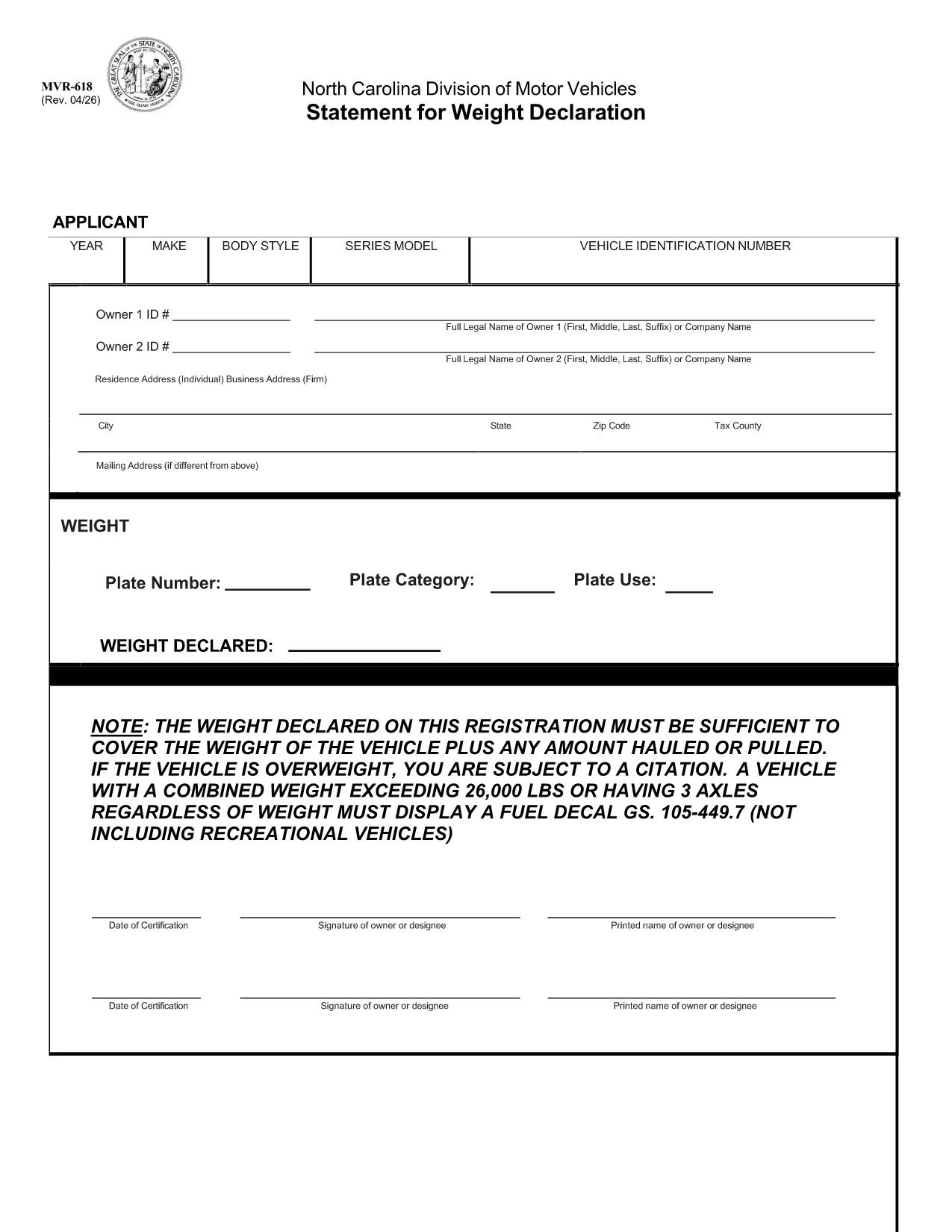
The MVR-618 is the North Carolina Division of Motor Vehicles (NCDMV) “Statement for Weight Declaration.” It is required whenever you register a vehicle that carries a load, pulls a trailer, or exceeds certain weight thresholds. The form ensures the declared weight covers the vehicle plus any hauled or pulled cargo, helping you stay compliant and avoid citations.

What is Form MVR-618?

Form MVR-618 captures the total weight of your vehicle and any additional load. North Carolina law mandates that the declared weight must be sufficient for the vehicle’s own weight plus any cargo. Vehicles over 26,000 lbs or with three axles must display a fuel decal (GS 105‑449.7). The form is part of the standard vehicle registration packet and is used by the Department of Motor Vehicles to verify compliance.

How to Fill Out MVR-618 Online

Instead of printing, printing, and scanning, you can complete the form instantly in your browser using Formize’s Fillable PDF tool. Follow the quick steps below:

  • Click the “Fill out this form” button on this page.
  • The Formize PDF Filler loads – no download required.
  • Enter the requested information (vehicle weight, cargo weight, axle count, etc.).
  • Review the data, then click **Submit** to generate a completed PDF.
  • Save or print the finished document for your records.

Common Mistakes & Tips

Even a small error can lead to a citation. Keep these tips in mind:

  • Double‑check the total weight. Add vehicle weight and cargo weight accurately.
  • Include all axles. Remember that three‑axle vehicles need a fuel decal regardless of weight.
  • Use pounds (lbs) only. The form does not accept kilograms.
  • Signature required. The online filler adds a digital signature field – sign before saving.
  • Keep a copy. Store the completed PDF in your vehicle records folder.

Download & Save the PDF

If you prefer a hard copy, the original fillable PDF is available for download below. The file is the official NCDOT version, fully compatible with Formize.

Download MVR-618 (Official PDF)

Whether you use the online filler or the printable PDF, Formize makes completing MVR-618 fast, accurate, and hassle‑free.

सामान्य प्रश्न
  • Do I need to print the MVR-618 after filling it online?

    Printing is optional. You can keep the digital PDF for your records, but many DMV offices still require a printed copy. Use the “Print” button in the Formize filler if you need one.

  • What happens if my declared weight is too low?

    If the declared weight does not cover the vehicle plus any load, the DMV may issue a citation and you could be required to re‑register with a corrected weight declaration.

  • Can I edit the form after I’ve downloaded it?

    Once you download the completed PDF, it is locked for editing. If you need to make changes, return to the online filler, adjust the fields, and download a new version.

  • Is the Formize filler secure?

    Yes. Formize uses SSL encryption for data transmission, and the completed PDF is stored only in your browser session unless you choose to download it.

  • Do I need a fuel decal if my vehicle is under 26,000 lbs but has three axles?

    Yes. North Carolina law requires a fuel decal for any vehicle with three axles, regardless of total weight.

  • What if I lose the completed MVR-618?

    You can re‑fill the form online at any time using the same vehicle information. Keep a digital copy saved on your computer or cloud storage for easy access.

कैसे करें

MVR-618 को मुफ़्त में, ऑनलाइन 4 आसान स्टेप्स में कैसे भरें:

  1. 1
    Open the Fillable Form
    Click the “Fill out this form” button on this page. The Formize PDF Filler loads directly in your browser – no software download needed.
  2. 2
    Enter Required Information
    Fill in the vehicle’s gross weight, cargo weight, axle count, and any other fields shown. All entries are saved automatically.
  3. 3
    Review and Sign
    Check the completed values for accuracy, then use the digital signature field to sign the form.
  4. 4
    Save or Print
    Click “Download” to save the completed PDF to your device, or select “Print” to obtain a hard copy for your records.
पीडीएफ फिलर एप तैयार करें
के बारे में

वाहन पंजीकरण प्रपत्र

MVR-618 डीएमवी फॉर्मों में से एक है, जिसे मोटर वाहन विभाग फॉर्म के रूप में भी जाना जाता है, जो मोटर वाहनों से संबंधित विभिन्न लेनदेन और प्रक्रियाओं में उपयोग किए जाने वाले दस्तावेज हैं। DMV एक सरकारी एजेंसी है जो ड्राइवर लाइसेंसिंग, वाहन पंजीकरण और मोटर वाहन कानूनों को लागू करने के लिए जिम्मेदार है। उपलब्ध विशिष्ट DMV फॉर्म क्षेत्राधिकार के अनुसार भिन्न हो सकते हैं, लेकिन यहां कुछ सामान्य उदाहरण दिए गए हैं:

ड्राइवर लाइसेंस फॉर्म: इन फॉर्म का उपयोग ड्राइवर के लाइसेंस के लिए आवेदन करने या परिवर्तन या नवीनीकरण का अनुरोध करने के लिए किया जाता है। उन्हें आम तौर पर व्यक्तिगत जानकारी, पहचान के प्रमाण की आवश्यकता होती है, और इसमें चिकित्सा जानकारी या ड्राइविंग इतिहास के अनुभाग शामिल हो सकते हैं।

वाहन पंजीकरण फॉर्म: इन फॉर्मों का उपयोग डीएमवी के साथ मोटर वाहन को पंजीकृत करने के लिए किया जाता है। उन्हें वाहन की जानकारी, स्वामित्व विवरण और बीमा के प्रमाण की आवश्यकता होती है।

टाइटल ट्रांसफर फॉर्म: वाहन खरीदते या बेचते समय, इन फॉर्मों का उपयोग एक पक्ष से दूसरे पक्ष को स्वामित्व हस्तांतरित करने के लिए किया जाता है। उन्हें खरीदार, विक्रेता, वाहन विवरण के बारे में जानकारी की आवश्यकता होती है और इसमें बिक्री का बिल भी शामिल हो सकता है।

वाहन दायित्व प्रपत्र जारी करना: किसी वाहन के स्वामित्व को बेचते या स्थानांतरित करते समय, ये प्रपत्र डीएमवी को सूचित करते हैं कि विक्रेता अब वाहन के लिए जिम्मेदार नहीं है। यह विक्रेता को बिक्री के बाद वाहन से जुड़ी दुर्घटनाओं या घटनाओं के लिए दायित्व से बचाने में मदद करता है।

लाइसेंस प्लेट और पंजीकरण नवीनीकरण फॉर्म: इन फॉर्मों का उपयोग वाहन पंजीकरण को नवीनीकृत करने या नए लाइसेंस प्लेटों का अनुरोध करने के लिए किया जाता है। उन्हें आम तौर पर पंजीकृत मालिक, वर्तमान पंजीकरण विवरण और लागू शुल्क के भुगतान के बारे में जानकारी की आवश्यकता होती है।

ड्राइविंग रिकॉर्ड अनुरोध फॉर्म: ये फॉर्म व्यक्तियों को डीएमवी से अपने ड्राइविंग रिकॉर्ड का अनुरोध करने की अनुमति देते हैं, जो ड्राइविंग उल्लंघन, लाइसेंस स्थिति और अन्य प्रासंगिक विवरणों के बारे में जानकारी प्रदान करते हैं।

विशेषता या वैयक्तिकृत लाइसेंस प्लेट फॉर्म: इन फॉर्मों का उपयोग वैयक्तिकृत या विशिष्ट लाइसेंस प्लेटों के लिए आवेदन करने के लिए किया जाता है, जो व्यक्तियों को विशिष्ट पात्रों या डिज़ाइन के साथ अपनी लाइसेंस प्लेट को अनुकूलित करने की अनुमति देते हैं।

ये उन अनेक प्रपत्रों के कुछ उदाहरण हैं जो DMV के माध्यम से उपलब्ध हो सकते हैं। विशिष्ट फॉर्म और आवश्यकताएं क्षेत्राधिकार के अनुसार अलग-अलग हो सकती हैं, इसलिए अपनी विशेष जरूरतों के लिए सही फॉर्म प्राप्त करने के लिए स्थानीय डीएमवी वेबसाइट से परामर्श करना या डीएमवी कार्यालय में जाना महत्वपूर्ण है।

विशेषताएं

पीडीएफ भराव

पीडीएफ फॉर्म ऑनलाइन भरने का सबसे आसान तरीका

  • जल्दी से MVR-618 भरें
    MVR-618 को जल्दी से ऑनलाइन भरने का कोई तरीका खोज रहे हैं? हमारे ऑनलाइन नि:शुल्क पीडीएफ फॉर्म फिलर के साथ, आप एक मिनट से भी कम समय में इस पीडीएफ दस्तावेज़ को संपादित करने और भरने का तरीका जानेंगे।
  • ऑनलाइन पीडीएफ संपादक का उपयोग करना आसान है
    पीडीएफ फाइलों को प्रिंट करने से तंग आ गए हैं ताकि आप उन्हें फिर से स्कैन करने और उन्हें वापस भेजने से पहले संपादित कर सकें? PDF दस्तावेज़ों को निःशुल्क ऑनलाइन संपादित करें। समय और कागज बचाने के लिए हमारे ऑनलाइन पीडीएफ संपादक का प्रयोग करें।
  • महान उपकरण, सभी प्लेटफार्म
    आश्चर्य है कि मैक पर MVR-618 कैसे भरें, या शायद पीडीएफ फिलर का मुफ्त में उपयोग कैसे करें? हमारे ऑनलाइन पीडीएफ टूल सभी प्लेटफॉर्म पर काम करते हैं।
  • सुरक्षित फ़ाइल भंडारण
    पूर्ण की गई "MVR-618" फ़ाइलें Amazon क्लाउड होस्टिंग द्वारा प्रबंधित एक सुरक्षित डेटाबेस में संग्रहीत की जाती हैं। आप कभी भी अपनी फाइलों को हमारे सिस्टम से हटा सकते हैं। किसी भी स्थिति में, ये फ़ाइलें 24 घंटे के बाद स्वतः हटा दी जाती हैं।
  • {कीवर्ड} से चैट करें
    Chatize पर "MVR-618" के साथ चैट करें, जो एक निःशुल्क पीडीएफ रीडर सहायक है। प्रश्न पूछें और "MVR-618" से उत्तर प्राप्त करें। बस ऊपर दस्तावेज़ के साथ चैट करें बटन पर क्लिक करें।

फ़िलिंग सत्र मिटाएँ

चयनित फ़िलिंग सत्र को मिटाएँ? इस स्थिति में, फ़ॉर्म को पूरा करने में आपकी प्रगति खो जाएगी।

संपादन सत्र हटाएँ

चयनित संपादन सत्र हटाएँ? इस स्थिति में, फ़ॉर्म बनाने और संपादित करने में आपकी प्रगति नष्ट हो जाएगी।