
hamburger-menu icon
भाषा का चयन करें

MVR-622 HMMWV Affidavit – Fillable PDF Form

  1. भाषा अंग्रेज़ी
  2. देश अमेरीका
  3. गतिविधि वाहन पंजीकरण
  4. राज्य उत्तरी केरोलिना
फार्म को भरो
MVR-622 HMMWV Affidavit – Fillable PDF Form

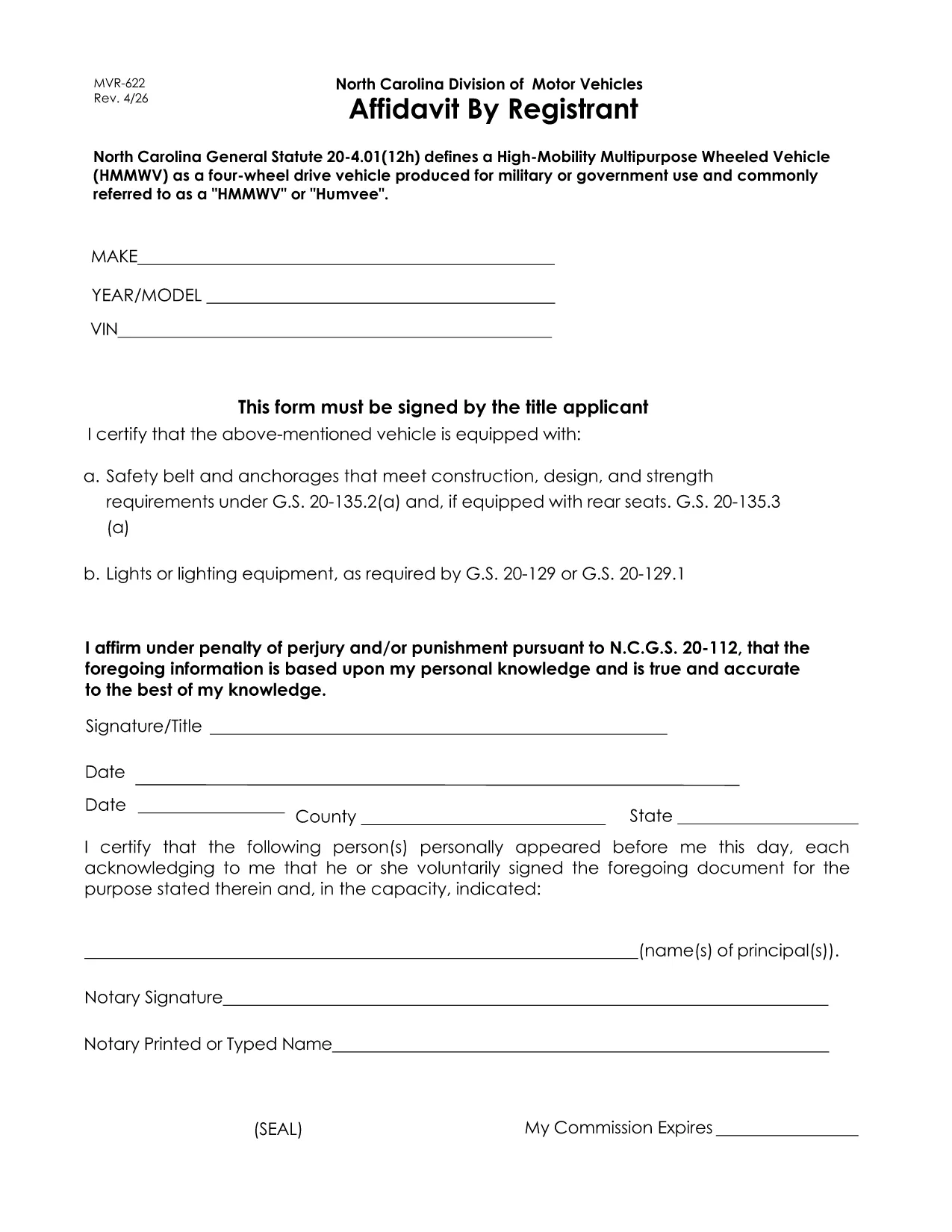
The MVR-622 is the North Carolina Motor Vehicle Registration (MVR) HMMWV Affidavit required when a manufacturer or seller certifies that a High‑Mobility Multipurpose Wheeled Vehicle (HMMWV) meets all applicable federal safety standards. This form is essential for registering or titling an HMMWV in North Carolina.

Formize offers a fillable PDF version of the MVR-622, so you can complete the affidavit directly in your browser—no Adobe Acrobat or other PDF editor required.

What Is the MVR-622 Form?

  • Official North Carolina DMV document (Form Number MVR‑622).
  • Used to attest that the vehicle complies with federal motor‑vehicle safety standards.
  • Signed by the manufacturer, seller, or authorized representative.

How to Complete the MVR-622 Online

Simply click the "Fill out this form" button below. The Formize PDF Filler will load, presenting every field as an interactive input box. Fill in the required information, save, and download the completed PDF.

Common Mistakes to Avoid

  • Leaving any required field blank – the filler will highlight missing data.
  • Using the wrong vehicle identification number (VIN) – double‑check the VIN on the vehicle.
  • Forgetting the signature block – you must sign electronically or print and sign after download.

Where to Submit the Completed Form

After completing and printing the form, submit it to your local North Carolina DMV office together with the required title or registration documents. You can also mail it to the address listed on the DMV website.

Need the PDF now? Click below to start filling it out instantly.

सामान्य प्रश्न
  • Is the MVR-622 form available as a free download?

    Yes. The fillable PDF version is free to download and complete using Formize’s online filler.

  • Do I need Adobe Acrobat to fill out MVR-622?

    No. Formize’s web‑based PDF filler works in any modern browser—no extra software required.

  • Can I save my progress and return later?

    Absolutely. Use the “Save” button to store a draft in your Formize account and finish it whenever you’re ready.

  • What information is required on the affidavit?

    You must provide the vehicle’s VIN, manufacturer or seller name, certification that the HMMWV meets federal safety standards, and an authorized signature.

  • How do I submit the completed MVR-622?

    Print the completed PDF and bring it to your local NC DMV office, or mail it according to the instructions on the form.

  • Is the electronic signature accepted by the DMV?

    The DMV requires a handwritten signature on the printed form. You can add an electronic signature for your records, then sign after printing.

  • What if I make a mistake after downloading?

    You can re‑open the saved draft in Formize, correct the error, and download a new PDF without starting from scratch.

  • Is my data safe while using Formize?

    Formize uses SSL encryption and stores files securely, ensuring your personal and vehicle information remains private.

कैसे करें

MVR-622 को मुफ़्त में, ऑनलाइन 6 आसान स्टेप्स में कैसे भरें:

  1. 1
    Click the Fill‑out Button
    Press the “Fill out this form” button on the page to launch Formize’s secure PDF filler.
  2. 2
    Wait for the Filler to Load
    The application loads in seconds. All form fields become editable directly in your browser.
  3. 3
    Enter Required Information
    Type the manufacturer’s details, VIN, safety compliance statements, and any other required data.
  4. 4
    Add Your Signature
    Use the electronic signature field or plan to sign after you download and print the PDF.
  5. 5
    Save or Download
    When every required field is filled, click “Save” to store a copy in your Formize account or “Download” to get the completed PDF.
  6. 6
    Print and Submit
    Print the completed form and submit it to the North Carolina DMV as instructed on the form.
पीडीएफ फिलर एप तैयार करें
के बारे में

वाहन पंजीकरण प्रपत्र

MVR-622 डीएमवी फॉर्मों में से एक है, जिसे मोटर वाहन विभाग फॉर्म के रूप में भी जाना जाता है, जो मोटर वाहनों से संबंधित विभिन्न लेनदेन और प्रक्रियाओं में उपयोग किए जाने वाले दस्तावेज हैं। DMV एक सरकारी एजेंसी है जो ड्राइवर लाइसेंसिंग, वाहन पंजीकरण और मोटर वाहन कानूनों को लागू करने के लिए जिम्मेदार है। उपलब्ध विशिष्ट DMV फॉर्म क्षेत्राधिकार के अनुसार भिन्न हो सकते हैं, लेकिन यहां कुछ सामान्य उदाहरण दिए गए हैं:

ड्राइवर लाइसेंस फॉर्म: इन फॉर्म का उपयोग ड्राइवर के लाइसेंस के लिए आवेदन करने या परिवर्तन या नवीनीकरण का अनुरोध करने के लिए किया जाता है। उन्हें आम तौर पर व्यक्तिगत जानकारी, पहचान के प्रमाण की आवश्यकता होती है, और इसमें चिकित्सा जानकारी या ड्राइविंग इतिहास के अनुभाग शामिल हो सकते हैं।

वाहन पंजीकरण फॉर्म: इन फॉर्मों का उपयोग डीएमवी के साथ मोटर वाहन को पंजीकृत करने के लिए किया जाता है। उन्हें वाहन की जानकारी, स्वामित्व विवरण और बीमा के प्रमाण की आवश्यकता होती है।

टाइटल ट्रांसफर फॉर्म: वाहन खरीदते या बेचते समय, इन फॉर्मों का उपयोग एक पक्ष से दूसरे पक्ष को स्वामित्व हस्तांतरित करने के लिए किया जाता है। उन्हें खरीदार, विक्रेता, वाहन विवरण के बारे में जानकारी की आवश्यकता होती है और इसमें बिक्री का बिल भी शामिल हो सकता है।

वाहन दायित्व प्रपत्र जारी करना: किसी वाहन के स्वामित्व को बेचते या स्थानांतरित करते समय, ये प्रपत्र डीएमवी को सूचित करते हैं कि विक्रेता अब वाहन के लिए जिम्मेदार नहीं है। यह विक्रेता को बिक्री के बाद वाहन से जुड़ी दुर्घटनाओं या घटनाओं के लिए दायित्व से बचाने में मदद करता है।

लाइसेंस प्लेट और पंजीकरण नवीनीकरण फॉर्म: इन फॉर्मों का उपयोग वाहन पंजीकरण को नवीनीकृत करने या नए लाइसेंस प्लेटों का अनुरोध करने के लिए किया जाता है। उन्हें आम तौर पर पंजीकृत मालिक, वर्तमान पंजीकरण विवरण और लागू शुल्क के भुगतान के बारे में जानकारी की आवश्यकता होती है।

ड्राइविंग रिकॉर्ड अनुरोध फॉर्म: ये फॉर्म व्यक्तियों को डीएमवी से अपने ड्राइविंग रिकॉर्ड का अनुरोध करने की अनुमति देते हैं, जो ड्राइविंग उल्लंघन, लाइसेंस स्थिति और अन्य प्रासंगिक विवरणों के बारे में जानकारी प्रदान करते हैं।

विशेषता या वैयक्तिकृत लाइसेंस प्लेट फॉर्म: इन फॉर्मों का उपयोग वैयक्तिकृत या विशिष्ट लाइसेंस प्लेटों के लिए आवेदन करने के लिए किया जाता है, जो व्यक्तियों को विशिष्ट पात्रों या डिज़ाइन के साथ अपनी लाइसेंस प्लेट को अनुकूलित करने की अनुमति देते हैं।

ये उन अनेक प्रपत्रों के कुछ उदाहरण हैं जो DMV के माध्यम से उपलब्ध हो सकते हैं। विशिष्ट फॉर्म और आवश्यकताएं क्षेत्राधिकार के अनुसार अलग-अलग हो सकती हैं, इसलिए अपनी विशेष जरूरतों के लिए सही फॉर्म प्राप्त करने के लिए स्थानीय डीएमवी वेबसाइट से परामर्श करना या डीएमवी कार्यालय में जाना महत्वपूर्ण है।

विशेषताएं

पीडीएफ भराव

पीडीएफ फॉर्म ऑनलाइन भरने का सबसे आसान तरीका

  • जल्दी से MVR-622 भरें
    MVR-622 को जल्दी से ऑनलाइन भरने का कोई तरीका खोज रहे हैं? हमारे ऑनलाइन नि:शुल्क पीडीएफ फॉर्म फिलर के साथ, आप एक मिनट से भी कम समय में इस पीडीएफ दस्तावेज़ को संपादित करने और भरने का तरीका जानेंगे।
  • ऑनलाइन पीडीएफ संपादक का उपयोग करना आसान है
    पीडीएफ फाइलों को प्रिंट करने से तंग आ गए हैं ताकि आप उन्हें फिर से स्कैन करने और उन्हें वापस भेजने से पहले संपादित कर सकें? PDF दस्तावेज़ों को निःशुल्क ऑनलाइन संपादित करें। समय और कागज बचाने के लिए हमारे ऑनलाइन पीडीएफ संपादक का प्रयोग करें।
  • महान उपकरण, सभी प्लेटफार्म
    आश्चर्य है कि मैक पर MVR-622 कैसे भरें, या शायद पीडीएफ फिलर का मुफ्त में उपयोग कैसे करें? हमारे ऑनलाइन पीडीएफ टूल सभी प्लेटफॉर्म पर काम करते हैं।
  • सुरक्षित फ़ाइल भंडारण
    पूर्ण की गई "MVR-622" फ़ाइलें Amazon क्लाउड होस्टिंग द्वारा प्रबंधित एक सुरक्षित डेटाबेस में संग्रहीत की जाती हैं। आप कभी भी अपनी फाइलों को हमारे सिस्टम से हटा सकते हैं। किसी भी स्थिति में, ये फ़ाइलें 24 घंटे के बाद स्वतः हटा दी जाती हैं।
  • {कीवर्ड} से चैट करें
    Chatize पर "MVR-622" के साथ चैट करें, जो एक निःशुल्क पीडीएफ रीडर सहायक है। प्रश्न पूछें और "MVR-622" से उत्तर प्राप्त करें। बस ऊपर दस्तावेज़ के साथ चैट करें बटन पर क्लिक करें।

फ़िलिंग सत्र मिटाएँ

चयनित फ़िलिंग सत्र को मिटाएँ? इस स्थिति में, फ़ॉर्म को पूरा करने में आपकी प्रगति खो जाएगी।

संपादन सत्र हटाएँ

चयनित संपादन सत्र हटाएँ? इस स्थिति में, फ़ॉर्म बनाने और संपादित करने में आपकी प्रगति नष्ट हो जाएगी।