
hamburger-menu icon
भाषा का चयन करें

SFN 51269 – Request for Vehicle Information (North Dakota)

  1. भाषा अंग्रेज़ी
  2. देश अमेरीका
  3. गतिविधि वाहन पंजीकरण
  4. राज्य नॉर्थ डकोटा
फार्म को भरो
SFN 51269 – Request for Vehicle Information (North Dakota)

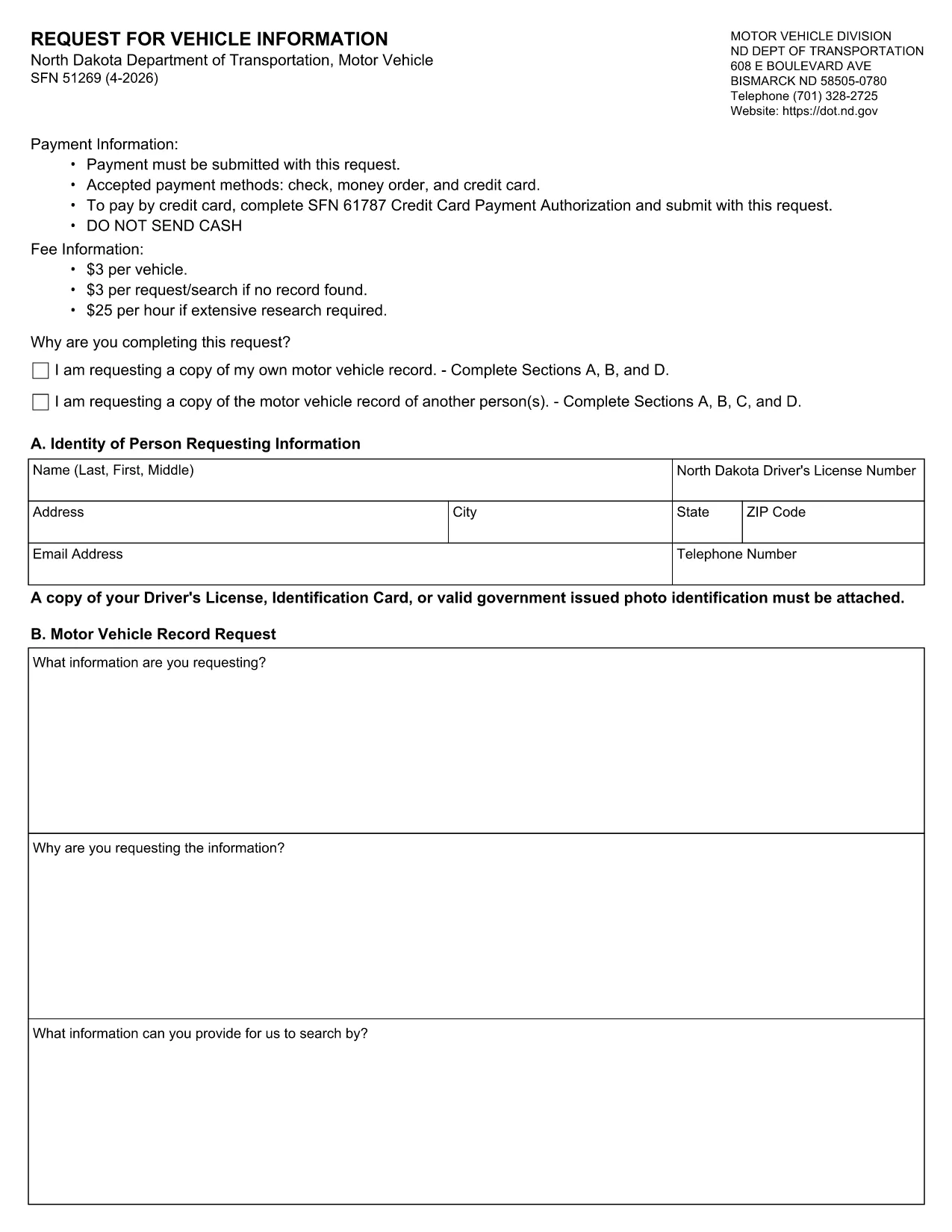
The SFN 51269 is the North Dakota Department of Transportation’s official request for vehicle information. Businesses, law‑enforcement agencies, and individuals use this form to obtain registration details, VIN, and ownership data for a small processing fee.

What Is the SFN 51269 Form?

This fillable PDF collects:

  • Requester’s contact information
  • Vehicle description (make, model, year, VIN)
  • Purpose of the request (legal, insurance, research, etc.)
  • Payment method (credit card authorization is included on the form)

It is required by North Dakota law that the request be submitted to the ND DOT’s Vehicle Records Division.

How to Complete the Form Online

Instead of downloading the PDF and opening it in a separate editor, simply click the “Fill out this form” button on this page. The Formize PDF Filler app will load the document directly in your browser, allowing you to type, sign, and attach supporting documents.

  • Step 1: Click the blue “Fill out this form” button.
  • Step 2: Wait a few seconds for the Formize PDF Filler to load.
  • Step 3: Complete each field, upload a copy of your ID, and add the credit‑card authorization if you’re paying online.
  • Step 4: Review the information, then click **Submit**. You’ll receive a confirmation email with a tracking number.

Common Mistakes & Tips

  • Double‑check the VIN; an incorrect digit will delay processing.
  • Provide a clear, legible copy of a government‑issued photo ID.
  • Ensure the payment authorization matches the card used for the fee.
  • Use the exact purpose description required by ND DOT (e.g., “law enforcement investigation”).

Where to Submit the Completed Form

After you submit through Formize, the system securely forwards the request to the ND DOT’s Vehicle Records Division. You will receive a receipt and, once approved, the requested vehicle data will be emailed to the address you provided.

For any questions about fees or processing times, contact the North Dakota Department of Transportation at vehiclerecords@nd.gov.

सामान्य प्रश्न
  • What is the fee for filing SFN 51269?

    The standard processing fee is $3 per vehicle. Additional fees may apply for expedited service or multiple vehicle requests.

  • Can I pay the fee with a credit card?

    Yes. The form includes a Credit Card Payment Authorization section. Fill it out and attach a copy of the card for verification.

  • Do I need a copy of my driver’s license?

    A clear, government‑issued photo ID (driver’s license, state ID, or passport) is required to validate the request.

  • How long does it take to receive the vehicle information?

    Standard processing takes 5‑7 business days after the request is approved. Expedited service is available for an additional fee.

  • Is the Formize PDF Filler secure?

    Yes. All data is encrypted in transit and the completed form is stored only for the time needed to forward it to the ND DOT.

  • Can I request information for more than one vehicle on the same form?

    Each vehicle requires its own SFN 51269 form and fee. Submit separate forms for each vehicle you need information on.

कैसे करें

SFN 51269 को मुफ़्त में, ऑनलाइन 4 आसान स्टेप्स में कैसे भरें:

  1. 1
    Open the Fillable Form
    Click the “Fill out this form” button on the page. The Formize PDF Filler loads the SFN 51269 PDF directly in your browser.
  2. 2
    Enter Your Information
    Complete each field: requester details, vehicle description, purpose of request, and payment authorization. Upload a clear copy of your government‑issued ID.
  3. 3
    Review and Submit
    Double‑check every entry for accuracy, then click the Submit button. The system will encrypt your data and send it to the ND DOT.
  4. 4
    Receive Confirmation
    A confirmation email with a tracking number will arrive within minutes. Use this number to check the status of your request.
पीडीएफ फिलर एप तैयार करें
के बारे में

वाहन पंजीकरण प्रपत्र

यदि आप एक मोटर वाहन, ट्रेलर या नाव के मालिक हैं या पट्टे पर हैं, तो आपको अपने वाहन को कानूनी रूप से पंजीकृत और सुरक्षित रखने के लिए कुछ दायित्वों को पूरा करना होगा।

SFN 51269 वाहन पंजीकरण प्रपत्रों में से एक है जो ऐसे दस्तावेज़ हैं जिनका उपयोग प्रासंगिक राज्य या प्रांतीय प्राधिकरण के साथ मोटर वाहन को पंजीकृत करने के लिए किया जाता है। ये फॉर्म आमतौर पर तब आवश्यक होते हैं जब कोई व्यक्ति नया या इस्तेमाल किया हुआ वाहन खरीदता है या जब वे वाहन के साथ किसी नए राज्य या प्रांत में जाते हैं।

वाहन पंजीकरण के लिए आवश्यक सटीक आवश्यकताएं और फॉर्म स्थान के अनुसार भिन्न हो सकते हैं, लेकिन आम तौर पर, प्रक्रिया में वाहन, मालिक और वाहन पर किसी भी ग्रहणाधिकार के बारे में जानकारी प्रदान करना शामिल होता है।

पंजीकरण फॉर्म और शुल्क जमा करने के बाद, राज्य या प्रांतीय प्राधिकरण वाहन के मालिक को पंजीकरण प्रमाणपत्र या लाइसेंस प्लेट जारी करेगा। यह पंजीकरण वाहन को सार्वजनिक सड़कों और राजमार्गों पर कानूनी रूप से संचालित करने की अनुमति देता है।

विशेषताएं

पीडीएफ भराव

पीडीएफ फॉर्म ऑनलाइन भरने का सबसे आसान तरीका

  • जल्दी से SFN 51269 भरें
    SFN 51269 को जल्दी से ऑनलाइन भरने का कोई तरीका खोज रहे हैं? हमारे ऑनलाइन नि:शुल्क पीडीएफ फॉर्म फिलर के साथ, आप एक मिनट से भी कम समय में इस पीडीएफ दस्तावेज़ को संपादित करने और भरने का तरीका जानेंगे।
  • ऑनलाइन पीडीएफ संपादक का उपयोग करना आसान है
    पीडीएफ फाइलों को प्रिंट करने से तंग आ गए हैं ताकि आप उन्हें फिर से स्कैन करने और उन्हें वापस भेजने से पहले संपादित कर सकें? PDF दस्तावेज़ों को निःशुल्क ऑनलाइन संपादित करें। समय और कागज बचाने के लिए हमारे ऑनलाइन पीडीएफ संपादक का प्रयोग करें।
  • महान उपकरण, सभी प्लेटफार्म
    आश्चर्य है कि मैक पर SFN 51269 कैसे भरें, या शायद पीडीएफ फिलर का मुफ्त में उपयोग कैसे करें? हमारे ऑनलाइन पीडीएफ टूल सभी प्लेटफॉर्म पर काम करते हैं।
  • सुरक्षित फ़ाइल भंडारण
    पूर्ण की गई "SFN 51269" फ़ाइलें Amazon क्लाउड होस्टिंग द्वारा प्रबंधित एक सुरक्षित डेटाबेस में संग्रहीत की जाती हैं। आप कभी भी अपनी फाइलों को हमारे सिस्टम से हटा सकते हैं। किसी भी स्थिति में, ये फ़ाइलें 24 घंटे के बाद स्वतः हटा दी जाती हैं।
  • {कीवर्ड} से चैट करें
    Chatize पर "SFN 51269" के साथ चैट करें, जो एक निःशुल्क पीडीएफ रीडर सहायक है। प्रश्न पूछें और "SFN 51269" से उत्तर प्राप्त करें। बस ऊपर दस्तावेज़ के साथ चैट करें बटन पर क्लिक करें।

फ़िलिंग सत्र मिटाएँ

चयनित फ़िलिंग सत्र को मिटाएँ? इस स्थिति में, फ़ॉर्म को पूरा करने में आपकी प्रगति खो जाएगी।

संपादन सत्र हटाएँ

चयनित संपादन सत्र हटाएँ? इस स्थिति में, फ़ॉर्म बनाने और संपादित करने में आपकी प्रगति नष्ट हो जाएगी।