
hamburger-menu icon
भाषा का चयन करें

SFN 60662 – Indemnifying Affidavit (Fillable PDF)

  1. भाषा अंग्रेज़ी
  2. देश अमेरीका
  3. गतिविधि वाहन पंजीकरण
  4. राज्य नॉर्थ डकोटा
फार्म को भरो
SFN 60662 – Indemnifying Affidavit (Fillable PDF)

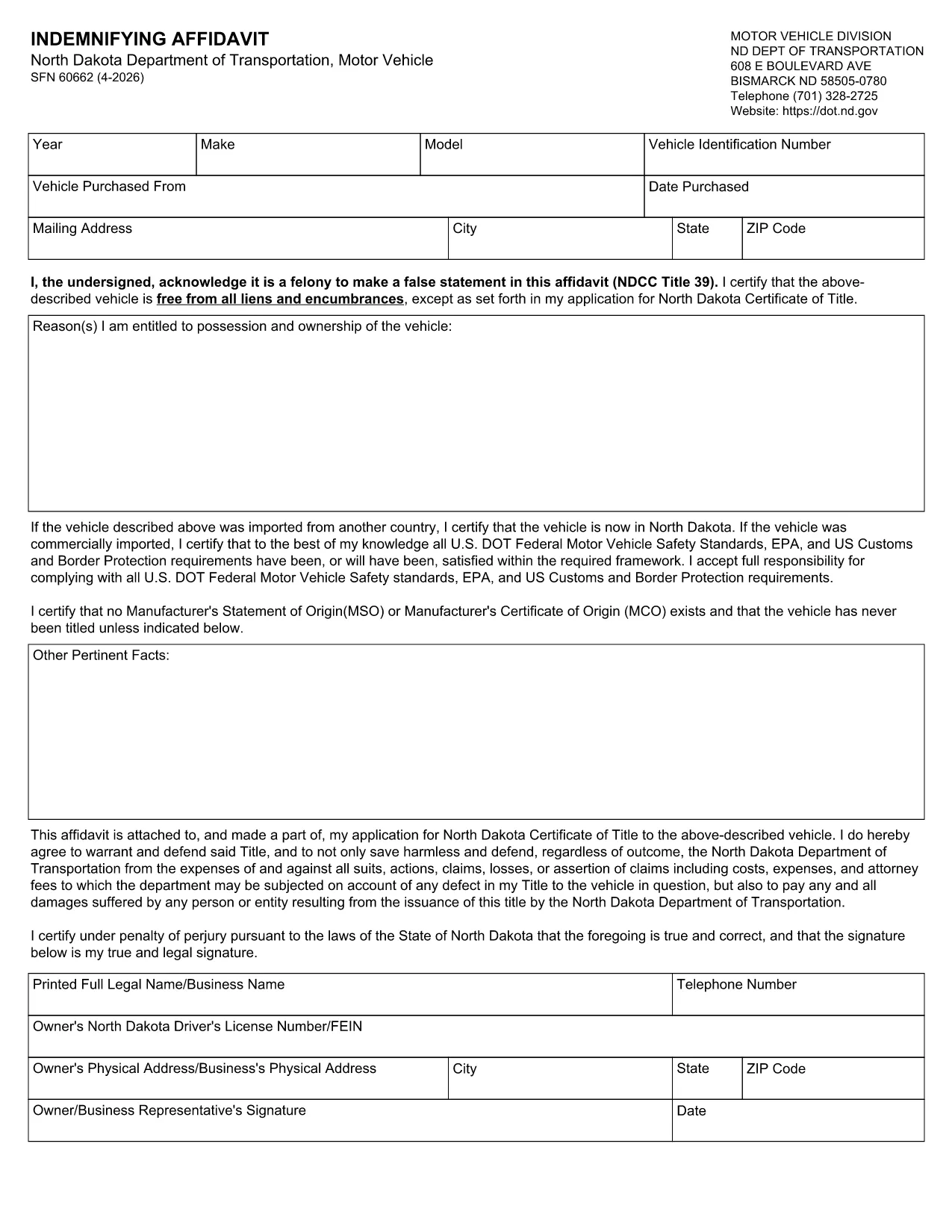
The SFN 60662 is the North Dakota Department of Transportation’s Indemnifying Affidavit. It is required when registering a vehicle, transferring ownership, or completing certain motor‑vehicle transactions in North Dakota. The form is now available as a fillable PDF so you can complete it directly in your browser without printing or scanning.

What Is SFN 60662?

SFN 60662 is an affidavit that legally binds the signer to indemnify the North Dakota Department of Transportation (ND DOT) against any loss, damage, or liability that may arise from the vehicle transaction. Making a false statement on this form is a felony under ND law.

How to Complete the Indemnifying Affidavit Online

Instead of downloading the PDF and opening it in a separate editor, simply click the "Fill out this form" button on this page. The Formize PDF Filler app will load the fillable version automatically.

  • Step 1: Click the button and wait for the Formize interface to appear.
  • Step 2: Fill each field; required fields are highlighted.
  • Step 3: Use the tooltip icons for help on specific sections.
  • Step 4: Review your entries, then add an electronic signature.
  • Step 5: Save, download, or email the completed form directly from Formize.

Common Mistakes & Tips

  • Do not leave any required field blank – the form will not submit.
  • Double‑check the VIN and license‑plate numbers for accuracy.
  • Make sure the date format matches MM/DD/YYYY as required by ND law.
  • Read the affidavit language carefully; a false statement is a felony.

Where to Submit the Form

After completing the affidavit, you can:

  • Print and bring it to any ND DOT Motor Vehicle office.
  • Upload the PDF through the ND DOT online portal, if applicable.
  • Email the signed PDF to the address provided by the receiving agency.

Download the Official PDF

If you prefer to work offline, you can download the official PDF directly from the ND DOT website:

https://www.dot.nd.gov/forms/sfn60662.pdf

सामान्य प्रश्न
  • Is the SFN 60662 form free to download?

    Yes. The official ND DOT version is available at no cost. You can download it or fill it online with Formize for free.

  • Can I print the form after filling it online?

    Absolutely. After you complete the affidavit in Formize, you can download a printable PDF version and bring it to a motor‑vehicle office.

  • Do I need a digital signature?

    A digital signature is accepted by the ND DOT for this affidavit. If you prefer a handwritten signature, print the completed form and sign it before submission.

  • What happens if I make a mistake on the affidavit?

    Because a false statement is a felony, double‑check all entries before signing. If you discover an error after signing, contact the ND DOT to request a corrected form.

  • Which agencies accept the online‑filled SFN 60662?

    All North Dakota Motor Vehicle Division offices accept the electronically completed affidavit, as do any third‑party dealers or lienholders that request it.

  • Do I need any special software to use Formize?

    No. Formize runs in any modern web browser, so you don’t need Adobe Acrobat or other PDF editors.

कैसे करें

SFN 60662 को मुफ़्त में, ऑनलाइन 5 आसान स्टेप्स में कैसे भरें:

  1. 1
    Click the Fill Button
    Press the "Fill out this form" button on the page to launch the Formize PDF Filler.
  2. 2
    Wait for the Filler to Load
    The fillable version of SFN 60662 will appear in a secure window. This only takes a few seconds.
  3. 3
    Enter Your Information
    Complete each highlighted field. Use the tooltips for guidance on legal language and required formats.
  4. 4
    Add Your Electronic Signature
    When all fields are filled, click the signature box to sign electronically. This signature is legally binding.
  5. 5
    Save or Send the Completed Form
    Download the finished PDF to your device or email it directly to the ND DOT office from the Formize interface.
पीडीएफ फिलर एप तैयार करें
के बारे में

वाहन पंजीकरण प्रपत्र

यदि आप एक मोटर वाहन, ट्रेलर या नाव के मालिक हैं या पट्टे पर हैं, तो आपको अपने वाहन को कानूनी रूप से पंजीकृत और सुरक्षित रखने के लिए कुछ दायित्वों को पूरा करना होगा।

SFN 60662 वाहन पंजीकरण प्रपत्रों में से एक है जो ऐसे दस्तावेज़ हैं जिनका उपयोग प्रासंगिक राज्य या प्रांतीय प्राधिकरण के साथ मोटर वाहन को पंजीकृत करने के लिए किया जाता है। ये फॉर्म आमतौर पर तब आवश्यक होते हैं जब कोई व्यक्ति नया या इस्तेमाल किया हुआ वाहन खरीदता है या जब वे वाहन के साथ किसी नए राज्य या प्रांत में जाते हैं।

वाहन पंजीकरण के लिए आवश्यक सटीक आवश्यकताएं और फॉर्म स्थान के अनुसार भिन्न हो सकते हैं, लेकिन आम तौर पर, प्रक्रिया में वाहन, मालिक और वाहन पर किसी भी ग्रहणाधिकार के बारे में जानकारी प्रदान करना शामिल होता है।

पंजीकरण फॉर्म और शुल्क जमा करने के बाद, राज्य या प्रांतीय प्राधिकरण वाहन के मालिक को पंजीकरण प्रमाणपत्र या लाइसेंस प्लेट जारी करेगा। यह पंजीकरण वाहन को सार्वजनिक सड़कों और राजमार्गों पर कानूनी रूप से संचालित करने की अनुमति देता है।

विशेषताएं

पीडीएफ भराव

पीडीएफ फॉर्म ऑनलाइन भरने का सबसे आसान तरीका

  • जल्दी से SFN 60662 भरें
    SFN 60662 को जल्दी से ऑनलाइन भरने का कोई तरीका खोज रहे हैं? हमारे ऑनलाइन नि:शुल्क पीडीएफ फॉर्म फिलर के साथ, आप एक मिनट से भी कम समय में इस पीडीएफ दस्तावेज़ को संपादित करने और भरने का तरीका जानेंगे।
  • ऑनलाइन पीडीएफ संपादक का उपयोग करना आसान है
    पीडीएफ फाइलों को प्रिंट करने से तंग आ गए हैं ताकि आप उन्हें फिर से स्कैन करने और उन्हें वापस भेजने से पहले संपादित कर सकें? PDF दस्तावेज़ों को निःशुल्क ऑनलाइन संपादित करें। समय और कागज बचाने के लिए हमारे ऑनलाइन पीडीएफ संपादक का प्रयोग करें।
  • महान उपकरण, सभी प्लेटफार्म
    आश्चर्य है कि मैक पर SFN 60662 कैसे भरें, या शायद पीडीएफ फिलर का मुफ्त में उपयोग कैसे करें? हमारे ऑनलाइन पीडीएफ टूल सभी प्लेटफॉर्म पर काम करते हैं।
  • सुरक्षित फ़ाइल भंडारण
    पूर्ण की गई "SFN 60662" फ़ाइलें Amazon क्लाउड होस्टिंग द्वारा प्रबंधित एक सुरक्षित डेटाबेस में संग्रहीत की जाती हैं। आप कभी भी अपनी फाइलों को हमारे सिस्टम से हटा सकते हैं। किसी भी स्थिति में, ये फ़ाइलें 24 घंटे के बाद स्वतः हटा दी जाती हैं।
  • {कीवर्ड} से चैट करें
    Chatize पर "SFN 60662" के साथ चैट करें, जो एक निःशुल्क पीडीएफ रीडर सहायक है। प्रश्न पूछें और "SFN 60662" से उत्तर प्राप्त करें। बस ऊपर दस्तावेज़ के साथ चैट करें बटन पर क्लिक करें।

फ़िलिंग सत्र मिटाएँ

चयनित फ़िलिंग सत्र को मिटाएँ? इस स्थिति में, फ़ॉर्म को पूरा करने में आपकी प्रगति खो जाएगी।

संपादन सत्र हटाएँ

चयनित संपादन सत्र हटाएँ? इस स्थिति में, फ़ॉर्म बनाने और संपादित करने में आपकी प्रगति नष्ट हो जाएगी।