
hamburger-menu icon
भाषा का चयन करें

Pennsylvania MV‑38L Fillable Form – Duplicate Title & Lien Requests

  1. भाषा अंग्रेज़ी
  2. देश अमेरीका
  3. गतिविधि वाहन पंजीकरण
  4. राज्य पेंसिल्वेनिया
फार्म को भरो
Pennsylvania MV‑38L Fillable Form – Duplicate Title & Lien Requests

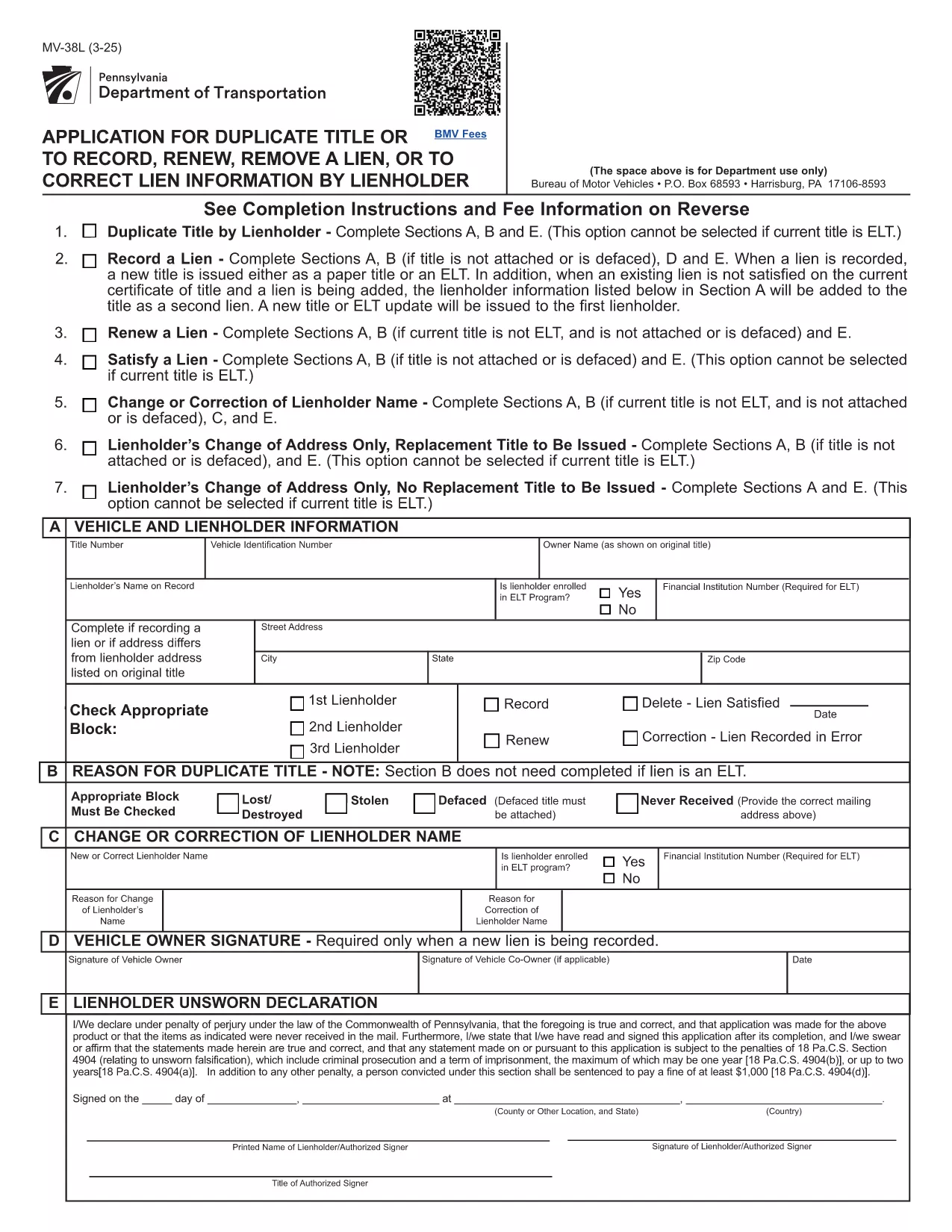
The MV‑38L is Pennsylvania's official application for a duplicate vehicle title, title renewal, lien removal, or title correction. Historically you had to print a paper copy, fill it out by hand, and mail it to PennDOT. With Formize you can now complete the entire form online, save a printed copy for your records, and submit it the way PennDOT requires.

What Is the MV‑38L Form?

MV‑38L is a fillable PDF issued by the Pennsylvania Department of Transportation (PennDOT). It replaces a lost, stolen, or damaged title and can also be used to:

  • Record a new lienholder or remove an existing lien.
  • Renew an expired title.
  • Correct errors on the original title.

When to Use MV‑38L

Typical scenarios include:

  • Your original title was misplaced or destroyed.
  • You have paid off a loan and need the lien released.
  • You are transferring ownership and the buyer needs a clean title.
  • You need to update the vehicle’s information (e.g., name change).

How to Complete the Form Online

Instead of downloading, printing, and scanning, follow these simple steps:

  1. Click the "Fill out this form" button on this page.
  2. The Formize PDF Filler app loads the MV‑38L PDF directly in your browser.
  3. Enter the required information in each field. All fields are editable and auto‑saved.
  4. When finished, click Save & Download to get a completed PDF you can print or email to PennDOT.

The online filler also validates required fields, helping you avoid common errors before submission.

Common Mistakes to Avoid

  • Incorrect VIN: Double‑check the Vehicle Identification Number; a single digit error can delay processing.
  • Missing Notarization: If Block #5 or #6 is checked, PennDOT requires a notarized signature and a fee receipt.
  • Wrong Fee Amount: Fees change annually. Verify the current amount on the PennDOT website before paying.
  • Omitting Lienholder Info: When removing a lien, provide the lender’s name, address, and account number.

Fees, Notarization, and Submission Details

Depending on the option you select, PennDOT may charge a fee (e.g., $22.50 for lien removal) and require notarization. After completing the form, you can either:

  • Print and mail the PDF to the address listed on the form, or
  • Submit electronically if your local PennDOT office accepts e‑filing.

Keep a copy of the completed PDF for your records – it serves as proof of application.

सामान्य प्रश्न
  • What is the purpose of the MV‑38L form?

    MV‑38L is used to request a duplicate vehicle title, renew an existing title, remove or record a lien, or correct errors on a Pennsylvania title.

  • Do I need a notary for every MV‑38L submission?

    Notary is required only if you check Block #5 (lien removal) or Block #6 (title correction). Otherwise, a signature alone is sufficient.

  • How much does it cost to get a duplicate title?

    The fee varies; as of the latest update it is $22.50 for lien‑related requests. Check the PennDOT website for the current fee schedule.

  • Can I submit the completed MV‑38L online?

    Many PennDOT offices accept electronic submissions, but some still require a mailed paper copy. Review the instructions on the form for your local office.

  • What information is required for the VIN?

    Enter the 17‑character Vehicle Identification Number exactly as it appears on the registration or insurance card. A single typo can delay processing.

  • Is the Formize filler free to use?

    Yes, Formize provides a free, secure PDF filler for the MV‑38L form. No software download is needed.

  • What should I do if I lose the completed PDF after filling it?

    The Formize app automatically saves a copy to your browser’s download folder. You can also email the PDF to yourself before printing.

  • Do I need to attach any supporting documents?

    If you are removing a lien, attach a lien release letter from the lender. For title corrections, include any relevant proof (e.g., court order).

कैसे करें

MV-38L को मुफ़्त में, ऑनलाइन 5 आसान स्टेप्स में कैसे भरें:

  1. 1
    Open the Fillable Form
    Click the "Fill out this form" button on the page. The Formize PDF Filler will open the MV‑38L PDF directly in your browser.
  2. 2
    Enter Your Information
    Complete each editable field—vehicle details, owner information, and lien data. The app highlights required fields.
  3. 3
    Add Notarization (if required)
    If you checked Block #5 or #6, print the completed form, have it notarized, and scan it back into the PDF.
  4. 4
    Save and Download
    When all fields are filled, click "Save & Download" to get a finished PDF you can print or email to PennDOT.
  5. 5
    Submit to PennDOT
    Mail the printed PDF with the appropriate fee, or follow any electronic submission instructions provided on the form.
पीडीएफ फिलर एप तैयार करें
के बारे में

वाहन पंजीकरण प्रपत्र

MV-38L डीएमवी फॉर्मों में से एक है, जिसे मोटर वाहन विभाग फॉर्म के रूप में भी जाना जाता है, जो मोटर वाहनों से संबंधित विभिन्न लेनदेन और प्रक्रियाओं में उपयोग किए जाने वाले दस्तावेज हैं। DMV एक सरकारी एजेंसी है जो ड्राइवर लाइसेंसिंग, वाहन पंजीकरण और मोटर वाहन कानूनों को लागू करने के लिए जिम्मेदार है। उपलब्ध विशिष्ट DMV फॉर्म क्षेत्राधिकार के अनुसार भिन्न हो सकते हैं, लेकिन यहां कुछ सामान्य उदाहरण दिए गए हैं:

ड्राइवर लाइसेंस फॉर्म: इन फॉर्म का उपयोग ड्राइवर के लाइसेंस के लिए आवेदन करने या परिवर्तन या नवीनीकरण का अनुरोध करने के लिए किया जाता है। उन्हें आम तौर पर व्यक्तिगत जानकारी, पहचान के प्रमाण की आवश्यकता होती है, और इसमें चिकित्सा जानकारी या ड्राइविंग इतिहास के अनुभाग शामिल हो सकते हैं।

वाहन पंजीकरण फॉर्म: इन फॉर्मों का उपयोग डीएमवी के साथ मोटर वाहन को पंजीकृत करने के लिए किया जाता है। उन्हें वाहन की जानकारी, स्वामित्व विवरण और बीमा के प्रमाण की आवश्यकता होती है।

टाइटल ट्रांसफर फॉर्म: वाहन खरीदते या बेचते समय, इन फॉर्मों का उपयोग एक पक्ष से दूसरे पक्ष को स्वामित्व हस्तांतरित करने के लिए किया जाता है। उन्हें खरीदार, विक्रेता, वाहन विवरण के बारे में जानकारी की आवश्यकता होती है और इसमें बिक्री का बिल भी शामिल हो सकता है।

वाहन दायित्व प्रपत्र जारी करना: किसी वाहन के स्वामित्व को बेचते या स्थानांतरित करते समय, ये प्रपत्र डीएमवी को सूचित करते हैं कि विक्रेता अब वाहन के लिए जिम्मेदार नहीं है। यह विक्रेता को बिक्री के बाद वाहन से जुड़ी दुर्घटनाओं या घटनाओं के लिए दायित्व से बचाने में मदद करता है।

लाइसेंस प्लेट और पंजीकरण नवीनीकरण फॉर्म: इन फॉर्मों का उपयोग वाहन पंजीकरण को नवीनीकृत करने या नए लाइसेंस प्लेटों का अनुरोध करने के लिए किया जाता है। उन्हें आम तौर पर पंजीकृत मालिक, वर्तमान पंजीकरण विवरण और लागू शुल्क के भुगतान के बारे में जानकारी की आवश्यकता होती है।

ड्राइविंग रिकॉर्ड अनुरोध फॉर्म: ये फॉर्म व्यक्तियों को डीएमवी से अपने ड्राइविंग रिकॉर्ड का अनुरोध करने की अनुमति देते हैं, जो ड्राइविंग उल्लंघन, लाइसेंस स्थिति और अन्य प्रासंगिक विवरणों के बारे में जानकारी प्रदान करते हैं।

विशेषता या वैयक्तिकृत लाइसेंस प्लेट फॉर्म: इन फॉर्मों का उपयोग वैयक्तिकृत या विशिष्ट लाइसेंस प्लेटों के लिए आवेदन करने के लिए किया जाता है, जो व्यक्तियों को विशिष्ट पात्रों या डिज़ाइन के साथ अपनी लाइसेंस प्लेट को अनुकूलित करने की अनुमति देते हैं।

ये उन अनेक प्रपत्रों के कुछ उदाहरण हैं जो DMV के माध्यम से उपलब्ध हो सकते हैं। विशिष्ट फॉर्म और आवश्यकताएं क्षेत्राधिकार के अनुसार अलग-अलग हो सकती हैं, इसलिए अपनी विशेष जरूरतों के लिए सही फॉर्म प्राप्त करने के लिए स्थानीय डीएमवी वेबसाइट से परामर्श करना या डीएमवी कार्यालय में जाना महत्वपूर्ण है।

विशेषताएं

पीडीएफ भराव

पीडीएफ फॉर्म ऑनलाइन भरने का सबसे आसान तरीका

  • जल्दी से MV-38L भरें
    MV-38L को जल्दी से ऑनलाइन भरने का कोई तरीका खोज रहे हैं? हमारे ऑनलाइन नि:शुल्क पीडीएफ फॉर्म फिलर के साथ, आप एक मिनट से भी कम समय में इस पीडीएफ दस्तावेज़ को संपादित करने और भरने का तरीका जानेंगे।
  • ऑनलाइन पीडीएफ संपादक का उपयोग करना आसान है
    पीडीएफ फाइलों को प्रिंट करने से तंग आ गए हैं ताकि आप उन्हें फिर से स्कैन करने और उन्हें वापस भेजने से पहले संपादित कर सकें? PDF दस्तावेज़ों को निःशुल्क ऑनलाइन संपादित करें। समय और कागज बचाने के लिए हमारे ऑनलाइन पीडीएफ संपादक का प्रयोग करें।
  • महान उपकरण, सभी प्लेटफार्म
    आश्चर्य है कि मैक पर MV-38L कैसे भरें, या शायद पीडीएफ फिलर का मुफ्त में उपयोग कैसे करें? हमारे ऑनलाइन पीडीएफ टूल सभी प्लेटफॉर्म पर काम करते हैं।
  • सुरक्षित फ़ाइल भंडारण
    पूर्ण की गई "MV-38L" फ़ाइलें Amazon क्लाउड होस्टिंग द्वारा प्रबंधित एक सुरक्षित डेटाबेस में संग्रहीत की जाती हैं। आप कभी भी अपनी फाइलों को हमारे सिस्टम से हटा सकते हैं। किसी भी स्थिति में, ये फ़ाइलें 24 घंटे के बाद स्वतः हटा दी जाती हैं।
  • {कीवर्ड} से चैट करें
    Chatize पर "MV-38L" के साथ चैट करें, जो एक निःशुल्क पीडीएफ रीडर सहायक है। प्रश्न पूछें और "MV-38L" से उत्तर प्राप्त करें। बस ऊपर दस्तावेज़ के साथ चैट करें बटन पर क्लिक करें।

फ़िलिंग सत्र मिटाएँ

चयनित फ़िलिंग सत्र को मिटाएँ? इस स्थिति में, फ़ॉर्म को पूरा करने में आपकी प्रगति खो जाएगी।

संपादन सत्र हटाएँ

चयनित संपादन सत्र हटाएँ? इस स्थिति में, फ़ॉर्म बनाने और संपादित करने में आपकी प्रगति नष्ट हो जाएगी।