
hamburger-menu icon
भाषा का चयन करें

MCD-361 Forestry Vehicle Registration Form (Fillable PDF)

  1. भाषा अंग्रेज़ी
  2. देश अमेरीका
  3. गतिविधि वाहन पंजीकरण
  4. राज्य टेक्सास
फार्म को भरो
MCD-361 Forestry Vehicle Registration Form (Fillable PDF)

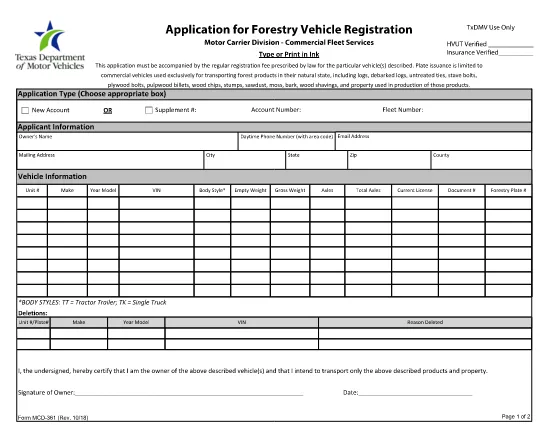
The MCD-361 is the official Texas Department of Motor Vehicles (TxDMV) application for registering a forestry vehicle. Whether you need a new registration, a renewal, or a change of ownership, this form captures all required details in a single, easy‑to‑complete document.

What is the MCD-361 Form?

Form MCD-361 (Rev. 10/18) is specifically designed for forestry vehicles such as log trucks, skidders, and other equipment used in timber operations. The form collects information about the vehicle, the owner, and any special permits required for operating in Texas.

How to Fill the MCD-361 Online

Instead of printing, printing, and scanning, you can fill the form directly in your browser using Formize’s PDF Filler. Follow the simple steps below.

  • Click the "Fill out this form" button on this page.
  • Wait a few seconds while the Formize PDF Filler app loads.
  • Enter the requested information in each fillable field.
  • Review your entries, then click Submit to download the completed PDF.

Common Errors to Avoid

  • Incorrect VIN or serial number: Double‑check the numbers on the vehicle’s title.
  • Missing signatures: Both the owner and a TxDMV authorized representative must sign.
  • Wrong fee amount: Verify the current registration fee schedule on the TxDMV website.
  • Incomplete address: Provide a full street address, city, and ZIP code.

Where to Submit Your Application

After completing the fillable PDF, you have two options:

  1. Mail: Send the printed, signed form along with payment to the address listed on the form.
  2. In‑person: Deliver the form to any Texas DMV regional office.

Download the Fillable PDF

Ready to start? Click the button below to open the official MCD‑361 PDF in Formize’s secure filler.

सामान्य प्रश्न
  • What type of vehicles require the MCD-361 form?

    Any vehicle classified as a forestry vehicle—log trucks, skidders, forwarders, and related equipment used in timber harvesting—must use MCD-361.

  • Can I submit the form electronically?

    The TxDMV currently accepts only printed and signed copies. Use the fillable PDF to avoid errors, then mail or deliver the hard copy.

  • Is there a fee for filing MCD-361?

    Yes. The registration fee varies by vehicle weight and type. Check the latest fee schedule on the Texas DMV website before submitting.

  • Do I need a special permit for out‑of‑state forestry vehicles?

    Out‑of‑state vehicles must obtain a Texas interstate permit in addition to completing MCD-361. Contact the TxDMV for details.

  • What happens if I make a mistake on the form?

    Mistakes can delay processing. Correct the error on a new fillable PDF, sign again, and resend. Do not submit a handwritten correction.

  • How long does processing take after I submit?

    Standard processing takes 7‑10 business days once the form and payment are received. Expedited service is available for an additional fee.

  • Can I use the same form for a renewal?

    Yes. The MCD-361 form serves both new registrations and renewals. Indicate the appropriate box at the top of the form.

कैसे करें

MCD-361 को मुफ़्त में, ऑनलाइन 5 आसान स्टेप्स में कैसे भरें:

  1. 1
    Click the Fill Out Button
    Press the "Fill out this form" button on the page to launch the Formize PDF Filler.
  2. 2
    Wait for the Filler to Load
    A few seconds later the fillable PDF will appear in the browser. No download needed.
  3. 3
    Enter Your Information
    Complete each field with accurate data—VIN, owner name, address, and vehicle details.
  4. 4
    Review and Sign
    Check all entries for errors, add required signatures, and then click "Submit".
  5. 5
    Save or Print
    Download the finished PDF, print it if you need a hard copy, and send it to the TxDMV.
पीडीएफ फिलर एप तैयार करें
के बारे में

वाहन पंजीकरण प्रपत्र

MCD-361 वाहन पंजीकरण फॉर्मों में से एक है जो संबंधित सरकारी प्राधिकरण, आमतौर पर मोटर वाहन विभाग (डीएमवी) या समकक्ष एजेंसी के साथ मोटर वाहन को पंजीकृत करने के लिए उपयोग किए जाने वाले दस्तावेज हैं। इन फॉर्मों की आवश्यकता तब होती है जब कोई व्यक्ति नया या प्रयुक्त वाहन खरीदता है, वाहन का स्वामित्व स्थानांतरित करता है, या वाहन के साथ नए क्षेत्राधिकार में जाता है।

विशिष्ट वाहन पंजीकरण फॉर्म क्षेत्राधिकार के अनुसार भिन्न हो सकते हैं, लेकिन उन्हें आम तौर पर निम्नलिखित जानकारी की आवश्यकता होती है:

वाहन जानकारी: इसमें वाहन के बारे में विवरण शामिल हैं, जैसे मेक, मॉडल, वर्ष, वाहन पहचान संख्या (वीआईएन), और ओडोमीटर रीडिंग।

मालिक की जानकारी: फॉर्म में वाहन के मालिक के बारे में जानकारी की आवश्यकता होगी, जिसमें उनका नाम, पता, संपर्क जानकारी और ड्राइवर का लाइसेंस नंबर शामिल है।

स्वामित्व का प्रमाण: परिस्थितियों के आधार पर, स्वामित्व के प्रमाण की आवश्यकता हो सकती है, जैसे शीर्षक प्रमाण पत्र, बिक्री का बिल, या निर्माता का मूल प्रमाण पत्र (नए वाहनों के लिए)।

बीमा जानकारी: वैध वाहन बीमा कवरेज का प्रमाण आम तौर पर आवश्यक होता है। इसमें बीमा पॉलिसी नंबर, कवरेज की तारीखें और बीमा कंपनी का विवरण प्रदान करना शामिल हो सकता है।

फीस का भुगतान: वाहन पंजीकरण में विभिन्न शुल्कों का भुगतान शामिल है, जैसे पंजीकरण शुल्क, कर और संभवतः क्षेत्राधिकार के लिए विशिष्ट अन्य शुल्क।

इन बुनियादी आवश्यकताओं के अलावा, कुछ न्यायालयों में अतिरिक्त फॉर्म या दस्तावेज़ीकरण आवश्यकताएँ हो सकती हैं। उदाहरण के लिए, कुछ क्षेत्रों में उत्सर्जन परीक्षण के परिणाम, सुरक्षा निरीक्षण या निवास का प्रमाण आवश्यक हो सकता है।

एक बार वाहन पंजीकरण फॉर्म पूरा हो जाने और जमा हो जाने के बाद, सरकारी प्राधिकरण एक पंजीकरण प्रमाणपत्र, लाइसेंस प्लेट और पंजीकरण स्टिकर जारी करेगा। ये दस्तावेज़ दर्शाते हैं कि वाहन कानूनी रूप से पंजीकृत है और सार्वजनिक सड़कों पर संचालन के लिए अधिकृत है।

यह ध्यान रखना महत्वपूर्ण है कि वाहन पंजीकरण आवश्यकताएँ क्षेत्राधिकार के अनुसार काफी भिन्न हो सकती हैं। इसलिए, आपके स्थान पर लागू विशिष्ट रूपों और प्रक्रियाओं के लिए स्थानीय डीएमवी या समकक्ष एजेंसी से परामर्श करने की अनुशंसा की जाती है।

विशेषताएं

पीडीएफ भराव

पीडीएफ फॉर्म ऑनलाइन भरने का सबसे आसान तरीका

  • जल्दी से MCD-361 भरें
    MCD-361 को जल्दी से ऑनलाइन भरने का कोई तरीका खोज रहे हैं? हमारे ऑनलाइन नि:शुल्क पीडीएफ फॉर्म फिलर के साथ, आप एक मिनट से भी कम समय में इस पीडीएफ दस्तावेज़ को संपादित करने और भरने का तरीका जानेंगे।
  • ऑनलाइन पीडीएफ संपादक का उपयोग करना आसान है
    पीडीएफ फाइलों को प्रिंट करने से तंग आ गए हैं ताकि आप उन्हें फिर से स्कैन करने और उन्हें वापस भेजने से पहले संपादित कर सकें? PDF दस्तावेज़ों को निःशुल्क ऑनलाइन संपादित करें। समय और कागज बचाने के लिए हमारे ऑनलाइन पीडीएफ संपादक का प्रयोग करें।
  • महान उपकरण, सभी प्लेटफार्म
    आश्चर्य है कि मैक पर MCD-361 कैसे भरें, या शायद पीडीएफ फिलर का मुफ्त में उपयोग कैसे करें? हमारे ऑनलाइन पीडीएफ टूल सभी प्लेटफॉर्म पर काम करते हैं।
  • सुरक्षित फ़ाइल भंडारण
    पूर्ण की गई "MCD-361" फ़ाइलें Amazon क्लाउड होस्टिंग द्वारा प्रबंधित एक सुरक्षित डेटाबेस में संग्रहीत की जाती हैं। आप कभी भी अपनी फाइलों को हमारे सिस्टम से हटा सकते हैं। किसी भी स्थिति में, ये फ़ाइलें 24 घंटे के बाद स्वतः हटा दी जाती हैं।
  • {कीवर्ड} से चैट करें
    Chatize पर "MCD-361" के साथ चैट करें, जो एक निःशुल्क पीडीएफ रीडर सहायक है। प्रश्न पूछें और "MCD-361" से उत्तर प्राप्त करें। बस ऊपर दस्तावेज़ के साथ चैट करें बटन पर क्लिक करें।

फ़िलिंग सत्र मिटाएँ

चयनित फ़िलिंग सत्र को मिटाएँ? इस स्थिति में, फ़ॉर्म को पूरा करने में आपकी प्रगति खो जाएगी।

संपादन सत्र हटाएँ

चयनित संपादन सत्र हटाएँ? इस स्थिति में, फ़ॉर्म बनाने और संपादित करने में आपकी प्रगति नष्ट हो जाएगी।