
hamburger-menu icon
भाषा का चयन करें

Form VTR-53 – Mobile Amateur Radio Operator License Plate Application

  1. भाषा अंग्रेज़ी
  2. देश अमेरीका
  3. गतिविधि वाहन पंजीकरण
  4. राज्य टेक्सास
फार्म को भरो
Form VTR-53 – Mobile Amateur Radio Operator License Plate Application

What Is Form VTR-53?

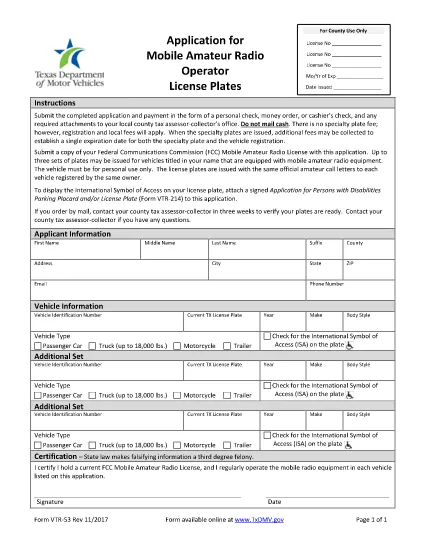
Form VTR-53 is the official application used by the Texas Department of Motor Vehicles (TxDMV) for issuing Mobile Amateur Radio Operator (M.A.R.O.) specialty license plates. The form collects vehicle information, radio‑operator details, and a certification that the applicant meets the eligibility requirements set by the Federal Communications Commission (FCC) and the TxDMV.

How to Complete the Fillable PDF Online

Instead of downloading the PDF and editing it with a separate editor, you can fill it out directly on our page using the Formize PDF Filler app. Follow the simple steps below.

  • Click the "Fill out this form" button below.
  • Wait a few seconds while the Formize PDF Filler loads the fillable VTR‑53 document.
  • Enter the requested information in each field – the form validates data in real time.
  • When you’re finished, click Save & Download to get a completed PDF ready for printing or electronic submission.

Common Mistakes to Avoid

Even a small error can delay processing. Keep these tips in mind:

  1. Vehicle VIN: Double‑check the 17‑character VIN for typos.
  2. Radio Call Sign: Use the exact call sign as issued by the FCC.
  3. Signature: The electronic signature must be clear; avoid scribbles.
  4. Eligibility Proof: Attach a copy of your FCC amateur radio license if the TxDMV requests it.

Where to Submit Your Application

After completing the form, you have two options:

  • In‑person: Bring the printed, signed form to any TxDMV regional office.
  • Mail: Send the completed PDF to:
    Texas Department of Motor Vehicles
    P.O. Box 12870
    Austin, TX 78711‑2870

Processing typically takes 7‑10 business days once the form is received.

सामान्य प्रश्न
  • Is Form VTR-53 required for all amateur radio operators?

    Only operators who want the special Mobile Amateur Radio Operator license plate need to complete Form VTR‑53. Regular vehicle registration does not require it.

  • Can I submit the form electronically?

    TxDMV currently accepts only printed and signed copies. However, you can fill the PDF online, print it, sign it, and mail or drop it off.

  • What fee is associated with the VTR‑53 plate?

    The specialty plate fee varies by vehicle type and year. Check the TxDMV fee schedule for the most up‑to‑date amount.

  • Do I need to attach my FCC amateur radio license?

    A copy of your FCC license is not required with the initial application, but TxDMV may request it during verification.

  • How long does processing take after I submit the form?

    Processing usually takes 7‑10 business days once the completed, signed form is received by TxDMV.

  • Can I edit the form after I download it?

    Yes, the PDF is fully fillable. Use the Formize PDF Filler on our page to make changes before finalizing.

कैसे करें

Form VTR-53 को मुफ़्त में, ऑनलाइन 4 आसान स्टेप्स में कैसे भरें:

  1. 1
    Open the Fillable Form
    Click the "Fill out this form" button on the page. The Formize PDF Filler app will load the VTR‑53 PDF directly in your browser.
  2. 2
    Enter Your Information
    Complete each field—vehicle details, radio call sign, and personal data. The app validates entries as you type.
  3. 3
    Save and Download
    When all required fields are filled, click "Save & Download" to obtain a finished PDF ready for printing or electronic submission.
  4. 4
    Submit to TxDMV
    Print the signed form and submit it in person or by mail to the Texas Department of Motor Vehicles.
पीडीएफ फिलर एप तैयार करें
के बारे में

वाहन पंजीकरण प्रपत्र

यदि आप एक मोटर वाहन, ट्रेलर या नाव के मालिक हैं या पट्टे पर हैं, तो आपको अपने वाहन को कानूनी रूप से पंजीकृत और सुरक्षित रखने के लिए कुछ दायित्वों को पूरा करना होगा।

Form VTR-53 वाहन पंजीकरण प्रपत्रों में से एक है जो ऐसे दस्तावेज़ हैं जिनका उपयोग प्रासंगिक राज्य या प्रांतीय प्राधिकरण के साथ मोटर वाहन को पंजीकृत करने के लिए किया जाता है। ये फॉर्म आमतौर पर तब आवश्यक होते हैं जब कोई व्यक्ति नया या इस्तेमाल किया हुआ वाहन खरीदता है या जब वे वाहन के साथ किसी नए राज्य या प्रांत में जाते हैं।

वाहन पंजीकरण के लिए आवश्यक सटीक आवश्यकताएं और फॉर्म स्थान के अनुसार भिन्न हो सकते हैं, लेकिन आम तौर पर, प्रक्रिया में वाहन, मालिक और वाहन पर किसी भी ग्रहणाधिकार के बारे में जानकारी प्रदान करना शामिल होता है।

पंजीकरण फॉर्म और शुल्क जमा करने के बाद, राज्य या प्रांतीय प्राधिकरण वाहन के मालिक को पंजीकरण प्रमाणपत्र या लाइसेंस प्लेट जारी करेगा। यह पंजीकरण वाहन को सार्वजनिक सड़कों और राजमार्गों पर कानूनी रूप से संचालित करने की अनुमति देता है।

विशेषताएं

पीडीएफ भराव

पीडीएफ फॉर्म ऑनलाइन भरने का सबसे आसान तरीका

  • जल्दी से Form VTR-53 भरें
    Form VTR-53 को जल्दी से ऑनलाइन भरने का कोई तरीका खोज रहे हैं? हमारे ऑनलाइन नि:शुल्क पीडीएफ फॉर्म फिलर के साथ, आप एक मिनट से भी कम समय में इस पीडीएफ दस्तावेज़ को संपादित करने और भरने का तरीका जानेंगे।
  • ऑनलाइन पीडीएफ संपादक का उपयोग करना आसान है
    पीडीएफ फाइलों को प्रिंट करने से तंग आ गए हैं ताकि आप उन्हें फिर से स्कैन करने और उन्हें वापस भेजने से पहले संपादित कर सकें? PDF दस्तावेज़ों को निःशुल्क ऑनलाइन संपादित करें। समय और कागज बचाने के लिए हमारे ऑनलाइन पीडीएफ संपादक का प्रयोग करें।
  • महान उपकरण, सभी प्लेटफार्म
    आश्चर्य है कि मैक पर Form VTR-53 कैसे भरें, या शायद पीडीएफ फिलर का मुफ्त में उपयोग कैसे करें? हमारे ऑनलाइन पीडीएफ टूल सभी प्लेटफॉर्म पर काम करते हैं।
  • सुरक्षित फ़ाइल भंडारण
    पूर्ण की गई "Form VTR-53" फ़ाइलें Amazon क्लाउड होस्टिंग द्वारा प्रबंधित एक सुरक्षित डेटाबेस में संग्रहीत की जाती हैं। आप कभी भी अपनी फाइलों को हमारे सिस्टम से हटा सकते हैं। किसी भी स्थिति में, ये फ़ाइलें 24 घंटे के बाद स्वतः हटा दी जाती हैं।
  • {कीवर्ड} से चैट करें
    Chatize पर "Form VTR-53" के साथ चैट करें, जो एक निःशुल्क पीडीएफ रीडर सहायक है। प्रश्न पूछें और "Form VTR-53" से उत्तर प्राप्त करें। बस ऊपर दस्तावेज़ के साथ चैट करें बटन पर क्लिक करें।

फ़िलिंग सत्र मिटाएँ

चयनित फ़िलिंग सत्र को मिटाएँ? इस स्थिति में, फ़ॉर्म को पूरा करने में आपकी प्रगति खो जाएगी।

संपादन सत्र हटाएँ

चयनित संपादन सत्र हटाएँ? इस स्थिति में, फ़ॉर्म बनाने और संपादित करने में आपकी प्रगति नष्ट हो जाएगी।