
hamburger-menu icon
भाषा का चयन करें

VTR-62-BUS Fillable PDF – School Transportation Services Certification

  1. भाषा अंग्रेज़ी
  2. देश अमेरीका
  3. गतिविधि वाहन पंजीकरण
  4. राज्य टेक्सास
फार्म को भरो
VTR-62-BUS Fillable PDF – School Transportation Services Certification

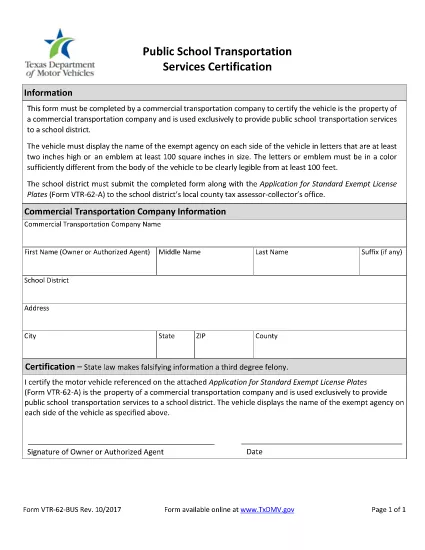
The VTR-62-BUS is the Texas Department of Motor Vehicles (TxDMV) form used by public schools and private contractors to certify that they provide transportation services for school children. This form must be completed for every vehicle that transports students and is required for registration, licensing, and compliance with Texas Transportation Code §501.155.

What Is the VTR-62-BUS Form?

The VTR-62-BUS collects essential information about the service provider, vehicle details, driver qualifications, and insurance coverage. Submitting accurate data helps TxDMV verify that transportation services meet safety standards and prevents fraudulent claims.

How to Fill Out the VTR-62-BUS Online

Instead of downloading the PDF, simply click the "Fill out this form" button on this page. The Formize PDF Filler app will load the fillable PDF directly in your browser. Follow the on‑screen prompts and the form will save automatically.

  • Step 1: Click the button to open the fillable PDF.
  • Step 2: Enter the school or contractor name, address, and Texas Tax ID.
  • Step 3: Provide vehicle information – make, model, VIN, and license plate.
  • Step 4: Fill driver details and confirm valid commercial driver’s license (CDL) status.
  • Step 5: Upload proof of insurance and sign electronically.

Common Mistakes to Avoid

  • Leaving any required field blank – the form will not submit.
  • Using an outdated insurance policy number.
  • Mismatching the VIN with the license plate number.
  • Falsifying information – this is a third‑degree felony under Texas law.

Where to Submit Your Completed Form

After you finish, click Submit inside the Formize app. Your completed VTR-62-BUS will be securely sent to TxDMV’s online portal. You will receive a confirmation email with a reference number for future inquiries.

Need a hard copy? You can still download the PDF using the link below and mail it to the address listed on the confirmation page.

सामान्य प्रश्न
  • Is the VTR-62-BUS form required for every school bus?

    Yes. Any vehicle that transports students for a public or private school must file a VTR-62-BUS for each registration period.

  • Can I submit the form on a mobile device?

    Absolutely. The Formize PDF Filler works on smartphones and tablets as long as the browser supports PDF rendering.

  • What happens if I make a mistake after submitting?

    Contact TxDMV with your confirmation number. You may be asked to submit an amended VTR-62-BUS using the same online portal.

  • Do I need to attach supporting documents?

    Yes. Insurance proof, driver’s license copies, and vehicle registration must be uploaded before final submission.

  • Is there a filing fee?

    TxDMV does not charge a separate fee for the VTR-62-BUS, but standard vehicle registration fees still apply.

  • How long does the approval process take?

    Typically 3‑5 business days after successful electronic submission, provided all information is correct.

कैसे करें

VTR-62-BUS को मुफ़्त में, ऑनलाइन 4 आसान स्टेप्स में कैसे भरें:

  1. 1
    Open the Fillable Form
    Click the "Fill out this form" button on the page. The Formize PDF Filler loads the VTR-62-BUS directly in your browser.
  2. 2
    Enter Required Information
    Complete each section—entity details, vehicle data, driver credentials, and insurance—using the on‑screen fields.
  3. 3
    Review and Sign
    Double‑check all entries for accuracy, then use the electronic signature field to sign the form.
  4. 4
    Submit Electronically
    Press the Submit button. A confirmation email with a reference number will be sent to you instantly.
पीडीएफ फिलर एप तैयार करें
के बारे में

वाहन पंजीकरण प्रपत्र

यदि आप एक मोटर वाहन, ट्रेलर या नाव के मालिक हैं या पट्टे पर हैं, तो आपको अपने वाहन को कानूनी रूप से पंजीकृत और सुरक्षित रखने के लिए कुछ दायित्वों को पूरा करना होगा।

VTR-62-BUS वाहन पंजीकरण प्रपत्रों में से एक है जो ऐसे दस्तावेज़ हैं जिनका उपयोग प्रासंगिक राज्य या प्रांतीय प्राधिकरण के साथ मोटर वाहन को पंजीकृत करने के लिए किया जाता है। ये फॉर्म आमतौर पर तब आवश्यक होते हैं जब कोई व्यक्ति नया या इस्तेमाल किया हुआ वाहन खरीदता है या जब वे वाहन के साथ किसी नए राज्य या प्रांत में जाते हैं।

वाहन पंजीकरण के लिए आवश्यक सटीक आवश्यकताएं और फॉर्म स्थान के अनुसार भिन्न हो सकते हैं, लेकिन आम तौर पर, प्रक्रिया में वाहन, मालिक और वाहन पर किसी भी ग्रहणाधिकार के बारे में जानकारी प्रदान करना शामिल होता है।

पंजीकरण फॉर्म और शुल्क जमा करने के बाद, राज्य या प्रांतीय प्राधिकरण वाहन के मालिक को पंजीकरण प्रमाणपत्र या लाइसेंस प्लेट जारी करेगा। यह पंजीकरण वाहन को सार्वजनिक सड़कों और राजमार्गों पर कानूनी रूप से संचालित करने की अनुमति देता है।

विशेषताएं

पीडीएफ भराव

पीडीएफ फॉर्म ऑनलाइन भरने का सबसे आसान तरीका

  • जल्दी से VTR-62-BUS भरें
    VTR-62-BUS को जल्दी से ऑनलाइन भरने का कोई तरीका खोज रहे हैं? हमारे ऑनलाइन नि:शुल्क पीडीएफ फॉर्म फिलर के साथ, आप एक मिनट से भी कम समय में इस पीडीएफ दस्तावेज़ को संपादित करने और भरने का तरीका जानेंगे।
  • ऑनलाइन पीडीएफ संपादक का उपयोग करना आसान है
    पीडीएफ फाइलों को प्रिंट करने से तंग आ गए हैं ताकि आप उन्हें फिर से स्कैन करने और उन्हें वापस भेजने से पहले संपादित कर सकें? PDF दस्तावेज़ों को निःशुल्क ऑनलाइन संपादित करें। समय और कागज बचाने के लिए हमारे ऑनलाइन पीडीएफ संपादक का प्रयोग करें।
  • महान उपकरण, सभी प्लेटफार्म
    आश्चर्य है कि मैक पर VTR-62-BUS कैसे भरें, या शायद पीडीएफ फिलर का मुफ्त में उपयोग कैसे करें? हमारे ऑनलाइन पीडीएफ टूल सभी प्लेटफॉर्म पर काम करते हैं।
  • सुरक्षित फ़ाइल भंडारण
    पूर्ण की गई "VTR-62-BUS" फ़ाइलें Amazon क्लाउड होस्टिंग द्वारा प्रबंधित एक सुरक्षित डेटाबेस में संग्रहीत की जाती हैं। आप कभी भी अपनी फाइलों को हमारे सिस्टम से हटा सकते हैं। किसी भी स्थिति में, ये फ़ाइलें 24 घंटे के बाद स्वतः हटा दी जाती हैं।
  • {कीवर्ड} से चैट करें
    Chatize पर "VTR-62-BUS" के साथ चैट करें, जो एक निःशुल्क पीडीएफ रीडर सहायक है। प्रश्न पूछें और "VTR-62-BUS" से उत्तर प्राप्त करें। बस ऊपर दस्तावेज़ के साथ चैट करें बटन पर क्लिक करें।

फ़िलिंग सत्र मिटाएँ

चयनित फ़िलिंग सत्र को मिटाएँ? इस स्थिति में, फ़ॉर्म को पूरा करने में आपकी प्रगति खो जाएगी।

संपादन सत्र हटाएँ

चयनित संपादन सत्र हटाएँ? इस स्थिति में, फ़ॉर्म बनाने और संपादित करने में आपकी प्रगति नष्ट हो जाएगी।