
hamburger-menu icon
भाषा का चयन करें

VTR-62-EMS Fillable PDF – Texas EMS Exempt License Plate Application

  1. भाषा अंग्रेज़ी
  2. देश अमेरीका
  3. गतिविधि वाहन पंजीकरण
  4. राज्य टेक्सास
फार्म को भरो
VTR-62-EMS Fillable PDF – Texas EMS Exempt License Plate Application

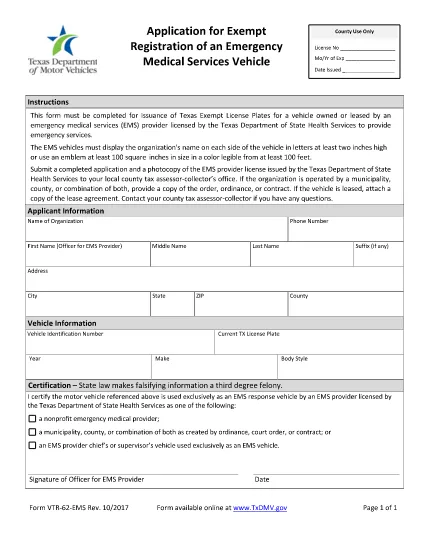
The VTR-62-EMS is the Texas Department of Motor Vehicles (TxDMV) application used by emergency medical services (EMS) providers to obtain exempt license plates for their emergency vehicles. This form must be completed, signed, and submitted to the TxDMV before the plates can be issued.

What Is the VTR-62-EMS Form?

The VTR-62-EMS form authorizes the issuance of special, exempt license plates that are reserved for EMS vehicles. The plates display the organization’s name or an approved emblem and are exempt from standard registration fees.

How to Complete the Form Online

Instead of downloading the PDF, simply click the "Fill out this form" button on this page. The Formize PDF Filler app will load the fillable version of the VTR-62-EMS, allowing you to:

  • Enter organization details, vehicle information, and contact data.
  • Upload a digital copy of the EMS emblem (optional).
  • Sign electronically with a mouse or touchscreen.
  • Save your progress and return later if needed.

Common Mistakes to Avoid

  • Incorrect vehicle identification number (VIN): Double‑check the VIN on the vehicle registration.
  • Missing signature: The form requires an authorized signature; an unsigned form will be rejected.
  • Improper emblem size: The emblem must be at least two inches high if used.
  • Wrong organization name spelling: The name appears on both sides of the plate and must be exact.

Where to Submit the Completed Form

After filling out and signing the form online, you can:

  • Download the completed PDF and mail it to the TxDMV address listed on the form.
  • Print the form and deliver it in person to any Texas Department of Motor Vehicles office.

Be sure to include any required supporting documents, such as proof of EMS licensing.

Download the Official PDF

If you prefer the original PDF, you can download it directly from the Texas DMV website:

Download VTR-62-EMS PDF

सामान्य प्रश्न
  • Who can use the VTR-62-EMS form?

    Any EMS provider licensed by the Texas Department of State Health Services that operates emergency vehicles may apply for exempt plates using this form.

  • Is there a fee for the exempt license plates?

    The plates are exempt from the standard registration fee, but you may still need to pay for the physical plate production, depending on the TxDMV policy.

  • Can I submit the form electronically?

    Yes. After completing the fillable PDF with Formize, you can download the signed document and email it to the TxDMV, or mail a printed copy.

  • What size must the EMS emblem be?

    The emblem must be at least two inches high and clearly visible on the plate.

  • How long does it take to receive the plates after submission?

    Processing typically takes 7‑10 business days once the TxDMV receives a complete and correctly signed application.

  • Do I need to renew the exempt plates?

    Exempt plates are valid for the same period as standard plates. Renewal notices will be sent by the TxDMV.

  • What if I make a mistake on the form?

    Correct any errors before signing. If you submit a form with mistakes, the TxDMV will return it, causing delays.

  • Can I use a different PDF editor to fill the form?

    You can, but the Formize fillable version is optimized for ease of use and ensures all required fields are completed.

कैसे करें

VTR-62-EMS को मुफ़्त में, ऑनलाइन 5 आसान स्टेप्स में कैसे भरें:

  1. 1
    Click the Fill Out Button
    Press the "Fill out this form" button on the page to launch the Formize PDF Filler.
  2. 2
    Wait for the Filler to Load
    The fillable version of VTR-62-EMS will appear in a secure window. This only takes a few seconds.
  3. 3
    Enter All Required Information
    Complete each field—organization name, vehicle VIN, driver details, etc.—exactly as shown on your registration documents.
  4. 4
    Add Your Signature
    Use your mouse, trackpad, or touchscreen to sign electronically. The signature is legally binding.
  5. 5
    Save, Download, or Print
    When finished, click "Save" to store a copy in your browser, "Download" to get a PDF file, or "Print" to submit a hard copy to the TxDMV.
पीडीएफ फिलर एप तैयार करें
के बारे में

वाहन पंजीकरण प्रपत्र

VTR-62-EMS डीएमवी फॉर्मों में से एक है, जिसे मोटर वाहन विभाग फॉर्म के रूप में भी जाना जाता है, जो मोटर वाहनों से संबंधित विभिन्न लेनदेन और प्रक्रियाओं में उपयोग किए जाने वाले दस्तावेज हैं। DMV एक सरकारी एजेंसी है जो ड्राइवर लाइसेंसिंग, वाहन पंजीकरण और मोटर वाहन कानूनों को लागू करने के लिए जिम्मेदार है। उपलब्ध विशिष्ट DMV फॉर्म क्षेत्राधिकार के अनुसार भिन्न हो सकते हैं, लेकिन यहां कुछ सामान्य उदाहरण दिए गए हैं:

ड्राइवर लाइसेंस फॉर्म: इन फॉर्म का उपयोग ड्राइवर के लाइसेंस के लिए आवेदन करने या परिवर्तन या नवीनीकरण का अनुरोध करने के लिए किया जाता है। उन्हें आम तौर पर व्यक्तिगत जानकारी, पहचान के प्रमाण की आवश्यकता होती है, और इसमें चिकित्सा जानकारी या ड्राइविंग इतिहास के अनुभाग शामिल हो सकते हैं।

वाहन पंजीकरण फॉर्म: इन फॉर्मों का उपयोग डीएमवी के साथ मोटर वाहन को पंजीकृत करने के लिए किया जाता है। उन्हें वाहन की जानकारी, स्वामित्व विवरण और बीमा के प्रमाण की आवश्यकता होती है।

टाइटल ट्रांसफर फॉर्म: वाहन खरीदते या बेचते समय, इन फॉर्मों का उपयोग एक पक्ष से दूसरे पक्ष को स्वामित्व हस्तांतरित करने के लिए किया जाता है। उन्हें खरीदार, विक्रेता, वाहन विवरण के बारे में जानकारी की आवश्यकता होती है और इसमें बिक्री का बिल भी शामिल हो सकता है।

वाहन दायित्व प्रपत्र जारी करना: किसी वाहन के स्वामित्व को बेचते या स्थानांतरित करते समय, ये प्रपत्र डीएमवी को सूचित करते हैं कि विक्रेता अब वाहन के लिए जिम्मेदार नहीं है। यह विक्रेता को बिक्री के बाद वाहन से जुड़ी दुर्घटनाओं या घटनाओं के लिए दायित्व से बचाने में मदद करता है।

लाइसेंस प्लेट और पंजीकरण नवीनीकरण फॉर्म: इन फॉर्मों का उपयोग वाहन पंजीकरण को नवीनीकृत करने या नए लाइसेंस प्लेटों का अनुरोध करने के लिए किया जाता है। उन्हें आम तौर पर पंजीकृत मालिक, वर्तमान पंजीकरण विवरण और लागू शुल्क के भुगतान के बारे में जानकारी की आवश्यकता होती है।

ड्राइविंग रिकॉर्ड अनुरोध फॉर्म: ये फॉर्म व्यक्तियों को डीएमवी से अपने ड्राइविंग रिकॉर्ड का अनुरोध करने की अनुमति देते हैं, जो ड्राइविंग उल्लंघन, लाइसेंस स्थिति और अन्य प्रासंगिक विवरणों के बारे में जानकारी प्रदान करते हैं।

विशेषता या वैयक्तिकृत लाइसेंस प्लेट फॉर्म: इन फॉर्मों का उपयोग वैयक्तिकृत या विशिष्ट लाइसेंस प्लेटों के लिए आवेदन करने के लिए किया जाता है, जो व्यक्तियों को विशिष्ट पात्रों या डिज़ाइन के साथ अपनी लाइसेंस प्लेट को अनुकूलित करने की अनुमति देते हैं।

ये उन अनेक प्रपत्रों के कुछ उदाहरण हैं जो DMV के माध्यम से उपलब्ध हो सकते हैं। विशिष्ट फॉर्म और आवश्यकताएं क्षेत्राधिकार के अनुसार अलग-अलग हो सकती हैं, इसलिए अपनी विशेष जरूरतों के लिए सही फॉर्म प्राप्त करने के लिए स्थानीय डीएमवी वेबसाइट से परामर्श करना या डीएमवी कार्यालय में जाना महत्वपूर्ण है।

विशेषताएं

पीडीएफ भराव

पीडीएफ फॉर्म ऑनलाइन भरने का सबसे आसान तरीका

  • जल्दी से VTR-62-EMS भरें
    VTR-62-EMS को जल्दी से ऑनलाइन भरने का कोई तरीका खोज रहे हैं? हमारे ऑनलाइन नि:शुल्क पीडीएफ फॉर्म फिलर के साथ, आप एक मिनट से भी कम समय में इस पीडीएफ दस्तावेज़ को संपादित करने और भरने का तरीका जानेंगे।
  • ऑनलाइन पीडीएफ संपादक का उपयोग करना आसान है
    पीडीएफ फाइलों को प्रिंट करने से तंग आ गए हैं ताकि आप उन्हें फिर से स्कैन करने और उन्हें वापस भेजने से पहले संपादित कर सकें? PDF दस्तावेज़ों को निःशुल्क ऑनलाइन संपादित करें। समय और कागज बचाने के लिए हमारे ऑनलाइन पीडीएफ संपादक का प्रयोग करें।
  • महान उपकरण, सभी प्लेटफार्म
    आश्चर्य है कि मैक पर VTR-62-EMS कैसे भरें, या शायद पीडीएफ फिलर का मुफ्त में उपयोग कैसे करें? हमारे ऑनलाइन पीडीएफ टूल सभी प्लेटफॉर्म पर काम करते हैं।
  • सुरक्षित फ़ाइल भंडारण
    पूर्ण की गई "VTR-62-EMS" फ़ाइलें Amazon क्लाउड होस्टिंग द्वारा प्रबंधित एक सुरक्षित डेटाबेस में संग्रहीत की जाती हैं। आप कभी भी अपनी फाइलों को हमारे सिस्टम से हटा सकते हैं। किसी भी स्थिति में, ये फ़ाइलें 24 घंटे के बाद स्वतः हटा दी जाती हैं।
  • {कीवर्ड} से चैट करें
    Chatize पर "VTR-62-EMS" के साथ चैट करें, जो एक निःशुल्क पीडीएफ रीडर सहायक है। प्रश्न पूछें और "VTR-62-EMS" से उत्तर प्राप्त करें। बस ऊपर दस्तावेज़ के साथ चैट करें बटन पर क्लिक करें।

फ़िलिंग सत्र मिटाएँ

चयनित फ़िलिंग सत्र को मिटाएँ? इस स्थिति में, फ़ॉर्म को पूरा करने में आपकी प्रगति खो जाएगी।

संपादन सत्र हटाएँ

चयनित संपादन सत्र हटाएँ? इस स्थिति में, फ़ॉर्म बनाने और संपादित करने में आपकी प्रगति नष्ट हो जाएगी।