
hamburger-menu icon
भाषा का चयन करें

VTR-71-6 – Application for Authority to Dispose of an Abandoned Vehicle (Fillable PDF)

  1. भाषा अंग्रेज़ी
  2. देश अमेरीका
  3. गतिविधि वाहन पंजीकरण
  4. राज्य टेक्सास
फार्म को भरो
VTR-71-6 – Application for Authority to Dispose of an Abandoned Vehicle (Fillable PDF)

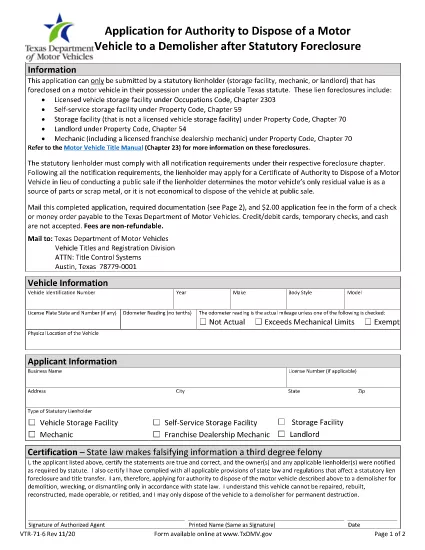
The Texas Department of Motor Vehicles (TxDMV) requires the VTR-71-6 form when you need official permission to dispose of an abandoned or public nuisance vehicle to a licensed demolisher. This fillable PDF is now available through Formize, so you can complete it securely in your browser—no extra software needed.

What Is the VTR-71-6 Form?

VTR-71-6, titled Application for Authority to Dispose of an Abandoned Nuisance Vehicle to a Demolisher, is used by vehicle owners, lienholders, or law‑enforcement agencies to certify that a vehicle meets the state’s criteria for demolition. The form collects:

  • Vehicle identification details (VIN, make, model, year)
  • Owner and lienholder information
  • Reason for disposal and supporting documentation
  • Signatures from the owner, lienholder and a law‑enforcement officer (if required)

How to Complete the VTR-71-6 Online with Formize

Instead of downloading the PDF, clicking “Fill out this form” on this page launches the Formize PDF Filler app. Follow the steps below to finish the form in minutes.

Common Mistakes to Avoid

  • Missing signatures: Every required signature must be entered; otherwise the TxDMV will reject the submission.
  • Incorrect VIN: Double‑check the VIN against the title and registration documents.
  • Incomplete supporting documents: Attach a copy of the notice to the owner and any police reports when applicable.

Where to Submit the Completed Form

After you finish the online form, you can:

  • Print the completed PDF and mail it to the TxDMV address listed on the form.
  • Upload the PDF through the TxDMV online filing portal.

Download the Official PDF

If you prefer the original document, you can download the official VTR-71-6 PDF directly from the TxDMV:

Download VTR-71-6 PDF

सामान्य प्रश्न
  • Who can submit a VTR-71-6 form?

    The vehicle owner, a lienholder, or an authorized law‑enforcement agency may complete and submit the VTR-71-6.

  • Is the Formize filler free to use?

    Yes, Formize provides a free online filler for this PDF. No download or installation is required.

  • What happens after I submit the form?

    The TxDMV reviews the application. If approved, you’ll receive a Certificate of Authority, allowing the vehicle to be taken to a licensed demolisher.

  • Can I save my progress and finish later?

    The Formize app lets you save a draft locally. Click “Save Draft” before closing the browser, then reopen the saved file to continue.

  • Do I need a notarized signature?

    A notarized signature is not required for VTR-71-6, but all required parties must sign electronically.

  • How long does the approval process take?

    Processing typically takes 7‑10 business days after the TxDMV receives a complete, correctly signed form.

कैसे करें

VTR-71-6 को मुफ़्त में, ऑनलाइन 5 आसान स्टेप्स में कैसे भरें:

  1. 1
    Open the Fillable Form
    Click the “Fill out this form” button on this page. The Formize PDF Filler app will load in a new window.
  2. 2
    Enter Vehicle Information
    Type the VIN, make, model, year, and license plate number into the highlighted fields.
  3. 3
    Provide Owner and Lienholder Details
    Fill in the owner’s name, address, and any lienholder information required by the form.
  4. 4
    Add Supporting Documents
    Upload a scanned copy of the notice to the owner and any police or law‑enforcement reports if applicable.
  5. 5
    Sign and Submit
    Use the electronic signature fields for the owner, lienholder, and law‑enforcement officer. When finished, click “Save & Download” to get the completed PDF.
पीडीएफ फिलर एप तैयार करें
के बारे में

वाहन पंजीकरण प्रपत्र

यदि आप एक मोटर वाहन, ट्रेलर या नाव के मालिक हैं या पट्टे पर हैं, तो आपको अपने वाहन को कानूनी रूप से पंजीकृत और सुरक्षित रखने के लिए कुछ दायित्वों को पूरा करना होगा।

VTR-71-6 वाहन पंजीकरण प्रपत्रों में से एक है जो ऐसे दस्तावेज़ हैं जिनका उपयोग प्रासंगिक राज्य या प्रांतीय प्राधिकरण के साथ मोटर वाहन को पंजीकृत करने के लिए किया जाता है। ये फॉर्म आमतौर पर तब आवश्यक होते हैं जब कोई व्यक्ति नया या इस्तेमाल किया हुआ वाहन खरीदता है या जब वे वाहन के साथ किसी नए राज्य या प्रांत में जाते हैं।

वाहन पंजीकरण के लिए आवश्यक सटीक आवश्यकताएं और फॉर्म स्थान के अनुसार भिन्न हो सकते हैं, लेकिन आम तौर पर, प्रक्रिया में वाहन, मालिक और वाहन पर किसी भी ग्रहणाधिकार के बारे में जानकारी प्रदान करना शामिल होता है।

पंजीकरण फॉर्म और शुल्क जमा करने के बाद, राज्य या प्रांतीय प्राधिकरण वाहन के मालिक को पंजीकरण प्रमाणपत्र या लाइसेंस प्लेट जारी करेगा। यह पंजीकरण वाहन को सार्वजनिक सड़कों और राजमार्गों पर कानूनी रूप से संचालित करने की अनुमति देता है।

विशेषताएं

पीडीएफ भराव

पीडीएफ फॉर्म ऑनलाइन भरने का सबसे आसान तरीका

  • जल्दी से VTR-71-6 भरें
    VTR-71-6 को जल्दी से ऑनलाइन भरने का कोई तरीका खोज रहे हैं? हमारे ऑनलाइन नि:शुल्क पीडीएफ फॉर्म फिलर के साथ, आप एक मिनट से भी कम समय में इस पीडीएफ दस्तावेज़ को संपादित करने और भरने का तरीका जानेंगे।
  • ऑनलाइन पीडीएफ संपादक का उपयोग करना आसान है
    पीडीएफ फाइलों को प्रिंट करने से तंग आ गए हैं ताकि आप उन्हें फिर से स्कैन करने और उन्हें वापस भेजने से पहले संपादित कर सकें? PDF दस्तावेज़ों को निःशुल्क ऑनलाइन संपादित करें। समय और कागज बचाने के लिए हमारे ऑनलाइन पीडीएफ संपादक का प्रयोग करें।
  • महान उपकरण, सभी प्लेटफार्म
    आश्चर्य है कि मैक पर VTR-71-6 कैसे भरें, या शायद पीडीएफ फिलर का मुफ्त में उपयोग कैसे करें? हमारे ऑनलाइन पीडीएफ टूल सभी प्लेटफॉर्म पर काम करते हैं।
  • सुरक्षित फ़ाइल भंडारण
    पूर्ण की गई "VTR-71-6" फ़ाइलें Amazon क्लाउड होस्टिंग द्वारा प्रबंधित एक सुरक्षित डेटाबेस में संग्रहीत की जाती हैं। आप कभी भी अपनी फाइलों को हमारे सिस्टम से हटा सकते हैं। किसी भी स्थिति में, ये फ़ाइलें 24 घंटे के बाद स्वतः हटा दी जाती हैं।
  • {कीवर्ड} से चैट करें
    Chatize पर "VTR-71-6" के साथ चैट करें, जो एक निःशुल्क पीडीएफ रीडर सहायक है। प्रश्न पूछें और "VTR-71-6" से उत्तर प्राप्त करें। बस ऊपर दस्तावेज़ के साथ चैट करें बटन पर क्लिक करें।

फ़िलिंग सत्र मिटाएँ

चयनित फ़िलिंग सत्र को मिटाएँ? इस स्थिति में, फ़ॉर्म को पूरा करने में आपकी प्रगति खो जाएगी।

संपादन सत्र हटाएँ

चयनित संपादन सत्र हटाएँ? इस स्थिति में, फ़ॉर्म बनाने और संपादित करने में आपकी प्रगति नष्ट हो जाएगी।