
hamburger-menu icon
भाषा का चयन करें

VTR-76 Disaster Relief Vehicle License Plate Application (Fillable PDF)

  1. भाषा अंग्रेज़ी
  2. देश अमेरीका
  3. गतिविधि वाहन पंजीकरण
  4. राज्य टेक्सास
फार्म को भरो
VTR-76 Disaster Relief Vehicle License Plate Application (Fillable PDF)

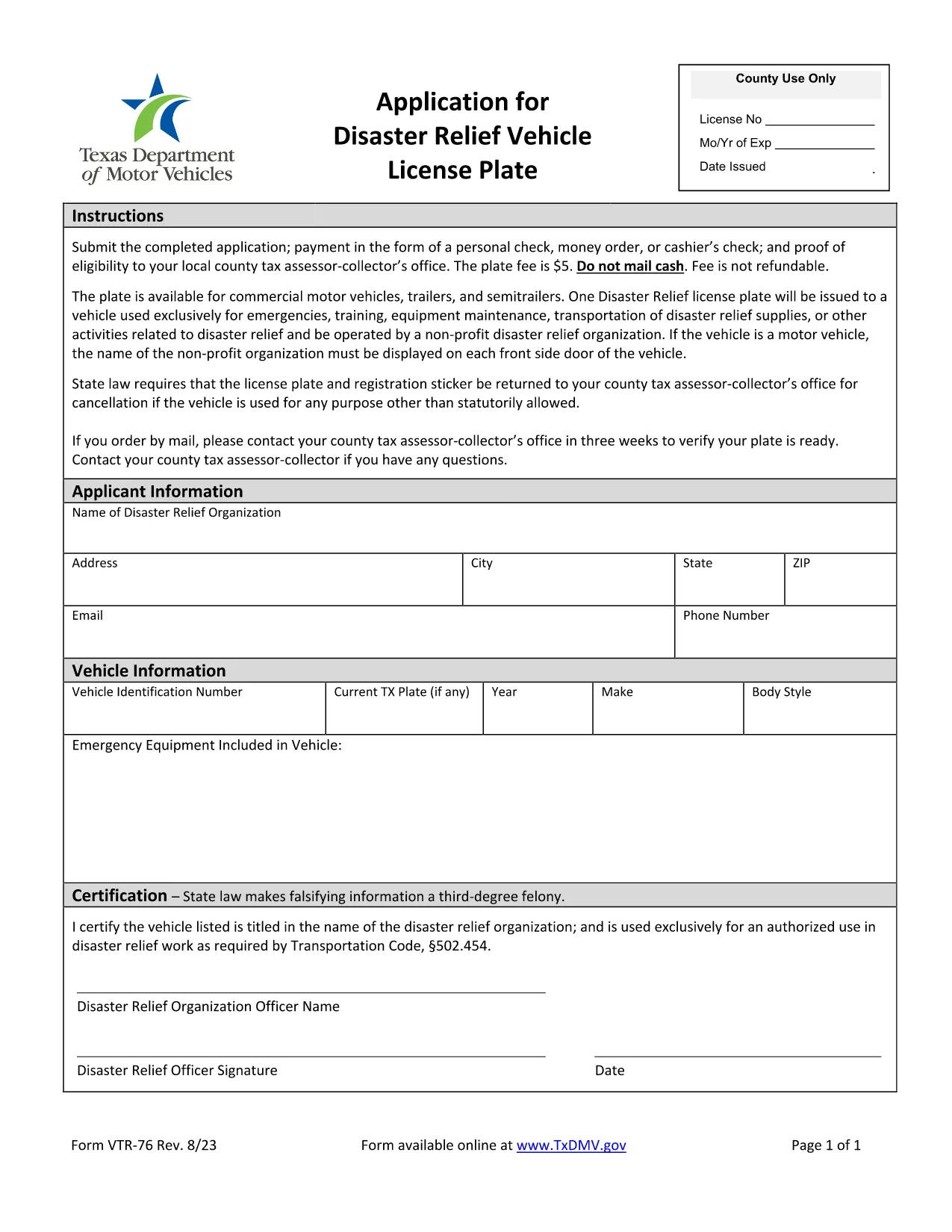
The VTR-76 is the official Texas Department of Motor Vehicles (TxDMV) application for a Disaster Relief Vehicle License Plate. This fillable PDF lets eligible owners quickly obtain a special plate that provides tax and registration benefits for vehicles used in disaster‑relief efforts.

What Is the VTR-76 Form?

Form VTR-76 is specifically designed for:

  • Non‑profit organizations, government agencies, and individuals who operate vehicles in disaster‑relief activities.
  • Vehicles that will be used for transporting supplies, personnel, or equipment during emergencies.
  • Applicants who need a distinct plate to identify their vehicle as a disaster‑relief asset.

How to Complete the VTR-76 Online

Instead of downloading the PDF to a desktop editor, simply click the "Fill out this form" button on this page. The Formize PDF Filler app will load automatically, letting you enter data directly in your browser.

Common Mistakes to Avoid

  • Incorrect vehicle identification number (VIN): Double‑check the VIN before submitting.
  • Missing supporting documents: Attach proof of disaster‑relief affiliation (e.g., letter from a recognized agency).
  • Wrong expiration date: The plate is valid for one year; ensure the date matches the current calendar year.

Submission Requirements & Fees

After completing the form, you will need to:

  • Pay the nominal processing fee (currently $5) via TxDMV’s online portal.
  • Submit the completed PDF through the TxDMV website or mail it to the address listed on the form.
  • Allow 7‑10 business days for the plate to be manufactured and mailed.

FAQs About VTR-76

For quick answers to the most common questions, scroll down to our FAQ section.

सामान्य प्रश्न
  • Who is eligible for a disaster‑relief vehicle plate?

    Eligible applicants include nonprofit disaster‑relief organizations, government agencies, and individuals who regularly use a vehicle for emergency response or recovery operations.

  • Do I need to attach proof of eligibility?

    Yes. Attach a letter of endorsement from a recognized disaster‑relief authority or a copy of your organization’s 501(c)(3) status.

  • How long does the VTR‑76 process take?

    After submission, the TxDMV typically processes the application within 7‑10 business days, after which the special plate is mailed to the address on file.

  • Can I edit the form after I submit it?

    Once submitted, the form cannot be edited. If you need changes, contact TxDMV to request a new VTR‑76 submission.

  • Is there a fee for the disaster‑relief plate?

    A modest processing fee (currently $5) is required. The fee covers plate manufacturing and administrative costs.

  • What if I lose my special plate?

    Report the loss to TxDMV immediately. You will need to complete a replacement request and pay a small replacement fee.

कैसे करें

VTR-76 को मुफ़्त में, ऑनलाइन 4 आसान स्टेप्स में कैसे भरें:

  1. 1
    Click the Fillable Form Button
    On this page, locate the "Fill out this form" button and click it. The Formize PDF Filler will open in a new window.
  2. 2
    Enter Your Information
    Use the on‑screen fields to type in your vehicle details, organization info, and any supporting data. All fields are interactive and save automatically.
  3. 3
    Review and Validate
    Check each section for accuracy. The filler highlights required fields and alerts you to common errors.
  4. 4
    Submit or Download
    When finished, click "Submit" to send the form directly to TxDMV, or choose "Download" to save a copy for your records.
पीडीएफ फिलर एप तैयार करें
के बारे में

वाहन पंजीकरण प्रपत्र

VTR-76 वाहन पंजीकरण फॉर्मों में से एक है जो संबंधित सरकारी प्राधिकरण, आमतौर पर मोटर वाहन विभाग (डीएमवी) या समकक्ष एजेंसी के साथ मोटर वाहन को पंजीकृत करने के लिए उपयोग किए जाने वाले दस्तावेज हैं। इन फॉर्मों की आवश्यकता तब होती है जब कोई व्यक्ति नया या प्रयुक्त वाहन खरीदता है, वाहन का स्वामित्व स्थानांतरित करता है, या वाहन के साथ नए क्षेत्राधिकार में जाता है।

विशिष्ट वाहन पंजीकरण फॉर्म क्षेत्राधिकार के अनुसार भिन्न हो सकते हैं, लेकिन उन्हें आम तौर पर निम्नलिखित जानकारी की आवश्यकता होती है:

वाहन जानकारी: इसमें वाहन के बारे में विवरण शामिल हैं, जैसे मेक, मॉडल, वर्ष, वाहन पहचान संख्या (वीआईएन), और ओडोमीटर रीडिंग।

मालिक की जानकारी: फॉर्म में वाहन के मालिक के बारे में जानकारी की आवश्यकता होगी, जिसमें उनका नाम, पता, संपर्क जानकारी और ड्राइवर का लाइसेंस नंबर शामिल है।

स्वामित्व का प्रमाण: परिस्थितियों के आधार पर, स्वामित्व के प्रमाण की आवश्यकता हो सकती है, जैसे शीर्षक प्रमाण पत्र, बिक्री का बिल, या निर्माता का मूल प्रमाण पत्र (नए वाहनों के लिए)।

बीमा जानकारी: वैध वाहन बीमा कवरेज का प्रमाण आम तौर पर आवश्यक होता है। इसमें बीमा पॉलिसी नंबर, कवरेज की तारीखें और बीमा कंपनी का विवरण प्रदान करना शामिल हो सकता है।

फीस का भुगतान: वाहन पंजीकरण में विभिन्न शुल्कों का भुगतान शामिल है, जैसे पंजीकरण शुल्क, कर और संभवतः क्षेत्राधिकार के लिए विशिष्ट अन्य शुल्क।

इन बुनियादी आवश्यकताओं के अलावा, कुछ न्यायालयों में अतिरिक्त फॉर्म या दस्तावेज़ीकरण आवश्यकताएँ हो सकती हैं। उदाहरण के लिए, कुछ क्षेत्रों में उत्सर्जन परीक्षण के परिणाम, सुरक्षा निरीक्षण या निवास का प्रमाण आवश्यक हो सकता है।

एक बार वाहन पंजीकरण फॉर्म पूरा हो जाने और जमा हो जाने के बाद, सरकारी प्राधिकरण एक पंजीकरण प्रमाणपत्र, लाइसेंस प्लेट और पंजीकरण स्टिकर जारी करेगा। ये दस्तावेज़ दर्शाते हैं कि वाहन कानूनी रूप से पंजीकृत है और सार्वजनिक सड़कों पर संचालन के लिए अधिकृत है।

यह ध्यान रखना महत्वपूर्ण है कि वाहन पंजीकरण आवश्यकताएँ क्षेत्राधिकार के अनुसार काफी भिन्न हो सकती हैं। इसलिए, आपके स्थान पर लागू विशिष्ट रूपों और प्रक्रियाओं के लिए स्थानीय डीएमवी या समकक्ष एजेंसी से परामर्श करने की अनुशंसा की जाती है।

विशेषताएं

पीडीएफ भराव

पीडीएफ फॉर्म ऑनलाइन भरने का सबसे आसान तरीका

  • जल्दी से VTR-76 भरें
    VTR-76 को जल्दी से ऑनलाइन भरने का कोई तरीका खोज रहे हैं? हमारे ऑनलाइन नि:शुल्क पीडीएफ फॉर्म फिलर के साथ, आप एक मिनट से भी कम समय में इस पीडीएफ दस्तावेज़ को संपादित करने और भरने का तरीका जानेंगे।
  • ऑनलाइन पीडीएफ संपादक का उपयोग करना आसान है
    पीडीएफ फाइलों को प्रिंट करने से तंग आ गए हैं ताकि आप उन्हें फिर से स्कैन करने और उन्हें वापस भेजने से पहले संपादित कर सकें? PDF दस्तावेज़ों को निःशुल्क ऑनलाइन संपादित करें। समय और कागज बचाने के लिए हमारे ऑनलाइन पीडीएफ संपादक का प्रयोग करें।
  • महान उपकरण, सभी प्लेटफार्म
    आश्चर्य है कि मैक पर VTR-76 कैसे भरें, या शायद पीडीएफ फिलर का मुफ्त में उपयोग कैसे करें? हमारे ऑनलाइन पीडीएफ टूल सभी प्लेटफॉर्म पर काम करते हैं।
  • सुरक्षित फ़ाइल भंडारण
    पूर्ण की गई "VTR-76" फ़ाइलें Amazon क्लाउड होस्टिंग द्वारा प्रबंधित एक सुरक्षित डेटाबेस में संग्रहीत की जाती हैं। आप कभी भी अपनी फाइलों को हमारे सिस्टम से हटा सकते हैं। किसी भी स्थिति में, ये फ़ाइलें 24 घंटे के बाद स्वतः हटा दी जाती हैं।
  • {कीवर्ड} से चैट करें
    Chatize पर "VTR-76" के साथ चैट करें, जो एक निःशुल्क पीडीएफ रीडर सहायक है। प्रश्न पूछें और "VTR-76" से उत्तर प्राप्त करें। बस ऊपर दस्तावेज़ के साथ चैट करें बटन पर क्लिक करें।

फ़िलिंग सत्र मिटाएँ

चयनित फ़िलिंग सत्र को मिटाएँ? इस स्थिति में, फ़ॉर्म को पूरा करने में आपकी प्रगति खो जाएगी।

संपादन सत्र हटाएँ

चयनित संपादन सत्र हटाएँ? इस स्थिति में, फ़ॉर्म बनाने और संपादित करने में आपकी प्रगति नष्ट हो जाएगी।