
hamburger-menu icon
भाषा का चयन करें

Virginia MVDB-61 Dealer Qualification Form (Fillable PDF)

  1. भाषा अंग्रेज़ी
  2. देश अमेरीका
  3. गतिविधि वाहन पंजीकरण
  4. राज्य वर्जीनिया
फार्म को भरो
Virginia MVDB-61 Dealer Qualification Form (Fillable PDF)

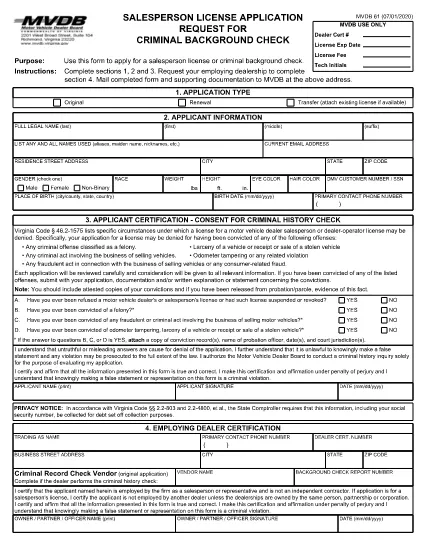
The MVDB-61 is the official Virginia Motor Vehicle Dealer Qualification form required for anyone applying to become a dealer operator or salesperson. This fillable PDF lets you complete the application quickly, securely, and without printing a single page.

What Is the MVDB-61 Form?

MVDB‑61 collects personal information, business details, and background data needed by the Virginia Department of Motor Vehicles (DMV) to assess your eligibility for a dealer license. The form is also used when you need a background check for a salesperson license.

How to Fill Out MVDB-61 Online

Instead of downloading, printing, and scanning, simply click the "Fill out this form" button on this page. The Formize PDF Filler app will load the MVDB‑61 document directly in your browser:

  • Step 1: Click the button and wait a few seconds for the filler to appear.
  • Step 2: Complete sections 1, 2, and 3 with your personal and business information.
  • Step 3: If you are a salesperson, have your employing dealership fill out section 4.
  • Step 4: Review all entries, add your electronic signature, and click Save or Download.
  • Step 5: Print the completed PDF (optional) and mail it with supporting documents to the address shown on the form, or submit it electronically if your DMV office accepts e‑submissions.

Common Mistakes to Avoid

  • Leaving any required field blank – the filler will highlight missing data.
  • Using an outdated address for the DMV – verify the current mailing address on the official Virginia DMV website.
  • Forgetting the $50 non‑refundable test fee when applying for the Dealer Qualification Test.
  • Submitting a scanned copy of a printed form with illegible handwriting.

Where to Submit Your Completed Form

After you finish the fillable PDF, mail the form and any required attachments to:

Virginia Department of Motor Vehicles
2020 West Broad Street
Richmond, VA 23220

If you are taking the Dealer Qualification Test, bring the completed MVDB‑61 and the $50 fee to any DMV Customer Service Center.

Benefits of Using Formize’s Fillable PDF

  • Instant validation of required fields.
  • Secure electronic signature without printing.
  • Save a copy for your records with one click.
  • Accessible on desktop, tablet, and mobile browsers.

Start your dealer qualification journey now—click the button below and let Formize handle the paperwork for you.

सामान्य प्रश्न
  • What is the purpose of the MVDB‑61 form?

    MVDB‑61 is used to apply for a Virginia motor vehicle dealer operator or salesperson license and to schedule the Dealer Qualification Test.

  • Can I fill out MVDB‑61 on a mobile device?

    Yes. The Formize PDF Filler works on smartphones, tablets, and desktop browsers, allowing you to complete the form anywhere.

  • Do I need to pay a fee when submitting MVDB‑61?

    A non‑refundable $50 fee is required when you take the Dealer Qualification Test. The fee is paid at the DMV Customer Service Center.

  • What happens if I make a mistake on the form?

    The fillable PDF highlights missing or incorrectly formatted fields. You can correct any errors before saving or printing the final document.

  • Is an electronic signature accepted?

    Yes. The Virginia DMV accepts electronic signatures on the MVDB‑61 when submitted via the official fillable PDF.

  • Where can I find the official mailing address for the DMV?

    The current mailing address is 2020 West Broad Street, Richmond, VA 23220. Always verify on the Virginia DMV website for any updates.

कैसे करें

MVDB-61 को मुफ़्त में, ऑनलाइन 5 आसान स्टेप्स में कैसे भरें:

  1. 1
    Open the Fillable Form
    Click the "Fill out this form" button on the page. The Formize PDF Filler will load the MVDB‑61 document directly in your browser.
  2. 2
    Complete Required Sections
    Enter your personal, business, and background information in sections 1‑3. If you are a salesperson, have your dealership fill out section 4.
  3. 3
    Add Your Signature
    Use the built‑in e‑signature field to sign electronically. No printing required.
  4. 4
    Save or Download
    Click "Save" to store the completed form in your cloud storage, or "Download" to get a PDF copy for your records.
  5. 5
    Submit to the DMV
    Mail the printed form with supporting documents and the $50 test fee to the Virginia DMV address, or bring it to a DMV Customer Service Center for the qualification test.
पीडीएफ फिलर एप तैयार करें
के बारे में

वाहन पंजीकरण प्रपत्र

यदि आप एक मोटर वाहन, ट्रेलर या नाव के मालिक हैं या पट्टे पर हैं, तो आपको अपने वाहन को कानूनी रूप से पंजीकृत और सुरक्षित रखने के लिए कुछ दायित्वों को पूरा करना होगा।

MVDB-61 वाहन पंजीकरण प्रपत्रों में से एक है जो ऐसे दस्तावेज़ हैं जिनका उपयोग प्रासंगिक राज्य या प्रांतीय प्राधिकरण के साथ मोटर वाहन को पंजीकृत करने के लिए किया जाता है। ये फॉर्म आमतौर पर तब आवश्यक होते हैं जब कोई व्यक्ति नया या इस्तेमाल किया हुआ वाहन खरीदता है या जब वे वाहन के साथ किसी नए राज्य या प्रांत में जाते हैं।

वाहन पंजीकरण के लिए आवश्यक सटीक आवश्यकताएं और फॉर्म स्थान के अनुसार भिन्न हो सकते हैं, लेकिन आम तौर पर, प्रक्रिया में वाहन, मालिक और वाहन पर किसी भी ग्रहणाधिकार के बारे में जानकारी प्रदान करना शामिल होता है।

पंजीकरण फॉर्म और शुल्क जमा करने के बाद, राज्य या प्रांतीय प्राधिकरण वाहन के मालिक को पंजीकरण प्रमाणपत्र या लाइसेंस प्लेट जारी करेगा। यह पंजीकरण वाहन को सार्वजनिक सड़कों और राजमार्गों पर कानूनी रूप से संचालित करने की अनुमति देता है।

विशेषताएं

पीडीएफ भराव

पीडीएफ फॉर्म ऑनलाइन भरने का सबसे आसान तरीका

  • जल्दी से MVDB-61 भरें
    MVDB-61 को जल्दी से ऑनलाइन भरने का कोई तरीका खोज रहे हैं? हमारे ऑनलाइन नि:शुल्क पीडीएफ फॉर्म फिलर के साथ, आप एक मिनट से भी कम समय में इस पीडीएफ दस्तावेज़ को संपादित करने और भरने का तरीका जानेंगे।
  • ऑनलाइन पीडीएफ संपादक का उपयोग करना आसान है
    पीडीएफ फाइलों को प्रिंट करने से तंग आ गए हैं ताकि आप उन्हें फिर से स्कैन करने और उन्हें वापस भेजने से पहले संपादित कर सकें? PDF दस्तावेज़ों को निःशुल्क ऑनलाइन संपादित करें। समय और कागज बचाने के लिए हमारे ऑनलाइन पीडीएफ संपादक का प्रयोग करें।
  • महान उपकरण, सभी प्लेटफार्म
    आश्चर्य है कि मैक पर MVDB-61 कैसे भरें, या शायद पीडीएफ फिलर का मुफ्त में उपयोग कैसे करें? हमारे ऑनलाइन पीडीएफ टूल सभी प्लेटफॉर्म पर काम करते हैं।
  • सुरक्षित फ़ाइल भंडारण
    पूर्ण की गई "MVDB-61" फ़ाइलें Amazon क्लाउड होस्टिंग द्वारा प्रबंधित एक सुरक्षित डेटाबेस में संग्रहीत की जाती हैं। आप कभी भी अपनी फाइलों को हमारे सिस्टम से हटा सकते हैं। किसी भी स्थिति में, ये फ़ाइलें 24 घंटे के बाद स्वतः हटा दी जाती हैं।
  • {कीवर्ड} से चैट करें
    Chatize पर "MVDB-61" के साथ चैट करें, जो एक निःशुल्क पीडीएफ रीडर सहायक है। प्रश्न पूछें और "MVDB-61" से उत्तर प्राप्त करें। बस ऊपर दस्तावेज़ के साथ चैट करें बटन पर क्लिक करें।

फ़िलिंग सत्र मिटाएँ

चयनित फ़िलिंग सत्र को मिटाएँ? इस स्थिति में, फ़ॉर्म को पूरा करने में आपकी प्रगति खो जाएगी।

संपादन सत्र हटाएँ

चयनित संपादन सत्र हटाएँ? इस स्थिति में, फ़ॉर्म बनाने और संपादित करने में आपकी प्रगति नष्ट हो जाएगी।