
hamburger-menu icon
भाषा का चयन करें

VSA-24 Certification of Authority to Transfer Virginia Title (Fillable PDF)

  1. भाषा अंग्रेज़ी
  2. देश अमेरीका
  3. गतिविधि वाहन पंजीकरण
  4. राज्य वर्जीनिया
फार्म को भरो
VSA-24 Certification of Authority to Transfer Virginia Title (Fillable PDF)

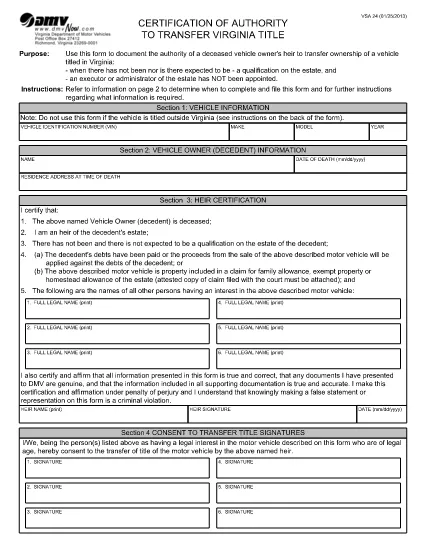
The VSA-24 – officially titled Certification of Authority to Transfer Virginia Title – is the legal document the Virginia Department of Motor Vehicles (DMV) requires when a vehicle owner has passed away and there is no executor or administrator appointed for the estate. This fillable PDF lets heirs complete the form quickly, securely, and without printing.

When Is the VSA-24 Form Required?

Use the VSA-24 when all of the following apply:

  • The vehicle is titled in Virginia.
  • The owner (decedent) is deceased.
  • There will be no formal estate qualification, and no executor or administrator has been appointed.
  • The heir(s) need to transfer the title to their name.

Key Sections of the VSA-24 Form

The form is divided into four main sections:

  1. Vehicle Information – VIN, make, model, year.
  2. Decedent Information – name, date of death, residence at time of death.
  3. Heir Certification – statements confirming the heir’s right to transfer the title and that debts are settled or the vehicle is part of a family allowance.
  4. Consent to Transfer Title – signatures of all parties with a legal interest in the vehicle.

How to Complete the VSA-24 Online with Formize

Instead of downloading, printing, and scanning, you can fill the form directly in your browser using Formize’s PDF Filler app. Follow the simple steps below.

Common Mistakes to Avoid

  • Leaving any required field blank – the form will be rejected.
  • Using an outdated version of the VSA-24 (always use the latest PDF provided by the VA DMV).
  • Failing to attach supporting documents such as a death certificate or court claim when required.
  • Signing with a printed name only – an electronic signature is accepted when using Formize.
सामान्य प्रश्न
  • What does the VSA-24 form replace?

    It replaces a paper‑only certification when an estate is not being formally qualified and no executor or administrator is appointed.

  • Can I file the VSA-24 electronically with the DMV?

    Virginia DMV currently requires a printed copy with signatures, but you can fill it out electronically, print, sign, and mail it.

  • Do I need a death certificate attached?

    Yes. Attach a certified copy of the decedent’s death certificate with the completed VSA-24.

  • How long does it take to fill the VSA-24?

    Most users complete the form in under 5 minutes when using the fillable PDF.

  • What if there are multiple heirs?

    All heirs with a legal interest must be listed in Section 3 and sign the consent section.

  • Is the Formize PDF Filler free to use?

    Yes, the online filler is free for basic PDF completion and electronic signatures.

  • Where do I mail the completed VSA-24?

    Send the signed form and supporting documents to the Virginia DMV address listed on the form’s instructions page.

कैसे करें

VSA-24 को मुफ़्त में, ऑनलाइन 4 आसान स्टेप्स में कैसे भरें:

  1. 1
    Open the Fillable Form
    Click the “Fill out this form” button on the page. The Formize PDF Filler app will load the VSA-24 PDF directly in your browser.
  2. 2
    Enter All Required Information
    Complete each field – vehicle details, decedent information, and heir certification. The app highlights required fields in real‑time.
  3. 3
    Add Your Electronic Signature
    Use the built‑in signature tool to sign electronically. No printing or scanning is needed.
  4. 4
    Review and Save
    Double‑check every entry, then click “Save”. You can download a copy for your records or email it directly to the Virginia DMV.
पीडीएफ फिलर एप तैयार करें
के बारे में

वाहन पंजीकरण प्रपत्र

यदि आप एक मोटर वाहन, ट्रेलर या नाव के मालिक हैं या पट्टे पर हैं, तो आपको अपने वाहन को कानूनी रूप से पंजीकृत और सुरक्षित रखने के लिए कुछ दायित्वों को पूरा करना होगा।

VSA-24 वाहन पंजीकरण प्रपत्रों में से एक है जो ऐसे दस्तावेज़ हैं जिनका उपयोग प्रासंगिक राज्य या प्रांतीय प्राधिकरण के साथ मोटर वाहन को पंजीकृत करने के लिए किया जाता है। ये फॉर्म आमतौर पर तब आवश्यक होते हैं जब कोई व्यक्ति नया या इस्तेमाल किया हुआ वाहन खरीदता है या जब वे वाहन के साथ किसी नए राज्य या प्रांत में जाते हैं।

वाहन पंजीकरण के लिए आवश्यक सटीक आवश्यकताएं और फॉर्म स्थान के अनुसार भिन्न हो सकते हैं, लेकिन आम तौर पर, प्रक्रिया में वाहन, मालिक और वाहन पर किसी भी ग्रहणाधिकार के बारे में जानकारी प्रदान करना शामिल होता है।

पंजीकरण फॉर्म और शुल्क जमा करने के बाद, राज्य या प्रांतीय प्राधिकरण वाहन के मालिक को पंजीकरण प्रमाणपत्र या लाइसेंस प्लेट जारी करेगा। यह पंजीकरण वाहन को सार्वजनिक सड़कों और राजमार्गों पर कानूनी रूप से संचालित करने की अनुमति देता है।

विशेषताएं

पीडीएफ भराव

पीडीएफ फॉर्म ऑनलाइन भरने का सबसे आसान तरीका

  • जल्दी से VSA-24 भरें
    VSA-24 को जल्दी से ऑनलाइन भरने का कोई तरीका खोज रहे हैं? हमारे ऑनलाइन नि:शुल्क पीडीएफ फॉर्म फिलर के साथ, आप एक मिनट से भी कम समय में इस पीडीएफ दस्तावेज़ को संपादित करने और भरने का तरीका जानेंगे।
  • ऑनलाइन पीडीएफ संपादक का उपयोग करना आसान है
    पीडीएफ फाइलों को प्रिंट करने से तंग आ गए हैं ताकि आप उन्हें फिर से स्कैन करने और उन्हें वापस भेजने से पहले संपादित कर सकें? PDF दस्तावेज़ों को निःशुल्क ऑनलाइन संपादित करें। समय और कागज बचाने के लिए हमारे ऑनलाइन पीडीएफ संपादक का प्रयोग करें।
  • महान उपकरण, सभी प्लेटफार्म
    आश्चर्य है कि मैक पर VSA-24 कैसे भरें, या शायद पीडीएफ फिलर का मुफ्त में उपयोग कैसे करें? हमारे ऑनलाइन पीडीएफ टूल सभी प्लेटफॉर्म पर काम करते हैं।
  • सुरक्षित फ़ाइल भंडारण
    पूर्ण की गई "VSA-24" फ़ाइलें Amazon क्लाउड होस्टिंग द्वारा प्रबंधित एक सुरक्षित डेटाबेस में संग्रहीत की जाती हैं। आप कभी भी अपनी फाइलों को हमारे सिस्टम से हटा सकते हैं। किसी भी स्थिति में, ये फ़ाइलें 24 घंटे के बाद स्वतः हटा दी जाती हैं।
  • {कीवर्ड} से चैट करें
    Chatize पर "VSA-24" के साथ चैट करें, जो एक निःशुल्क पीडीएफ रीडर सहायक है। प्रश्न पूछें और "VSA-24" से उत्तर प्राप्त करें। बस ऊपर दस्तावेज़ के साथ चैट करें बटन पर क्लिक करें।

फ़िलिंग सत्र मिटाएँ

चयनित फ़िलिंग सत्र को मिटाएँ? इस स्थिति में, फ़ॉर्म को पूरा करने में आपकी प्रगति खो जाएगी।

संपादन सत्र हटाएँ

चयनित संपादन सत्र हटाएँ? इस स्थिति में, फ़ॉर्म बनाने और संपादित करने में आपकी प्रगति नष्ट हो जाएगी।