
hamburger-menu icon
भाषा का चयन करें

Virginia DMV Form VSA-31 – Fillable Moped Certification PDF

  1. भाषा अंग्रेज़ी
  2. देश अमेरीका
  3. गतिविधि वाहन पंजीकरण
  4. राज्य वर्जीनिया
फार्म को भरो
Virginia DMV Form VSA-31 – Fillable Moped Certification PDF

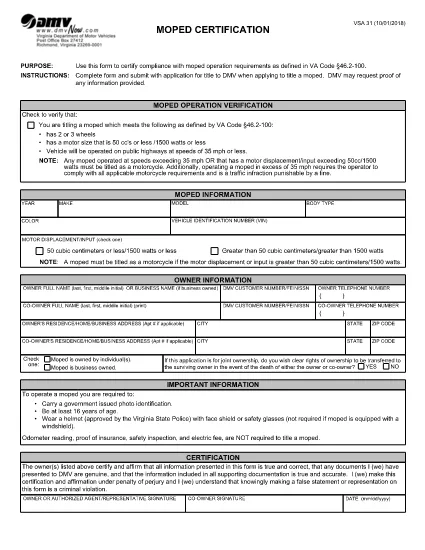
The VSA-31 is the Virginia Department of Motor Vehicles (DMV) form used to certify that a moped meets the state’s operational standards before it can be titled or registered. This form is required for any new or transferred moped and must be submitted with the title application.

What Is the VSA-31 Form?

The VSA-31, often called the “Moped Certification” form, verifies that the vehicle complies with Virginia Code §46.2‑100. It includes fields for the moped’s engine size, top speed, VIN, and the certifying dealer’s signature.

How to Complete the VSA-31 Online

Our fillable PDF works directly in the browser – no extra software needed. Follow these simple steps:

  1. Click the "Fill out this form" button on this page.
  2. Wait a few seconds while the Formize PDF Filler app loads.
  3. Enter the required information in each highlighted field.
  4. Use the digital signature tool to sign as the dealer or authorized agent.
  5. Click "Save" to generate a completed PDF you can download or print.

Common Mistakes to Avoid

  • Incorrect engine size: Verify the manufacturer’s specifications before entering kW or cc.
  • Missing dealer signature: The form is invalid without a signed certification.
  • Wrong VIN format: VA DMV requires a 17‑character VIN; double‑check each character.
  • Leaving optional fields blank: Even optional fields help the DMV process faster.

Where to Submit the Completed Form

After you’ve saved the filled PDF, you can:

  • Mail it with your title application to the nearest Virginia DMV office.
  • Upload it through the DMV’s online portal (if you have an account).
  • Hand‑deliver it to a local DMV customer service center.

Download the Fillable PDF Instantly

Ready to get started? Click the button below to open the fillable VSA-31 form in the Formize PDF Filler and complete it in minutes.

सामान्य प्रश्न
  • What is the purpose of the VSA-31 form?

    The VSA-31 certifies that a moped meets Virginia’s operational standards, allowing it to be titled and registered.

  • Can I fill out VSA-31 on a mobile device?

    Yes. The Formize fillable PDF works on smartphones and tablets as long as you use a modern browser.

  • Do I need a notary for the VSA-31?

    No. A digital signature from an authorized dealer or agent is sufficient for the DMV.

  • How long does the DMV take to process a submitted VSA-31?

    Processing times vary, but most title applications are completed within 7‑10 business days after receipt.

  • What should I do if I make a mistake on the form?

    Use the "Clear" button in the Formize filler to erase the field, correct the information, and re‑save the PDF.

  • Is there a fee to download the VSA-31 form?

    Downloading the fillable PDF from Formize is free. The DMV may charge a title or registration fee when you submit the form.

  • Can I submit a scanned copy of a handwritten VSA-31?

    A scanned handwritten form is not accepted. The DMV requires a completed, signed PDF or a printed version of the fillable PDF.

कैसे करें

VSA-31 को मुफ़्त में, ऑनलाइन 5 आसान स्टेप्स में कैसे भरें:

  1. 1
    Open the Fillable Form
    Click the "Fill out this form" button on the page. The Formize PDF Filler will launch in your browser.
  2. 2
    Enter Required Information
    Type the moped’s details, VIN, engine size, and other required fields directly into the highlighted boxes.
  3. 3
    Add a Digital Signature
    Use the built‑in signature tool to sign as the dealer or authorized representative.
  4. 4
    Save and Download
    Press "Save" to generate a completed PDF. Download it to your computer or print it for submission.
  5. 5
    Submit to the DMV
    Mail, upload, or deliver the completed form along with your title application to the Virginia DMV.
पीडीएफ फिलर एप तैयार करें
के बारे में

वाहन पंजीकरण प्रपत्र

यदि आप एक मोटर वाहन, ट्रेलर या नाव के मालिक हैं या पट्टे पर हैं, तो आपको अपने वाहन को कानूनी रूप से पंजीकृत और सुरक्षित रखने के लिए कुछ दायित्वों को पूरा करना होगा।

VSA-31 वाहन पंजीकरण प्रपत्रों में से एक है जो ऐसे दस्तावेज़ हैं जिनका उपयोग प्रासंगिक राज्य या प्रांतीय प्राधिकरण के साथ मोटर वाहन को पंजीकृत करने के लिए किया जाता है। ये फॉर्म आमतौर पर तब आवश्यक होते हैं जब कोई व्यक्ति नया या इस्तेमाल किया हुआ वाहन खरीदता है या जब वे वाहन के साथ किसी नए राज्य या प्रांत में जाते हैं।

वाहन पंजीकरण के लिए आवश्यक सटीक आवश्यकताएं और फॉर्म स्थान के अनुसार भिन्न हो सकते हैं, लेकिन आम तौर पर, प्रक्रिया में वाहन, मालिक और वाहन पर किसी भी ग्रहणाधिकार के बारे में जानकारी प्रदान करना शामिल होता है।

पंजीकरण फॉर्म और शुल्क जमा करने के बाद, राज्य या प्रांतीय प्राधिकरण वाहन के मालिक को पंजीकरण प्रमाणपत्र या लाइसेंस प्लेट जारी करेगा। यह पंजीकरण वाहन को सार्वजनिक सड़कों और राजमार्गों पर कानूनी रूप से संचालित करने की अनुमति देता है।

विशेषताएं

पीडीएफ भराव

पीडीएफ फॉर्म ऑनलाइन भरने का सबसे आसान तरीका

  • जल्दी से VSA-31 भरें
    VSA-31 को जल्दी से ऑनलाइन भरने का कोई तरीका खोज रहे हैं? हमारे ऑनलाइन नि:शुल्क पीडीएफ फॉर्म फिलर के साथ, आप एक मिनट से भी कम समय में इस पीडीएफ दस्तावेज़ को संपादित करने और भरने का तरीका जानेंगे।
  • ऑनलाइन पीडीएफ संपादक का उपयोग करना आसान है
    पीडीएफ फाइलों को प्रिंट करने से तंग आ गए हैं ताकि आप उन्हें फिर से स्कैन करने और उन्हें वापस भेजने से पहले संपादित कर सकें? PDF दस्तावेज़ों को निःशुल्क ऑनलाइन संपादित करें। समय और कागज बचाने के लिए हमारे ऑनलाइन पीडीएफ संपादक का प्रयोग करें।
  • महान उपकरण, सभी प्लेटफार्म
    आश्चर्य है कि मैक पर VSA-31 कैसे भरें, या शायद पीडीएफ फिलर का मुफ्त में उपयोग कैसे करें? हमारे ऑनलाइन पीडीएफ टूल सभी प्लेटफॉर्म पर काम करते हैं।
  • सुरक्षित फ़ाइल भंडारण
    पूर्ण की गई "VSA-31" फ़ाइलें Amazon क्लाउड होस्टिंग द्वारा प्रबंधित एक सुरक्षित डेटाबेस में संग्रहीत की जाती हैं। आप कभी भी अपनी फाइलों को हमारे सिस्टम से हटा सकते हैं। किसी भी स्थिति में, ये फ़ाइलें 24 घंटे के बाद स्वतः हटा दी जाती हैं।
  • {कीवर्ड} से चैट करें
    Chatize पर "VSA-31" के साथ चैट करें, जो एक निःशुल्क पीडीएफ रीडर सहायक है। प्रश्न पूछें और "VSA-31" से उत्तर प्राप्त करें। बस ऊपर दस्तावेज़ के साथ चैट करें बटन पर क्लिक करें।

फ़िलिंग सत्र मिटाएँ

चयनित फ़िलिंग सत्र को मिटाएँ? इस स्थिति में, फ़ॉर्म को पूरा करने में आपकी प्रगति खो जाएगी।

संपादन सत्र हटाएँ

चयनित संपादन सत्र हटाएँ? इस स्थिति में, फ़ॉर्म बनाने और संपादित करने में आपकी प्रगति नष्ट हो जाएगी।