
hamburger-menu icon
भाषा का चयन करें

VSA-40 Vehicle Removal Certificate – Fillable PDF

  1. भाषा अंग्रेज़ी
  2. देश अमेरीका
  3. गतिविधि वाहन पंजीकरण
  4. राज्य वर्जीनिया
फार्म को भरो
VSA-40 Vehicle Removal Certificate – Fillable PDF

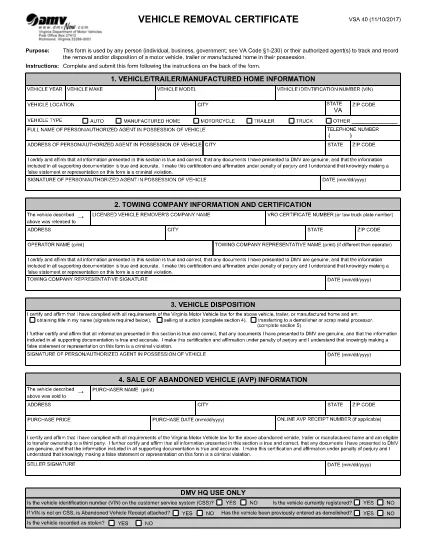
The VSA-40 Vehicle Removal Certificate is the official Virginia DMV form used to record the removal, disposal, or transfer of a motor vehicle, trailer, or manufactured home. Whether you are an individual, a business, or a government agency, this form provides a legal trail for any vehicle that leaves your possession.

Because the VSA-40 is required by Virginia Code §1‑230, completing it accurately protects you from future liability and ensures compliance with state regulations.

What Is the VSA-40 Vehicle Removal Certificate?

The VSA-40 captures essential details such as the vehicle identification number (VIN), owner information, reason for removal, and the date of disposition. It serves as proof that the vehicle was properly removed from the owner's records.

Who Must Complete the VSA-40 Form?

  • Private owners selling or disposing of a vehicle.
  • Dealerships transferring ownership to another party.
  • Government agencies handling fleet disposals.
  • Authorized agents acting on behalf of the owner.

How to Fill Out the VSA-40 Online with Formize

Instead of downloading the PDF and opening a separate editor, simply click the "Fill out this form" button on this page. The Formize PDF Filler app will load instantly, letting you complete every field directly in your browser.

Common Mistakes to Avoid

  • Leaving the VIN or license plate number blank.
  • Using an outdated address for the owner.
  • Forgetting to sign and date the form.
  • Submitting the form without attaching required supporting documents (e.g., bill of sale).

Where to Submit the Completed Form

After you finish the fillable VSA-40, you can:

  • Print and mail it to your local Virginia DMV office.
  • Upload a scanned copy through the DMV’s online portal.
  • Deliver it in person to the DMV service center.

Using the Formize filler saves time, reduces errors, and creates a clean, searchable PDF ready for submission.

सामान्य प्रश्न
  • What is the purpose of the VSA‑40 form?

    The VSA‑40 records the removal, disposal, or transfer of a vehicle, trailer, or manufactured home, providing legal proof for the Virginia DMV.

  • Can I fill out the VSA‑40 on a mobile device?

    Yes. The Formize PDF Filler works on all major browsers, including mobile Safari and Chrome, so you can complete the form on a phone or tablet.

  • Do I need a digital signature?

    A digital signature created in the Formize filler is accepted for most DMV submissions. Check your local office if a wet signature is specifically required.

  • How long does the VSA‑40 remain valid after completion?

    Once submitted to the DMV, the certificate is considered valid indefinitely as a record of the vehicle’s removal.

  • Is there a filing fee for the VSA‑40?

    No, the VSA‑40 itself does not carry a fee. However, related DMV services (e.g., title transfer) may have separate charges.

  • What supporting documents should I attach?

    Include a bill of sale, transfer notice, or any document that proves the vehicle’s disposition, as required by the DMV.

  • Can I save my progress and finish later?

    Yes. The Formize filler lets you download a partially completed PDF, which you can reopen later to finish.

कैसे करें

VSA 40 को मुफ़्त में, ऑनलाइन 4 आसान स्टेप्स में कैसे भरें:

  1. 1
    Open the Fillable Form
    Click the "Fill out this form" button on the page. The Formize PDF Filler loads directly in your browser.
  2. 2
    Enter All Required Information
    Complete each field—owner details, VIN, removal reason, and date—using the on‑screen keyboard or your own typing.
  3. 3
    Review and Sign
    Double‑check every entry for accuracy, then use the built‑in signature tool to sign the form.
  4. 4
    Save or Submit
    Download the completed PDF, print and mail it, or upload it to the Virginia DMV portal as instructed.
पीडीएफ फिलर एप तैयार करें
के बारे में

वाहन पंजीकरण प्रपत्र

यदि आप एक मोटर वाहन, ट्रेलर या नाव के मालिक हैं या पट्टे पर हैं, तो आपको अपने वाहन को कानूनी रूप से पंजीकृत और सुरक्षित रखने के लिए कुछ दायित्वों को पूरा करना होगा।

VSA 40 वाहन पंजीकरण प्रपत्रों में से एक है जो ऐसे दस्तावेज़ हैं जिनका उपयोग प्रासंगिक राज्य या प्रांतीय प्राधिकरण के साथ मोटर वाहन को पंजीकृत करने के लिए किया जाता है। ये फॉर्म आमतौर पर तब आवश्यक होते हैं जब कोई व्यक्ति नया या इस्तेमाल किया हुआ वाहन खरीदता है या जब वे वाहन के साथ किसी नए राज्य या प्रांत में जाते हैं।

वाहन पंजीकरण के लिए आवश्यक सटीक आवश्यकताएं और फॉर्म स्थान के अनुसार भिन्न हो सकते हैं, लेकिन आम तौर पर, प्रक्रिया में वाहन, मालिक और वाहन पर किसी भी ग्रहणाधिकार के बारे में जानकारी प्रदान करना शामिल होता है।

पंजीकरण फॉर्म और शुल्क जमा करने के बाद, राज्य या प्रांतीय प्राधिकरण वाहन के मालिक को पंजीकरण प्रमाणपत्र या लाइसेंस प्लेट जारी करेगा। यह पंजीकरण वाहन को सार्वजनिक सड़कों और राजमार्गों पर कानूनी रूप से संचालित करने की अनुमति देता है।

विशेषताएं

पीडीएफ भराव

पीडीएफ फॉर्म ऑनलाइन भरने का सबसे आसान तरीका

  • जल्दी से VSA 40 भरें
    VSA 40 को जल्दी से ऑनलाइन भरने का कोई तरीका खोज रहे हैं? हमारे ऑनलाइन नि:शुल्क पीडीएफ फॉर्म फिलर के साथ, आप एक मिनट से भी कम समय में इस पीडीएफ दस्तावेज़ को संपादित करने और भरने का तरीका जानेंगे।
  • ऑनलाइन पीडीएफ संपादक का उपयोग करना आसान है
    पीडीएफ फाइलों को प्रिंट करने से तंग आ गए हैं ताकि आप उन्हें फिर से स्कैन करने और उन्हें वापस भेजने से पहले संपादित कर सकें? PDF दस्तावेज़ों को निःशुल्क ऑनलाइन संपादित करें। समय और कागज बचाने के लिए हमारे ऑनलाइन पीडीएफ संपादक का प्रयोग करें।
  • महान उपकरण, सभी प्लेटफार्म
    आश्चर्य है कि मैक पर VSA 40 कैसे भरें, या शायद पीडीएफ फिलर का मुफ्त में उपयोग कैसे करें? हमारे ऑनलाइन पीडीएफ टूल सभी प्लेटफॉर्म पर काम करते हैं।
  • सुरक्षित फ़ाइल भंडारण
    पूर्ण की गई "VSA 40" फ़ाइलें Amazon क्लाउड होस्टिंग द्वारा प्रबंधित एक सुरक्षित डेटाबेस में संग्रहीत की जाती हैं। आप कभी भी अपनी फाइलों को हमारे सिस्टम से हटा सकते हैं। किसी भी स्थिति में, ये फ़ाइलें 24 घंटे के बाद स्वतः हटा दी जाती हैं।
  • {कीवर्ड} से चैट करें
    Chatize पर "VSA 40" के साथ चैट करें, जो एक निःशुल्क पीडीएफ रीडर सहायक है। प्रश्न पूछें और "VSA 40" से उत्तर प्राप्त करें। बस ऊपर दस्तावेज़ के साथ चैट करें बटन पर क्लिक करें।

फ़िलिंग सत्र मिटाएँ

चयनित फ़िलिंग सत्र को मिटाएँ? इस स्थिति में, फ़ॉर्म को पूरा करने में आपकी प्रगति खो जाएगी।

संपादन सत्र हटाएँ

चयनित संपादन सत्र हटाएँ? इस स्थिति में, फ़ॉर्म बनाने और संपादित करने में आपकी प्रगति नष्ट हो जाएगी।