
hamburger-menu icon
भाषा का चयन करें

VSA-59 Rebuilt Vehicle Disclosure Form – Fill Online

  1. भाषा अंग्रेज़ी
  2. देश अमेरीका
  3. गतिविधि वाहन पंजीकरण
  4. राज्य वर्जीनिया
फार्म को भरो
VSA-59 Rebuilt Vehicle Disclosure Form – Fill Online

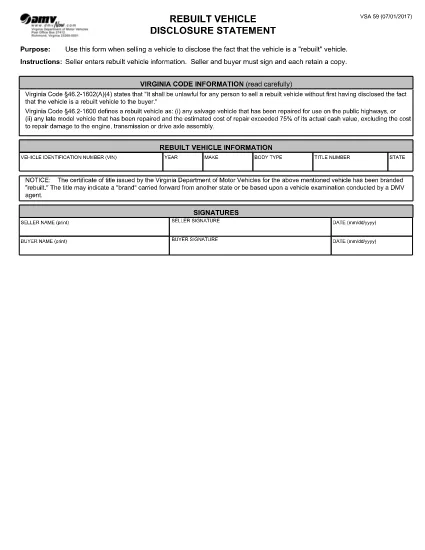
The VSA-59 is the official Virginia Department of Motor Vehicles (DMV) disclosure statement used when selling a rebuilt vehicle. It ensures the buyer is informed that the vehicle has a rebuilt title, protecting both parties during the title transfer.

What Is the VSA-59 Form?

This fillable PDF requires the seller to provide detailed information about the rebuilt vehicle, including VIN, make, model, year, and the nature of the reconstruction. Both the seller and buyer must sign, and each party keeps a copy.

How to Complete the VSA-59 Online

Instead of downloading the PDF and editing it manually, simply click the "Fill out this form" button on this page. The Formize PDF Filler app will load instantly, allowing you to type directly into each field, add signatures, and save a completed copy.

Common Mistakes to Avoid

  • Leaving any required field blank – the form will not submit.
  • Using an illegible handwritten signature – digital signatures are clearer and accepted.
  • Mismatching the VIN on the title with the VIN entered on the form.
  • Forgetting to attach the rebuilt title documentation when filing with the DMV.

Where to Submit the Completed Form

After filling out the VSA-59, print a copy for your records and bring the original, along with the rebuilt title, to any Virginia DMV customer service center. You can also mail the documents to the address listed on the form.

Frequently Asked Questions

Find quick answers to the most common queries below. If you need more help, consult the Virginia DMV website or your local DMV office.

सामान्य प्रश्न
  • Who must sign the VSA-59 form?

    Both the seller and the buyer must sign the VSA-59. Each party should retain a signed copy for their records.

  • Can I submit a digital signature?

    Yes. The Formize PDF Filler app allows you to add a legally accepted digital signature, which the Virginia DMV accepts.

  • Do I need to attach the rebuilt title when I file?

    Yes. The rebuilt title must accompany the VSA-59 when you submit it to the DMV. It proves the vehicle’s rebuilt status.

  • What if I make a mistake after saving?

    Open the saved PDF in the Formize filler again, correct the error, and re‑save. Do not use a handwritten correction on the printed form.

  • Is the VSA-59 required for all rebuilt vehicles?

    Yes. Virginia law mandates that any rebuilt vehicle being sold must have a completed VSA-59 disclosure statement.

  • How long does the Formize filler take to load?

    The app loads within seconds on most browsers. A stable internet connection ensures the fastest experience.

  • Can I file the VSA-59 online without printing?

    The Virginia DMV still requires a physical copy for record‑keeping, so printing the completed form is recommended.

  • Where can I find a list of DMV offices?

    Visit the Virginia DMV website’s "Office Locations" page for the nearest service center.

कैसे करें

VSA-59 को मुफ़्त में, ऑनलाइन 4 आसान स्टेप्स में कैसे भरें:

  1. 1
    Click the Fill‑out Button
    On this page, locate the "Fill out this form" button and click it. The Formize PDF Filler app will open in a new window.
  2. 2
    Enter Information
    Type directly into each highlighted field—VIN, make, model, year, reconstruction details, and signatures.
  3. 3
    Save and Download
    When all required fields are completed, click "Save". Download the finished PDF for your records and print a copy for the DMV.
  4. 4
    Submit to the DMV
    Take the printed form, the rebuilt title, and any supporting documents to a Virginia DMV office or mail them as instructed on the form.
पीडीएफ फिलर एप तैयार करें
के बारे में

वाहन पंजीकरण प्रपत्र

VSA-59 डीएमवी फॉर्मों में से एक है, जिसे मोटर वाहन विभाग फॉर्म के रूप में भी जाना जाता है, जो मोटर वाहनों से संबंधित विभिन्न लेनदेन और प्रक्रियाओं में उपयोग किए जाने वाले दस्तावेज हैं। DMV एक सरकारी एजेंसी है जो ड्राइवर लाइसेंसिंग, वाहन पंजीकरण और मोटर वाहन कानूनों को लागू करने के लिए जिम्मेदार है। उपलब्ध विशिष्ट DMV फॉर्म क्षेत्राधिकार के अनुसार भिन्न हो सकते हैं, लेकिन यहां कुछ सामान्य उदाहरण दिए गए हैं:

ड्राइवर लाइसेंस फॉर्म: इन फॉर्म का उपयोग ड्राइवर के लाइसेंस के लिए आवेदन करने या परिवर्तन या नवीनीकरण का अनुरोध करने के लिए किया जाता है। उन्हें आम तौर पर व्यक्तिगत जानकारी, पहचान के प्रमाण की आवश्यकता होती है, और इसमें चिकित्सा जानकारी या ड्राइविंग इतिहास के अनुभाग शामिल हो सकते हैं।

वाहन पंजीकरण फॉर्म: इन फॉर्मों का उपयोग डीएमवी के साथ मोटर वाहन को पंजीकृत करने के लिए किया जाता है। उन्हें वाहन की जानकारी, स्वामित्व विवरण और बीमा के प्रमाण की आवश्यकता होती है।

टाइटल ट्रांसफर फॉर्म: वाहन खरीदते या बेचते समय, इन फॉर्मों का उपयोग एक पक्ष से दूसरे पक्ष को स्वामित्व हस्तांतरित करने के लिए किया जाता है। उन्हें खरीदार, विक्रेता, वाहन विवरण के बारे में जानकारी की आवश्यकता होती है और इसमें बिक्री का बिल भी शामिल हो सकता है।

वाहन दायित्व प्रपत्र जारी करना: किसी वाहन के स्वामित्व को बेचते या स्थानांतरित करते समय, ये प्रपत्र डीएमवी को सूचित करते हैं कि विक्रेता अब वाहन के लिए जिम्मेदार नहीं है। यह विक्रेता को बिक्री के बाद वाहन से जुड़ी दुर्घटनाओं या घटनाओं के लिए दायित्व से बचाने में मदद करता है।

लाइसेंस प्लेट और पंजीकरण नवीनीकरण फॉर्म: इन फॉर्मों का उपयोग वाहन पंजीकरण को नवीनीकृत करने या नए लाइसेंस प्लेटों का अनुरोध करने के लिए किया जाता है। उन्हें आम तौर पर पंजीकृत मालिक, वर्तमान पंजीकरण विवरण और लागू शुल्क के भुगतान के बारे में जानकारी की आवश्यकता होती है।

ड्राइविंग रिकॉर्ड अनुरोध फॉर्म: ये फॉर्म व्यक्तियों को डीएमवी से अपने ड्राइविंग रिकॉर्ड का अनुरोध करने की अनुमति देते हैं, जो ड्राइविंग उल्लंघन, लाइसेंस स्थिति और अन्य प्रासंगिक विवरणों के बारे में जानकारी प्रदान करते हैं।

विशेषता या वैयक्तिकृत लाइसेंस प्लेट फॉर्म: इन फॉर्मों का उपयोग वैयक्तिकृत या विशिष्ट लाइसेंस प्लेटों के लिए आवेदन करने के लिए किया जाता है, जो व्यक्तियों को विशिष्ट पात्रों या डिज़ाइन के साथ अपनी लाइसेंस प्लेट को अनुकूलित करने की अनुमति देते हैं।

ये उन अनेक प्रपत्रों के कुछ उदाहरण हैं जो DMV के माध्यम से उपलब्ध हो सकते हैं। विशिष्ट फॉर्म और आवश्यकताएं क्षेत्राधिकार के अनुसार अलग-अलग हो सकती हैं, इसलिए अपनी विशेष जरूरतों के लिए सही फॉर्म प्राप्त करने के लिए स्थानीय डीएमवी वेबसाइट से परामर्श करना या डीएमवी कार्यालय में जाना महत्वपूर्ण है।

विशेषताएं

पीडीएफ भराव

पीडीएफ फॉर्म ऑनलाइन भरने का सबसे आसान तरीका

  • जल्दी से VSA-59 भरें
    VSA-59 को जल्दी से ऑनलाइन भरने का कोई तरीका खोज रहे हैं? हमारे ऑनलाइन नि:शुल्क पीडीएफ फॉर्म फिलर के साथ, आप एक मिनट से भी कम समय में इस पीडीएफ दस्तावेज़ को संपादित करने और भरने का तरीका जानेंगे।
  • ऑनलाइन पीडीएफ संपादक का उपयोग करना आसान है
    पीडीएफ फाइलों को प्रिंट करने से तंग आ गए हैं ताकि आप उन्हें फिर से स्कैन करने और उन्हें वापस भेजने से पहले संपादित कर सकें? PDF दस्तावेज़ों को निःशुल्क ऑनलाइन संपादित करें। समय और कागज बचाने के लिए हमारे ऑनलाइन पीडीएफ संपादक का प्रयोग करें।
  • महान उपकरण, सभी प्लेटफार्म
    आश्चर्य है कि मैक पर VSA-59 कैसे भरें, या शायद पीडीएफ फिलर का मुफ्त में उपयोग कैसे करें? हमारे ऑनलाइन पीडीएफ टूल सभी प्लेटफॉर्म पर काम करते हैं।
  • सुरक्षित फ़ाइल भंडारण
    पूर्ण की गई "VSA-59" फ़ाइलें Amazon क्लाउड होस्टिंग द्वारा प्रबंधित एक सुरक्षित डेटाबेस में संग्रहीत की जाती हैं। आप कभी भी अपनी फाइलों को हमारे सिस्टम से हटा सकते हैं। किसी भी स्थिति में, ये फ़ाइलें 24 घंटे के बाद स्वतः हटा दी जाती हैं।
  • {कीवर्ड} से चैट करें
    Chatize पर "VSA-59" के साथ चैट करें, जो एक निःशुल्क पीडीएफ रीडर सहायक है। प्रश्न पूछें और "VSA-59" से उत्तर प्राप्त करें। बस ऊपर दस्तावेज़ के साथ चैट करें बटन पर क्लिक करें।

फ़िलिंग सत्र मिटाएँ

चयनित फ़िलिंग सत्र को मिटाएँ? इस स्थिति में, फ़ॉर्म को पूरा करने में आपकी प्रगति खो जाएगी।

संपादन सत्र हटाएँ

चयनित संपादन सत्र हटाएँ? इस स्थिति में, फ़ॉर्म बनाने और संपादित करने में आपकी प्रगति नष्ट हो जाएगी।