
hamburger-menu icon
भाषा का चयन करें

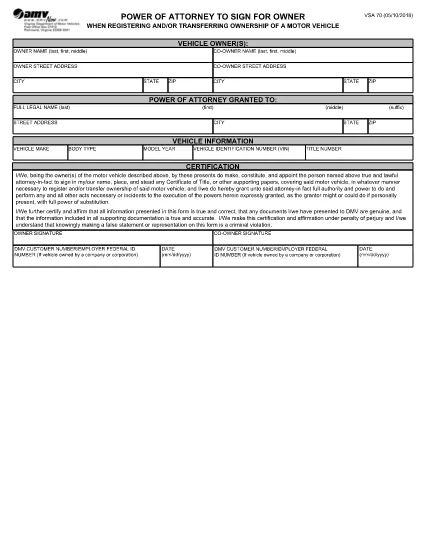
Virginia VSA 70 Power of Attorney – Fillable PDF Form

  1. भाषा अंग्रेज़ी
  2. देश अमेरीका
  3. गतिविधि वाहन पंजीकरण
  4. राज्य वर्जीनिया
फार्म को भरो
Virginia VSA 70 Power of Attorney – Fillable PDF Form

The VSA 70 Power of Attorney is the official Virginia Department of Motor Vehicles (DMV) form that authorizes another person to sign for the owner when registering or transferring ownership of a motor vehicle. Whether you’re selling a car, transferring a title, or need a trusted agent to handle DMV paperwork, the VSA 70 is required.

What is the VSA 70 Power of Attorney?

This form grants a designated attorney‑in‑fact the legal authority to act on behalf of the vehicle owner for DMV transactions. It is commonly used for:

  • Title transfers
  • Vehicle registration renewals
  • Obtaining new plates
  • Any other DMV process that requires the owner's signature

How to Fill Out the VSA 70 Online with Formize

Instead of downloading the PDF and editing it manually, you can fill the form instantly on our page. Follow these simple steps:

  1. Click the "Fill out this form" button below the description.
  2. Our Formize PDF Filler app will load in a secure window.
  3. Enter the required information – owner details, attorney‑in‑fact data, vehicle description, and signatures.
  4. Review the completed form for accuracy.
  5. Save a copy, print, or submit directly to the Virginia DMV as instructed.

Common Mistakes to Avoid on the VSA 70

  • Incorrect VIN or license plate number: Double‑check the vehicle identification number.
  • Missing signatures: Both the owner and the attorney‑in‑fact must sign.
  • Wrong date format: Use MM/DD/YYYY as required by the DMV.
  • Leaving blank fields: The form is considered incomplete if any required box is empty.

Where to Submit the Completed Form

After filling the VSA 70, you can:

  • Mail it to your local Virginia DMV office.
  • Take it in person to a DMV customer service center.
  • Include it with any other paperwork for a title transfer or registration renewal.

For the most up‑to‑date submission addresses, visit the Virginia DMV website.

सामान्य प्रश्न
  • What is the purpose of Form VSA 70?

    Form VSA 70 grants another person the legal authority to sign DMV documents on behalf of the vehicle owner, such as title transfers or registration renewals.

  • Can I use the VSA 70 for out‑of‑state vehicle transfers?

    Yes, the VSA 70 is accepted by the Virginia DMV for any vehicle that will be titled or registered in Virginia, even if the vehicle was previously registered out of state.

  • Do both the owner and the attorney‑in‑fact need to sign?

    Both signatures are required. The owner signs to grant authority, and the attorney‑in‑fact signs to acknowledge the responsibility.

  • Is there a filing fee for submitting VSA 70?

    The VSA 70 itself does not have a separate fee, but any DMV transaction it accompanies (title transfer, registration, etc.) may have associated fees.

  • How long is a VSA 70 valid?

    The form remains valid until the vehicle is sold, the ownership changes, or the owner revokes the power of attorney in writing.

  • Can I submit the VSA 70 electronically?

    Virginia DMV currently requires a printed and signed original. However, you can fill it out online, print, and then mail or bring the paper copy to a DMV office.

  • What should I do if I make a mistake on the form?

    Cross out the error with a single line, initial the change, and fill in the correct information. For major errors, it’s best to start a new form.

  • Do minors need a VSA 70?

    If the vehicle owner is a minor, a parent or legal guardian must complete the form and sign on the minor’s behalf.

कैसे करें

VSA 70 को मुफ़्त में, ऑनलाइन 5 आसान स्टेप्स में कैसे भरें:

  1. 1
    Open the Fillable Form
    Click the "Fill out this form" button on the page. The Formize PDF Filler will launch in a new window.
  2. 2
    Enter Owner Information
    Type the vehicle owner's name, address, and driver's license number exactly as they appear on the ID.
  3. 3
    Add Attorney‑in‑Fact Details
    Provide the name, relationship, and contact information of the person you are authorizing.
  4. 4
    Complete Vehicle Data
    Enter the VIN, make, model, year, and license plate number of the vehicle.
  5. 5
    Sign and Submit
    Use the electronic signature fields for both the owner and the attorney‑in‑fact, then save or print the completed form for submission to the DMV.
पीडीएफ फिलर एप तैयार करें
के बारे में

वाहन पंजीकरण प्रपत्र

VSA 70 डीएमवी फॉर्मों में से एक है, जिसे मोटर वाहन विभाग फॉर्म के रूप में भी जाना जाता है, जो मोटर वाहनों से संबंधित विभिन्न लेनदेन और प्रक्रियाओं में उपयोग किए जाने वाले दस्तावेज हैं। DMV एक सरकारी एजेंसी है जो ड्राइवर लाइसेंसिंग, वाहन पंजीकरण और मोटर वाहन कानूनों को लागू करने के लिए जिम्मेदार है। उपलब्ध विशिष्ट DMV फॉर्म क्षेत्राधिकार के अनुसार भिन्न हो सकते हैं, लेकिन यहां कुछ सामान्य उदाहरण दिए गए हैं:

ड्राइवर लाइसेंस फॉर्म: इन फॉर्म का उपयोग ड्राइवर के लाइसेंस के लिए आवेदन करने या परिवर्तन या नवीनीकरण का अनुरोध करने के लिए किया जाता है। उन्हें आम तौर पर व्यक्तिगत जानकारी, पहचान के प्रमाण की आवश्यकता होती है, और इसमें चिकित्सा जानकारी या ड्राइविंग इतिहास के अनुभाग शामिल हो सकते हैं।

वाहन पंजीकरण फॉर्म: इन फॉर्मों का उपयोग डीएमवी के साथ मोटर वाहन को पंजीकृत करने के लिए किया जाता है। उन्हें वाहन की जानकारी, स्वामित्व विवरण और बीमा के प्रमाण की आवश्यकता होती है।

टाइटल ट्रांसफर फॉर्म: वाहन खरीदते या बेचते समय, इन फॉर्मों का उपयोग एक पक्ष से दूसरे पक्ष को स्वामित्व हस्तांतरित करने के लिए किया जाता है। उन्हें खरीदार, विक्रेता, वाहन विवरण के बारे में जानकारी की आवश्यकता होती है और इसमें बिक्री का बिल भी शामिल हो सकता है।

वाहन दायित्व प्रपत्र जारी करना: किसी वाहन के स्वामित्व को बेचते या स्थानांतरित करते समय, ये प्रपत्र डीएमवी को सूचित करते हैं कि विक्रेता अब वाहन के लिए जिम्मेदार नहीं है। यह विक्रेता को बिक्री के बाद वाहन से जुड़ी दुर्घटनाओं या घटनाओं के लिए दायित्व से बचाने में मदद करता है।

लाइसेंस प्लेट और पंजीकरण नवीनीकरण फॉर्म: इन फॉर्मों का उपयोग वाहन पंजीकरण को नवीनीकृत करने या नए लाइसेंस प्लेटों का अनुरोध करने के लिए किया जाता है। उन्हें आम तौर पर पंजीकृत मालिक, वर्तमान पंजीकरण विवरण और लागू शुल्क के भुगतान के बारे में जानकारी की आवश्यकता होती है।

ड्राइविंग रिकॉर्ड अनुरोध फॉर्म: ये फॉर्म व्यक्तियों को डीएमवी से अपने ड्राइविंग रिकॉर्ड का अनुरोध करने की अनुमति देते हैं, जो ड्राइविंग उल्लंघन, लाइसेंस स्थिति और अन्य प्रासंगिक विवरणों के बारे में जानकारी प्रदान करते हैं।

विशेषता या वैयक्तिकृत लाइसेंस प्लेट फॉर्म: इन फॉर्मों का उपयोग वैयक्तिकृत या विशिष्ट लाइसेंस प्लेटों के लिए आवेदन करने के लिए किया जाता है, जो व्यक्तियों को विशिष्ट पात्रों या डिज़ाइन के साथ अपनी लाइसेंस प्लेट को अनुकूलित करने की अनुमति देते हैं।

ये उन अनेक प्रपत्रों के कुछ उदाहरण हैं जो DMV के माध्यम से उपलब्ध हो सकते हैं। विशिष्ट फॉर्म और आवश्यकताएं क्षेत्राधिकार के अनुसार अलग-अलग हो सकती हैं, इसलिए अपनी विशेष जरूरतों के लिए सही फॉर्म प्राप्त करने के लिए स्थानीय डीएमवी वेबसाइट से परामर्श करना या डीएमवी कार्यालय में जाना महत्वपूर्ण है।

विशेषताएं

पीडीएफ भराव

पीडीएफ फॉर्म ऑनलाइन भरने का सबसे आसान तरीका

  • जल्दी से VSA 70 भरें
    VSA 70 को जल्दी से ऑनलाइन भरने का कोई तरीका खोज रहे हैं? हमारे ऑनलाइन नि:शुल्क पीडीएफ फॉर्म फिलर के साथ, आप एक मिनट से भी कम समय में इस पीडीएफ दस्तावेज़ को संपादित करने और भरने का तरीका जानेंगे।
  • ऑनलाइन पीडीएफ संपादक का उपयोग करना आसान है
    पीडीएफ फाइलों को प्रिंट करने से तंग आ गए हैं ताकि आप उन्हें फिर से स्कैन करने और उन्हें वापस भेजने से पहले संपादित कर सकें? PDF दस्तावेज़ों को निःशुल्क ऑनलाइन संपादित करें। समय और कागज बचाने के लिए हमारे ऑनलाइन पीडीएफ संपादक का प्रयोग करें।
  • महान उपकरण, सभी प्लेटफार्म
    आश्चर्य है कि मैक पर VSA 70 कैसे भरें, या शायद पीडीएफ फिलर का मुफ्त में उपयोग कैसे करें? हमारे ऑनलाइन पीडीएफ टूल सभी प्लेटफॉर्म पर काम करते हैं।
  • सुरक्षित फ़ाइल भंडारण
    पूर्ण की गई "VSA 70" फ़ाइलें Amazon क्लाउड होस्टिंग द्वारा प्रबंधित एक सुरक्षित डेटाबेस में संग्रहीत की जाती हैं। आप कभी भी अपनी फाइलों को हमारे सिस्टम से हटा सकते हैं। किसी भी स्थिति में, ये फ़ाइलें 24 घंटे के बाद स्वतः हटा दी जाती हैं।
  • {कीवर्ड} से चैट करें
    Chatize पर "VSA 70" के साथ चैट करें, जो एक निःशुल्क पीडीएफ रीडर सहायक है। प्रश्न पूछें और "VSA 70" से उत्तर प्राप्त करें। बस ऊपर दस्तावेज़ के साथ चैट करें बटन पर क्लिक करें।

फ़िलिंग सत्र मिटाएँ

चयनित फ़िलिंग सत्र को मिटाएँ? इस स्थिति में, फ़ॉर्म को पूरा करने में आपकी प्रगति खो जाएगी।

संपादन सत्र हटाएँ

चयनित संपादन सत्र हटाएँ? इस स्थिति में, फ़ॉर्म बनाने और संपादित करने में आपकी प्रगति नष्ट हो जाएगी।