
hamburger-menu icon
भाषा का चयन करें

Wisconsin MV2016 Substitute Renewal & Non‑Operation Statement (Fillable PDF)

  1. भाषा अंग्रेज़ी
  2. देश अमेरीका
  3. गतिविधि वाहन पंजीकरण
  4. राज्य विस्कॉन्सिन
फार्म को भरो
Wisconsin MV2016 Substitute Renewal & Non‑Operation Statement (Fillable PDF)

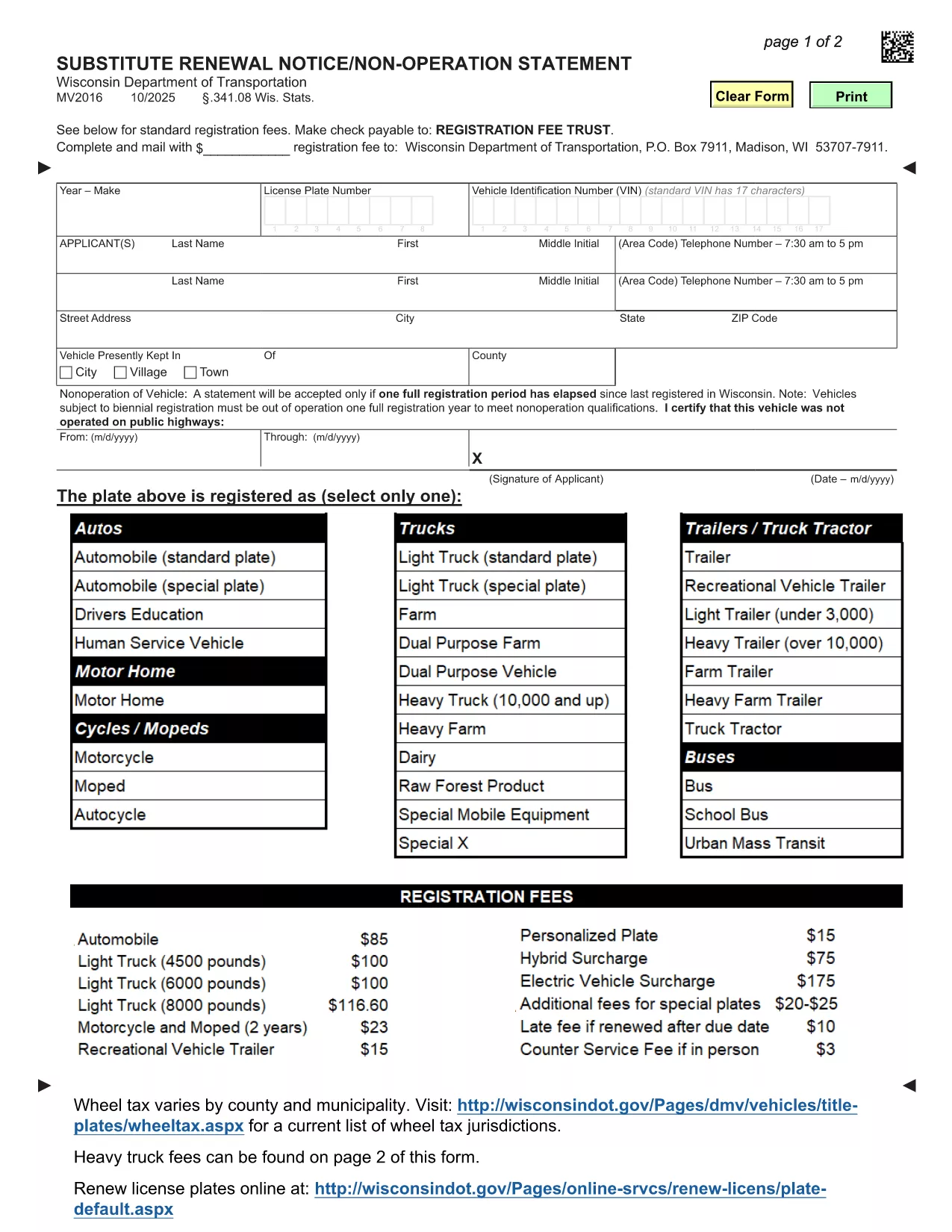
The MV2016 is Wisconsin's official Substitute Renewal Notice and Non‑Operation Statement. It is required when a vehicle is not being operated for a full registration period or when you need to renew a registration without a title transfer.

What Is the MV2016 Form?

MV2016 is a fillable PDF provided by the Wisconsin Department of Transportation (WisDOT). The form captures essential details such as vehicle identification, owner information, and the reason for non‑operation or renewal.

When Do You Need to File MV2016?

  • Vehicle has been out of service for an entire registration year.
  • You are renewing a registration but do not have a recent title.
  • You need to certify that the vehicle was not operated on public highways during the specified period.

How to Complete MV2016 Online with Formize

Instead of downloading the PDF and opening a separate editor, simply click the "Fill out this form" button on this page. The Formize PDF Filler app will load in your browser, letting you complete the form instantly.

Common Mistakes to Avoid

  • Skipping the signature field: The form is invalid without an owner’s signature.
  • Incorrect dates: Ensure the non‑operation period covers a full registration year.
  • Wrong vehicle type code: Use the exact code listed on your registration (e.g., RDTR for road tractors).

Download, Save, and Submit Your Completed Form

After filling out MV2016 with Formize, click Save to download the completed PDF. Mail or bring the printed copy to your local Wisconsin DMV office. Remember, electronic submission is not accepted for this form.

सामान्य प्रश्न
  • Do I need to print MV2016 after filling it online?

    Yes. Wisconsin DMV requires a hard‑copy signature. Print the completed PDF and sign it before submitting.

  • Can I submit MV2016 electronically?

    No. The MV2016 must be mailed or delivered in person to a Wisconsin DMV office; electronic submission is not accepted.

  • What if my vehicle is a truck or bus?

    Select the appropriate vehicle type code (e.g., HTK for trucks, BUS for buses) on the form. The fee schedule varies by vehicle class.

  • How long does the non‑operation period have to be?

    The vehicle must be out of operation for a full registration year (12 months) before you can certify non‑operation on MV2016.

  • Is there a fee for filing MV2016?

    There is no separate fee for the MV2016 itself, but any outstanding registration fees or quarterly fees must be paid when you submit the form.

  • Can I use a mobile device to fill out MV2016?

    Yes. The Formize PDF Filler works on most modern browsers, including mobile Safari and Chrome, allowing you to complete the form on a phone or tablet.

  • What if I make a mistake after saving?

    Open the saved PDF again in Formize, correct the error, and re‑save. Ensure the final version is the one you print and submit.

  • Do I need a Wisconsin driver’s license to file MV2016?

    No. The form is for vehicle owners; a Wisconsin driver’s license is not required, but you must provide a valid mailing address.

  • Where can I find help if I get stuck?

    Contact your local Wisconsin DMV office at (608) 264‑7447 for assistance with the MV2016 form.

  • Is the MV2016 form available in languages other than English?

    The official Wisconsin DOT version is only provided in English.

कैसे करें

MV2016 को मुफ़्त में, ऑनलाइन 5 आसान स्टेप्स में कैसे भरें:

  1. 1
    Open the Fillable Form
    Click the "Fill out this form" button on the page. The Formize PDF Filler loads directly in your browser.
  2. 2
    Enter Required Information
    Complete each field – owner details, vehicle identification number, registration dates, and the reason for non‑operation or renewal.
  3. 3
    Sign the Form
    Use the signature field at the bottom of the form. You can type your name or draw a signature with your mouse/touchscreen.
  4. 4
    Save and Download
    When all fields are filled, click the "Save" button in Formize. A completed PDF will be downloaded to your computer.
  5. 5
    Submit to the DMV
    Print the saved PDF and mail it or bring it in person to your nearest Wisconsin DMV office.
पीडीएफ फिलर एप तैयार करें
के बारे में

वाहन पंजीकरण प्रपत्र

MV2016 डीएमवी फॉर्मों में से एक है, जिसे मोटर वाहन विभाग फॉर्म के रूप में भी जाना जाता है, जो मोटर वाहनों से संबंधित विभिन्न लेनदेन और प्रक्रियाओं में उपयोग किए जाने वाले दस्तावेज हैं। DMV एक सरकारी एजेंसी है जो ड्राइवर लाइसेंसिंग, वाहन पंजीकरण और मोटर वाहन कानूनों को लागू करने के लिए जिम्मेदार है। उपलब्ध विशिष्ट DMV फॉर्म क्षेत्राधिकार के अनुसार भिन्न हो सकते हैं, लेकिन यहां कुछ सामान्य उदाहरण दिए गए हैं:

ड्राइवर लाइसेंस फॉर्म: इन फॉर्म का उपयोग ड्राइवर के लाइसेंस के लिए आवेदन करने या परिवर्तन या नवीनीकरण का अनुरोध करने के लिए किया जाता है। उन्हें आम तौर पर व्यक्तिगत जानकारी, पहचान के प्रमाण की आवश्यकता होती है, और इसमें चिकित्सा जानकारी या ड्राइविंग इतिहास के अनुभाग शामिल हो सकते हैं।

वाहन पंजीकरण फॉर्म: इन फॉर्मों का उपयोग डीएमवी के साथ मोटर वाहन को पंजीकृत करने के लिए किया जाता है। उन्हें वाहन की जानकारी, स्वामित्व विवरण और बीमा के प्रमाण की आवश्यकता होती है।

टाइटल ट्रांसफर फॉर्म: वाहन खरीदते या बेचते समय, इन फॉर्मों का उपयोग एक पक्ष से दूसरे पक्ष को स्वामित्व हस्तांतरित करने के लिए किया जाता है। उन्हें खरीदार, विक्रेता, वाहन विवरण के बारे में जानकारी की आवश्यकता होती है और इसमें बिक्री का बिल भी शामिल हो सकता है।

वाहन दायित्व प्रपत्र जारी करना: किसी वाहन के स्वामित्व को बेचते या स्थानांतरित करते समय, ये प्रपत्र डीएमवी को सूचित करते हैं कि विक्रेता अब वाहन के लिए जिम्मेदार नहीं है। यह विक्रेता को बिक्री के बाद वाहन से जुड़ी दुर्घटनाओं या घटनाओं के लिए दायित्व से बचाने में मदद करता है।

लाइसेंस प्लेट और पंजीकरण नवीनीकरण फॉर्म: इन फॉर्मों का उपयोग वाहन पंजीकरण को नवीनीकृत करने या नए लाइसेंस प्लेटों का अनुरोध करने के लिए किया जाता है। उन्हें आम तौर पर पंजीकृत मालिक, वर्तमान पंजीकरण विवरण और लागू शुल्क के भुगतान के बारे में जानकारी की आवश्यकता होती है।

ड्राइविंग रिकॉर्ड अनुरोध फॉर्म: ये फॉर्म व्यक्तियों को डीएमवी से अपने ड्राइविंग रिकॉर्ड का अनुरोध करने की अनुमति देते हैं, जो ड्राइविंग उल्लंघन, लाइसेंस स्थिति और अन्य प्रासंगिक विवरणों के बारे में जानकारी प्रदान करते हैं।

विशेषता या वैयक्तिकृत लाइसेंस प्लेट फॉर्म: इन फॉर्मों का उपयोग वैयक्तिकृत या विशिष्ट लाइसेंस प्लेटों के लिए आवेदन करने के लिए किया जाता है, जो व्यक्तियों को विशिष्ट पात्रों या डिज़ाइन के साथ अपनी लाइसेंस प्लेट को अनुकूलित करने की अनुमति देते हैं।

ये उन अनेक प्रपत्रों के कुछ उदाहरण हैं जो DMV के माध्यम से उपलब्ध हो सकते हैं। विशिष्ट फॉर्म और आवश्यकताएं क्षेत्राधिकार के अनुसार अलग-अलग हो सकती हैं, इसलिए अपनी विशेष जरूरतों के लिए सही फॉर्म प्राप्त करने के लिए स्थानीय डीएमवी वेबसाइट से परामर्श करना या डीएमवी कार्यालय में जाना महत्वपूर्ण है।

विशेषताएं

पीडीएफ भराव

पीडीएफ फॉर्म ऑनलाइन भरने का सबसे आसान तरीका

  • जल्दी से MV2016 भरें
    MV2016 को जल्दी से ऑनलाइन भरने का कोई तरीका खोज रहे हैं? हमारे ऑनलाइन नि:शुल्क पीडीएफ फॉर्म फिलर के साथ, आप एक मिनट से भी कम समय में इस पीडीएफ दस्तावेज़ को संपादित करने और भरने का तरीका जानेंगे।
  • ऑनलाइन पीडीएफ संपादक का उपयोग करना आसान है
    पीडीएफ फाइलों को प्रिंट करने से तंग आ गए हैं ताकि आप उन्हें फिर से स्कैन करने और उन्हें वापस भेजने से पहले संपादित कर सकें? PDF दस्तावेज़ों को निःशुल्क ऑनलाइन संपादित करें। समय और कागज बचाने के लिए हमारे ऑनलाइन पीडीएफ संपादक का प्रयोग करें।
  • महान उपकरण, सभी प्लेटफार्म
    आश्चर्य है कि मैक पर MV2016 कैसे भरें, या शायद पीडीएफ फिलर का मुफ्त में उपयोग कैसे करें? हमारे ऑनलाइन पीडीएफ टूल सभी प्लेटफॉर्म पर काम करते हैं।
  • सुरक्षित फ़ाइल भंडारण
    पूर्ण की गई "MV2016" फ़ाइलें Amazon क्लाउड होस्टिंग द्वारा प्रबंधित एक सुरक्षित डेटाबेस में संग्रहीत की जाती हैं। आप कभी भी अपनी फाइलों को हमारे सिस्टम से हटा सकते हैं। किसी भी स्थिति में, ये फ़ाइलें 24 घंटे के बाद स्वतः हटा दी जाती हैं।
  • {कीवर्ड} से चैट करें
    Chatize पर "MV2016" के साथ चैट करें, जो एक निःशुल्क पीडीएफ रीडर सहायक है। प्रश्न पूछें और "MV2016" से उत्तर प्राप्त करें। बस ऊपर दस्तावेज़ के साथ चैट करें बटन पर क्लिक करें।

फ़िलिंग सत्र मिटाएँ

चयनित फ़िलिंग सत्र को मिटाएँ? इस स्थिति में, फ़ॉर्म को पूरा करने में आपकी प्रगति खो जाएगी।

संपादन सत्र हटाएँ

चयनित संपादन सत्र हटाएँ? इस स्थिति में, फ़ॉर्म बनाने और संपादित करने में आपकी प्रगति नष्ट हो जाएगी।