
hamburger-menu icon
भाषा का चयन करें

Wisconsin MV2592 Historic Military Vehicle License Plate Application

  1. भाषा अंग्रेज़ी
  2. देश अमेरीका
  3. गतिविधि वाहन पंजीकरण
  4. राज्य विस्कॉन्सिन
फार्म को भरो
Wisconsin MV2592 Historic Military Vehicle License Plate Application

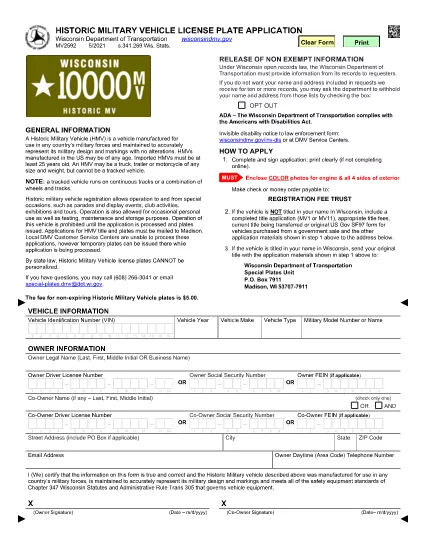
The MV2592 is Wisconsin’s official application for a historic military vehicle (HMV) license plate. This special plate allows owners to drive historic military vehicles to parades, exhibitions, club events, and limited personal use while preserving the vehicle’s historic status.

Our Formize PDF Filler lets you complete the MV2592 directly in your browser—no printing, scanning, or faxing required. Simply click the “Fill out this form” button and the fillable PDF will load instantly.

What Is the MV2592 Form?

The MV2592 collects essential information about the vehicle, its historic status, and the owner. Required sections include:

  • Vehicle identification (make, model, year, VIN)
  • Proof of historic military ownership or restoration
  • Owner’s contact details
  • Signature and date

How to Complete the MV2592 Online

Follow these three simple steps:

  1. Click the Fill out this form button below.
  2. The Formize PDF Filler loads the MV2592 automatically. Enter your information in each fillable field.
  3. When you’re finished, click Submit to download the completed PDF, then print and mail it with the required fees.

Common Mistakes & Tips

  • Do not leave required fields blank. The PDF will highlight missing data.
  • Make sure the VIN matches the title exactly.
  • Attach a copy of the vehicle’s historic military documentation (e.g., original title, acquisition paperwork).
  • Double‑check the mailing address; applications sent to the wrong office are delayed.

Where to Submit Your Application

Mail the completed MV2592, supporting documents, and the registration fee to:

Wisconsin Department of Transportation
Vehicle Services Division
P.O. Box 26712
Madison, WI 53726‑0712

Or deliver it in person to any DMV office that processes historic vehicle registrations.

Frequently Asked Questions

Below are the top questions drivers have about the MV2592. Click each question to reveal the answer.

सामान्य प्रश्न
  • Who can apply for a historic military vehicle plate?

    Any Wisconsin resident who owns a vehicle that was originally used by the U.S. military and is at least 25 years old can apply.

  • Do I need a title in my name to use MV2592?

    Yes. The vehicle must be titled in your name, or you must include a completed title transfer application (MV1 or MV11) with the MV2592.

  • What documentation proves historic military status?

    Acceptable proof includes the original military title, a bill of sale from a government auction, or a certified historic vehicle affidavit.

  • How much is the registration fee?

    The fee varies by vehicle weight and plate type. Refer to the fee schedule on the Wisconsin DOT website or the MV2592 instructions.

  • Can I use the MV2592 for a non‑military historic vehicle?

    No. The MV2592 is specific to historic military vehicles. For other historic or classic cars, use the appropriate state forms (e.g., MV2591).

  • How long does processing take?

    Processing typically takes 7–10 business days after the Wisconsin DOT receives a complete application.

  • Is the Formize PDF filler secure?

    Yes. All data is processed locally in your browser; nothing is stored on our servers.

  • Can I save my progress and finish later?

    The Formize filler allows you to save a copy of the partially completed PDF on your computer and resume editing at any time.

कैसे करें

MV2592 को मुफ़्त में, ऑनलाइन 3 आसान स्टेप्स में कैसे भरें:

  1. 1
    Open the Formize PDF Filler
    Click the “Fill out this form” button on this page. The MV2592 fillable PDF will open instantly in the Formize PDF Filler.
  2. 2
    Enter Your Information
    Type directly into each highlighted field—owner details, vehicle data, historic status, and signature.
  3. 3
    Download and Submit
    When you finish, click “Submit” to download the completed PDF. Print, attach required documents, and mail it to the Wisconsin DOT address listed above.
पीडीएफ फिलर एप तैयार करें
के बारे में

वाहन पंजीकरण प्रपत्र

यदि आप एक मोटर वाहन, ट्रेलर या नाव के मालिक हैं या पट्टे पर हैं, तो आपको अपने वाहन को कानूनी रूप से पंजीकृत और सुरक्षित रखने के लिए कुछ दायित्वों को पूरा करना होगा।

MV2592 वाहन पंजीकरण प्रपत्रों में से एक है जो ऐसे दस्तावेज़ हैं जिनका उपयोग प्रासंगिक राज्य या प्रांतीय प्राधिकरण के साथ मोटर वाहन को पंजीकृत करने के लिए किया जाता है। ये फॉर्म आमतौर पर तब आवश्यक होते हैं जब कोई व्यक्ति नया या इस्तेमाल किया हुआ वाहन खरीदता है या जब वे वाहन के साथ किसी नए राज्य या प्रांत में जाते हैं।

वाहन पंजीकरण के लिए आवश्यक सटीक आवश्यकताएं और फॉर्म स्थान के अनुसार भिन्न हो सकते हैं, लेकिन आम तौर पर, प्रक्रिया में वाहन, मालिक और वाहन पर किसी भी ग्रहणाधिकार के बारे में जानकारी प्रदान करना शामिल होता है।

पंजीकरण फॉर्म और शुल्क जमा करने के बाद, राज्य या प्रांतीय प्राधिकरण वाहन के मालिक को पंजीकरण प्रमाणपत्र या लाइसेंस प्लेट जारी करेगा। यह पंजीकरण वाहन को सार्वजनिक सड़कों और राजमार्गों पर कानूनी रूप से संचालित करने की अनुमति देता है।

विशेषताएं

पीडीएफ भराव

पीडीएफ फॉर्म ऑनलाइन भरने का सबसे आसान तरीका

  • जल्दी से MV2592 भरें
    MV2592 को जल्दी से ऑनलाइन भरने का कोई तरीका खोज रहे हैं? हमारे ऑनलाइन नि:शुल्क पीडीएफ फॉर्म फिलर के साथ, आप एक मिनट से भी कम समय में इस पीडीएफ दस्तावेज़ को संपादित करने और भरने का तरीका जानेंगे।
  • ऑनलाइन पीडीएफ संपादक का उपयोग करना आसान है
    पीडीएफ फाइलों को प्रिंट करने से तंग आ गए हैं ताकि आप उन्हें फिर से स्कैन करने और उन्हें वापस भेजने से पहले संपादित कर सकें? PDF दस्तावेज़ों को निःशुल्क ऑनलाइन संपादित करें। समय और कागज बचाने के लिए हमारे ऑनलाइन पीडीएफ संपादक का प्रयोग करें।
  • महान उपकरण, सभी प्लेटफार्म
    आश्चर्य है कि मैक पर MV2592 कैसे भरें, या शायद पीडीएफ फिलर का मुफ्त में उपयोग कैसे करें? हमारे ऑनलाइन पीडीएफ टूल सभी प्लेटफॉर्म पर काम करते हैं।
  • सुरक्षित फ़ाइल भंडारण
    पूर्ण की गई "MV2592" फ़ाइलें Amazon क्लाउड होस्टिंग द्वारा प्रबंधित एक सुरक्षित डेटाबेस में संग्रहीत की जाती हैं। आप कभी भी अपनी फाइलों को हमारे सिस्टम से हटा सकते हैं। किसी भी स्थिति में, ये फ़ाइलें 24 घंटे के बाद स्वतः हटा दी जाती हैं।
  • {कीवर्ड} से चैट करें
    Chatize पर "MV2592" के साथ चैट करें, जो एक निःशुल्क पीडीएफ रीडर सहायक है। प्रश्न पूछें और "MV2592" से उत्तर प्राप्त करें। बस ऊपर दस्तावेज़ के साथ चैट करें बटन पर क्लिक करें।

फ़िलिंग सत्र मिटाएँ

चयनित फ़िलिंग सत्र को मिटाएँ? इस स्थिति में, फ़ॉर्म को पूरा करने में आपकी प्रगति खो जाएगी।

संपादन सत्र हटाएँ

चयनित संपादन सत्र हटाएँ? इस स्थिति में, फ़ॉर्म बनाने और संपादित करने में आपकी प्रगति नष्ट हो जाएगी।